
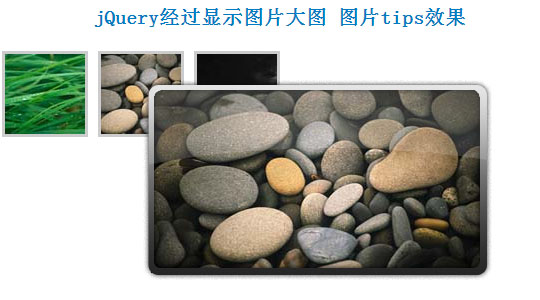
jQuery制作鼠标经过显示图片大图,生成图片tips效果
一般tips都是文字,这个可以支持图片,很漂亮:
<script type="text/javascript">

    // Load this script once the document is ready

    $(document).ready(function () {

        // Get all the thumbnail

        $('div.thumbnail-item').mouseenter(function(e) {

            // Calculate the position of the image tooltip

            x = e.pageX - $(this).offset().left;

            y = e.pageY - $(this).offset().top;

            // Set the z-index of the current item,

            // make sure it's greater than the rest of thumbnail items

            // Set the position and display the image tooltip

            $(this).css('z-index','15')

            .children("div.tooltip")

            .css({'top': y + 10,'left': x + 20,'display':'block'});

        }).mousemove(function(e) {

            // Calculate the position of the image tooltip

            x = e.pageX - $(this).offset().left;

            y = e.pageY - $(this).offset().top;

            // This line causes the tooltip will follow the mouse pointer

            $(this).children("div.tooltip").css({'top': y + 10,'left': x + 20});

        }).mouseleave(function() {

            // Reset the z-index and hide the image tooltip

            $(this).css('z-index','1')

            .children("div.tooltip")

            .animate({"opacity": "hide"}, "fast");

        });

    });

    </script>
CSS文件如下:
<style>

.thumbnail-item {

    /* position relative so that we can use position absolute for the tooltip */

    position: relative;

    float: left;

    margin: 0px 5px;

}

.thumbnail-item a {

    display: block;

}

.thumbnail-item img.thumbnail {

    border:3px solid #ccc;

}

.tooltip {

    /* by default, hide it */

    display: none;

    /* allow us to move the tooltip */

    position: absolute;

    /* align the image properly */

    padding: 8px 0 0 8px;

}

    .tooltip span.overlay {

        /* the png image, need ie6 hack though */

        background: url(images/overlay.png) no-repeat;

        /* put this overlay on the top of the tooltip image */

        position: absolute;

        top: 0px;

        left: 0px;

        display: block;

        width: 350px;

        height: 200px;

    }

    </style>
HTML代码:
<div class="thumbnail-item">

        <a href="#"><img src="data:images/small1.jpg" class="thumbnail"/></a>

        <div class="tooltip">

            <img src="data:images/big1.jpg" alt="" width="330" height="185" />

            <span class="overlay"></span>

        </div>

    </div>

    <div class="thumbnail-item">

        <a href="#"><img src="data:images/small2.jpg" class="thumbnail"/></a>

        <div class="tooltip">

            <img src="data:images/big2.jpg" alt="" width="330" height="185" />

            <span class="overlay"></span>

        </div>

    </div>

    <div class="thumbnail-item">

        <a href="#"><img src="data:images/small3.jpg" class="thumbnail"/></a>

        <div class="tooltip">

            <img src="data:images/big3.jpg" alt="" width="330" height="185" />

            <span class="overlay"></span>

        </div>

    </div>
jQuery制作鼠标经过显示图片大图,生成图片tips效果的更多相关文章
- 杠杠做的全屏随鼠标滚动显示图片,类似于PPT效果
图片有22张,是一张张加载的,耐心点,鼠标一直尝试向下滚就行了. 图片来自<天空之境:乌尤尼盐沼>,一个好美好美的地方 引个流,欢迎去我的博客看看:http://blog.cxycs.co ...
- jQuery实现鼠标划过展示大图的方法
这篇文章主要介绍了jQuery实现鼠标划过展示大图的方法,实例分析了jQuery操作鼠标事件及图片处理的技巧,具有一定参考借鉴价值,需要的朋友可以参考下 本文实例讲述了jQuery实现鼠标划过展示大图 ...
- jQuery实现鼠标悬停显示提示信息窗口的方法
<!DOCTYPE html PUBLIC "-//W3C//DTD XHTML 1.0 Transitional//EN" "http://www.w3.org/ ...
- jQuery - 制作点击显示二级菜单效果
<!DOCTYPE html> <html> <head lang="en"> <meta charset="UTF-8&quo ...
- JS实现 鼠标放上去 图片自动放大的效果
前段时间做项目,要实现,一张图片,鼠标放上去图片自动变大的效果,虽然难度不大,但当时也想了一段时间,当时没时间记录一下,现在有时间了,写篇博客把代码给记录一下: 效果如下: 代码如下: <!DO ...
- wpf image控件循环显示图片 以达到动画效果 问题及解决方案
1>最初方案: 用wpf的image控件循环显示图片,达到动画效果,其实就是在后台代码动态改变Image.Source的值,关键代码: ; i < ; i++)//六百张图片 { Bitm ...
- jQuery实现鼠标移入切换图片
初始效果: 鼠标移入效果: 首先添加jQuery库,我这边直接引用百度CDN地址 <script src="https://apps.bdimg.com/libs/jquery/2.1 ...
- jquery easyui鼠标右击显示自定义的菜单
1.datagrid表格中,对某一行鼠标右击,显示出如下的自定义的菜单: 在html页面中写: <div id="menu" class="easyui-menu& ...
- Qt5制作鼠标悬停显示Hint的ToolTip
在日常生活中的使用的软件中,我们经常会遇到这样的情况. 我们在网页上,有些网页链接的文字(比如文章标题,知乎问题标题,百度的词条等)因为太长了,而显示不出来,但是鼠标悬停在上面的时候就可以显示出来. ...
随机推荐
- Pygame - Python游戏编程入门(0) 转
博客刚开,想把最近学习的东西记录下来,算是一种笔记.最近打算开始学习Python,因为我感觉Python是一门很有意思的语言,很早以前就想学了(碍于懒),它的功能很强大,你可以用它来做科学运算,或者数 ...
- Nagios学习笔记
1 Nagios功能 1.1 监控工具 1.2 可以监控主机/服务或者资源 1.3 四种状态值 OK,WARNING,CRITICAL,UNKNOWN CPU:90%(CRITICAL),80% ...
- 【转载】css3动画简介以及动画库animate.css的使用
原文地址:http://www.cnblogs.com/2050/p/3409129.html 在这个年代,你要是不懂一点点css3的知识,你都不好意思说你是个美工.美你妹啊,请叫我前端工程师好不好. ...
- ReentrantLock详解 以及与synchronized的区别
ReentrantLock lock = new ReentrantLock(); //参数默认false,不公平锁 ReentrantLock lock = new ReentrantLock(tr ...
- MT【143】统一分母
已知$a,b>0$,则$m=\dfrac{b^2+2}{a+b}+\dfrac{a^2}{ab+1}$的最小值是______ 解答: $$m\geqslant \dfrac{b^2+2}{\sq ...
- BZOJ 4454: C Language Practice
4454: C Language Practice Time Limit: 20 Sec Memory Limit: 24 MBSubmit: 501 Solved: 112[Submit][St ...
- 退出Android程序时清除所有activity的实现方法
思路: 1. 自定义ActivityList管理类,添加删除维护该list; 2.Activity Stack 类似上面: 3.singleTask定义一个Activity为该启动模式,然后当返回时, ...
- bzoj3473: 字符串 && bzoj3277串
3473: 字符串 Time Limit: 20 Sec Memory Limit: 256 MBSubmit: 121 Solved: 53[Submit][Status][Discuss] D ...
- 牛客练习赛23 F 托米的游戏
https://www.nowcoder.com/acm/contest/156/F 树 概率 #include <cstdio> #include <cstdlib> #in ...
- Non-Local Image Dehazing 复现
本文选自CVPR 2016, 文章链接Dana Berman, Tali Treibitz, Shai Avidan. Non-Local Image Dehazing 复现源码见我的Github 无 ...