
python Linux 环境 (版本隔离工具)
python Linux 环境 (版本隔离工具)
首先新建用户,养成良好习惯useradd python
1、安装pyenv
GitHub官网:https://github.com/pyenv/pyenv-installer
pyenv installer
This tool installs pyenv and friends. It is inspired by rbenv-installer.
Prerequisites
In general, compiling your own Python interpreter requires the installation of the appropriate libraries and packages. The installation wiki provides a list of these for common operating systems.
Install:
$ curl https://pyenv.run | bash
pyenv.run redirects to the install script in this repository and the invocation above is equivalent to:
$ curl -L https://github.com/pyenv/pyenv-installer/raw/master/bin/pyenv-installer | bash
Restart your shell so the path changes take effect:
You can now begin using pyenv.
Update:
$ pyenv update
Uninstall: pyenv is installed within $PYENV_ROOT (default: ~/.pyenv). To uninstall, just remove it:
$ rm -fr ~/.pyenv
and remove these three lines from .bashrc:
export PATH="$HOME/.pyenv/bin:$PATH"

eval "$(pyenv init -)"

eval "$(pyenv virtualenv-init -)"
If you need, export USE_GIT_URI to use git:// instead of https:// for git clone.
Travis itself uses pyenv and therefore PYENV_ROOT is set already. To make it work anyway the installation for pyenv-installer needs to look like this:
[...]

- unset PYENV_ROOT

- curl -L https://github.com/pyenv/pyenv-installer/raw/master/bin/pyenv-installer | bash

- export PATH="$HOME/.pyenv/bin:$PATH"

- pyenv install 3.5.2
The project on github contains a setup for vagrant to test the installer inside a vagrant managed virtual image.
If you don't know vagrant yet: just install the latest package, open a shell in this project directory and say
$ vagrant up

$ vagrant ssh
Now you are inside the vagrant container and your prompt should like something like vagrant@vagrant-ubuntu-trusty-64:~$
The project (this repository) is mapped into the vagrant image at /vagrant
$ cd /vagrant

$ python setup.py install

$ echo 'export PATH="$HOME/.pyenv/bin:$PATH"' >> ~/.bashrc

$ echo 'eval "$(pyenv init -)"' >> ~/.bashrc

$ echo 'eval "$(pyenv virtualenv-init -)"' >> ~/.bashrc

$ source ~/.bashrc
Pyenv should be installed and responding now.
20190111
Remove experimental PyPi support and replace with a dummy package.
Initial release on PyPi.
Initial public release.
MIT - see License file.
2、安装python
查看python可用版本
pyenv install -l
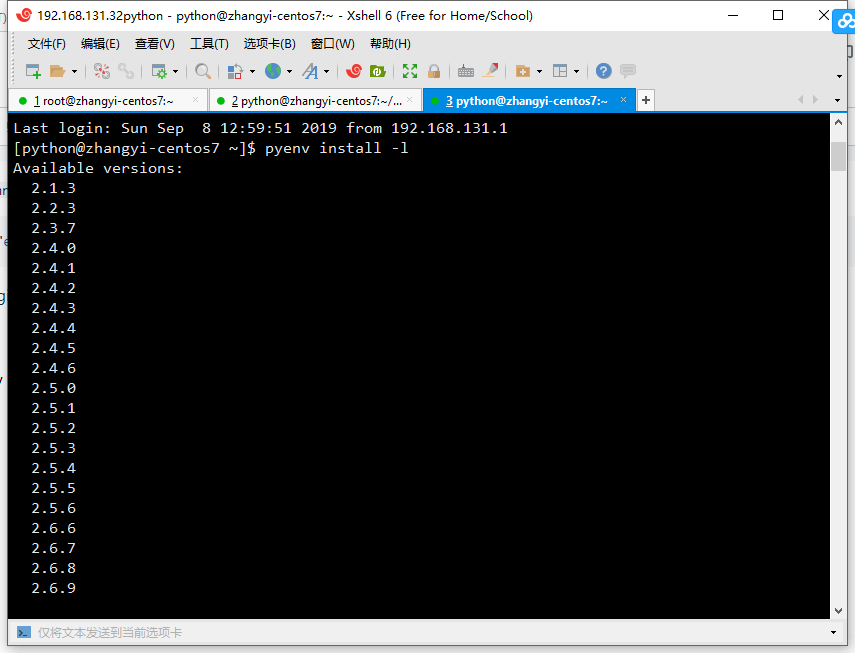
在线安装
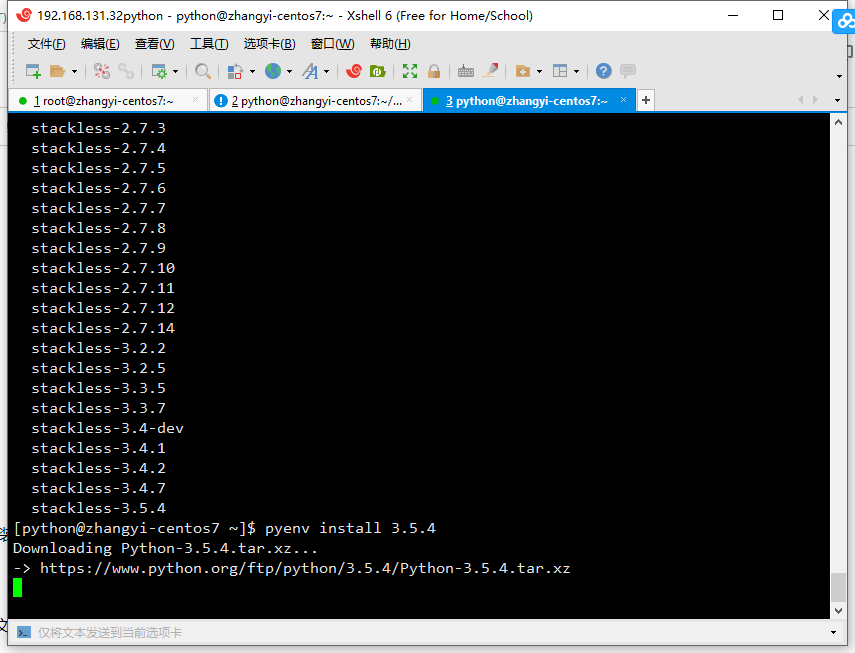
[python@zhangyi-centos7 ~]$ pyenv install 3.5.4

Downloading Python-3.5.4.tar.xz...-> https://www.python.org/ftp/python/3.5.4/Python-3.5.4.tar.xz
离线安装
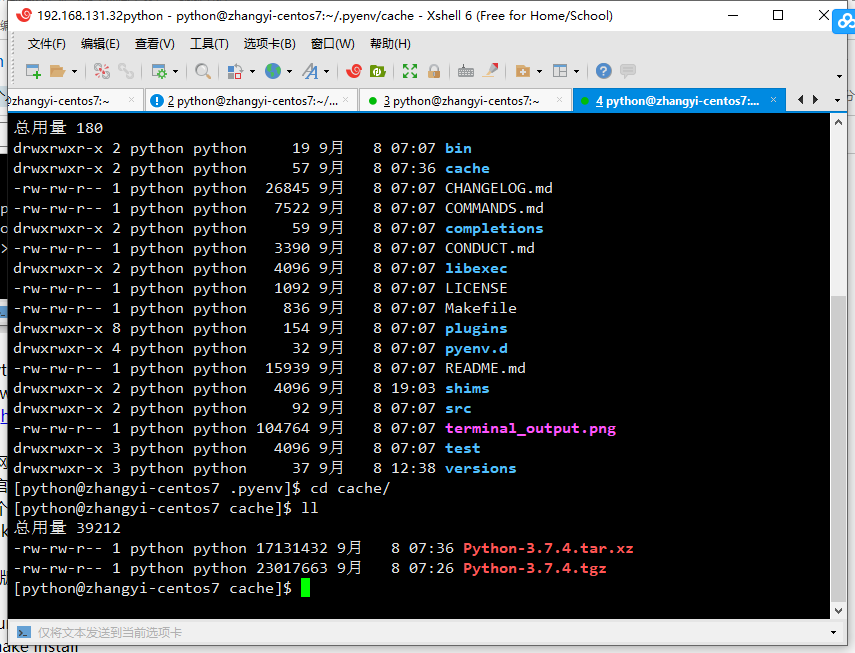
到官网下载 对应版本源码
https://www.python.org/downloads/source/
两个包都下载好
Python-x.x.x.tar.xz
Python-x.x.x.tgz
放入用户目录下的~/.pyenv/cache文件夹
新建文件夹
makedir -r ~/.pyenv/cache
3、3.7版本依赖问题:
3.7版本需要一个新的包libffi-devel,安装此包之后再次进行编译安装即可。
#yum install libffi-devel -y

#make install
若在安装前移除了/usr/bin下python的文件链接依赖,此时yum无法正常使用,需要自己下载相关软件包安装,为节省读者时间,放上链接
#wget http://mirror.centos.org/centos/7/os/x86_64/Packages/libffi-devel-3.0.13-18.el7.x86_64.rpm

#rpm -ivh libffi-devel-3.0.13-18.el7.x86_64.rpm
安装完成后重新进行make install,结束后再次配置相关文件的软连接即可。
4、使用 pyenv 进行版本隔离
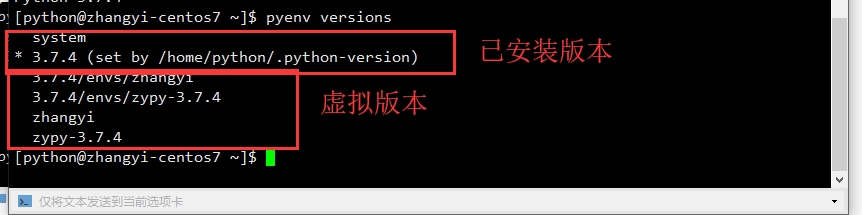
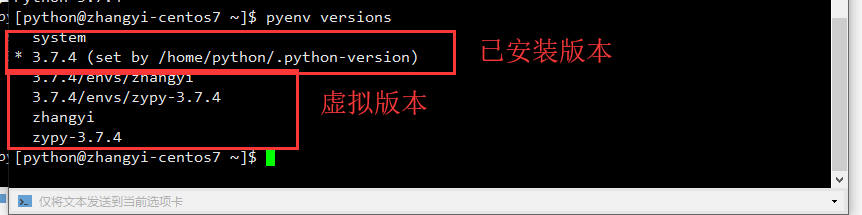
查看已安装的python版本
5、把用户目录下的环境设置成新安装的python版本
pyenv local 3.7.4

6、增加虚拟环境
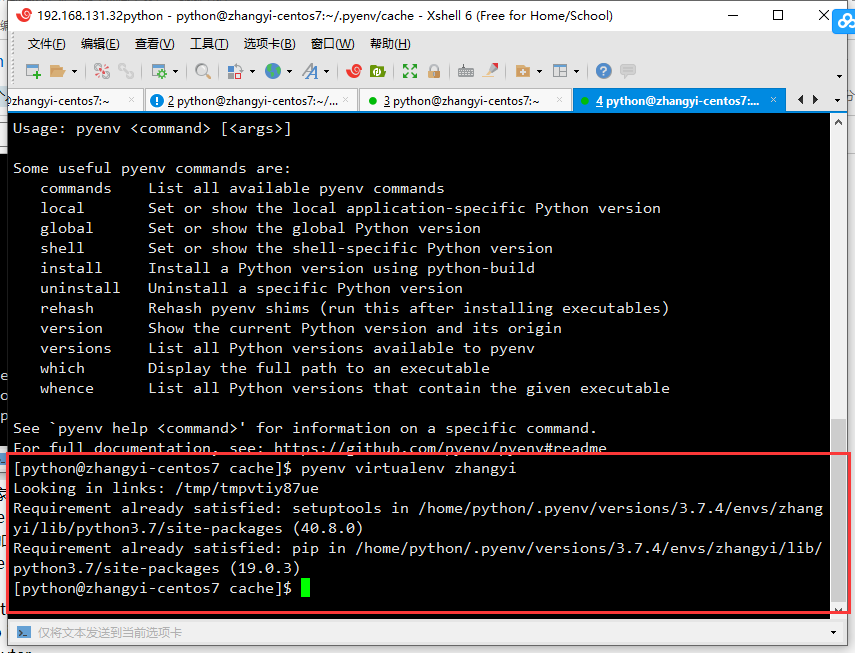
增加名为zhangyi的虚拟环境
pyenv virtualenv zhangyi
.png)
查看虚拟环境
7、安装ipython
切换pip源
参考博客:https://blog.csdn.net/u011220960/article/details/81512435
Linux系统:
mkdir ~/.pip

cat > ~/.pip/pip.conf << EOF

[global]trusted-host=[mirrors.aliyun.com](http://mirrors.aliyun.com/)index-url=https://mirrors.aliyun.com/pypi/simple/

EOF

pip install ipython
8、安装jupyter
pip install jupyter
启动jupyter初始化密码
jupyter notebook passwd

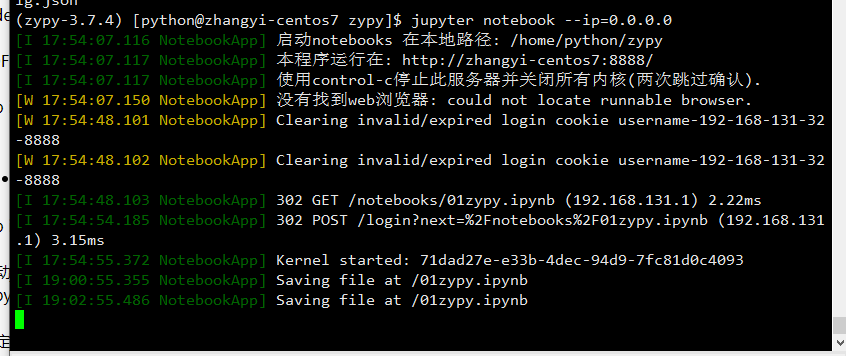
指定jupyter 启动绑定的ip
jupyter notebook --ip=0.0.0.0
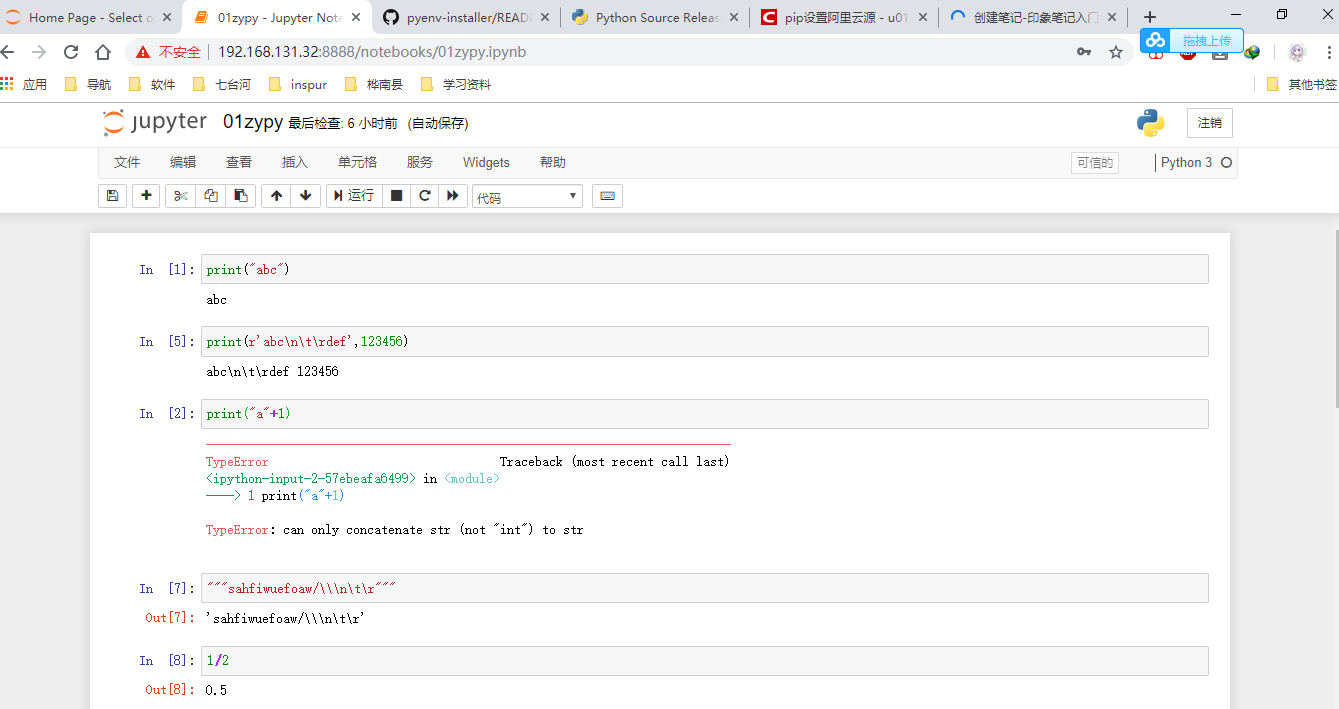
浏览器访问jupyter

9、Python 虚拟环境包导出
导出包配置文件
pip freeze > requirement
导入包配置文件
pip -r requirement
python Linux 环境 (版本隔离工具)的更多相关文章
- [转]windows环境下使用virtualenv对python进行多版本隔离
windows环境下使用virtualenv对python进行多版本隔离 最近在用python做一个文本的情感分析的项目,用到tensorflow,需要用python3的版本,之前因为<机器学习 ...
- Python linux多版本共存以及虚拟环境管理(转摘)
Python linux多版本共存以及虚拟环境管理 2017年08月01日 18:42:25 sliderSun 阅读数:197更多 个人分类: python 版权声明:本文为博主原创文章,未经博 ...
- Linux 环境下自动化测试工具,Redhat dogtail的安装
dogtail基于Accessibility(a11y)的GUI图形界面测试工具和自动化框架可以与linux桌面应用程序进行交互操作. dogtail是用Python语言写的.dogtail的测试脚本 ...
- windows下使用virtualenv对python进行多版本隔离开发
1.windows下安装virtualenv pip install virtualenv 2.进入项目目录,创建虚拟环境,例如: virtualenv venv (默认python版本) virtu ...
- windows环境下使用virtualenv对python进行多版本隔离
最近在用python做一个文本的情感分析的项目,用到tensorflow,需要用python3的版本,之前因为<机器学习实战>那本书的缘故,用的是python2.7.所以目前的情况是要两个 ...
- Python linux 上的管理工具 pyenv 安装, pip 使用, python项目(版本分割, 项目分割, 虚拟环境创建)
01: 假设你有一个最小环境安装的 centos-6.x 的linux操作系统 02: 安装 git => yum -y install git 03: 安装依赖 => yum -y in ...
- s11 day 101 python Linux环境安装 与路飞项目支付功能
from django.conf.urls import urlfrom django.contrib import adminfrom app01 import viewsurlpatterns = ...
- Linux环境安装Eclipse工具开发
1.官网下载maven:https://maven.apache.org/download.cgi 2.上传到虚拟机进行解压缩操作: [hadoop@slaver1 package]$ tar -zx ...
- Linux环境下FTP工具的使用方法
在Windows环境下创建Ftp目录作为服务器根目录 在Linux端的操作: 从服务器端下载文件到Linux端: ftpget -u User -p Password ServerIP File Fi ...
随机推荐
- 使用yarn代替npm作为node.js的模块管理器
使用yarn代替npm作为node.js的模块管理器 转 https://www.jianshu.com/p/bfe96f89da0e Fast, reliable, and secure d ...
- 流行-Manifold学习理解与应用
流行-Manifold[1] 流形,也就是 Manifold . 1. 比较好的形象理解 流形学习的观点是认为,我们所能观察到的数据实际上是由一个低维流形映射到高维空间上的,即这些数据所在的空间是“ ...
- Java8 Stream流方法
流是Java API的新成员,它允许以声明性方式处理数据集合(通过查询语句来表达,而不是临时编写一个实现).就现在来说,可以把它们看成遍历数据集的高级迭代器.此外,流还可以透明地并行处理,无需写任何多 ...
- LODOP设置某打印项锁定下边距
LODOP中的打印项定位都是按照top值(顶边距),left(左边距)来决定的 ,不能直接设置某打印项的下边距.此外,打印项的位置还受PRINT_INTA的前两个整体偏移值,打印机可打区域的影响.该文 ...
- 用ArcMap在PostgreSQL中创建要素类需要执行”create enterprise geodatabase”吗
问:用Acmap在PostgreSQL中创建要素类需要执行"create enterprise geodatabase"吗? 关于这个问题,是在为新员工做postgresql培训后 ...
- Oracle和Mysql中的字符串的拼接
SQL允许两个或者多个字段之间进行计算,字符串类型的字段也不例外.比如我们需要 以"工号+姓名"的方式在报表中显示一个员工的信息,那么就需要把工号和姓名两个字符 串类型的字段拼接计 ...
- LeetCode 566. 重塑矩阵(Reshape the Matrix)
566. 重塑矩阵 566. Reshape the Matrix 题目描述 LeetCode LeetCode LeetCode566. Reshape the Matrix简单 Java 实现 c ...
- React路由传参的三种方式
方式 一: 通过params 1.路由表中 <Route path=' /sort/:id ' component= ...
- strings包 — 汇总
转自:https://www.jb51.net/article/148388.htm strings 包中的函数和方法 // Count 计算字符串 sep 在 s 中的非重叠个数 // 如果 sep ...
- 升级nginx1.12为1.161版本
升级nginx1.12为1.161版本 一.添加源 到 cd /etc/yum.repos.d/ 目录下 新建nginx.repo 文件 vim nginx.repo 输入以下信息 [nginx-st ...