
Learning Cocos2d-x for WP8(8)——动作Action
原文:Learning Cocos2d-x for WP8(8)——动作Action
游戏很大程度上是由动作画面支撑起来的。
动作分为两大类:瞬间动作和延时动作。
瞬间动作基本等同于设置节点的属性,延时动作会执行一段时间,不需要清除这两种动作,一旦动作完成,就会从节点上清除并释放所占内存。
封装CCSpriteBatchNode的使用方法
 CCSprite* SpriteActionLayer::BatchAnimatitonSprite(CCLayer* pLayer,CCSprite *pSprite, CCPoint* spriteStartPoint, const char *strFramesFileName,const char *strFramesFileNameImg,const char *strFirstFrameName,const char *strEachFrameName,int frameCount,float frameDelay)

 {

     //CCSpriteBatchNode

     //创建批处理节点,读取plist文件

     CCSpriteFrameCache* cache=CCSpriteFrameCache::sharedSpriteFrameCache();

     cache->addSpriteFramesWithFile(strFramesFileName,strFramesFileNameImg);

     //起始精灵

     pSprite=CCSprite::spriteWithSpriteFrameName(strFirstFrameName);//纹理plist中包含strfirstFrameName

     pSprite->setPosition(ccp(spriteStartPoint->x,spriteStartPoint->y));

     CCSpriteBatchNode* spritebatch = CCSpriteBatchNode::batchNodeWithFile(strFramesFileNameImg);//与CCSpriteFrameCache同一纹理

     spritebatch->addChild(pSprite);

     pLayer->addChild(spritebatch,);

     //创建逐帧数组

     CCMutableArray<CCSpriteFrame*>* animFrames1=new CCMutableArray<CCSpriteFrame*>(frameCount);

     char str1[]={};

     for(int i=;i<frameCount;i++)

     {

         sprintf(str1,strEachFrameName,i);

         CCSpriteFrame* pFrame=cache->spriteFrameByName( str1 );

         animFrames1->addObject(pFrame);

     }

     CCAnimation* animation1=CCAnimation::animationWithFrames(animFrames1,frameDelay);

     pSprite->runAction(CCRepeatForever::actionWithAction(CCAnimate::actionWithAnimation(animation1,false)));

     animFrames1->release();

     return pSprite;

 }
重复动作
可以使一个动作或一系列的动作不停地重复无限循环,除非“外力”使其停止。
实例
     //重复动作

     CCSprite *role0=CCSprite::spriteWithFile("Sprite/Role.png");

     role0->setPosition(ccp(,s.height-));

     addChild(role0,);

     CCRotateBy* role0RotateBy=CCRotateBy::actionWithDuration(2.0f,);

     CCRepeatForever* role0Repeat=CCRepeatForever::actionWithAction(role0RotateBy);

     role0->runAction(role0Repeat);
Sprite循环不停地旋转

流畅动画
CCEaseAction类能在一段时间内动作的流畅执行,使得更强大。而非简单地执行简单动画效果。
在实际运动过程中,匀速运动在启动和结束时往往会有一定的加速和减速的效果,这样更加的真实。
cocoos2d-x引擎提供了相关的API,免除了我们编写相关的算法实现的烦恼,实现起来相当的方便。
实现该方法的是CCActionEase中CCEaseRateAction系列,大体分成三类:
In:开始时候的加速度
Out:结束时候的加速度
InOut:开始结束时候的加速度
(以下图片来源其他博文,具体地址忘记了,以后再加上)
1.指数缓冲

EaseExponentialIn
EaseExponentialOut
EaseExponentialInOut
2.赛因缓冲

EaseSineIn
EaseSineOut
EaseSineInOut
3.弹性缓冲
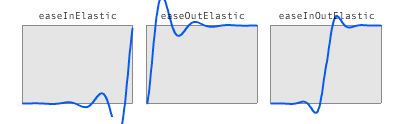
EaseElasticIn
EaseElasticOut
EaseElasticInOut
4.跳跃缓冲

EaseBounceIn
EaseBounceOut
EaseBounceInOut
5.回震缓冲

EaseBackIn
EaseBackOut
EaseBackInOut
实例
     //流畅动画

     CCSprite* role1=NULL;

     role1=SpriteActionLayer::BatchAnimatitonSprite(this,role1,new CCPoint(,s.height/),"Sprite/Plist/RoleRun.plist","Sprite/Plist/RoleRun.png","RoleRun0.png","RoleRun%d.png",,0.2f);

     CCMoveTo* role1Move=CCMoveTo::actionWithDuration(,CCPointMake(s.width-,s.height/));//CCMoveTo绝对位置移动

     CCEaseInOut* role1MoveEase=CCEaseInOut::actionWithAction(role1Move,);//rate=4,决定流畅动画的明显程度,只有当它大于1时才能看到效果

     role1->runAction(role1MoveEase);
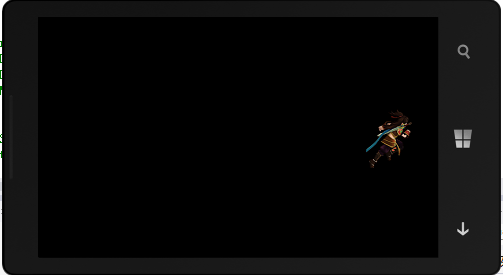
可见,Sprite开始缓慢移动——加速——缓慢停止。

动作序列
通常情况下,Action动作执行添加多个动作时,它们会在同一时间运行,如上面的动作。但有时我们需要让动作一个接着一个运行。CCSequence将实现该功能。
实例
     //动作序列

     CCSprite* role2=NULL;

     role2=SpriteActionLayer::BatchAnimatitonSprite(this,role2,new CCPoint(,s.height/),"Sprite/Plist/Role2Run.plist","Sprite/Plist/Role2Run.png","Role2Run0.png","Role2Run%d.png",,0.3f);

     CCMoveBy* role2MoveBy=CCMoveBy::actionWithDuration(,CCPointMake(,));//CCMoveBy相对位置移动

     CCJumpBy* role2JumpBy=CCJumpBy::actionWithDuration(,CCPointMake(-,),,);//CCJumpBy相当位置jump

     role2->runAction(CCSequence::actions(role2MoveBy,role2JumpBy,NULL));
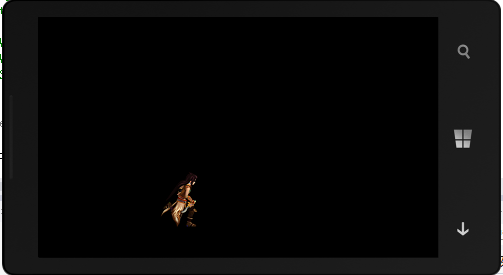
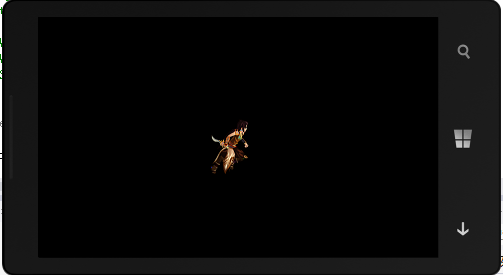
Sprite跑动到指定位置后,下个动作就是弹跳回起始位置
瞬间动作
有时在一串动作中,需要改变Sprite的属性,然后在继续执行下个动作。瞬间动作将实现该功能,通常情况下依赖与CCCallFunc动作。
实例
     //瞬时动作

     CCSprite* role3=CCSprite::spriteWithFile("Sprite/Role.png");

     role3->setPosition(ccp(s.width-,s.height-));

     addChild(role3,);

     CCScaleTo * role3ScaleTo=CCScaleTo::actionWithDuration(,2.0f);

     CCCallFuncN* role3FunN=CCCallFuncN::actionWithTarget(this,callfuncN_selector(SpriteActionLayer::repeatForever));

     role3->runAction(CCSequence::actions(role3ScaleTo,role3FunN,NULL));
repeatForever方法
 void SpriteActionLayer::repeatForever(CCNode* pSender)

 {

     CCRepeatForever* repeat=CCRepeatForever::actionWithAction(CCSkewBy::actionWithDuration(, 37.2f, -37.2f));//歪斜

     pSender->runAction(repeat);

 }
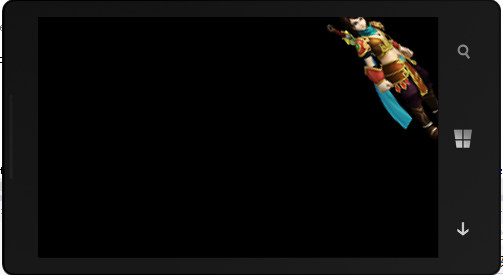
执行完ScaleTo后执行SkewBy
完整源码
 #ifndef _SPRITE_ACTION_TEST_

 #define _SPRITE_ACTION_TEST_

 #include "cocos2d.h"

 using namespace cocos2d;

 class SpriteActionScene:public CCScene

 {

 public:

     SpriteActionScene();

     ~SpriteActionScene();

     virtual void onEnter();

 };

 class SpriteActionLayer:public CCLayer

 {

 public:

     SpriteActionLayer();

     ~SpriteActionLayer();

 public:

     void repeatForever(CCNode* pTarget);

     CCSprite* BatchAnimatitonSprite(CCLayer* pLayer,CCSprite *pSprite,CCPoint* spriteStartPoint,const char *strFramesFileName,const char *strFramesFileNameImg,const char *strFirstFrameName,const char *strEachFrameName,int frameCount,float frameDelay);

 };

 #endif
 #include "pch.h"

 #include "Classes\SpriteActionTest.h"

 //----------------------------------------

 //

 //SpriteActionLayer

 //

 //----------------------------------------

 SpriteActionLayer::SpriteActionLayer()

 {

     CCSize s=CCDirector::sharedDirector()->getWinSize();

     //重复动作

     CCSprite *role0=CCSprite::spriteWithFile("Sprite/Role.png");

     role0->setPosition(ccp(,s.height-));

     addChild(role0,);

     CCRotateBy* role0RotateBy=CCRotateBy::actionWithDuration(2.0f,);

     CCRepeatForever* role0Repeat=CCRepeatForever::actionWithAction(role0RotateBy);

     role0->runAction(role0Repeat);

     //流畅动画

     CCSprite* role1=NULL;

     role1=SpriteActionLayer::BatchAnimatitonSprite(this,role1,new CCPoint(,s.height/),"Sprite/Plist/RoleRun.plist","Sprite/Plist/RoleRun.png","RoleRun0.png","RoleRun%d.png",,0.2f);

     CCMoveTo* role1Move=CCMoveTo::actionWithDuration(,CCPointMake(s.width-,s.height/));//CCMoveTo绝对位置移动

     CCEaseInOut* role1MoveEase=CCEaseInOut::actionWithAction(role1Move,);//rate=4,决定流畅动画的明显程度,只有当它大于1时才能看到效果

     role1->runAction(role1MoveEase);

     //动作序列

     CCSprite* role2=NULL;

     role2=SpriteActionLayer::BatchAnimatitonSprite(this,role2,new CCPoint(,s.height/),"Sprite/Plist/Role2Run.plist","Sprite/Plist/Role2Run.png","Role2Run0.png","Role2Run%d.png",,0.3f);

     CCMoveBy* role2MoveBy=CCMoveBy::actionWithDuration(,CCPointMake(,));//CCMoveBy相对位置移动

     CCJumpBy* role2JumpBy=CCJumpBy::actionWithDuration(,CCPointMake(-,),,);//CCJumpBy相当位置jump

     role2->runAction(CCSequence::actions(role2MoveBy,role2JumpBy,NULL));

     //瞬时动作

     CCSprite* role3=CCSprite::spriteWithFile("Sprite/Role.png");

     role3->setPosition(ccp(s.width-,s.height-));

     addChild(role3,);

     CCScaleTo * role3ScaleTo=CCScaleTo::actionWithDuration(,2.0f);

     CCCallFuncN* role3FunN=CCCallFuncN::actionWithTarget(this,callfuncN_selector(SpriteActionLayer::repeatForever));

     role3->runAction(CCSequence::actions(role3ScaleTo,role3FunN,NULL));

 }

 void SpriteActionLayer::repeatForever(CCNode* pSender)

 {

     CCRepeatForever* repeat=CCRepeatForever::actionWithAction(CCSkewBy::actionWithDuration(, 37.2f, -37.2f));//歪斜

     pSender->runAction(repeat);

 }

 SpriteActionLayer::~SpriteActionLayer()

 {}

 CCSprite* SpriteActionLayer::BatchAnimatitonSprite(CCLayer* pLayer,CCSprite *pSprite, CCPoint* spriteStartPoint, const char *strFramesFileName,const char *strFramesFileNameImg,const char *strFirstFrameName,const char *strEachFrameName,int frameCount,float frameDelay)

 {

     //CCSpriteBatchNode

     //创建批处理节点,读取plist文件

     CCSpriteFrameCache* cache=CCSpriteFrameCache::sharedSpriteFrameCache();

     cache->addSpriteFramesWithFile(strFramesFileName,strFramesFileNameImg);

     //起始精灵

     pSprite=CCSprite::spriteWithSpriteFrameName(strFirstFrameName);//纹理plist中包含strfirstFrameName

     pSprite->setPosition(ccp(spriteStartPoint->x,spriteStartPoint->y));

     CCSpriteBatchNode* spritebatch = CCSpriteBatchNode::batchNodeWithFile(strFramesFileNameImg);//与CCSpriteFrameCache同一纹理

     spritebatch->addChild(pSprite);

     pLayer->addChild(spritebatch,);

     //创建逐帧数组

     CCMutableArray<CCSpriteFrame*>* animFrames1=new CCMutableArray<CCSpriteFrame*>(frameCount);

     char str1[]={};

     for(int i=;i<frameCount;i++)

     {

         sprintf(str1,strEachFrameName,i);

         CCSpriteFrame* pFrame=cache->spriteFrameByName( str1 );

         animFrames1->addObject(pFrame);

     }

     CCAnimation* animation1=CCAnimation::animationWithFrames(animFrames1,frameDelay);

     pSprite->runAction(CCRepeatForever::actionWithAction(CCAnimate::actionWithAnimation(animation1,false)));

     animFrames1->release();

     return pSprite;

 }

 //----------------------------------------

 //

 //SpriteActionScene

 //

 //----------------------------------------

 SpriteActionScene::SpriteActionScene()

 {}

 SpriteActionScene::~SpriteActionScene()

 {}

 void SpriteActionScene::onEnter()

 {

     CCScene::onEnter();

     CCLayer* spriteActionLayer=new SpriteActionLayer();

     addChild(spriteActionLayer);

     spriteActionLayer->release();

 }

著作权声明:本文由http://www.cnblogs.com/suguoqiang 原创,欢迎转载分享。请尊重作者劳动,转载时保留该声明和作者博客链接,谢谢!
Learning Cocos2d-x for WP8(8)——动作Action的更多相关文章
- Java基础之处理事件——使用动作Action(Sketcher 6 using Action objects)
控制台程序. 动作Action是任何实现了javax.swing.Action接口的类的对象.这个接口声明了操作Action对象的方法,例如,存储与动作相关的属性.启用和禁用动作.Action接口扩展 ...
- 08 Zabbix4.0系统配置事件通知 - 动作Action
点击返回:自学Zabbix之路 点击返回:自学Zabbix4.0之路 点击返回:自学zabbix集锦 08 Zabbix4.0系统配置事件通知 - 动作Action 请点击查看Zabbix3.0.8版 ...
- [Cocos2d-x For WP8]ActionManager动作管理
在Cocos2d-x里面可以通过CCActionManger类来管理动作的暂停和恢复,CCActionMessage是管理所有Action的单例,一般情况下并不直接使用这个单例,而是使用CCNode的 ...
- 动作Action
/** * DelayTime延迟 * @param d Duration 延迟时间 */ auto delayTime = DelayTime::create(); sprite->runAc ...
- 创建一个动作-Action类:
让我们创建一个Java文件HelloWorldAction.java的Java资源> SRC下一个的包名com.yiibai.struts2与下面的内容. package com.yiibai. ...
- libgdx学习记录6——动作Action
libgdx中的Action类能够有效的帮助我们实现位移.旋转.缩放.淡入淡出等效果,对游戏的设计很有用. Action是一个抽象类,本身不可以实例化.一般使用的它的继承类,常用的有 MoveToAc ...
- Asp.Net MVC学习总结(二)——控制器与动作(Controller And Action)
一.理解控制器 1.1.什么是控制器 控制器是包含必要的处理请求的.NET类,控制器的角色封装了应用程序逻辑,控制器主要是负责处理请求,实行对模型的操作,选择视图呈现给用户. 简单理解:实现了ICon ...
- Struts2 In Action笔记_页面到动作的数据流入和流出
因为回答百度知道的一个问题,仔细查看了<Struts2 In Action>,深入细致的看了 “数据转移OGNL 和 构建视图-标签”,很多东西才恍然大悟. 一直觉得国外写的书很浮,不具有 ...
- 行为识别(action recognition)相关资料
转自:http://blog.csdn.net/kezunhai/article/details/50176209 ================华丽分割线=================这部分来 ...
随机推荐
- JS - 全屏滚动
下载地址:http://www.lanrentuku.com/js/quanping-1141.html
- 改变TPageControl的活动标签颜色
设置PageControl的owndraw属性为TRUE. procedure TForm1.pgc1DrawTab(Control: TCustomTabControl; TabIndex: Int ...
- 自定义NavgationBa返回按钮
iOS 上UINavigationController视图压栈形式,可以在当前视图无限制push许多视图,然而一些会觉得自带的push按钮不够美观,而且当上的上一个页面title很长的时候,那个返回 ...
- 【源代码】LinkedHashMap源代码剖析
注:下面源代码基于jdk1.7.0_11 之前的两篇文章通过源代码分析了两种常见的Map集合,HashMap和Hashtable.本文将继续介绍还有一种Map集合--LinkedHashMap. 顾名 ...
- ios添加pre和post build action
再vs中,我们可以很方便的再build前.后执行一些脚本为我们做点什么事情.再ios中怎么搞呢,哪必然是对xcode进行操作了.再google搜索了一把,有说操作Scheme的也有说再直接再targe ...
- 如何获取本地html文件的标题
本文用于提取本地网页的标签元素如<TITLE></TITLE>,<IMG>,<A></A>...的内容,非常实用于批量文件的操作,这是按一般 ...
- VC/MFC 在ListCtl 控件中随鼠标移动提示单元格信息
BEGIN_MESSAGE_MAP(CTipListCtrl, CListCtrl) //{{AFX_MSG_MAP(CTipListCtrl) ON_WM_MOUSEMOVE() ON_WM_DES ...
- WPF入门介绍
Windows Vista已经于2007年1月30正式发行零售版本,安装Vista的计算机将会大量出现.在Vista时代,身为编程员,就一定要具备Vista桌面应用开发的能力.而开发Vista桌面应用 ...
- WebSocket是一种协议
WebSocket,并非HTML 5独有,WebSocket是一种协议.只是在handshake的时候,发送的链接信息头和HTTP相似.HTML 5只是实现了WebSocket的客户端.其实,难点在于 ...
- 14.4.7 Configuring the Number of Background InnoDB IO Threads 配置 后台InnoDB IO Threads的数量
14.4.7 Configuring the Number of Background InnoDB IO Threads 配置 后台InnoDB IO Threads的数量 InnoDB 使用bac ...