
ES--05
第四十一讲!分词器内部组成 内置分词器
课程大纲
1、什么是分词器
切分词语,normalization(提升recall召回率)
给你一段句子,然后将这段句子拆分成一个一个的单个的单词,同时对每个单词进行normalization(时态转换,单复数转换),分词器
recall,召回率:搜索的时候,增加能够搜索到的结果的数量
character filter:在一段文本进行分词之前,先进行预处理,比如说最常见的就是,过滤html标签(<span>hello<span> --> hello),& --> and(I&you --> I and you)
tokenizer:分词,hello you and me --> hello, you, and, me
token filter:lowercase,stop word,synonymom,dogs --> dog,liked --> like,Tom --> tom,a/the/an --> 干掉,mother --> mom,small --> little
一个分词器,很重要,将一段文本进行各种处理,最后处理好的结果才会拿去建立倒排索引
2、内置分词器的介绍
Set the shape to semi-transparent by calling set_trans(5)
standard analyzer:set, the, shape, to, semi, transparent, by, calling, set_trans, 5(默认的是standard)
simple analyzer:set, the, shape, to, semi, transparent, by, calling, set, trans
whitespace analyzer:Set, the, shape, to, semi-transparent, by, calling, set_trans(5)
language analyzer(特定的语言的分词器,比如说,english,英语分词器):set, shape, semi, transpar, call, set_tran, 5
第四十二讲!query string分词 以及 mapping
课程大纲
1、query string分词
query string必须以和index建立时相同的analyzer进行分词
query string对exact value和full text的区别对待
date:exact value
_all:full text
比如我们有一个document,其中有一个field,包含的value是:hello you and me,建立倒排索引
我们要搜索这个document对应的index,搜索文本是hell me,这个搜索文本就是query string
query string,默认情况下,es会使用它对应的field建立倒排索引时相同的分词器去进行分词,分词和normalization,只有这样,才能实现正确的搜索
我们建立倒排索引的时候,将dogs --> dog,结果你搜索的时候,还是一个dogs,那不就搜索不到了吗?所以搜索的时候,那个dogs也必须变成dog才行。才能搜索到。
知识点:不同类型的field,可能有的就是full text,有的就是exact value
post_date,date:exact value
_all:full text,分词,normalization
2、mapping引入案例遗留问题大揭秘
GET /_search?q=2017
搜索的是_all field,document所有的field都会拼接成一个大串,进行分词
2017-01-02 my second article this is my second article in this website 11400
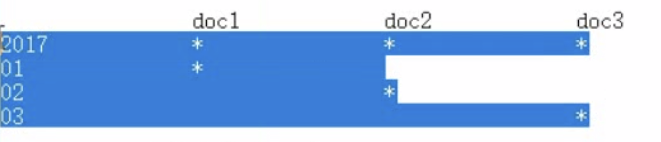
_all,2017,自然会搜索到3个docuemnt
GET /_search?q=2017-01-01
_all,2017-01-01,query string会用跟建立倒排索引一样的分词器去进行分词
2017
01
01
GET /_search?q=post_date:2017-01-01
date,会作为exact value去建立索引

post_date:2017-01-01,2017-01-01,doc1一条document
GET /_search?q=post_date:2017,这个在这里不讲解,因为是es 5.2以后做的一个优化
3、测试分词器
GET /_analyze
{
"analyzer": "standard",
"text": "Text to analyze"
}
第四十三讲!mapping
课程大纲
(1)往es里面直接插入数据,es会自动建立索引,同时建立type以及对应的mapping
(2)mapping中就自动定义了每个field的数据类型
(3)不同的数据类型(比如说text和date),可能有的是exact value,有的是full text
(4)exact value,在建立倒排索引的时候,分词的时候,是将整个值一起作为一个关键词建立到倒排索引中的;full text,会经历各种各样的处理,分词,normaliztion(时态转换,同义词转换,大小写转换),才会建立到倒排索引中
(5)同时呢,exact value和full text类型的field就决定了,在一个搜索过来的时候,对exact value field或者是full text field进行搜索的行为也是不一样的,会跟建立倒排索引的行为保持一致;比如说exact value搜索的时候,就是直接按照整个值进行匹配,full text query string,也会进行分词和normalization再去倒排索引中去搜索
(6)可以用es的dynamic mapping,让其自动建立mapping,包括自动设置数据类型;也可以提前手动创建index和type的mapping,自己对各个field进行设置,包括数据类型,包括索引行为,包括分词器,等等
mapping,就是index的type的元数据,每个type都有一个自己的mapping,决定了数据类型,建立倒排索引的行为,还有进行搜索的行为
第四十四讲!44.初识搜索引擎_mapping的核心数据类型以及dynamic mapping
课程大纲
1、核心的数据类型
string
byte,short,integer,long
float,double
boolean
date
2、dynamic mapping
true or false --> boolean
123 --> long
123.45 --> double
2017-01-01 --> date
"hello world" --> string/text
3、查看mapping
GET /index/_mapping/type
第四十五讲!45.初识搜索引擎_手动建立和修改mapping以及定制string类型数据是否分词
课程大纲
1、如何建立索引
analyzed
not_analyzed
no
2、修改mapping
只能创建index时手动建立mapping,或者新增field mapping,但是不能update field mapping
PUT /website
{
"mappings": {
"article": {
"properties": {
"author_id": {
"type": "long"
},
"title": {
"type": "text",
"analyzer": "english"
},
"content": {
"type": "text"
},
"post_date": {
"type": "date"
},
"publisher_id": {
"type": "text",
"index": "not_analyzed"
}
}
}
}
}
PUT /website
{
"mappings": {
"article": {
"properties": {
"author_id": {
"type": "text"
}
}
}
}
}
{
"error": {
"root_cause": [
{
"type": "index_already_exists_exception",
"reason": "index [website/co1dgJ-uTYGBEEOOL8GsQQ] already exists",
"index_uuid": "co1dgJ-uTYGBEEOOL8GsQQ",
"index": "website"
}
],
"type": "index_already_exists_exception",
"reason": "index [website/co1dgJ-uTYGBEEOOL8GsQQ] already exists",
"index_uuid": "co1dgJ-uTYGBEEOOL8GsQQ",
"index": "website"
},
"status": 400
}
PUT /website/_mapping/article
{
"properties" : {
"new_field" : {
"type" : "string",
"index": "not_analyzed"
}
}
}
"index":true /false
3、测试mapping
GET /website/_analyze
{
"field": "content",
"text": "my-dogs"
}
GET website/_analyze
{
"field": "new_field",
"text": "my dogs"
}
{
"error": {
"root_cause": [
{
"type": "remote_transport_exception",
"reason": "[4onsTYV][127.0.0.1:9300][indices:admin/analyze[s]]"
}
],
"type": "illegal_argument_exception",
"reason": "Can't process field [new_field], Analysis requests are only supported on tokenized fields"
},
"status": 400
}
第46讲!46.初识搜索引擎_mapping复杂数据类型以及object类型数据底层结构大揭秘
课程大纲
1、multivalue field
{ "tags": [ "tag1", "tag2" ]}
建立索引时与string是一样的,数据类型不能混
2、empty field
null,[],[null]
3、object field
PUT /company/employee/1
{
"address": {
"country": "china",
"province": "guangdong",
"city": "guangzhou"
},
"name": "jack",
"age": 27,
"join_date": "2017-01-01"
}


address:object类型
{
"company": {
"mappings": {
"employee": {
"properties": {
"address": {
"properties": {
"city": {
"type": "text",
"fields": {
"keyword": {
"type": "keyword",
"ignore_above": 256
}
}
},
"country": {
"type": "text",
"fields": {
"keyword": {
"type": "keyword",
"ignore_above": 256
}
}
},
"province": {
"type": "text",
"fields": {
"keyword": {
"type": "keyword",
"ignore_above": 256
}
}
}
}
},
"age": {
"type": "long"
},
"join_date": {
"type": "date"
},
"name": {
"type": "text",
"fields": {
"keyword": {
"type": "keyword",
"ignore_above": 256
}
}
}
}
}
}
}
}
object数据结构
---------------------------------------------------------------------------------------------------------------------------------------
{
"address": {
"country": "china",
"province": "guangdong",
"city": "guangzhou"
},
"name": "jack",
"age": 27,
"join_date": "2017-01-01"
}
{
"name": [jack],
"age": [27],
"join_date": [2017-01-01],
"address.country": [china],
"address.province": [guangdong],
"address.city": [guangzhou]
}
---------------------------------------------------------------------------------------------------------------------------------------
变为列式存储
{
"authors": [
{ "age": 26, "name": "Jack White"},
{ "age": 55, "name": "Tom Jones"},
{ "age": 39, "name": "Kitty Smith"}
]
}
{
"authors.age": [26, 55, 39],
"authors.name": [jack, white, tom, jones, kitty, smith]
}
第 47讲.初识搜索引擎_search api的基础语法介绍
课程大纲
1、search api的基本语法
GET /search
{}
GET /index1,index2/type1,type2/search
{}
GET /_search
{
"from": 0,
"size": 10
}
2、http协议中get是否可以带上request body
HTTP协议,一般不允许get请求带上request body,但是因为get更加适合描述查询数据的操作,因此还是这么用了
GET /_search?from=0&size=10
POST /_search
{
"from":0,
"size":10
}
碰巧,很多浏览器,或者是服务器,也都支持GET+request body模式
如果遇到不支持的场景,也可以用POST /_search
第48讲.初识搜索引擎_快速上机动手实战Query DSL搜索语法
课程大纲
1、一个例子让你明白什么是Query DSL
GET /_search
{
"query": {
"match_all": {}
}
}
2、Query DSL的基本语法
{
QUERY_NAME: {
ARGUMENT: VALUE,
ARGUMENT: VALUE,...
}
}
{
QUERY_NAME: {
FIELD_NAME: {
ARGUMENT: VALUE,
ARGUMENT: VALUE,...
}
}
}
示例:
GET /test_index/test_type/_search
{
"query": {
"match": {
"test_field": "test"
}
}
}
3、如何组合多个搜索条件
搜索需求:title必须包含elasticsearch,content可以包含elasticsearch也可以不包含,author_id必须不为111
{
"took": 1,
"timed_out": false,
"_shards": {
"total": 5,
"successful": 5,
"failed": 0
},
"hits": {
"total": 3,
"max_score": 1,
"hits": [
{
"_index": "website",
"_type": "article",
"_id": "2",
"_score": 1,
"_source": {
"title": "my hadoop article",
"content": "hadoop is very bad",
"author_id": 111
}
},
{
"_index": "website",
"_type": "article",
"_id": "1",
"_score": 1,
"_source": {
"title": "my elasticsearch article",
"content": "es is very bad",
"author_id": 110
}
},
{
"_index": "website",
"_type": "article",
"_id": "3",
"_score": 1,
"_source": {
"title": "my elasticsearch article",
"content": "es is very goods",
"author_id": 111
}
}
]
}
}
GET /website/article/_search
{
"query": {
"bool": {
"must": [
{
"match": {
"title": "elasticsearch"
}
}
],
"should": [
{
"match": {
"content": "elasticsearch"
}
}
],
"must_not": [
{
"match": {
"author_id": 111
}
}
]
}
}
}
GET /test_index/_search
{
"query": {
"bool": {
"must": { "match": { "name": "tom" }},
"should": [
{ "match": { "hired": true }},
{ "bool": {
"must": { "match": { "personality": "good" }},
"must_not": { "match": { "rude": true }}
}}
],
"minimum_should_match": 1
}
}
}
第49.初识搜索引擎_filter与query深入对比解密:相关度,性能
课程大纲
1、filter与query示例
PUT /company/employee/2
{
"address": {
"country": "china",
"province": "jiangsu",
"city": "nanjing"
},
"name": "tom",
"age": 30,
"join_date": "2016-01-01"
}
PUT /company/employee/3
{
"address": {
"country": "china",
"province": "shanxi",
"city": "xian"
},
"name": "marry",
"age": 35,
"join_date": "2015-01-01"
}
搜索请求:年龄必须大于等于30,同时join_date必须是2016-01-01
GET /company/employee/_search
{
"query": {
"bool": {
"must": [
{
"match": {
"join_date": "2016-01-01"
}
}
],
"filter": {
"range": {
"age": {
"gte": 30
}
}
}
}
}
}
2、filter与query对比大解密
filter,仅仅只是按照搜索条件过滤出需要的数据而已,不计算任何相关度分数,对相关度没有任何影响
query,会去计算每个document相对于搜索条件的相关度,并按照相关度进行排序
一般来说,如果你是在进行搜索,需要将最匹配搜索条件的数据先返回,那么用query;如果你只是要根据一些条件筛选出一部分数据,不关注其排序,那么用filter
除非是你的这些搜索条件,你希望越符合这些搜索条件的document越排在前面返回,那么这些搜索条件要放在query中;如果你不希望一些搜索条件来影响你的document排序,那么就放在filter中即可
3、filter与query性能
filter,不需要计算相关度分数,不需要按照相关度分数进行排序,同时还有内置的自动cache最常使用filter的数据
query,相反,要计算相关度分数,按照分数进行排序,而且无法cache结果
第50.初识搜索引擎_上机动手实战常用的各种query搜索语法
课程大纲
1、match all
GET /_search
{
"query": {
"match_all": {}
}
}
2、match
GET /_search
{
"query": { "match": { "title": "my elasticsearch article" }}
}
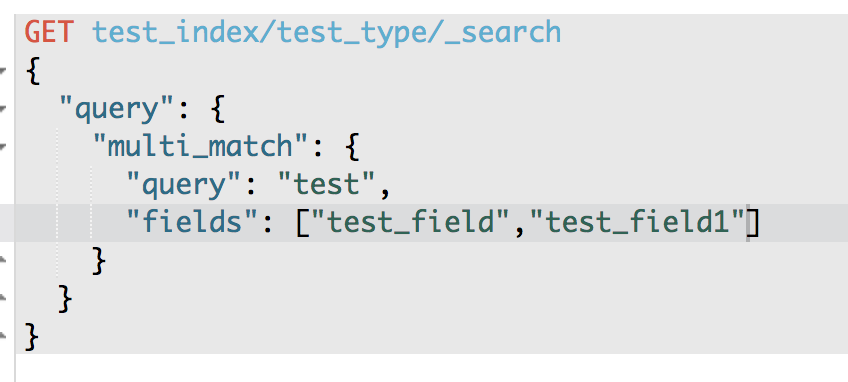
3、multi match
GET /test_index/test_type/_search
{
"query": {
"multi_match": {
"query": "test",
"fields": ["test_field", "test_field1"]
}
}
}
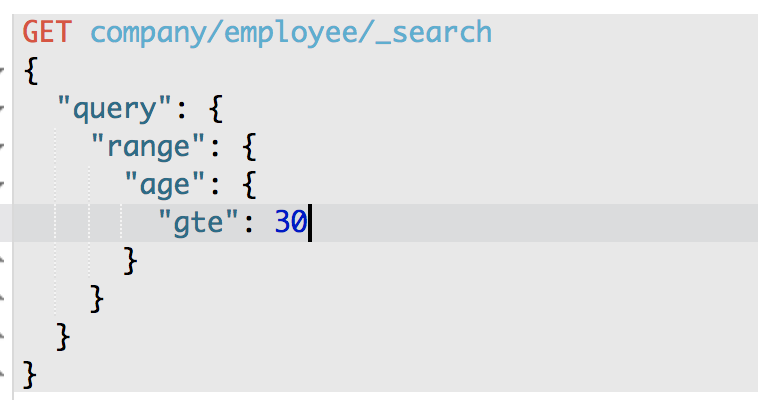
4、range query
GET /company/employee/_search
{
"query": {
"range": {
"age": {
"gte": 30
}
}
}
}
5、term query
match会将test 和 hello分为两个词进行查询 term不会分词 只查找test hello
GET /test_index/test_type/_search
{
"query": {
"term": {
"test_field": "test hello"
}
}
}
6、terms query
GET /_search
{
"query": { "terms": { "tag": [ "search", "full_text", "nosql" ] }}
}
7、exist query(2.x中的查询,现在已经不提供了)
ES--05的更多相关文章
- ES 05 - 通过Kibana管理Elasticsearch集群服务
目录 1 检查集群的健康状况 2 查看集群中的节点个数 3 查看集群中的索引 4 简单的索引操作 4.1 创建索引 4.2 删除索引 在本篇文章之前, 需要完成: ① 启动Elasticsearch服 ...
- OpenGL ES教程系列(经典合集)
为了搞透播放器的开发,花了些时间收集这些资料,虽然我已经搞定opengles渲染视频的内容,但是想玩玩opengles,往深里玩,图像处理这块是个好的方向,所以opengles是值得好好学的. O ...
- webpack-工程化工具
一.简介 1.webpack 是 facebook 公司发布的一款工程化工具,早期有 react 使用. 2.核心理念: 一切都是资源,是资源我们就能模块化打包加载. 3.webpack 默认支持 c ...
- JS 模块化- 05 ES Module & 4 大规范总结
1 ES Module 规范 ES Module 是目前使用较多的模块化规范,在 Vue.React 中大量使用,大家应该非常熟悉.TypeScript 中的模块化与 ES 类似. 1.1 导出模块 ...
- Android 中建立一个OpenGL ES的开发环境
转自: http://wiki.eoe.cn/page/Building_an_OpenGL_ES_Environment.html 负责人:zhangql原文链接:http://docs.eoean ...
- EGL接口介绍-----Android OpenGL ES底层开发
引自:http://www.cnitblog.com/zouzheng/archive/2011/05/30/74326.html EGL 是 OpenGL ES 和底层 Native 平台视窗系统之 ...
- ElasticSearch 学习记录之ES高亮搜索
高亮搜索 ES 通过在查询的时候可以在查询之后的字段数据加上html 标签字段,使文档在在web 界面上显示的时候是由颜色或者字体格式的 GET /product/_search { "si ...
- SpringData ES中一些底层原理的分析
之前写过一篇SpringData ES 关于字段名和索引中的列名字不一致导致的查询问题,顺便深入学习下Spring Data Elasticsearch. Spring Data Elasticsea ...
- ELK-filebeat收集日志到Kafka,并转存ES
https://blog.51cto.com/tryingstuff/2052271 场景需求 在有些不需要安装java环境的服务器如Nginx,php等为主的web 应用可以使用filebeat来对 ...
- ES 02 - 部署Elasticsearch单机服务 + 部署中的常见问题
目录 1 准备工作 1.1 安装JDK 1.2 下载安装包 1.3 创建elastic用户 2 启动ES服务 2.1 修改配置文件 2.2 启动服务 3 验证ES服务是否可用 4 关闭与重启服务 4. ...
随机推荐
- tomcat下的Cookie特殊符号问题
案例:在项目中通过Cookie方式临时存放检索条件,不小心在Cookie值中使用了特殊符号"@",导致在服务器端无法正确解析Cookie值.之所以说"不小心", ...
- 几本不错的数据仓库和Hadoop书籍
<<Pentaho Kettle解决方案:使用PDI构建开源ETL解决方案>>, Matt Casters等著,初建军翻译<<Hadoop应用架构>> ...
- IIS回收时间设置
IIS默认回收时1740分钟,这样的话,有可能在访问高峰期时时回收,可以设置为定时回收
- Android几个比较有用的插件
1.Android Drawable Importer 2.Android ButterKnife Zelezny 使用方法,在SetContentView上右键,Generate 3.Androi ...
- 二十六、Linux 进程与信号---system 函数 和进程状态切换
26.1 system 函数 26.1.1 函数说明 system(执行shell 命令)相关函数 fork,execve,waitpid,popen #include <stdlib.h> ...
- python中的深拷贝和浅拷贝
python的复制,深拷贝和浅拷贝的区别 在python中,对象赋值实际上是对象的引用.当创建一个对象,然后把它赋给另一个变量的时候,python并没有拷贝这个对象,而只是拷贝了这个对象的引用 一 ...
- 第25月25日 urlsession
1. private lazy var session: URLSession = { let configuration = URLSessionConfiguration.default conf ...
- python网络编程初识
一,什么是计算机网络: 计算机网络是指将地理位置不同的具有独立功能的多台计算机及其外部设备,通过通信线路连接起来,在网络操作系统,网络管理软件及网络通信协议的管理和协调下,实现资源共享和 [1] 信 ...
- 5-5 re模块 正则表达式
1,正则表达式 正则表达式,就是匹配字符串内容的一种规则. 官方定义:正则表达式是对字符串操作的一种逻辑公式,就是用事先定义好的一些特定字符.及这些特定字符的组合,组成一个“规则字符串”,这个“规则字 ...
- 服务器多站点多域名HTTPS实现
假设有这样一个场景,我们有多个站点(例如site1.marei.com,site2.marei.com和site3.marei.com)绑定到同一个IP:PORT,并区分不同的主机头.我们为每一个SS ...