
Angular中ui-router实现路由嵌套案例
学习 ui-router 资料整理
对于Angular内置的路由是单路由视图,ui-router可以实现路由嵌套。后面将会有一个案例概括前面所有资料整理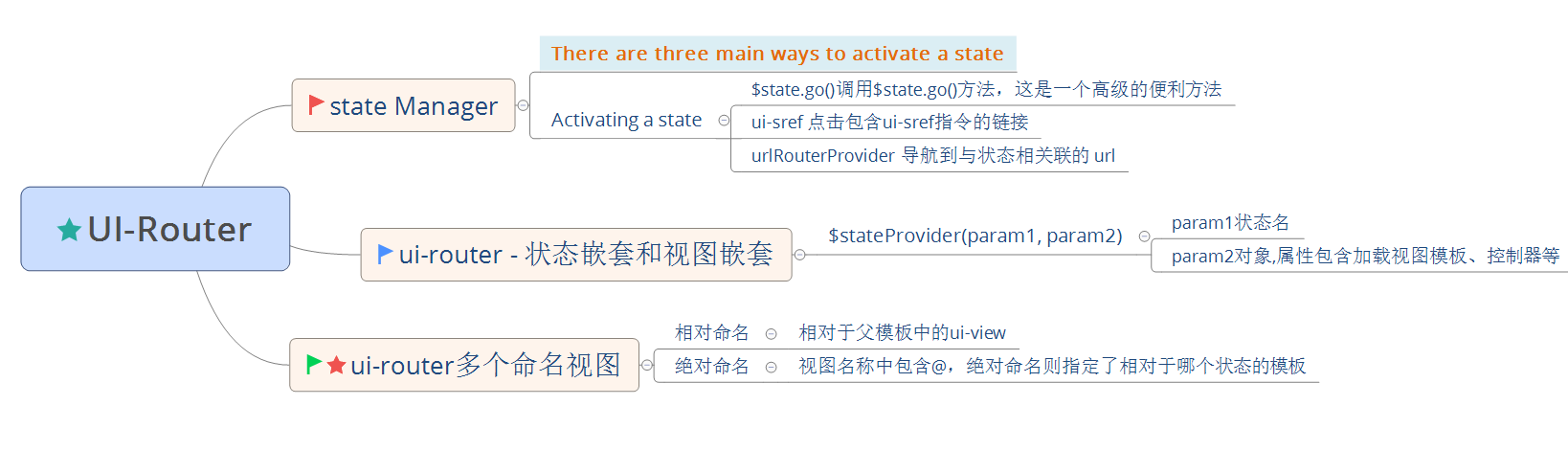
学习 ui-router - 管理状态 http://bubkoo.com/2014/01/01/angular/ui-router/guide/state-manager/
学习 ui-router - 状态嵌套和视图嵌套 http://bubkoo.com/2014/01/01/angular/ui-router/guide/nested-states%20&%20nested-views/
学习 ui-router - 多个命名的视图 http://bubkoo.com/2014/01/01/angular/ui-router/guide/multiple-named-views/
ui-router 多个命名的视图
<!-- index.html (root unnamed template) -->

<body ng-app>

<div ui-view></div> <!-- contacts.html plugs in here -->

<div ui-view="status"></div>

</body>
<!-- contacts.html -->

<h1>My Contacts</h1>

<div ui-view></div>

<div ui-view="detail"></div>
<!-- contacts.detail.html -->

<h1>Contacts Details</h1>

<div ui-view="info"></div>
ui-router 相对命名与绝对命名 写法
$stateProvider

  .state('contacts', {

    // 根状态,对应的父模板则是index.html

    // 所以 contacts.html 将被加载到 index.html 中未命名的 ui-view 中

    templateUrl: 'contacts.html'

  })

  .state('contacts.detail', {

    views: {

        // 嵌套状态,对应的父模板是 contacts.html

        // 相对命名

        // contacts.html 中 <div ui-view='detail'/> 将对应下面

        "detail" : { },

        // 相对命名

        // 对应 contacts.html 中的未命名 ui-view <div ui-view/>

        "" : { },

        // 绝对命名

        // 对应 contacts.detail.html 中 <div ui-view='info'/>

        "info@contacts.detail" : { }

        // 绝对命名

        // 对应 contacts.html 中 <div ui-view='detail'/>

        "detail@contacts" : { }

        // 绝对命名

        // 对应 contacts.html 中的未命名 ui-view <div ui-view/>

        "@contacts" : { }

        // 绝对命名

        // 对应 index.html 中 <div ui-view='status'/>

        "status@" : { }

        // 绝对命名

        // 对应 index.html 中 <div ui-view/>

        "@" : { }

  });
ui-router 实现视图与路由深层嵌套综合案例
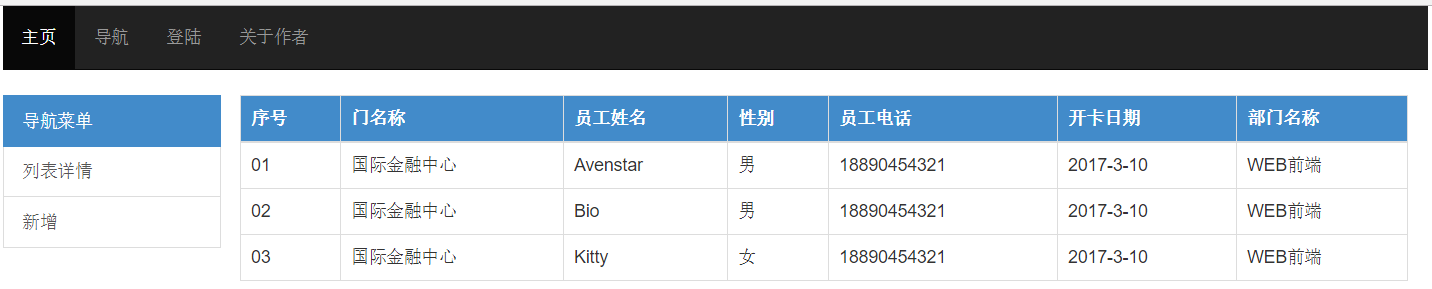
源代码下载请点击
推荐学习AngularJS Routing Using UI-Router https://scotch.io/tutorials/angular-routing-using-ui-router
Angular中ui-router实现路由嵌套案例的更多相关文章
- angular 的ui.router 定义不同的state 对应相同的url
Angular UI Router: Different states with same URL? The landing page of my app has two states: home-p ...
- angular中ui calendar的一些使用心得
ui calendar是封装fullcalendar的一款angular指令插件 官方地址:http://angular-ui.github.io/ui-calendar/ fullcalendar ...
- vue 中 this.$router.push() 路由跳转传参 及 参数接收的方法
传递参数的方法:1.Params 由于动态路由也是传递params的,所以在 this.$router.push() 方法中 path不能和params一起使用,否则params将无效.需要用name ...
- vue中this.$router.push()路由传值和获取的两种常见方法
1.路由传值 this.$router.push() (1) 路由跳转使用router.push()方法,这个方法会向history栈添加一个新纪录,所以,当用户点击浏览器后退按钮时,会回到之前的 ...
- 全面解析JavaScript的Backbone.js框架中的Router路由
这篇文章主要介绍了Backbone.js框架中的Router路由功能,Router在Backbone中相当于一个MVC框架中的Controller控制器功能,需要的朋友可以参考下. Backbone ...
- AngularJS 使用 UI Router 实现表单向导
Today we will be using AngularJS and the great UI Router and the Angular ngAnimate module to create ...
- Angular中懒加载一个模块并动态创建显示该模块下声明的组件
angular中支持可以通过路由来懒加载某些页面模块已达到减少首屏尺寸, 提高首屏加载速度的目的. 但是这种通过路由的方式有时候是无法满足需求的. 比如, 点击一个按钮后显示一行工具栏, 这个工具栏组 ...
- angular ui.router 路由传参数
angular已经用了一段时间了,最近在做路由,做一下笔记. 路由跳转的时候进行穿参 ui.router方式 <a ui-sref="edit({id:5})"> 编辑 ...
- 060——VUE中vue-router之路由嵌套在文章系统中的使用方法:
<!DOCTYPE html> <html lang="en"> <head> <meta charset="UTF-8&quo ...
随机推荐
- 南大算法设计与分析课程OJ答案代码(3)
问题 A: 动态中位数问题 时间限制: 1 Sec 内存限制: 8 MB提交: 866 解决: 102提交 状态 算法问答 题目描述 输入一组整数a1, a2, …, an ,每输入一个整数,输出 ...
- 【开源程序(C++)】获取bing图片并自动设置为电脑桌面背景
众所周知,bing搜索网站首页每日会更新一张图片,张张漂亮(额,也有一些不合我口味的),特别适合用来做电脑壁纸. 我们想要将bing网站背景图片设置为电脑桌面背景的通常做法是: 上网,搜索bing 找 ...
- Maven(六)Eclipse使用Maven插件创建项目
1. 创建Maven版Java工程 1.1 具体步骤 1.2 更改默认JDK版本 默认JDK版本过低 可以通过配置setting.xml来更改JDK版本 加入如下代码 <profile> ...
- Hibernate入门(十二)离线条件检索
Hibernate——离线条件检索DetachedCriteria DetachedCriteria翻译为离线条件查询,因为它是可以脱离Session来使用的一种条件查询对象,我们都知道Criteri ...
- js 位运算符
MDN定义:位运算符将它的操作数视为32位元的二进制串(0和1组成)而非十进制八进制或十六进制数. 例如:十进制数字9用二进制表示为1001,位运算符就是在这个二进制表示上执行运算,但是返回结果是标准 ...
- 将Y-m-d转换为Y年m月d日
自己编写的,不能直接套用,理解后可自行变化: $var=explode(' ',$res['act_starting']); $var1=$var[0]; $time=explode ...
- JAX-WS Web Service小试牛刀
1.使用Eclipse新建Java工程JavaDemo 2.新建包com.kira.ws 3.在包com.kira.ws新建类Hello,代码如下 package com.kira.ws; impor ...
- jQuery效果之简单的手风琴效果
实现效果如图所示: html结构: <div class="item_box box10"> <div class="item_box_wp" ...
- C#基础(201)--常量枚举
本文知识点: 1.掌握常量的定义和使用方法 2.理解枚举的作用和特点 3.掌握枚举的使用方法 1.1.常量的定义语法 const 数据类型 常量名称 = 值: 1.2.常见错误 1.3常量的 ...
- OSGI企业应用开发(十五)基于Spring、Mybatis、Spring MVC实现一个登录应用
前面文章中,我们已经完成了OSGI应用中Spring.Mybatis.Spring MVC的整合,本篇文章我们就在这个基础上来完成一个简单的登录应用,其中用户名和密码需要从数据库中查询. 前面文章中, ...