
css之 斜线
方案一
.x {

            border: solid 1px red;

            width: 100px;

            height: 100px;

            position: relative;

            background-color: transparent;

        }

            .x:before {

                position: absolute;

                top: 0px;

                right:;

                left:;

                bottom:;

                border-bottom: 100px solid red;

                border-left: 100px solid transparent;

                content: "";

            }

            .x:after {

                position: absolute;

                left: 1px;

                right:;

                top: 1px;

                bottom:;

                border-bottom: 99px solid white;

                border-left: 99px solid transparent;

                content: "";

            }

        .f {

            border: solid 1px red;

            width: 100px;

            height: 100px;

            position: relative;

            background-color: transparent;

        }

            .f:before {

                position: absolute;

                top: 0px;

                right:;

                left:;

                bottom:;

                border-bottom: 100px solid red;

                border-right: 100px solid transparent;

                content: "";

            }

            .f:after {

                position: absolute;

                left:;

                right: 1px;

                top: 1px;

                bottom:;

                border-bottom: 99px solid white;

                border-right: 99px solid transparent;

                content: "";

            }
x 是 斜线, f 是反斜线。
图:
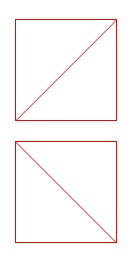
附:CSS 图形:
css3激发想象/css3各种图形 http://www.cnblogs.com/wwcherish/archive/2012/09/18/2690336.html
CSS3机器猫: http://keleyi.com/keleyi/phtml/html5/3.htm
方案二
background-image: url('data:image/svg+xml;utf8,<svg xmlns="http://www.w3.org/2000/svg" width="100%" height="100%"><line x1="0" y1="0" x2="100%" y2="100%" stroke="black" stroke-width="1"/></svg>');
css之 斜线的更多相关文章
- DIV+CSS制作斜线效果记录
DIV+CSS 斜线效果很简单,只需设置一下CSS Border 的边框就能有斜线效果.代码分享给大家,你可以自己变通. 提示要注意两点:1.DIV宽高的定义.2.DIV在 IE6 中默认是有高度的. ...
- css画斜线(用于时间的显示)
- css划斜线
http://stackoverflow.com/questions/18012420/draw-diagonal-lines-in-div-background-with-css
- 谈谈一些有趣的CSS题目(九)-- 巧妙的实现 CSS 斜线
开本系列,谈谈一些有趣的 CSS 题目,题目类型天马行空,想到什么说什么,不仅为了拓宽一下解决问题的思路,更涉及一些容易忽视的 CSS 细节. 解题不考虑兼容性,题目天马行空,想到什么说什么,如果解题 ...
- 巧妙的实现 CSS 斜线(炫酷的小效果)
开本系列,谈谈一些有趣的 CSS 题目,题目类型天马行空,想到什么说什么,不仅为了拓宽一下解决问题的思路,更涉及一些容易忽视的 CSS 细节. 解题不考虑兼容性,题目天马行空,想到什么说什么,如果 ...
- Matplotlib数据可视化(3):文本与轴
在一幅图表中,文本.坐标轴和图像的是信息传递的核心,对着三者的设置是作图这最为关心的内容,在上一篇博客中虽然列举了一些设置方法,但没有进行深入介绍,本文以围绕如何对文本和坐标轴进行设置展开(对图像 ...
- css斜线
斜线 .demo{ display: inline-block; width: 400px; height: 100px; resize: both; overflow: auto; margin-t ...
- CSS练习-导航栏斜线分隔-利用伪元素
开始切第一张图了,第一个遇到的问题是顶部导航栏这里,用斜线分割.想到的思路是用伪类:before或者:after实现 先写html结构. <!-- 导航栏begin --> <div ...
- css实现栏目两边斜线的效果
实现效果: 具体实现代码: <!DOCTYPE html> <html> <head> <meta charset="UTF-8"> ...
随机推荐
- mgo中DBRef-数据查询测试
下午对数据查询进行了代码测试: package main import ( "crypto/rand" "encoding/hex" "fmt&quo ...
- CentOS和Ubuntu下安装配置Greenplum数据库集群(包括安装包和源码编译安装)
首先说一下,无论是CentOS/RedHat还是Ubuntu都可以按源码方式.安装包方式编译安装. 1. 规划 192.168.4.93(h93) 1个主master 2个主segm ...
- Python2和Python3在windows下共存
Python2.7 和 Python3不兼容,两种环境可能都会用到.ubuntu14.04中已经默认安装了这两个版本,在shell中输入python会自动进入Python2.7的交互环境,输入Pyth ...
- Bootstrap 更改Navbar默认样式
alt+shift+n 新建文件ctrl+shift+/ 注释ctrl+shift+f 重新排版代码ctrl+/ 注释 /* navbar */.navbar-default { background ...
- C# WinForm 单例模式(例:同一个窗体只创建一次实例)
//C# WinForm 单例模式(例:同一个窗体只创建一次实例) //打开窗体的事件: Form3 f = Form3.InstanceObject() ; //实例化窗体 f.Focus(); / ...
- python生成中文验证码,带旋转,带干扰噪音线段
# -*- coding: utf-8 -*- """ Created on Sun Oct 4 15:57:46 2015 @author: keithguofan & ...
- JStorm注意事项
storm.yaml的配置可以参照defaults.yaml,例如: nimbus.childopts: " -Xms256m -Xmx256m -XX:+UseConcMarkSweepG ...
- 深入理解js——继承
JavaScript中继承是通过原型链来体现的. function Foo(){} var f1=new Foo(); f1.a=10; Foo.prototype.a=100; Foo.protot ...
- js 模块开发之一(模块开发价值)
首先引用我们的今天的主角 ----<前端模块化开发的价值> 1,前端开发最常见的两个问题 ---命名冲突和文件依赖 2,对于命名冲突的基本解决办法就是学习其他语言的习惯,添加命名空间 va ...
- [2015hdu多校联赛补题]hdu5348 MZL's endless loop
题目链接:http://acm.hdu.edu.cn/showproblem.php?pid=5348 题意:给你一个无向图,要你将无向图的边变成有向边,使得得到的图,出度和入度差的绝对值小于等于1, ...