
Vue项目中使用基于Vue.js的移动组件库cube-ui
cube-ui 是滴滴公司的技术团队基于 Vue.js 实现的精致移动端组件库。很赞,基本场景是够用了,感谢开源!感谢默默奉献的你们。
刚爬完坑,就来总结啦!!希望对需要的朋友有小小的帮助。
(一)创建一个vue项目
(1) (安装全局vue-cli,通过vue -V查看版本)
npm install -g vue-cli
(2)vue init 你用的模板工具 项目名称 (这里采用webpack作为模板工具)
vue init webpack cubeUiPro
(根据选项填写或者选择,可以按enter键进入下一步)如下图 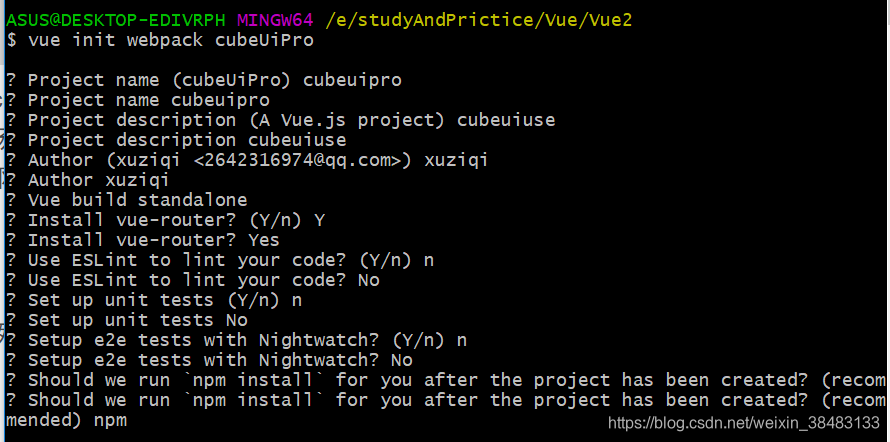
(3)安装成功后进入你的项目目录
cd cubeUiPro
(4) 启动项目啦
npm run dev
(二)安装cube-ui
建议大家先看看官网快速上手怎么说:https://didi.github.io/cube-ui/#/zh-CN/docs/introduction
安装:(注意:此安装部分只针对于 vue-cli < 3 的情况,vue -V查看你的版本去,cue-cli>3的请移步官网哦)
npm install cube-ui --save
cube-ui 搭配 webpack 2+ 支持后编译和普通编译 2 种构建方式(默认使用后编译),使用前都需要修改应用的依赖和配置。
- 后编译
(1)修改 package.json 并安装依赖
{

  // webpack-transform-modules-plugin 依赖 transformModules

  "transformModules": {

    "cube-ui": {

      "transform": "cube-ui/src/modules/${member}",

      "kebabCase": true

    }

  },

  "devDependencies": {

    // 新增 stylus 相关依赖

    "stylus": "^0.54.5",

    "stylus-loader": "^2.1.1",

    "webpack-post-compile-plugin": "^0.4.1",

    "webpack-transform-modules-plugin": "^0.3.5"

  }

}
(2)修改 webpack.base.conf.js
var PostCompilePlugin = require('webpack-post-compile-plugin')

var TransformModulesPlugin = require('webpack-transform-modules-plugin')

module.exports = {

  // ...

  plugins: [

    // ...

    new PostCompilePlugin(),

    new TransformModulesPlugin()

  ]

  // ...

}
(3)修改 build/utils.js 中的 exports.cssLoaders 函数
exports.cssLoaders = function (options) {

  // ...

  const stylusOptions = {

    'resolve url': true

  }

  // https://vue-loader.vuejs.org/en/configurations/extract-css.html

  return {

    css: generateLoaders(),

    postcss: generateLoaders(),

    less: generateLoaders('less'),

    sass: generateLoaders('sass', { indentedSyntax: true }),

    scss: generateLoaders('sass'),

    stylus: generateLoaders('stylus', stylusOptions),

    styl: generateLoaders('stylus', stylusOptions)

  }

}
(4)修改 vue-loader.conf.js
module.exports = {

  loaders: utils.cssLoaders({

    sourceMap: sourceMapEnabled,

    extract: false

  }),

  // ...

}
具体参见 https://github.com/vuejs-templates/webpack/pull/970/files
(5)index.html中引入以下文件
<script src="https://unpkg.com/cube-ui/lib/cube.min.js"></script>

<link rel="stylesheet" href="https://unpkg.com/cube-ui/lib/cube.min.css">
到此为止后编译配置完毕,用后编译就后编译哦,普通编译和后编译不能混着配置,就是说你不能既要配置普通编译还要配置后编译,会报错哒(作为一个过来人的忠告,嘻嘻),下面看看普通编译
- 普通编译
(1)修改 package.json 并安装依赖
{

  // webpack-transform-modules-plugin 依赖 transformModules

  "transformModules": {

    "cube-ui": {

      "transform": "cube-ui/lib/${member}",

      "kebabCase": true,

      "style": {

        "ignore": ["create-api", "better-scroll", "locale"]

      }

    }

  },

  "devDependencies": {

    "webpack-transform-modules-plugin": "^0.3.5"

  }

}
(2)修改 webpack 配置:
// webpack.config.js

var TransformModulesPlugin = require('webpack-transform-modules-plugin')

module.exports = {

  // ...

  resolve: {

    // ...

    alias: {

      // ...

      'cube-ui': 'cube-ui/lib'

      // ...

    }

    // ...

  }

  // ...

  plugins: [

    // ...

    new TransformModulesPlugin()

  ]

  // ...

}
(3)同样的要引入CDN文件到index.html中
<script src="https://unpkg.com/cube-ui/lib/cube.min.js"></script>

<link rel="stylesheet" href="https://unpkg.com/cube-ui/lib/cube.min.css">
(三)使用
全部引入(推荐,简单粗暴(嘻嘻))
一般在入口文件main.js中:
import Vue from 'vue'

import Cube from 'cube-ui'

Vue.use(Cube)
按需引入这里就暂时不介绍了哦,可以到官网看看哦,下面是个例子
- 案例
<template>

  <cube-button @click="showDialog">show dialog</cube-button>

</template>

<script>

  export default {

    methods: {

      showDialog() {

        this.$createDialog({

          type: 'alert',

          title: 'Alert',

          content: 'dialog content'

        }).show()

      }

    }

  }

</script>
运行你的项目看看是不是ok啦,以上是本文的全部内容,菜鸟总结,希望大神多多指点哦
Vue项目中使用基于Vue.js的移动组件库cube-ui的更多相关文章
- RSuite 一个基于 React.js 的 Web 组件库
RSuite http://rsuite.github.io RSuite 是一个基于 React.js 开发的 Web 组件库,参考 Bootstrap 设计,提供其中常用组件,支持响应式布局. 我 ...
- Vue项目中如何引用外部js
第一种方法:(感觉这个有问题) 1.把需要的js放到static文件夹下 2.在Index.html页面引入 3.在webpack.base.conf.js添加下面代码 externals: { 'W ...
- vue项目中引入mui.poppicker.js文件时报错“Uncaught ReferenceError: mui is not defined”
解决:在mui.js的源文件后最后加上 window.mui = mui;
- 在vue项目中使用element-ui的Upload上传组件
<el-upload v-else class='ensure ensureButt' :action="importFileUrl" :data="upLoadD ...
- 在vue项目中使用canvas-nest.js,报parameter 1 is not of type 'Element'
canvas-nest.js是一款轻量的网页特效,如图: github地址:https://github.com/hustcc/canvas-nest.js 在普通的html项目中,只要将<sc ...
- 在vue项目中使用axios发送FormData
这个是axios的中文文档,挺详细的: https://www.kancloud.cn/luponu/axios/873153 文档中的 使用 application/x-www-form-ur ...
- <转载> VUE项目中CSS管理
vue的scoped 在vue项目中,当 .vue文件中 <style> 标签有 *scoped 属性时,它的 CSS 只作用于当前组件中的元素,很好的实现了样式私有化的目的. 使用sco ...
- Vue项目中使用Vuex + axios发送请求
本文是受多篇类似博文的影响写成的,内容也大致相同.无意抄袭,只是为了总结出一份自己的经验. 一直以来,在使用Vue进行开发时,每当涉及到前后端交互都是在每个函数中单独的写代码,这样一来加大了工作量,二 ...
- vue项目中net::ERR_CONNECTION_TIMED_OUT错误
我出错的原因时network地址与我本机ip地址不一致 Network: http://192.168.13.30:8080/ 处理方法: 在vue项目中新建一个vue.config.js文件 配置上 ...
随机推荐
- 解决Error response from daemon: Get https://registry-1.docker.io/v2/library/hello-world/manifests/
https://blog.csdn.net/quanqxj/article/details/79479943
- Spring Boot:The field file exceeds its maximum permitted size of 1048576 bytes
错误信息:The field file exceeds its maximum permitted size of 1048576 bytes原因是因为SpringBoot内嵌tomcat默认所能上传 ...
- webservice调用和生成
webservice简介: Web Service技术, 能使得运行在不同机器上的不同应用无须借助附加的.专门的第三方软件或硬件, 就可相互交换数据或集成.依据Web Service规范实施的应用之间 ...
- SpringCloud(8)微服务监控Spring Boot Admin
1.简介 Spring Boot Admin 是一个管理和监控Spring Boot 应用程序的开源软件.Spring Boot Admin 分为 Server 端和 Client 端,Spring ...
- 有关python2与python3中关于除的不同
有关python2与python3中关于除的不同 python中2版本与3版本关于除的处理还是有一些差异的. 在python 2.7.15中除(/)是向下取整的,即去尾法. 123/10 # 结果 1 ...
- 【转】/bin/bash^M: bad interpreter: No such file or directory
执行一个脚本full_build.sh 时, 一直是提示我: -bash: ./full_build.sh: /bin/bash^M: bad interpreter: No such file or ...
- winform,同个程序只允许启动一次
static class Program { [DllImport("User32.dll")] private static extern bool ShowWindowAsyn ...
- Python项目部署-使用Nginx部署Django项目
一.nginx介绍及部署 二.nginx部署路飞学城代码 nginx配置安装 同样,nginx也有很多的安装方式: 1)源码安装(运维偏向:规范,便于配置管理) 2)yum,rpm安装(为了效率可以选 ...
- Activiti6作业执行器Job Executor配置(学习笔记)
内容概况: 异步执行配置相关: asyncExecutorActivate:这个属性是激活作业执行器,它的默认参数是false,只有设为true,activiti启动的时候才会开启线程池去扫描定时操作 ...
- JS 中的原型 -- prototype、__proto__ 以及原型链
原文: 1.深入理解javascript原型和闭包——prototype原型 2.三张图搞懂JavaScript的原型对象与原型链 打开浏览器控制台,任意定义一个对象,打印出来后,会发现有最后一定有一 ...