
Android蓝牙——HID开发
原文地址:
https://blog.csdn.net/VNanyesheshou/article/details/61914974
一 环境
开发环境:
jdk1.6 Eclipse
or jdk1.8 AS3.0.1
运行环境:
华为V10(Android8.0)
实现功能:
Android 蓝牙Hid——连接蓝牙鼠标、键盘等输入设备。
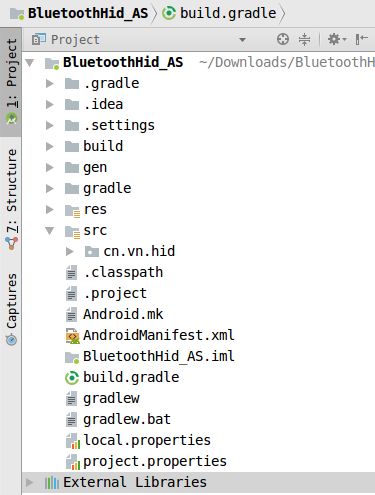
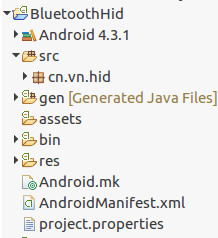
二 代码结构
三、代码
1 Hid简介
HID设备(Hunman Interface Device Profile),即人机交互设备,常见的有鼠标,键盘,游戏手柄,等等。一般有线方式都是通过USB连线连接到机器设备,作为用户输入设备。在蓝牙技术中,HID设备的接入就是无线的了。
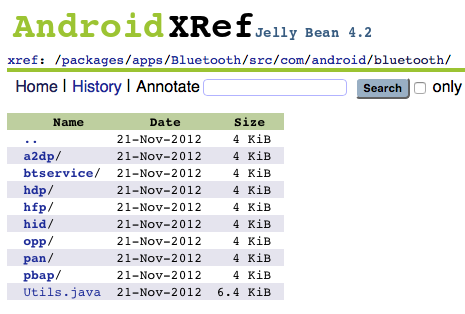
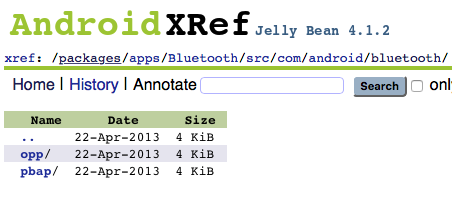
网上查资料说hid从android4.0开始支持(可能是usb hid),不过蓝牙hid应该从android4.2开始支持的,如下图所示:
android4.1.2中的Bluetooth应用中没有hid的相关代码,而android4.2源码中Bluetooth应用中才有hid的代码。
2 实现
连接hid设备步骤:
- 开启蓝牙
- 获得inputDevice profile
- 扫描
- 配对
- 连接
2.1 开启蓝牙,通过广播接收者监听蓝牙相关状态。
mBluetoothAdapter = BluetoothAdapter.getDefaultAdapter();

if (mBluetoothAdapter == null) {

    Toast.makeText(this, "不支持蓝牙功能", 0).show();

    // 不支持蓝牙

    return;

}

// 如果没有打开蓝牙

if (!mBluetoothAdapter.isEnabled()) {

    mBluetoothAdapter.enable();

}

// 初始化广播接收者

mBroadcastReceiver = new BlueBroadcastReceiver();

IntentFilter intentFilter = new IntentFilter();

intentFilter.addAction(BluetoothDevice.ACTION_FOUND);

intentFilter.addAction(BluetoothDevice.ACTION_BOND_STATE_CHANGED);

intentFilter.addAction(BluetoothAdapter.ACTION_STATE_CHANGED);

intentFilter.addAction(BluetoothAdapter.ACTION_DISCOVERY_STARTED);

intentFilter.addAction("android.bluetooth.input.profile.action.CONNECTION_STATE_CHANGED");

this.registerReceiver(mBroadcastReceiver, intentFilter);
2.2 获得inputDevice profile
// 4.2以上才支持HID模式
if (Build.VERSION.SDK_INT >= 17) {
mHidUtil = HidUtil.getInstance(this);
}
public static HidUtil getInstance(Context context){

    if(null == instance){

        instance = new HidUtil(context);

    }

    return instance;

}

private HidUtil(Context context) {

    this.context = context;

    mBtAdapter = BluetoothAdapter.getDefaultAdapter();

    try {

        mBtAdapter.getProfileProxy(context,

                mListener, INPUT_DEVICE);

    } catch (Exception e) {

        e.printStackTrace();

    }

}
通过BluetoothAdapter对象调用getProfileProxy()函数获取代理蓝牙输入设备代理对象。
其中参数mListener必须实现BluetoothProfile.ServiceListener()。获取代理对象成功或失败都会回调该Listener。
private BluetoothProfile.ServiceListener mListener = new BluetoothProfile.ServiceListener() {

	@Override

	public void onServiceConnected(int profile, BluetoothProfile proxy) {

		Log.i(TAG, "mConnectListener onServiceConnected");

		//BluetoothProfile proxy这个已经是BluetoothInputDevice类型了

		try {

			if (profile == INPUT_DEVICE) {

				mBluetoothProfile = proxy;

			}

		} catch (Exception e) {

			e.printStackTrace();

		}

	}

	@Override

	public void onServiceDisconnected(int profile) {

		Log.i(TAG, "mConnectListener onServiceConnected");

	}

};
当连接代理服务成功,回调onServiceConnected()函数,失败则回调onServiceDisconnected()函数。
其中onServiceConnected()中的参数proxy类型为BluetoothProfile,这里因为获取BluetoothHeadset、BluetoothA2dp对象也要使用该回调函数,所以参数类型设置为BluetoothInputDevice、BluetoothHeadset、BluetoothA2dp的父类。这里可以将其转换成BluetoothInputDevice类型(BluetoothInputDevice是BluetoothProfile的子类)。
获取到输入设备的代理对象,之后就可以进行连接操作了。
2.3 扫描(点击连接按钮开始扫描蓝牙设备)
mBluetoothAdapter.startDiscovery();
2.4 配对
广播接收者监听扫描到蓝牙设备,过滤出所需蓝牙设备进行配对,如果之前配对过则直接连接。
if(action.equals(BluetoothDevice.ACTION_FOUND)){

    // 通过广播接收到了BluetoothDevice

    final BluetoothDevice device = (BluetoothDevice) intent

            .getParcelableExtra(BluetoothDevice.EXTRA_DEVICE);

    if (device == null) return;

    String btname = device.getName();

    String address = device.getAddress();

    Log.i(TAG, "bluetooth name:"+btname+",address:"+address);

    if((address != null&& address.equals(HID_ADDR))||(btname != null && btname.equals(HID_NAME))){

        mConnectDevice = device;

        mBluetoothAdapter.cancelDiscovery();

        if(!mHidUtil.isBonded(device)){

            //先配对

            mHidUtil.pair(device);

        }else {

            //已经配对则直接连接

            mHidUtil.connect(device);

        }

    }

}
HidUtil类中的配对方法:
	/**

	 * 配对

	 * @param BluetoothDevice

     */

public void pair(BluetoothDevice device) {

    Log.i(TAG, "pair device:"+device);

    Method createBondMethod;

    try {

        createBondMethod = BluetoothDevice.class.getMethod("createBond");

        createBondMethod.invoke(device);

    } catch (Exception e) {

        e.printStackTrace();

    }

}
2.5 连接(配对成功后)
if(action.equals(BluetoothDevice.ACTION_BOND_STATE_CHANGED)){

	BluetoothDevice device = intent

        	.getParcelableExtra(BluetoothDevice.EXTRA_DEVICE);

	String name = device.getName();

	String address = device.getAddress();

	Log.i(TAG,"name:"+name+",address:"+address+",bondstate:"+device.getBondState());

	if((address != null&& address.equals(HID_ADDR))||(name != null && name.equals(HID_NAME))){

    		if(device.getBondState() == BluetoothDevice.BOND_BONDED)

        		mHidUtil.connect(device);

	}

}
判断是否是要连接的输入设备,如果符合条件则进行连接。
HidUtil中connect 方法
/**

 * 连接设备

 * @param bluetoothDevice

 */

public void connect(final BluetoothDevice device) {

    Log.i(TAG, "connect device:"+device);

    try {

        //得到BluetoothInputDevice然后反射connect连接设备

        Method method = mBluetoothProfile.getClass().getMethod("connect",

                new Class[] { BluetoothDevice.class });

        method.invoke(mBluetoothProfile, device);

    } catch (Exception e) {

        e.printStackTrace();

    }

}
BluetoothInputDevice中的connect方法是隐藏的,所以需要通过反射机制获取该方法进行调用。
2.6 监听连接状态
通过广播接收者监听连接状态。
if(action.equals("android.bluetooth.input.profile.action.CONNECTION_STATE_CHANGED")){

	int state = intent.getIntExtra(BluetoothProfile.EXTRA_STATE,0);

	BluetoothDevice device = intent.getParcelableExtra(BluetoothDevice.EXTRA_DEVICE);

	Log.i(TAG,"state="+state+",device="+device);

	if(state == BluetoothProfile.STATE_CONNECTED){//连接成功

		Toast.makeText(MainActivity.this, R.string.connnect_success, Toast.LENGTH_SHORT).show();

	} else if(state == BluetoothProfile.STATE_DISCONNECTED){//连接失败

		Toast.makeText(MainActivity.this, R.string.disconnected, Toast.LENGTH_SHORT).show();

	}

}
2.7 断开连接
if(mConnectDevice != null)

	mHidUtil.disConnect(mConnectDevice);
HidUtil中disconnect方法
/**

 * 断开连接

 * @param BluetoothDevice

 */

public void disConnect(BluetoothDevice device) {

    Log.i(TAG, "disConnect device:"+device);

    try {

        if (device != null) {

            Method method = mBluetoothProfile.getClass().getMethod("disconnect",

                    new Class[] { BluetoothDevice.class });

            method.invoke(mBluetoothProfile, device);

        }

    } catch (Exception e) {

        e.printStackTrace();

    }

}
手机端断开连接后,重新连接会提示“只能有鼠标发起重新连接请求,请使用鼠标重新连接”。
3 接收数据
adb shell
getevent -l
当连接成功后,会看到如下内容:
could not get driver version for /dev/input/mouse1, Not a typewriter

add device 7: /dev/input/event6

  name:     "Bluetooth Mouse"
这表示蓝牙鼠标成为一个输入设备。
左击鼠标:
/dev/input/event6: EV_MSC       MSC_SCAN             00090001

/dev/input/event6: EV_KEY       BTN_MOUSE            DOWN

/dev/input/event6: EV_SYN       SYN_REPORT           00000000

/dev/input/event6: EV_MSC       MSC_SCAN             00090001

/dev/input/event6: EV_KEY       BTN_MOUSE            UP

/dev/input/event6: EV_SYN       SYN_REPORT           00000000
我们应用中打印
03-13 12:08:36.526 I/MainActivity(23670): dispatchTouchEvent ev:MotionEvent { action=ACTION_DOWN, actionButton=0, id[0]=0, x[0]=269.7555, y[0]=543.9628, toolType[0]=TOOL_TYPE_MOUSE, buttonState=BUTTON_PRIMARY, metaState=0, flags=0x0, edgeFlags=0x0, pointerCount=1, historySize=0, eventTime=16788085, downTime=16788085, deviceId=39, source=0x2002 }

03-13 12:08:36.653 I/MainActivity(23670): dispatchTouchEvent ev:MotionEvent { action=ACTION_UP, actionButton=0, id[0]=0, x[0]=269.7555, y[0]=543.9628, toolType[0]=TOOL_TYPE_MOUSE, buttonState=0, metaState=0, flags=0x0, edgeFlags=0x0, pointerCount=1, historySize=0, eventTime=16788216, downTime=16788085, deviceId=39, source=0x2002 }
表示在屏幕中某位置处点击了一下。
右击鼠标:
/dev/input/event6: EV_MSC       MSC_SCAN             00090002

/dev/input/event6: EV_KEY       BTN_RIGHT            DOWN

/dev/input/event6: EV_SYN       SYN_REPORT           00000000

/dev/input/event6: EV_MSC       MSC_SCAN             00090002

/dev/input/event6: EV_KEY       BTN_RIGHT            UP

/dev/input/event6: EV_SYN       SYN_REPORT           00000000
表示点击了一下返回键,程序退出。
移动鼠标会发现屏幕上小光标在移动,滑动鼠标也会触发相应事件。
4 其他
现在大部分手机是支持hid的,并且也将该功能打开状态。
如果是做系统开发,就需要注意将Bluetooth中的hid开关打开。
将源码中的packages/apps/Bluetooth/res/values/config.xml的profile_supported_hid 修改为true。
true
欢迎关注我的微信公众号:

注:本文著作权归作者,由demo大师代发,拒绝转载,转载需要作者授权
Android蓝牙——HID开发的更多相关文章
- Android蓝牙BLE开发,扫描、连接、发送和读取信息;
1.BLE开发权限 Android蓝牙BLE开发须打开蓝牙权限和6.0位置权限: <uses-permission android:name="android.permission.B ...
- Qt on Android 蓝牙通信开发
版权声明:本文为MULTIBEANS ORG研发跟随文章,未经MLT ORG允许不得转载. 最近做项目,需要开发安卓应用,实现串口的收发,目测CH340G在安卓手机上非常麻烦,而且驱动都是Java版本 ...
- android蓝牙通讯开发(详细)
新建一个工程之后,我们可以先看到界面左边的项目栏,我们可以看到,除了app目录以外,大多数的文件和目录都是自动生成的,我们也不需要对他们进行修改,而app目录之下的文件才是我们工作的重点.下面,我先对 ...
- Android 蓝牙 BLE 开发笔记
最近公司头戴换了一块蓝牙4.0 BLE模块,所以我们Android组要适配 BLE.Android BLE 需要 4.3 以上系统,api 还是非常简单的, 第一步就是扫描, 扫描到设备后就可以连接了 ...
- Android 串口蓝牙通信开发Java版本
Android串口BLE蓝牙通信Java版 0. 导语 Qt on Android 蓝牙通信开发 我们都知道,在物联网中,BLE蓝牙是通信设备的关键设备.在传统的物联网应用中,无线WIFI.蓝牙和Zi ...
- Qt on Android 蓝牙开发
版权声明:本文为MULTIBEANS ORG研发跟随文章,未经MLT ORG允许不得转载. 最近做项目,需要开发安卓应用,实现串口的收发,目测CH340G在安卓手机上非常麻烦,而且驱动都是Java版本 ...
- android 蓝牙4.0 开发介绍
最近一直在研究一个蓝牙功能 由于本人是菜鸟 学起来比较忙 一直搞了好久才弄懂 , 网上对蓝牙4.0也就是几个个dome 抄来抄去,全是英文注解 , 对英语不好的朋友来说 真是硬伤 , 一些没必要的描 ...
- 【转】android蓝牙开发---与蓝牙模块进行通信--不错
原文网址:http://www.cnblogs.com/wenjiang/p/3200138.html 近半个月来一直在搞android蓝牙这方面,主要是项目需要与蓝牙模块进行通信.开头的进展很顺利, ...
- Android 蓝牙开发(整理大全)
Android蓝牙开发 鉴于国内Android蓝牙开发的例子很少,以及蓝牙开发也比较少用到,所以找的资料不是很全. (一): 由于Android蓝牙的通信都需要用到UUID,如果由手机发起搜索,当搜索 ...
随机推荐
- 80.Vigenère密码(模拟)
Vigenère密码(文件名vigenere.cpp vigenere.in vigenere.out) 题目描述 Description 16 世纪法国外交家Blaise de Vigen ...
- Codeforces Beta Round #10 A. Power Consumption Calculation 水题
A. Power Consumption Calculation 题目连接: http://www.codeforces.com/contest/10/problem/A Description To ...
- axios 与 Jquery-ajax 的使用区别
axios 和 ajax 的使用方法基本一样,只有个别参数不同: 附:axios 中文文档 一.axios axios({ url: 'http://jsonplaceholder.typicode. ...
- Spring EL方法调用实例
Spring表达式语言(使用SpEL)允许开发人员使用表达式来执行方法和将返回值以注入的方式到属性,或叫作“使用SpEL方法调用”. Spring EL在注解的形式 了解如何实现Spring EL方法 ...
- [前端]使用JQuery UI Layout Plug-in布局
引言 使用JQuery UI Layout Plug-in布局框架实现快速布局,用起来还是挺方便的,稍微研究了一下,就能上手,关于该布局框架的材料,网上也挺多的.在项目中也使用到了,不过那是前端的工作 ...
- java什么时候声明static方法
1.经常用到的方法,可以声明为static,这样省去了每次new对象的内存空间,因为非static方法,需要new对象才能调用此方法.但因此也产生多线程访问线程安全问题 比如: 2.当一个方法或者变量 ...
- Spring Data JPA -1-CRUD入门
1) 引入jar包支持 <dependency> <groupId>org.springframework.boot</groupId> <artifactI ...
- ffplay播放器移植VC的project:ffplay for MFC
本文介绍一个自己做的FFPLAY移植到VC下的开源project:ffplayfor MFC.本project将ffmpeg项目中的ffplay播放器(ffplay.c)移植到了VC的环境下.而且使用 ...
- 幸福框架:用户想看到的操作日志也要使用AOP吗?
背景 日志无论是对于开发人员.运维人员和最终用户都是一笔财富,是不是所有类型的日志都要AOP呢?本着交流的目的,这里先说一些看法,希望大家多批评. 常见的日志类型 异常日志 概念:记录异常的日志. 考 ...
- .NET:负载平衡的主意事项
允许局域网发现和共享. 设置固定IP. 网站的IP设置为“全部未分配”. 注意:如果停止IIS的话,不会对负载平衡有影响,负载还是会分配停止了的IIS所在在的电脑,只有停止服务器了,负载不会再分配给停 ...