
Button实现图文混排
Button实现图文混排
一、简介
本文介绍两种图文混排方式
1、android:drawableTop="@drawable/star"实现文字上有图片
当然有上下左右等等
2、SpannableString的ImageSpan实现图文混排
二、代码实例
效果图:
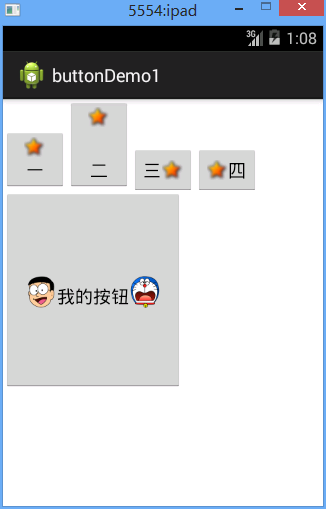
一二三四是用的第一种方式
下面的用的第二种方式
代码:
fry.Activity02
 package fry;

 import com.example.buttonDemo1.R;

 import android.app.Activity;

 import android.graphics.BitmapFactory;

 import android.os.Bundle;

 import android.text.Spannable;

 import android.text.SpannableString;

 import android.text.style.ImageSpan;

 import android.view.MotionEvent;

 import android.view.View;

 import android.view.View.OnClickListener;

 import android.view.View.OnFocusChangeListener;

 import android.view.View.OnTouchListener;

 import android.widget.Button;

 public class Activity02 extends Activity  {

     private Button btn_big;

     @Override

     protected void onCreate(Bundle savedInstanceState) {

         // TODO Auto-generated method stub

         super.onCreate(savedInstanceState);

         setContentView(R.layout.activity02);

         btn_big=(Button) findViewById(R.id.btn_big);

         //SpannableString的ImageSpan添加左边图片

         SpannableString spannableString1=new SpannableString("left");

         ImageSpan imageSpan=new ImageSpan(this, BitmapFactory.decodeResource(getResources(), R.drawable.image_left));

         spannableString1.setSpan(imageSpan, 0, 4, Spannable.SPAN_EXCLUSIVE_EXCLUSIVE);

         //SpannableString的ImageSpan添加右边图片

         SpannableString spannableString2=new SpannableString("right");

         ImageSpan imageSpan2=new ImageSpan(this, BitmapFactory.decodeResource(getResources(), R.drawable.image_right));

         spannableString2.setSpan(imageSpan2, 0, 5, Spannable.SPAN_EXCLUSIVE_EXCLUSIVE);

         btn_big.append(spannableString1);

         btn_big.append("我的按钮");

         btn_big.append(spannableString2);

     }

 }
/buttonDemo1/res/layout/activity02.xml
 <?xml version="1.0" encoding="utf-8"?>

 <LinearLayout xmlns:android="http://schemas.android.com/apk/res/android"

     android:layout_width="match_parent"

     android:layout_height="match_parent"

     android:orientation="vertical" >

     <LinearLayout

         android:layout_width="match_parent"

         android:layout_height="wrap_content"

         android:orientation="horizontal"

         >

         <!--android:drawableTop="@drawable/star"实现文字上有图片  -->

         <Button

             android:layout_width="wrap_content"

             android:layout_height="wrap_content"

             android:text="一"

             android:drawableTop="@drawable/star"

             />

         <!--android:drawablePadding="30dp实现文字和文字上的图片中间有30dp的空隙  -->

         <Button

             android:layout_width="wrap_content"

             android:layout_height="wrap_content"

             android:text="二"

             android:drawableTop="@drawable/star"

             android:drawablePadding="30dp"

             />

         <Button

             android:layout_width="wrap_content"

             android:layout_height="wrap_content"

             android:text="三"

             android:drawableRight="@drawable/star"

             />

         <Button

             android:layout_width="wrap_content"

             android:layout_height="wrap_content"

             android:text="四"

             android:drawableLeft="@drawable/star"

             />

     </LinearLayout>

     <Button

         android:id="@+id/btn_big"

         android:layout_width="180dp"

         android:layout_height="200dp"

         />

 </LinearLayout>
Button实现图文混排的更多相关文章
- EditText图文混排
下面就具体说一下我遇到的问题,首先是EditText里面的图文混排问题,这个问题的难点就是三点: 1.怎么插图片 2.怎么保存插入的图片和文字 3.怎么解析回图片和文字 解决: 一.怎么插入图片 在这 ...
- IOS实现UIButton图文混排、自定义按钮按下和正常状态下不同的背景颜色、根据文字长度自定义UIButton长度
在一些项目中,我们需要自定义自己的UIButton,使Button上面同时具有图片和文字描述,实现自定义UIButton的图文混排. 首先我们需要定义一个继承自UIButton的类,同时实现自己的in ...
- XMPP键盘订制实现图文混排
在现阶段的通信服务中,各种标准都有,因此会出现无法实现相互连通,而XMPP(Extensible Message and presence Protocol)协议的出现,实现了整个及时通信服务协议的互 ...
- IOS总结_实现UIButton的图文混排(二)
非常久没有写博客了,之前写过一篇关于UIButton图文混排的,可是有点复杂,今天来一个比較简单地.相信大家回用得着 UIButton *button=[[UIButton alloc, , )]; ...
- Android图文混排-实现EditText图文混合插入上传
前段时间做了一个Android会议管理系统,项目需求涉及到EditText的图文混排,如图: 在上图的"会议详情"中.须要支持文本和图片的混合插入,下图演示输入的演示样例: 当会议 ...
- 用NSAttributedString实现简单的图文混排
iOS7以后,因为TextKit的强大,可以用NSAttributedString很方便的实现图文混排(主要是利用了NSTextAttachment). 关于Textkit的牛逼之处,可以参考objc ...
- 图文混排--CoreText的简单运用
常见的在一些微博微信中可以看见一段文字中有不同的字体,字体有不同的颜色,并且可能会有一些笑脸之类的表情,这些可以通过图文混排做到. 图文混排可以通过WebView和CoreText做到,其他还有别的方 ...
- 【转】关于FLASH中图文混排聊天框的小结
原文链接 图文混排也是FLASH里一个很古老的话题了,我们不像美国佬那样游戏里面聊天框就是聊天框,全是文字干干净净,也不像日本人发明了并且频繁地使用颜文字.不管是做论坛.做游戏,必定要实现的一点就是带 ...
- DIV+CSS 图文混排的图片居中办法
不少人为了让 Div 图文混排的图片可以居中,给 IMG 套各式各样的 SPAN.DIV.LI 等等,以便于使用 text-align来进行居中. <div>图文混排 <br> ...
随机推荐
- 多个StoryBoard之间的跳转
iOS项目中可以将同一业务流程的页面归置到一个StoryBoard中,项目中必然会包含多个StroryBoard,可以利用跳转,实现项目的不同业务流程页面间的跳转切换. 实现思路: 1,项目(Proj ...
- <2014 08 28> 大学学习小结
大一:哲学.物理(科普).瞎玩 大二:机械.力学.继续哲学 大三:电子电路.计算机.编程 大四:毕业项目(机器人等) 研一:物理.数学(常熟) 研二:AGV.TUM实习 研三:写论文.实习程序员.申请 ...
- django博客项目9
................
- Leetcode 之 Combination Sum系列
39. Combination Sum 1.Problem Find all possible combinations of k numbers that add up to a number n, ...
- JavaScript-4.2函数,变量作用域---ShinePans
<html> <head> <meta http-equiv="content-type" content="text/html;chars ...
- 10046 trace详解(2)--tkprof
10046或10053生成的文件格式比较乱,直接查看有一定的困难,ORACLE自带的一个格式化命令工具tkprof可以将生成的.trc文件进行格式化,具体用说如下: 一.直接输入tkprof不带任 ...
- pkg-config用法和gcc cflags
pkg-config程序是干什么用的?简单的说就是向用户向程序提供相应库的路径.版本号等信息的程序. 譬如说我们运行以下命令:pkg-config 查看gcc的CFLAGS参数 $pkg-confi ...
- Delphi 正则表达式之TPerlRegEx 类的属性与方法(2): 关于子表达式
Delphi 正则表达式之TPerlRegEx 类的属性与方法(2): 关于子表达式 // MatchedExpression 与 SubExpressions[0] var reg: TPerl ...
- js高级---js运行原理
概述 浏览器组成可分两部分:Shell+内核.浏览器内核又可以分成两部分:渲染引擎(layout engineer或者Rendering Engine)和JS引擎.渲染引擎功能作用 渲染引擎,负责对网 ...
- HackerRank - powers-game-1 【博弈论】
HackerRank - powers-game-1 [博弈论] 题意 给出 * 2^1 * 2^2 * 2^3 * 2^4 * 2^5 * 2^n 这一串东西 ,然后有两个玩家,*号是可以被替换掉的 ...