
nginx config的多个config配置
在我们的一台服务器上,一个nginx服务器下面可能跑着许多许多的项目;
那么就需要配置多个对应的配置 端口号 已经文件入库目录等等
那么项目多了以后,把这些项目都写到一个文件里 到后期难以查看与管理
我们只需要新建一个文件夹,下面全部存放 我们的子配置 然后在主配置中把这个子目录引入即可
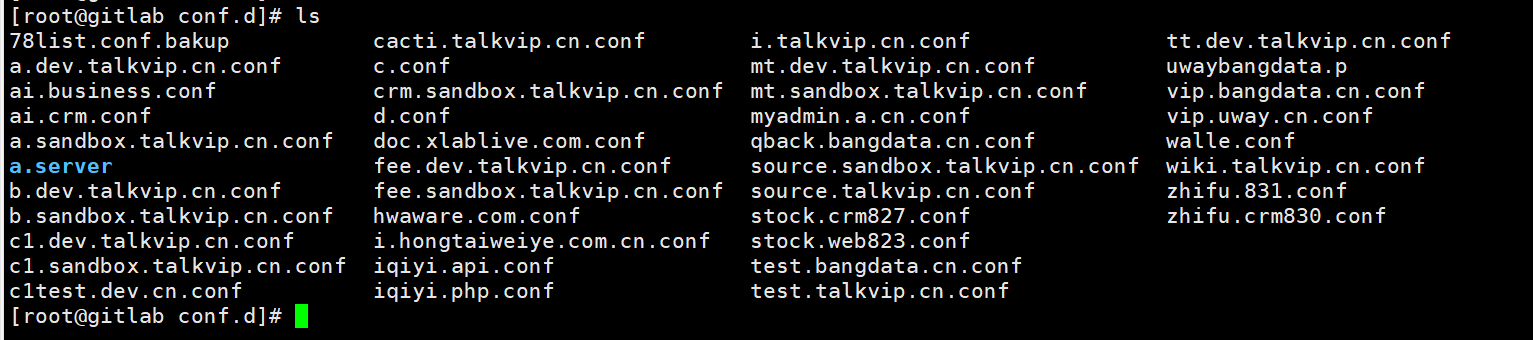
然后我们的主配置文件如下
user  www www;

worker_processes  8;

error_log  /www/logs/error.log info;

#access_log  /www/logs/nginx.access.log  main;

pid        /var/run/nginx.pid;

worker_rlimit_nofile 51200;

events {

    use epoll;

    worker_connections  51200;

}

http {

    include       /etc/nginx/mime.types;

    default_type  application/octet-stream;

log_format  main '"$time_local","$remote_addr","$http_x_forwarded_for","$http_host","$request","refer:$http_referer","$http_user_agent","$status","$request_time","$upstream_response_time","$body_bytes_sent","$upstream_addr","$upstream_status","$upstream_response_time","$http_cookie_pgv_pvi","$request_body","$uid_got"';

    server_names_hash_bucket_size 128;

    client_header_buffer_size 128k;

    large_client_header_buffers 4 128k;

    client_max_body_size 100m;

client_body_buffer_size 1024k;

    sendfile        on;

    tcp_nopush     on;

    keepalive_timeout  30;

    tcp_nodelay on;

  fastcgi_intercept_errors on;

  fastcgi_connect_timeout 300;

  fastcgi_send_timeout 300;

  fastcgi_read_timeout 300;

  fastcgi_buffer_size 128k;

user  www www;

worker_processes  8;

error_log  /www/logs/error.log info;

#access_log  /www/logs/nginx.access.log  main;

pid        /var/run/nginx.pid;

worker_rlimit_nofile 51200;

events {

    use epoll;

    worker_connections  51200;

}

http {

    include       /etc/nginx/mime.types;

    default_type  application/octet-stream;

log_format  main '"$time_local","$remote_addr","$http_x_forwarded_for","$http_host","$request","refer:$http_referer","$http_user_ag

ent","$status","$request_time","$upstream_response_time","$body_bytes_sent","$upstream_addr","$upstream_status","$upstream_response

_time","$http_cookie_pgv_pvi","$request_body","$uid_got"';

    server_names_hash_bucket_size 128;

    client_header_buffer_size 128k;

    large_client_header_buffers 4 128k;

    client_max_body_size 100m;

client_body_buffer_size 1024k;

    sendfile        on;

    tcp_nopush     on;

    keepalive_timeout  30;

    tcp_nodelay on;

  fastcgi_intercept_errors on;

  fastcgi_connect_timeout 300;

  fastcgi_send_timeout 300;

  fastcgi_read_timeout 300;

  fastcgi_buffer_size 128k;

  fastcgi_buffers 4 128k;

  fastcgi_busy_buffers_size 128k;

  fastcgi_temp_file_write_size 128k;

    gzip  on;

    gzip_min_length  1k;

    gzip_buffers     4 16k;

    gzip_http_version 1.0;

    gzip_comp_level 2;

    gzip_types       text/plain application/x-javascript text/css application/xml image/jpeg image/gif image/png;

    gzip_vary on;

    #server {

#       listen 80;

#       server_name  localhost;

 #       location / {

#           proxy_next_upstream http_502 http_504 http_404 error timeout invalid_header;

 #           proxy_pass http://78list.cn;

            #proxy_set_header Host www.yourdomain.com;

  #          proxy_set_header X-Forwarded-For $remote_addr;

   #     }

    #}

    #upstream 78list.cn {

    #    server 192.168.8.113:8080;

    #}

    include /etc/nginx/default.conf;

    include /etc/nginx/upstream/*.conf;

    include /etc/nginx/conf.d/*.conf; // 这里就是引入的子配置文件夹

}
一个范例 子配置的conf
server

  {

    listen       832; // 端口号

    server_name localhost; // 域名

    index index.html index.htm index.php;

    root  /home/www/ai/crm/web/public; //项目的入口文件夹

        location ~ /.svn/ {

        deny all;

    }

    location / {

        rewrite ^/$ /index.php last;

        rewrite ^/(?!index\.php|index\.html|layui|css|js|bootstrap|robots\.txt)(.*)$ /index.php/$1 last;

    }

   location ~ \.php {

                fastcgi_pass 127.0.0.1:9002;

                fastcgi_index index.php;

                fastcgi_param SCRIPT_FILENAME $document_root$fastcgi_script_name;

                include fastcgi_params;

        }

    location ~/uploads/.*\.(php|php5)?$ {

        deny all;

    }

    location ~/public/.*\.(php|php5)?$ {

        deny all;

    }

   location ~ .*\.(gif|jpg|jpeg|png|bmp|swf)$

    {

      expires      30d;

    }

    location ~ .*\.(js|css)?$

   {

      expires      8d;

    }

    #access_log  /www/logs/access.log  main;

  }
nginx config的多个config配置的更多相关文章
- 9.Spring Cloud Config统一管理微服务配置
Spring Cloud Config统一管理微服务配置 9.1. 为什么要统一管理微服务配置 9.2. Spring Cloud Config简介 Spring Cloud Config为分布式系统 ...
- C#微信开发-微信JS-SDK(1)之通过config接口注入权限验证配置
官方文档是微信JS-SDK的使用步骤http://mp.weixin.qq.com/wiki/7/aaa137b55fb2e0456bf8dd9148dd613f.html#JSSDK.E4.BD.B ...
- web.config中sessionState节点的配置方案
web.config中sessionState节点的配置方案 web.config关于sessionState节点的配置方案,sessionState有五种模式:Custom,off,inProc,S ...
- 程序集、应用程序配置及App.config和YourSoft.exe.config .
转自:http://www.cnblogs.com/luminji/archive/2010/10/21/1857339.html 什么是程序集 程序集标识属性 强名称的程序集 强名称工作原理 配置文 ...
- 使用配置文件(.settings、.config)存储应用程序配置
原文:使用配置文件(.settings..config)存储应用程序配置 引言 我不知大家早先是如何保存应用程序配置,以备下次打开时使用的,反正我开始学.Net的时候就去研究序列化,以二进制或XML格 ...
- 在web.Config文件中添加数据库连接配置
新建一个网站,打开web.config文件,在connectionString配置节点添加add节点进行数据库进行数据库连接配置代码如下: <connectionStrings> < ...
- 结合jquery的前后端加密解密 适用于WebApi的SQL注入过滤器 Web.config中customErrors异常信息配置 ife2018 零基础学院 day 4 ife2018 零基础学院 day 3 ife 零基础学院 day 2 ife 零基础学院 day 1 - 我为什么想学前端
在一个正常的项目中,登录注册的密码是密文传输到后台服务端的,也就是说,首先前端js对密码做处理,随后再传递到服务端,服务端解密再加密传出到数据库里面.Dotnet已经提供了RSA算法的加解密类库,我们 ...
- Spring Cloud Config 使用Bus的动态配置中心
server端配置 POM文件 <dependency> <groupId>org.springframework.boot</groupId> <artif ...
- C#项目 App.config 配置文件不同使用环境配置
问题 部署项目时,常常需要根据不同的环境使用不同的配置文件.例如,在部署网站时可能希望禁用调试选项,并更改连接字符串以使其指向不同的数据库.在创建 Web 项目时,Visual Studio 自动生成 ...
- Vue、webpack中默认的config.js、index.js 配置详情
在vue.js 框架搭建好后,其vue-cli 自动构建的目录里面相关环境变量及其基本变量配置,如下代码所示: module.exports = { build: { index: path.reso ...
随机推荐
- centos7 部署 dotnetcore
一.在centos上下载dotnetcore SDK 二. 选择Linux发行版安装 按上面的步骤安装,在centos终端输入dotnet --version 显示版本信息即安装成功
- PlusOne
问题描述:一个数组每一位代表一个数字的每一位.数字高位在数组的低位.求数字加1后得到新数组. 算法分析:要从数组的高位到低位进行遍历. public class PlusOne { public in ...
- Pandas分组(GroupBy)
任何分组(groupby)操作都涉及原始对象的以下操作之一.它们是 - 分割对象 应用一个函数 结合的结果 在许多情况下,我们将数据分成多个集合,并在每个子集上应用一些函数.在应用函数中,可以执行以下 ...
- JavaScript全屏显示
JavaScript全屏显示 需要引入的库 https://cdn.bootcss.com/jquery/1.9.0/jquery.min.js https://cdn.bootcss.com/scr ...
- spring mvc: 页面重定向调整
我的项目名称是hello, 在src/main/java目录下面建了一个chapter2目录 有三个配置文件: web.xml, chapter2-servlet.xml, applicationCo ...
- poj2446
题解: 二分图匹配 看看是否能达到目标 代码: #include<cstdio> #include<cstring> #include<algorithm> #in ...
- 剑指offer--28.栈的压入、弹出序列
时间限制:1秒 空间限制:32768K 热度指数:300132 本题知识点: 栈 算法知识视频讲解 题目描述 输入两个整数序列,第一个序列表示栈的压入顺序,请判断第二个序列是否可能为该栈的弹出顺序.假 ...
- pg_rewind 源端时间线发生改变 同步失败
master-standby情况下,发生如下行为: 1.master停掉后,standby做为新的master(可能存在部分事物没有同步到standby中). 2.新master运行过程中出错,进行恢 ...
- WeChat on Web 部分功能模拟实现
Flask from flask import Flask,request,render_template,session,jsonify import time import requests im ...
- LUAROCKS 报错解决办法
用luarocks 加载包时报错 Warning: falling back to curl - install luasec to get native HTTPS support 此时先安装 ./ ...