
Android @1x,@2x,@3x 资源文件自动分包工具
version 1.2
1.修改不用输入扩展名
2.输出路径可选。默认会在输入路径下建文件夹
前沿:
现在开发中ios,android会使用一套图,但是ui设计师给的图命名是以@1x,@2x,@3x这样命名的,android 客户端使用起来就略嫌麻烦了,这个小工具可以实现简单的分包。
原理:
I/o流读取 testPicture中的@1x,@2x,@3x 文件进行整理,按序输出旧文件文字同时,需要输入一个新文件名 + 后缀名,然后动态进行分组到desPicture中的文件夹1,文件夹2,文件夹3。1,2,3文件夹分别对应@1x,@2x,@3x.
Eg:尽量配对出现 @1x,@2x,@3x.
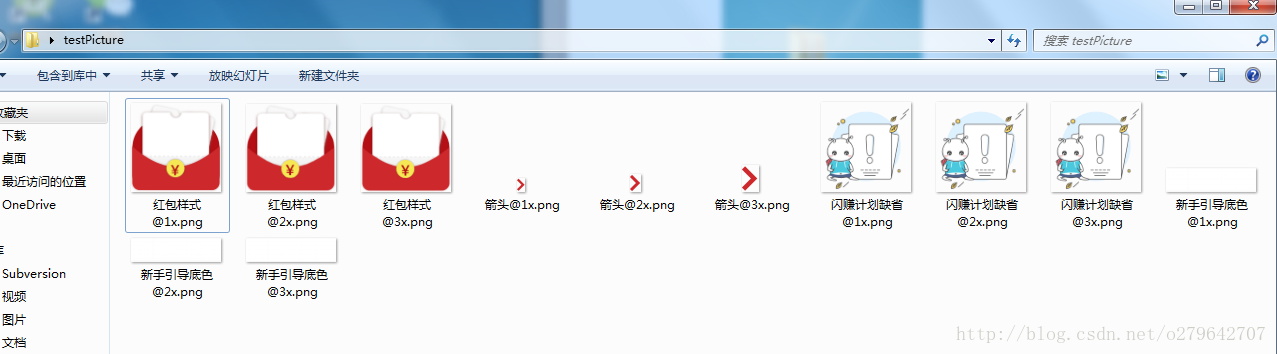
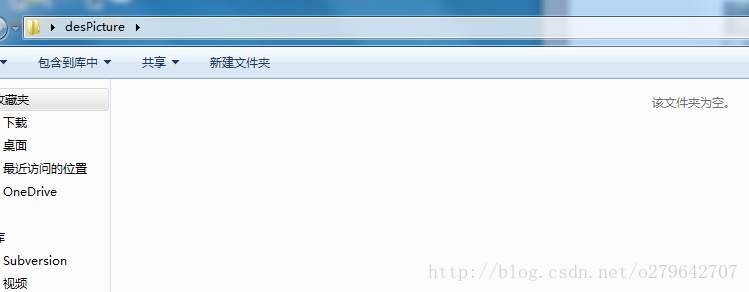
1.首先需要两个文件夹,一个里面存放着待处理的文件,另一个存放处理后的文件

testPicture
desPicture
步骤:
1.进入dos窗口
Window+r —–>cmd
2.进入mutiFile.jar 根目录 输入
java -jar MutiFile-x.x.x.jar srcFile outputDir
其中:MutiFile-x.x.x.jar ,是工具类
srcFile 为待处理文件夹路径
outputDir 为处理后的文件输出路径
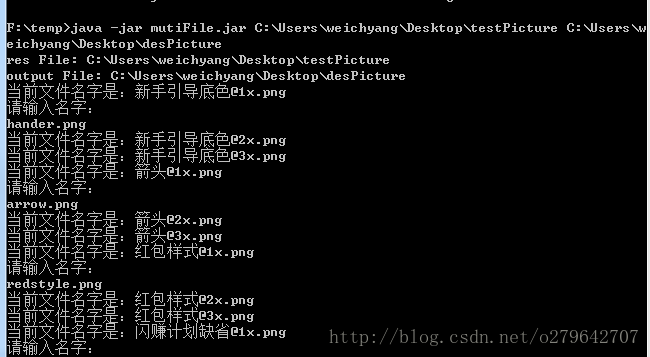
处理后的文件,已经进行分组成 @1x,@2x,@3x

贴出来源码:
package com.nuoyuan.mutiFile;

import java.io.File;

import java.io.FileInputStream;

import java.io.FileNotFoundException;

import java.io.FileOutputStream;

import java.io.IOException;

import java.util.ArrayList;

import java.util.HashMap;

import java.util.List;

import java.util.Map;

import java.util.Scanner;

/**

 * version 1.2

 * 1. 增加支持 不写后缀名字

 * 2. 增加输入输出路径可选

 * @author weichyang

 *

 */

public class MutiFile {

    private static final String USAGE_TEXT = "Usage: java -jar MutiFile-x.x.x.jar srcFile outputDir ";

    private static Map<String, String> onePlus = new HashMap();

    private static Map<String, String> twoPlus = new HashMap();

    private static Map<String, String> threePlus = new HashMap();

    private static List newFilePath = new ArrayList<String>();

    private static String[] spiltName = { "@1x", "@2x", "@3x" };

    private static ArrayList<String> filelist = new ArrayList<String>();

    private static String tempFileName = "xx@xx";

    private static String beforeName = "&6%";

    public static void main(String[] args) throws IOException {

        if (args.length < ) {

            println(USAGE_TEXT);

            return;

        }

        String resPathString = "";

        String desPathString = "";

        if (args.length == ) {

            resPathString = args[];

            desPathString = args[];

        } else {

            resPathString = args[];

            desPathString = args[];

        }

        File resFile = new File(resPathString);

        File desFile = new File(desPathString);

        if (!resFile.exists()) {

            println(" file '" + desPathString

                    + "' is not exists or not readable.");

            println(USAGE_TEXT);

            System.exit();

        }

        if (!desFile.exists()) {

            // desfile.createNewFile();

            println(" file '" + desFile.getAbsolutePath()

                    + "' is not exists or not readable.");

            println(USAGE_TEXT);

            System.exit();

            return;

        } else {

            for (int i = ; i <= ; i++) {

                String newPathString = desPathString + "\\" + i;

                new File(newPathString).mkdirs();

                newFilePath.add(newPathString + "\\");

            }

        }

        // 打印资源文件

        println("res File: " + resFile.getAbsolutePath());

        println("output File: " + desFile.getAbsolutePath());

        // 资源存在是否为null

        getFiles(resFile);

    }

    /*

     * 通过递归得到某一路径下所有的目录及其文件

     */

    public static void getFiles(File filePath) throws FileNotFoundException,

            IOException {

        File[] files = filePath.listFiles();

        if (files.length == ) {

            println(filePath + " is have't file exit!!");

            System.exit();

            return;

        }

        for (File file : files) {

            if (file.isDirectory()) {

                /*

                 * 递归调用

                 */

                getFiles(file);

                filelist.add(file.getAbsolutePath());

                System.out.println("show " + filePath + "下所有子目录及其文件"

                        + file.getAbsolutePath());

            } else {

                String currentFilePath = file.getAbsolutePath().toString();

                String fileName = splitFileName(currentFilePath);

                System.out.println("current file name is:" + fileName);

                if (!fileName.contains("@")) {

                    continue;

                }

                if (fileName.contains(spiltName[])) {

                    onePlus.put(fileName, currentFilePath);

                    String fileNameString = InputCode(fileName);

                    fromToAnotherDes(currentFilePath, newFilePath.get()

                            .toString() + fileNameString);

                } else if (fileName.contains(spiltName[])) {

                    twoPlus.put(fileName, newFilePath.get().toString()

                            + fileName);

                    String fileNameString = InputCode(fileName);

                    fromToAnotherDes(currentFilePath, newFilePath.get()

                            .toString() + fileNameString);

                } else if (fileName.contains(spiltName[])) {

                    threePlus.put(fileName, newFilePath.get().toString()

                            + fileName);

                    String fileNameString = InputCode(fileName);

                    fromToAnotherDes(currentFilePath, newFilePath.get()

                            .toString() + fileNameString);

                }

            }

        }

        System.out.print("/****** File rename Success *********/\n");

        System.out.print("共修改@1x 文件 " + onePlus.size() + "个\n");

        System.out.print("共修改@2x 文件 " + twoPlus.size() + "个\n");

        System.out.print("共修改@3x 文件 " + threePlus.size() + "个\n");

        System.out.print("总共修文件 " + threePlus.size() + onePlus.size()

                + twoPlus.size() + "个\n");

        System.out.print("/**************************************/\n");

    }

    /**

     * 分割文件名字

     *

     * @param str

     * @return

     */

    public static String splitFileName(String str) {

        String[] strs = str.split("\\\\");

        StringBuffer sb = new StringBuffer();

        for (int i = ; i < strs.length; i++) {

            if (i == strs.length - )

                sb.append(strs[i]);

        }

        return sb.toString();

    }

    /**

     * 拷貝一個文件到另一個問價中

     *

     * @param srcFile

     * @param desFile

     * @throws FileNotFoundException

     * @throws IOException

     */

    public static void fromToAnotherDes(String srcFile, String desFile) {

        try {

            FileInputStream fis = new FileInputStream(srcFile);

            FileOutputStream fos = new FileOutputStream(desFile);

            int len = ;

            byte[] buf = new byte[];

            while ((len = fis.read(buf)) != -) {

                fos.write(buf, , len);

            }

            fis.close();

            fos.close();

        } catch (Exception e) {

            // TODO Auto-generated catch block

            e.printStackTrace();

        }

    }

    /**

     * 接受输入的数字进行设置文件名字 一次输入使用三次

     *

     * @return

     */

    public static String InputCode(String fileName) {

        String extNameString = getExtension(fileName);

        String realNameString = fileName.split("@")[];

        if (realNameString.equals(beforeName)) {

            return tempFileName + extNameString;

        }

        Scanner scanner = new Scanner(System.in);// 创建输入流扫描器

        System.out.print("please input file name:\n");// 提示用户输入

        // 获取用户输入的一行文本

        String line = scanner.nextLine();

        // 打印对输入文本的描述

        tempFileName = line;

        beforeName = realNameString;

        return line + extNameString;

    }

    public static void println(String msg) {

        System.out.println(msg);

    }

    /**

     * 截取扩展名字

     *

     * @param filename

     * @param defExt

     * @return

     */

    public static String getExtension(String filename) {

        if ((filename != null) && (filename.length() > )) {

            int i = filename.lastIndexOf('.');

            if ((i > -) && (i < (filename.length() - ))) {

                return filename.substring(i);

            }

        }

        return "";

    }

}
下载地址 http://pan.baidu.com/s/1pK7qdLp
version 1.2 版本:http://pan.baidu.com/s/1boNnLoV
Android @1x,@2x,@3x 资源文件自动分包工具的更多相关文章
- huhamhire-hosts — Hosts文件自动配置工具
https://www.anotherhome.net/1376 推荐配合EasyGoAgent使用: EasyGoAgent — 开箱即用的GoAgent Update 2015.5.15 数据文件 ...
- Android屏幕适配-资源文件夹命名与匹配规则
说明:本文档目的为分析android工程res目录下的资源文件夹(drawable,values,layout等)在屏幕适配方面的限定与适配方法. 1. Res下文件夹命名方式 1. 可用的命名属性 ...
- intellij idea让资源文件自动更新
intellij idea默认文件是自动保存的,但是手头有个项目jsp文件改动后,在tomcat中不能立即响应变化.要jsp文件改动后立刻看到变化,有个配置.在idea tomcat 中server的 ...
- android 修改framework下资源文件后如何编译
在framework/base/core/res/res 下添加资源文件后需要先编译资源 然后编译framework 才可正常引用 进入项目根目录 cd frameworks/base/core/re ...
- 最简单的Android项目(含有资源文件)
上次的项目没有使用资源文件,打包出的apk安装后是系统默认图标,程序标题也是包名加类名. 添加资源需要对编译的命令做一点调整. 首先在项目根目录新建res和assets目录,在res内新建drawab ...
- Android中通过数组资源文件xml与适配器两种方式给ListView列表视图设置数据源
场景 实现效果如下 注: 博客: https://blog.csdn.net/badao_liumang_qizhi 关注公众号 霸道的程序猿 获取编程相关电子书.教程推送与免费下载. 实现 将布局改 ...
- Android学习笔记数组资源文件
在android中我们可以通过数组资源文件,定义数组元素. 数组资源文件是位于values目录下的 array.xml <?xml version="1.0" encodin ...
- SpringMVC+FreeMarker实现静态资源文件自动添加版本号(md5)
近日切换java开发,开始学习springframework.在实现静态资源文件自动计算版本号的实例时,因为不熟悉框架,走了不少弯路,好在最终解决了问题.这里写篇文章记录一下实现,也希望对大家有些用处 ...
- Android反编译获取资源文件-android学习之旅(69)
有时候你看到一些很好看的布局,会考虑别人怎么实现的,回想参考一下,那么这时候反编译一下是很必要的. 要用到的工具apktool.bat和aapt.exe和apktool.jar(要最新版本) 下载前两 ...
随机推荐
- P1082 同余方程
题意:给定a,b,求$ax \equiv 1 \pmod b$的最小正整数解x,保证有解 exgcd:求$ax+by=gcd(a,b)$的 一组解x,y 首先根据正常的gcd可得出 $gcd(a, ...
- P1080 国王游戏
题意: 让n 位大臣排成一排,国王站在队伍的最前面. 排好队后,所有的大臣都会获得国王奖赏的若干金币, 每位大臣获得的金币数分别是:排在该大臣前面的所有人的左手上的数的乘积除以他自己右手上的数,然后向 ...
- memcache_helper
class memcache_helper extends memcache { private $host = "127.0.0.1"; private $port = &quo ...
- HTML的知识点讲解(HTML版本)
老男孩培训机构老师的博客 1.html 2.css http://www.cnblogs.com/yuanchenqi/articles/6856399.html 3.javas ...
- C#面试题-递归
有一组数1.1.2.3.5.8.13.21.34...,求第n个数是多少? public int Recursion (int n){ ){ ; } &&n<=){ ; } )+ ...
- P2575 高手过招
传送门 直接搞好像搞不了 考虑转换模型 显然每一行棋子不会跑到其他行.. 所以可以把每一行的情况看成一个子博弈 显然整个答案就是每一行的SG值的异或和 不懂的回去学SG函数... 考虑怎么分析一行的状 ...
- linux学习3(vim)
一.文档编辑 1. vi和vim命令 Vim的打开文件的方式(4种,要求掌握的就前三种): 1. vim 文件路径 ...
- caffe 日志保存以及matlab绘制方法(windows以及ubuntu下)
caffe 用matlab解析日志画loss和accuracy clc; clear; % load the log file of caffe model fid = fopen('log-prev ...
- php连接数据库mysql数据库
查找数据 $con = mysqli_connect('localhost', 'root', '', 'mydb'); if (!$con) { die('数据库连接失败' . mysqli_con ...
- 2018.6.1学习CSS5里顺丰盒子小问题
在制作下面这样的小盒子时 编写的代码 首先要对li元素设置浮动. 在设置这个li元素下面的a元素时, 因为没有转行内块,inline-block,结果显示出来的页面,鼠标在经过这个选择时(:hover ...