
一种用XAML写Data Converter的方式
在WPF程序中,数据绑定是非常常用的手段。伴随着数据绑定,我们通常还需要编写一些Converter。而编写Converter是一件非常枯燥的事情,并且大量的converter不容易组织和维护。
今天在网上发现了一篇文章SwitchConverter – A "switch statement" for XAML,它可以通过XAML的方式编写一些类似switch-case方式的converter,十分简洁明了。例如,对如如下的数据绑定转换:
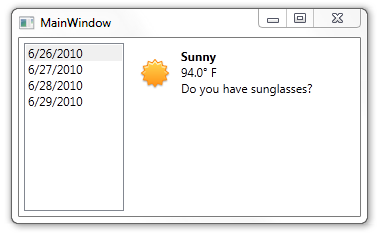
可以直接在XAML中通过如下方式写converter:
<Grid>

    <Grid.Resources>

        <e:SwitchConverter x:Key="WeatherIcons">

            <e:SwitchCase When="Sunny" Then="Sunny.png" />

            <e:SwitchCase When="Cloudy" Then="Cloudy.png" />

            <e:SwitchCase When="Rain" Then="Rain.png" />

            <e:SwitchCase When="Snow" Then="Snow.png" />

        </e:SwitchConverter>

    </Grid.Resources>

    <Image Source="{Binding Condition, Converter={StaticResource WeatherIcons}}" />

</Grid>
原文已经附上了代码的工程,但由于担心哪天方校长抖威风而导致该文章失效,这里将其转录了下来,一共三个文件:
SwitchCase.cs
using System;

using System.Collections.Generic;

using System.ComponentModel;

using System.Diagnostics.Contracts;

using System.Linq;

using System.Windows;

using System.Windows.Markup;

namespace SwitchConverterDemo

{

    /// <summary>

    /// An individual case in the switch statement.

    /// </summary>

    [ContentProperty( "Then" )]

    public sealed class SwitchCase : DependencyObject

    {

        #region Constructors

        /// <summary>

        /// Initializes a new instance of the <see cref="T:SwitchCase"/> class.

        /// </summary>

        public SwitchCase( )

        {

        }

        #endregion

        #region Properties

        /// <summary>

        /// Dependency property for the <see cref="P:When"/> property.

        /// </summary>

        public static readonly DependencyProperty WhenProperty = DependencyProperty.Register( "When", typeof( object ), typeof( SwitchCase ), new PropertyMetadata( default( object ) ) );

        /// <summary>

        /// The value to match against the input value.

        /// </summary>

        public object When

        {

            get

            {

                return (object)GetValue( WhenProperty );

            }

            set

            {

                SetValue( WhenProperty, value );

            }

        }

        /// <summary>

        /// Dependency property for the <see cref="P:Then"/> property.

        /// </summary>

        public static readonly DependencyProperty ThenProperty = DependencyProperty.Register( "Then", typeof( object ), typeof( SwitchCase ), new PropertyMetadata( default( object ) ) );

        /// <summary>

        /// The output value to use if the current case matches.

        /// </summary>

        public object Then

        {

            get

            {

                return (object)GetValue( ThenProperty );

            }

            set

            {

                SetValue( ThenProperty, value );

            }

        }

        #endregion

    }   // class

}   // namespace
SwitchCaseCollection.cs
using System;

using System.Collections.Generic;

using System.Collections.ObjectModel;

using System.ComponentModel;

using System.Diagnostics.Contracts;

using System.Linq;

namespace SwitchConverterDemo

{

    /// <summary>

    /// A collection of switch cases.

    /// </summary>

    public sealed class SwitchCaseCollection : Collection<SwitchCase>

    {

        #region Constructors

        /// <summary>

        /// Initializes a new instance of the <see cref="T:SwitchCaseCollection"/> class.

        /// </summary>

        internal SwitchCaseCollection( )

        {

        }

        #endregion

        #region Methods

        /// <summary>

        /// Adds a new case to the collection.

        /// </summary>

        /// <param name="when">The value to compare against the input.</param>

        /// <param name="then">The output value to use if the case matches.</param>

        public void Add( object when, object then )

        {

            Add(

                new SwitchCase {

                    When = when,

                    Then = then

                }

            );

        }

        #endregion

    }   // class

}   // namespace
SwitchConverter.cs
using System;

using System.Collections.Generic;

using System.Collections.ObjectModel;

using System.ComponentModel;

using System.Diagnostics.Contracts;

using System.Globalization;

using System.Linq;

using System.Windows;

using System.Windows.Data;

using System.Windows.Markup;

namespace SwitchConverterDemo

{

    /// <summary>

    /// Produces an output value based upon a collection of case statements.

    /// </summary>

    [ContentProperty( "Cases" )]

    public class SwitchConverter : IValueConverter

    {

        #region Constructors

        /// <summary>

        /// Initializes a new instance of the <see cref="T:SwitchConverter"/> class.

        /// </summary>

        public SwitchConverter( )

            : this( new SwitchCaseCollection( ) )

        {

        }

        /// <summary>

        /// Initializes a new instance of the <see cref="T:SwitchConverter"/> class.

        /// </summary>

        /// <param name="cases">The case collection.</param>

        internal SwitchConverter( SwitchCaseCollection cases )

        {

            Contract.Requires( cases != null );

            Cases = cases;

            StringComparison = StringComparison.OrdinalIgnoreCase;

        }

        #endregion

        #region Properties

        /// <summary>

        /// Holds a collection of switch cases that determine which output

        /// value will be produced for a given input value.

        /// </summary>

        public SwitchCaseCollection Cases

        {

            get;

            private set;

        }

        /// <summary>

        /// Specifies the type of comparison performed when comparing the input

        /// value against a case.

        /// </summary>

        public StringComparison StringComparison

        {

            get;

            set;

        }

        /// <summary>

        /// An optional value that will be output if none of the cases match.

        /// </summary>

        public object Else

        {

            get;

            set;

        }

        #endregion

        #region Methods

        /// <summary>

        /// Converts a value.

        /// </summary>

        /// <param name="value">The value produced by the binding source.</param>

        /// <param name="targetType">The type of the binding target property.</param>

        /// <param name="parameter">The converter parameter to use.</param>

        /// <param name="culture">The culture to use in the converter.</param>

        /// <returns>A converted value. If the method returns null, the valid null value is used.</returns>

        public object Convert( object value, Type targetType, object parameter, CultureInfo culture )

        {

            if ( value == null ) {

                // Special case for null

                // Null input can only equal null, no convert necessary

                return Cases.FirstOrDefault( x => x.When == null ) ?? Else;

            }

            foreach ( var c in Cases.Where( x => x.When != null ) ) {

                // Special case for string to string comparison

                if ( value is string && c.When is string ) {

                    if ( String.Equals( (string)value, (string)c.When, StringComparison ) ) {

                        return c.Then;

                    }

                }

                object when = c.When;

                // Normalize the types using IConvertible if possible

                if ( TryConvert( culture, value, ref when ) ) {

                    if ( value.Equals( when ) ) {

                        return c.Then;

                    }

                }

            }

            return Else;

        }

        /// <summary>

        /// Converts a value.

        /// </summary>

        /// <param name="value">The value that is produced by the binding target.</param>

        /// <param name="targetType">The type to convert to.</param>

        /// <param name="parameter">The converter parameter to use.</param>

        /// <param name="culture">The culture to use in the converter.</param>

        /// <returns>A converted value. If the method returns null, the valid null value is used.</returns>

        public object ConvertBack( object value, Type targetType, object parameter, CultureInfo culture )

        {

            throw new NotSupportedException( );

        }

        /// <summary>

        /// Attempts to use the IConvertible interface to convert <paramref name="value2"/> into a type

        /// compatible with <paramref name="value1"/>.

        /// </summary>

        /// <param name="culture">The culture.</param>

        /// <param name="value1">The input value.</param>

        /// <param name="value2">The case value.</param>

        /// <returns>True if conversion was performed, otherwise false.</returns>

        private static bool TryConvert( CultureInfo culture, object value1, ref object value2 )

        {

            Type type1 = value1.GetType( );

            Type type2 = value2.GetType( );

            if ( type1 == type2 ) {

                return true;

            }

            if ( type1.IsEnum ) {

                value2 = Enum.Parse( type1, value2.ToString( ), true );

                return true;

            }

            var convertible1 = value1 as IConvertible;

            var convertible2 = value2 as IConvertible;

            if ( convertible1 != null && convertible2 != null ) {

                value2 = System.Convert.ChangeType( value2, type1, culture );

                return true;

            }

            return false;

        }

        #endregion

    }   // class

}   // namespace
这种绑定的方式非常简洁有效,但也有限制,只能处理简单的switch-case形式的关联,并且不能有转换逻辑。不过已经可以替换很大一部分Converter了(非常典型的应用就是这种枚举到图片的转换)。
另外,网上也有一些开源库,实现了一些常见的通用Converter。例如:http://wpfconverters.codeplex.com/。在自己编写Converter之前,不妨先使用这些通用的Converter。
一种用XAML写Data Converter的方式的更多相关文章
- WPF的DataGrid的某个列绑定数据的三种方法(Binding、Converter、DataTrigger)
最近在使用WPF的时候,遇到某个列的值需要根据内容不同进行转换显示的需求.尝试了一下,大概有三种方式可以实现: 1.传统的Binding方法,后台构造好数据,绑定就行. 2.转换器方法(Convert ...
- Xaml引用图片路径的方式
最近写代码的时候遇到过好几次引用某个路径下图片资源的情况,思索了一下,便将自己所知的在xaml里引用图片资源的方法写成了个小Demo,并完成了这篇博文.希望罗列出的这些方式能够对大家有所帮助. Xam ...
- js replace 全局替换 以表单的方式提交参数 判断是否为ie浏览器 将jquery.qqFace.js表情转换成微信的字符码 手机端省市区联动 新字体引用本地运行可以获得,放到服务器上报404 C#提取html中的汉字 MVC几种找不到资源的解决方式 使用Windows服务定时去执行一个方法的三种方式
js replace 全局替换 js 的replace 默认替换只替换第一个匹配的字符,如果字符串有超过两个以上的对应字符就无法进行替换,这时候就要进行一点操作,进行全部替换. <scrip ...
- Java中几种office文档转pdf的方式
最近公司要做office的文档,搜集了几种office文档转pdf的方式,简单的做下总结 我主要尝试了三种方式:openoffice,aspose,jacob 对他们进行了大文件,小文件,在linux ...
- Android两种为ViewPager+Fragment添加Tab的方式
在Android开发中ViewPager的使用是非常广泛的,而它不仅仅能够实现简单的开始引导页,还可以结合Fragment并添加Tab作为选项卡或为显示大批量页面实现强大的顺畅滑动 下面介绍两种为Vi ...
- 简单总结几种常见web攻击手段及其防御方式
web攻击手段有几种,本文简单介绍几种常见的攻击手段及其防御方式 XSS(跨站脚本攻击) CSRF(跨站请求伪造) SQL注入 DDOS XSS 概念 全称是跨站脚本攻击(Cross Site Scr ...
- 简单地总结几种常见web攻击手段及其防御方式
web攻击手段有几种,本文简单介绍几种常见的攻击手段及其防御方式 XSS(跨站脚本攻击) CSRF(跨站请求伪造) SQL注入 DDOS XSS 概念 全称是跨站脚本攻击(Cross Site Scr ...
- jQuery.data() 的实现方式,jQuery16018518865841457738的由来,jQuery后边一串数字的由来
原文地址: http://xxing22657-yahoo-com-cn.iteye.com/blog/1042440 jQuery.data() 的实现方式 jQuery.data() 的作用是为普 ...
- 几种常见web攻击手段及其防御方式
XSS(跨站脚本攻击) CSRF(跨站请求伪造) SQL注入 DDOS web安全系列目录 总结几种常见web攻击手段极其防御方式 总结几种常见的安全算法 XSS 概念 全称是跨站脚本攻击(Cross ...
随机推荐
- 1086 Tree Traversals Again (25 分)(二叉树的遍历)
用栈来模拟一棵二叉树的先序遍历和中序遍历过程,求这棵二叉树的后序遍历 由题棵知道:push是先序遍历 pop是中序遍历 #include<bits/stdc++.h> using name ...
- Ipython\Jupyter数据分析工具
使用Python进行数据分析优点 1 Python大量的库为数据分析和处理提供了完整的工具集 2 比起R和Matlab等其他主要用于数据分析的编程语言,Python更全能 3 Python库一直在增加 ...
- [转]Docker学习笔记之一,搭建一个JAVA Tomcat运行环境
本文转自:http://www.blogjava.net/yongboy/archive/2013/12/12/407498.html 前言 Docker旨在提供一种应用程序的自动化部署解决方案,在 ...
- JSP/Servlet Web 学习笔记 DayOne
JSP概述 1)JSP是一种动态网页技术标准,它是在传统的页面HTML文件中插入Java程序段和JSP标记(tag),从而形成JSP文件(*.jsp),也称JSP页面. 2)JSP容器是一个支持JSP ...
- 【bzoj4898】[Apio2017]商旅 Floyd+分数规划+Spfa
题目描述 有n个点.m条边.和k种商品.第$i$个点可以以$B_{ij}$的价格买入商品$j$,并以$S_{ij}$的价格卖出.任何时候只能持有一个商品.求一个环,使得初始不携带商品时以某种交易方式走 ...
- POJ - 1469 COURSES (匈牙利算法入门题)
题意: P门课程,N个学生.给出每门课程的选课学生,求是否可以给每门课程选出一个课代表.课代表必须是选了该课的学生且每个学生只能当一门课程的. 题解: 匈牙利算法的入门题. #include < ...
- [GDOI2016] 疯狂动物园 [树链剖分+可持久化线段树]
题面 太长了,而且解释的不清楚,我来给个简化版的题意: 给定一棵$n$个点的数,每个点有点权,你需要实现以下$m$个操作 操作1,把$x$到$y$的路径上的所有点的权值都加上$delta$,并且更新一 ...
- bzoj 3309 DZY Loves Math 莫比乌斯反演
DZY Loves Math Time Limit: 20 Sec Memory Limit: 512 MBSubmit: 1303 Solved: 819[Submit][Status][Dis ...
- forEach循环dom元素
//让ie8支持foreach if (typeof Array.prototype.forEach != 'function') { Array.prototype.forEach = functi ...
- 组合数问题(NOIP2016)
原题传送门 这题啊. 裸的杨辉三角. 预处理杨辉三角和答案即可 下面贴代码 #include<iostream> #include<cstdio> #include<al ...