
Linux环境下MySQL5.7安装记录
参考文档
《Installing MySQL on Unix/Linux Using Generic Binaries》
https://dev.mysql.com/doc/refman/5.7/en/binary-installation.html
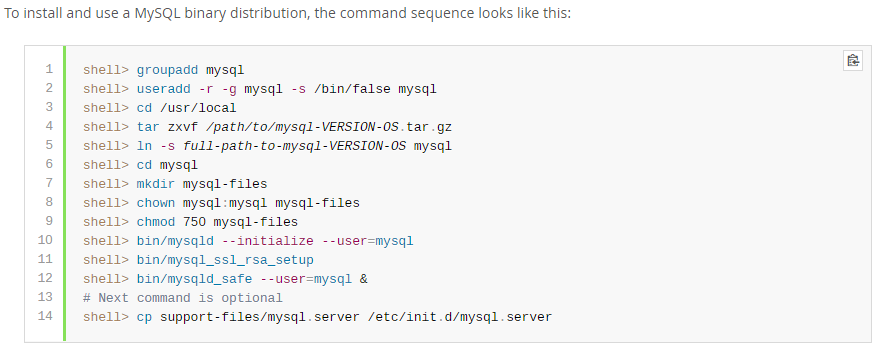
卸载旧版本MySQL
查看当前Linux环境中是否已经安装了MySQL。
执行命令:rpm -qa|grep mysql
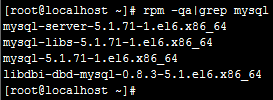
查看状态:service mysqld status

停止服务:service mysqld stop
卸载MySQL:
[root@localhost ~]# rpm -e mysql-server-5.1.71-1.el6.x86_64 --nodeps
[root@localhost ~]# rpm -e mysql-libs-5.1.71-1.el6.x86_64 --nodeps
[root@localhost ~]# rpm -e mysql-5.1.71-1.el6.x86_64 --nodeps
[root@localhost ~]# rpm -e libdbi-dbd-mysql-0.8.3-5.1.el6.x86_64 --nodeps
创建MySQL组和用户
查看是否已经具有mysql用户。
[root@iZ88rvassw1Z opt]# cat /etc/group | grep mysql
[root@iZ88rvassw1Z opt]# cat /etc/passwd | grep mysql
添加组和用户
[root@iZ88rvassw1Z opt]# groupadd mysql
[root@iZ88rvassw1Z opt]# useradd -r -g mysql mysql
[root@iZ88rvassw1Z opt]# cat /etc/group | grep mysql
mysql:x:500:
[root@iZ88rvassw1Z opt]# cat /etc/passwd | grep mysql
mysql:x:498:500::/home/mysql:/bin/bash
[root@iZ88rvassw1Z opt]#
下载MySQL安装介质
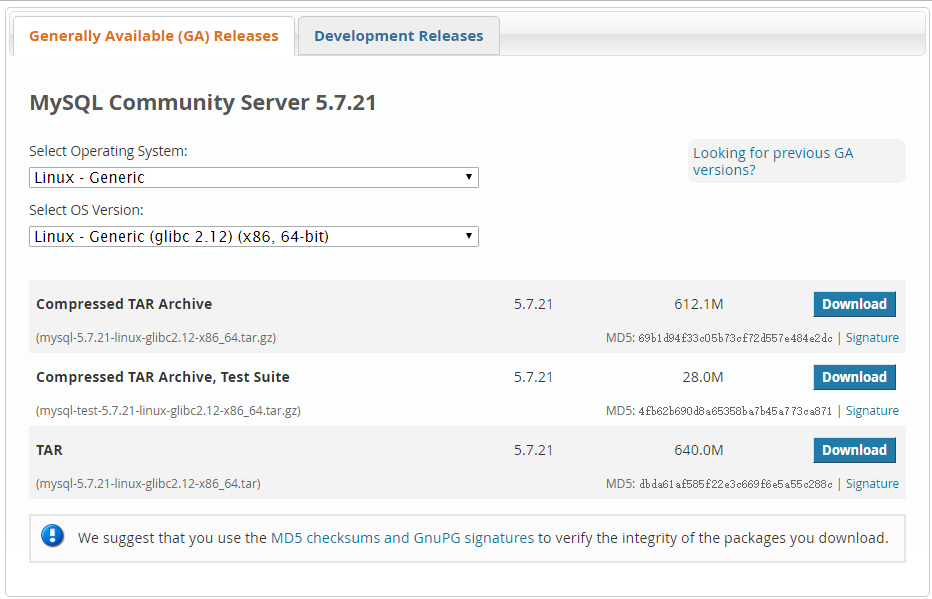
下载地址:
https://dev.mysql.com/downloads/mysql/
选择Linux-Generic,X86,64-bit;下载TAR。
上传MySQL安装介质
使用XFTP或者其他工具将安装介质上传至服务器。
本示例上传至“/opt/”目录。
[root@iZ88rvassw1Z opt]# ll
total 1310816
-rw-r--r-- 1 root root 671129600 Feb 5 16:48 mysql-5.7.21-linux-glibc2.12-x86_64.tar
MySQL安装过程
解压tar包:
[root@iZ88rvassw1Z opt]# tar xvf mysql-5.7.21-linux-glibc2.12-x86_64.tar

[root@iZ88rvassw1Z opt]# ll

total 1310816

-rw-r--r-- 1 root root 671129600 Feb 5 16:48 mysql-5.7.21-linux-glibc2.12-x86_64.tar

-rw-r--r-- 1 7161 31415 641798603 Dec 28 12:20 mysql-5.7.21-linux-glibc2.12-x86_64.tar.gz

-rw-r--r-- 1 7161 31415 29328152 Dec 28 12:18 mysql-test-5.7.21-linux-glibc2.12-x86_64.tar.gz
解压tar.gz包:
[root@iZ88rvassw1Z opt]# tar zxvf mysql-5.7.21-linux-glibc2.12-x86_64.tar.gz

[root@iZ88rvassw1Z opt]# ll

total 1310820

drwxr-xr-x 9 root root 4096 Feb 5 20:03 mysql-5.7.21-linux-glibc2.12-x86_64

-rw-r--r-- 1 root root 671129600 Feb 5 16:48 mysql-5.7.21-linux-glibc2.12-x86_64.tar

-rw-r--r-- 1 7161 31415 641798603 Dec 28 12:20 mysql-5.7.21-linux-glibc2.12-x86_64.tar.gz

-rw-r--r-- 1 7161 31415 29328152 Dec 28 12:18 mysql-test-5.7.21-linux-glibc2.12-x86_64.tar.gz

drwxr-xr-x. 2 root root 4096 Nov 22 2013 rh
修改文件夹名称:
[root@iZ88rvassw1Z opt]# mv mysql-5.7.21-linux-glibc2.12-x86_64 mysql
移动文件夹目录:
[root@iZ88rvassw1Z opt]# mv mysql /usr/local/
查看文件夹目录:
[root@iZ88rvassw1Z local]# ll

total 60

drwxr-xr-x  7 root root 4096 Nov  1 17:24 aegis

drwxr-xr-x. 2 root root 4096 Sep 23  2011 bin

drwxr-xr-x. 2 root root 4096 Sep 23  2011 etc

drwxr-xr-x. 2 root root 4096 Sep 23  2011 games

drwxr-xr-x. 2 root root 4096 Sep 23  2011 include

drwxr-xr-x  8 uucp  143 4096 Sep 27  2014 jdk1.7.0_71

drwxr-xr-x. 2 root root 4096 Sep 23  2011 lib

drwxr-xr-x. 2 root root 4096 Sep 23  2011 lib64

drwxr-xr-x. 2 root root 4096 Sep 23  2011 libexec

drwxr-xr-x  9 root root 4096 Feb  5 20:03 mysql

drwxr-xr-x. 2 root root 4096 Sep 23  2011 sbin

drwxr-xr-x. 5 root root 4096 Aug 14  2014 share

drwxr-xr-x. 2 root root 4096 Sep 23  2011 src

drwxr-xr-x  9 root root 4096 Jan 28 15:53 tomcat_gxwp

drwxr-xr-x  2 root root 4096 Jan 28 15:52 tools

[root@iZ88rvassw1Z local]#
修改文件所属权:
[root@iZ88rvassw1Z local]# chown -R mysql:mysql mysql/

[root@iZ88rvassw1Z local]# ll

total 60

drwxr-xr-x  7 root  root  4096 Nov  1 17:24 aegis

drwxr-xr-x. 2 root  root  4096 Sep 23  2011 bin

drwxr-xr-x. 2 root  root  4096 Sep 23  2011 etc

drwxr-xr-x. 2 root  root  4096 Sep 23  2011 games

drwxr-xr-x. 2 root  root  4096 Sep 23  2011 include

drwxr-xr-x  8 uucp    143 4096 Sep 27  2014 jdk1.7.0_71

drwxr-xr-x. 2 root  root  4096 Sep 23  2011 lib

drwxr-xr-x. 2 root  root  4096 Sep 23  2011 lib64

drwxr-xr-x. 2 root  root  4096 Sep 23  2011 libexec

drwxr-xr-x  9 mysql mysql 4096 Feb  5 20:03 mysql

drwxr-xr-x. 2 root  root  4096 Sep 23  2011 sbin

drwxr-xr-x. 5 root  root  4096 Aug 14  2014 share

drwxr-xr-x. 2 root  root  4096 Sep 23  2011 src

drwxr-xr-x  9 root  root  4096 Jan 28 15:53 tomcat_gxwp

drwxr-xr-x  2 root  root  4096 Jan 28 15:52 tools

[root@iZ88rvassw1Z local]#
开始执行安装:
安装命令:
mysqld --initialize --user=mysql --basedir=/usr/local/mysql --datadir=/usr/local/mysql/data
[root@iZ88rvassw1Z bin]# ./mysqld --initialize --user=mysql --basedir=/usr/local/mysql --datadir=/usr/local/mysql/data

2018-02-05T12:06:22.319404Z 0 [Warning] TIMESTAMP with implicit DEFAULT value is deprecated. Please use --explicit_defaults_for_timestamp server option (see documentation for more details).

2018-02-05T12:06:23.991371Z 0 [Warning] InnoDB: New log files created, LSN=45790

2018-02-05T12:06:24.235099Z 0 [Warning] InnoDB: Creating foreign key constraint system tables.

2018-02-05T12:06:24.333502Z 0 [Warning] No existing UUID has been found, so we assume that this is the first time that this server has been started. Generating a new UUID: fc7902f7-0a6c-11e8-9528-00163e00016c.

2018-02-05T12:06:24.336727Z 0 [Warning] Gtid table is not ready to be used. Table 'mysql.gtid_executed' cannot be opened.

2018-02-05T12:06:24.337416Z 1 [Note] A temporary password is generated for root@localhost: UdW3pJf4c+ko

[root@iZ88rvassw1Z bin]#

[Note] A temporary password is generated for root@localhost: UdW3pJf4c+ko
默认生成一个临时密码,通过该密码登录MySQL。
配置MySQL
登录MySQL控制台:
mysql -u root -p
输入刚才的临时密码后登录MySQL控制台。
修改root用户密码:
登录控制台后执行SQL发现报如下错误。
ERROR 1820 (HY000): You must reset your password using ALTER USER statement before executing this statement.
SET PASSWORD = PASSWORD('passw0rd');

mysql> flush privileges;
Query OK, 0 rows affected (0.00 sec)
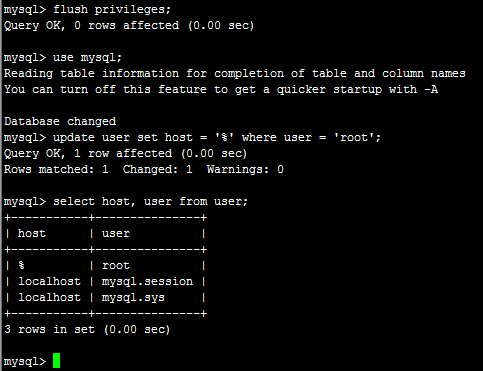
允许root用户远程访问:
mysql> use mysql;
Reading table information for completion of table and column names
You can turn off this feature to get a quicker startup with -A
Database changed
mysql> update user set host = '%' where user = 'root';
Query OK, 1 row affected (0.00 sec)
Rows matched: 1 Changed: 1 Warnings: 0
mysql> select host, user from user;
+-----------+---------------+
| host | user |
+-----------+---------------+
| % | root |
| localhost | mysql.session |
| localhost | mysql.sys |
+-----------+---------------+
3 rows in set (0.00 sec)
配置MySQL为服务
在/usr/local/mysql/目录下执行:
cp support-files/mysql.server /etc/init.d/mysqld
经过以上操作即可实现通过服务方式启动、停止MySQL。
启动:service mysqld start
停止:service mysqld stop
状态:service mysqld status
使用MySQL
创建数据库:
CREATE DATABASE IF NOT EXISTS test DEFAULT CHARSET utf8 COLLATE utf8_general_ci;
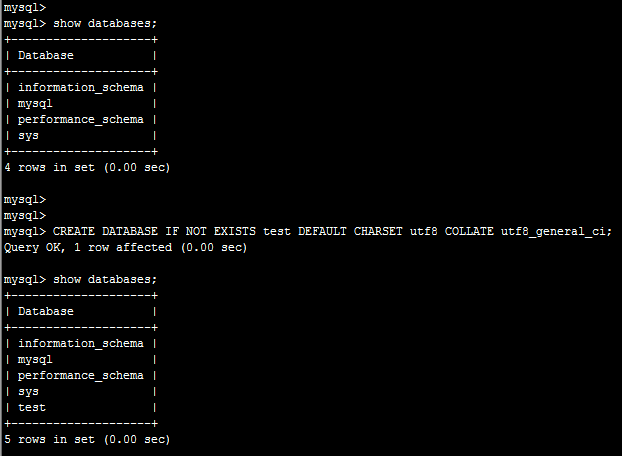
导入数据:
source /opt/t_analy_act_act.sql
完成。
Linux环境下MySQL5.7安装记录的更多相关文章
- Linux环境下Python的安装过程
Linux环境下Python的安装过程 前言 一般情况下,Linux都会预装 Python了,但是这个预装的Python版本一般都非常低,很多 Python的新特性都没有,必须重新安装新一点的版本,从 ...
- Linux环境下NodeJS的安装配置(HelloWorld)
Linux环境下NodeJS的安装配置(HelloWorld) 最简单的环境安装,测试helloworld.给初学者!! 安装脚本,请仔细阅读逐行执行: #!/bin/bash #检查是否已经安装 r ...
- Linux环境下使用yum安装zip和unzip
Linux环境下使用yum安装zip和unzip. yum install zip yum install unzip
- PCL库在Linux环境下的编译安装
PCL库在Linux环境下的编译安装 PCL库的源码库:https://github.com/PointCloudLibrary/pcl 下载完了之后解压下来 编译库的几个步骤 mkdir build ...
- Linux环境下卸载、安装及配置MySQL5.1
Linux环境下卸载原有MySQL5.1数据库,并重新安装MySQL数据库的示例记录. 一.卸载MySQL 查看主机中是否安装了MySQL数据库: [root@RD-viPORTAL- ~]# rpm ...
- mosquitto在Linux环境下的部署/安装/使用/测试
mosquitto在Linux环境下的部署 看了有三四天的的源码,(当然没怎么好好看了),突然发现对mosquitto的源码有了一点点感觉,于是在第五天决定在Linux环境下部署mosquitto. ...
- Linux环境下:vmware安装Windows报错误-缺少所需的CD/DVD驱动器设备驱动程序
解决方法:将硬盘格式从SCSI改为IDE. 方法如下: 右键点击你新建的虚拟机名,点击最下面的setting,看到左侧第二行是hard disk 了么,你那里肯定是SCSI的,选中它,点最下面的rem ...
- Redis学习——Linux环境下Redis的安装(一)
一.关于Redis Redis最为一款开源的key-value存储系统,自推出到现在一直受到编程人员的喜爱.它支持存储多种value类型,String .List .Set .Zset .Hash.这 ...
- Linux 环境下为VirtualBox安装增强功能
VirtualBox安装CentOS后,再安装增强功能就可以共享文件夹.粘贴板以及鼠标无缝移动,主要步骤如下: 1.yum -y update 2.yum -y install g++ gcc gcc ...
随机推荐
- 【Nginx】Nginx基础架构
调用HTTP模块的流程: Worker进程会在一个for循环语句中反复调用事件模块检测网络事件.当事件模块检测到某个客户端发起的TCP请求时(接收到SYN包),将会为它建立TCP连接,成功建立连接后根 ...
- Effective C++ Item 27 少做转型操作
本文为senlie原创,转载请保留此地址:http://blog.csdn.net/zhengsenlie todo Item34 旧式转型 (T) expression 或 T (expressio ...
- SQL - 创建一个学生表,要求有主键约束和非空约束
CREATE TABLE [dbo].[Student] ( [ID] [int] NOT NULL, [Name] [nchar](10) NOT NULL, [Age] [int] NOT NUL ...
- 精通CSS:高级Web标准解决方式(第2版)
精通CSS:高级Web标准解决方式(第2版) 跳转至: 导航. 搜索 层叠重要度:(也就是说.用户!important能够覆盖inline style) !important.用户>作者.最后是 ...
- python的线程thread笔记
python的线程是用thread和threading来实现的.其中利用threading会更好,因为thread没有线程保护,当主线程退出了之后,子线程也会被强行退出.threading支持守护线程 ...
- Spark调研笔记第3篇 - Spark集群相应用的调度策略简单介绍
Spark集群的调度分应用间调度和应用内调度两种情况,下文分别进行说明. 1. 应用间调度 1) 调度策略1: 资源静态分区 资源静态分区是指整个集群的资源被预先划分为多个partitions,资源分 ...
- Ant中批量调用TestNG的XML文件,并调用TestNgXlst生成漂亮的html测试报告
from:http://blog.csdn.net/bwgang/article/details/7865184 1.在Ant中设置如下: <target name="run_test ...
- 借助ltp 逐步程序化实现规则库 文本生成引擎基于规则库和业务词库 去生成文本
[哪个地方做什么的哪家靠谱?地名词库行业.业务词库]苏州做网络推广的公司哪家靠谱?苏州镭射机维修哪家最专业?昆山做账的公司哪家比较好广州称重灌装机生产厂家哪家口碑比较好 [含有专家知识]郑州律师哪个好 ...
- windows安装SVN服务器并设置开机启动
1.安装SVN服务器,到http://subversion.apache.org/packages.html上下载windows版的SVN,并安装,在命令行下运行svn命令,如下所以,则svn服务器安 ...
- get the page name from url
https://stackoverflow.com/questions/1874532/better-way-to-get-page-name The way I interpret the ques ...