
Springboot整合elasticsearch以及接口开发
Springboot整合elasticsearch以及接口开发
搭建elasticsearch集群
搭建过程略(我这里用的是elasticsearch5.5.2版本)
写入测试数据
新建索引book(非结构化索引)
PUT http://192.168.100.102:9200/book
修改mapping(结构化索引)
POST http://192.168.100.102:9200/book/novle/_mappings

{

  "novel": {

    "properties": {

      "word_count": {"type": "integer"},

      "author": {"type": "keyword"},

      "title": {"type": "text"},

      "publish_date": {"type": "date","format": "yyyy-MM-dd HH:mm:ss||yyyy-MM-dd||epoch_millis"}

    }

  }

}
查看新建索引结果(我这里使用的是elasticsearch-head插件)
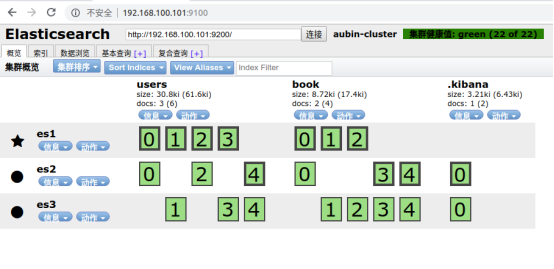
测试数据写入
PUT http://192.168.100.102:9200/book/novel/1

{

"word_count": 1000000,

"author": "金庸",

"title": "神雕侠侣",

"publish_date": "1997-10-1"

}
查看数据写入结果:
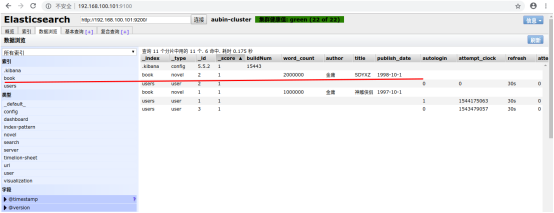
Springboot整合elasticsearch
新建springboot项目
目录结构
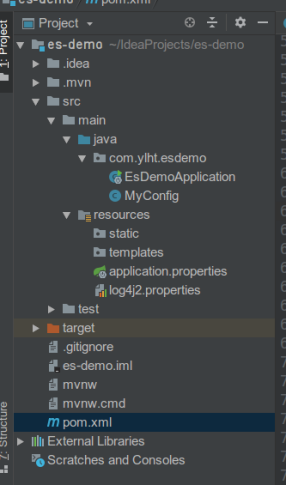
Pom文件
<?xml version="1.0" encoding="UTF-8"?>

<project xmlns="http://maven.apache.org/POM/4.0.0" xmlns:xsi="http://www.w3.org/2001/XMLSchema-instance"

         xsi:schemaLocation="http://maven.apache.org/POM/4.0.0 http://maven.apache.org/xsd/maven-4.0.0.xsd">

    <modelVersion>4.0.0</modelVersion>

    <parent>

        <groupId>org.springframework.boot</groupId>

        <artifactId>spring-boot-starter-parent</artifactId>

        <!--<version>2.1.1.RELEASE</version>-->

        <version>1.5.6.RELEASE</version>

        <relativePath/> <!-- lookup parent from repository -->

    </parent>

    <groupId>com.ylht</groupId>

    <artifactId>es-demo</artifactId>

    <version>0.0.1-SNAPSHOT</version>

    <name>es-demo</name>

    <description>Demo project for Spring Boot</description>

    <properties>

        <java.version>1.8</java.version>

        <es.version>5.5.2</es.version>

    </properties>

    <dependencies>

        <dependency>

            <groupId>org.springframework.boot</groupId>

            <artifactId>spring-boot-starter-web</artifactId>

        </dependency>

        <!-- https://mvnrepository.com/artifact/org.elasticsearch.client/transport -->

        <dependency>

            <groupId>org.elasticsearch.client</groupId>

            <artifactId>transport</artifactId>

            <version>${es.version}</version>

        </dependency>

        <dependency>

            <groupId>org.elasticsearch</groupId>

            <artifactId>elasticsearch</artifactId>

            <version>${es.version}</version>

        </dependency>

        <dependency>

            <groupId>org.apache.logging.log4j</groupId>

            <artifactId>log4j-api</artifactId>

            <version>2.7</version>

        </dependency>

        <!-- https://mvnrepository.com/artifact/org.apache.logging.log4j/log4j-core -->

        <dependency>

            <groupId>org.apache.logging.log4j</groupId>

            <artifactId>log4j-core</artifactId>

            <version>2.7</version>

        </dependency>

        <dependency>

            <groupId>org.springframework.boot</groupId>

            <artifactId>spring-boot-devtools</artifactId>

            <scope>runtime</scope>

        </dependency>

        <dependency>

            <groupId>org.springframework.boot</groupId>

            <artifactId>spring-boot-starter-test</artifactId>

            <scope>test</scope>

        </dependency>

    </dependencies>

    <build>

        <plugins>

            <plugin>

                <groupId>org.springframework.boot</groupId>

                <artifactId>spring-boot-maven-plugin</artifactId>

            </plugin>

        </plugins>

    </build>

</project>
log4j2.properties
appender.console.type=Console

appender.console.name=console

appender.console.layout.type=PatternLayout

appender.console.layout.pattern=[%t] %-5p %c %m%n

rootLogger.level=info

rootLogger.appenderRef.console.ref=console
MyConfig类
package com.ylht.esdemo;

import org.elasticsearch.client.transport.TransportClient;

import org.elasticsearch.common.settings.Settings;

import org.elasticsearch.common.transport.InetSocketTransportAddress;

import org.elasticsearch.transport.client.PreBuiltTransportClient;

import org.springframework.context.annotation.Bean;

import org.springframework.context.annotation.Configuration;

import java.net.InetAddress;

import java.net.UnknownHostException;

@Configuration

public class MyConfig {

    @Bean

    public TransportClient client() throws UnknownHostException {

        InetSocketTransportAddress es1 = new InetSocketTransportAddress(

                InetAddress.getByName("192.168.100.101"), 9300

        );

        InetSocketTransportAddress es2 = new InetSocketTransportAddress(

                InetAddress.getByName("192.168.100.102"), 9300

        );

        InetSocketTransportAddress es3 = new InetSocketTransportAddress(

                InetAddress.getByName("192.168.100.103"), 9300

        );

        Settings settings = Settings.builder()

                .put("cluster.name", "aubin-cluster")

                .build();

        TransportClient client = new PreBuiltTransportClient(settings);

        client.addTransportAddresses(es1, es2, es3);

        return client;

    }

}
EsDemoApplication类文件
package com.ylht.esdemo;

import org.elasticsearch.action.get.GetResponse;

import org.elasticsearch.client.transport.TransportClient;

import org.springframework.beans.factory.annotation.Autowired;

import org.springframework.boot.SpringApplication;

import org.springframework.boot.autoconfigure.SpringBootApplication;

import org.springframework.boot.autoconfigure.jdbc.DataSourceAutoConfiguration;

import org.springframework.boot.autoconfigure.orm.jpa.HibernateJpaAutoConfiguration;

import org.springframework.http.HttpStatus;

import org.springframework.http.ResponseEntity;

import org.springframework.web.bind.annotation.GetMapping;

import org.springframework.web.bind.annotation.RequestParam;

import org.springframework.web.bind.annotation.RestController;

import javax.xml.ws.Response;

@SpringBootApplication(exclude = {DataSourceAutoConfiguration.class, HibernateJpaAutoConfiguration.class})

@RestController

public class EsDemoApplication {

    @Autowired

    private TransportClient client;

    @GetMapping("/")

    public String index() {

        return "index";

    }

    @GetMapping(value = "/get/book/novel")

    public ResponseEntity get(@RequestParam(name = "id", defaultValue = "") String id) {

        try {

            if (id.isEmpty()) {

                return new ResponseEntity(HttpStatus.NOT_FOUND);

            }

            GetResponse response = this.client.prepareGet("book", "novel", id)

                    .get();

            if (!response.isExists()) {

                return new ResponseEntity(HttpStatus.NOT_FOUND);

            }

            return new ResponseEntity(response.getSource(), HttpStatus.OK);

        } catch (Exception e) {

            e.printStackTrace();

            return new ResponseEntity(HttpStatus.INTERNAL_SERVER_ERROR);

        }

    }

    public static void main(String[] args) {

        SpringApplication.run(EsDemoApplication.class, args);

    }

}
启动项目
(启动项目之前最好先 mvn clean,mvn package,mvn install)
启动方式有多种

- 直接点击绿色三角按钮运行(它右边一个是debug运行)
- 直接运行main方法
- 点击Teminal,输入mvn spring-boo:run
运行出错可以看看我的博客https://i.cnblogs.com/posts?categoryid=1373086
项目正常启动后

接口测试
我这里使用的ponstman
GET 192.168.100.53:8080/get/book/novel?id=1
结果图
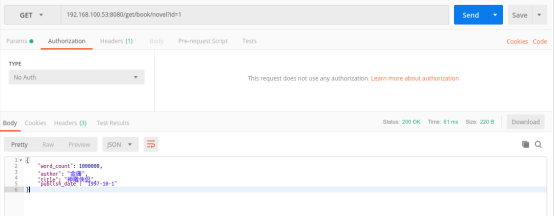
Springboot整合elasticsearch以及接口开发的更多相关文章
- SpringBoot整合ElasticSearch实现多版本的兼容
前言 在上一篇学习SpringBoot中,整合了Mybatis.Druid和PageHelper并实现了多数据源的操作.本篇主要是介绍和使用目前最火的搜索引擎ElastiSearch,并和Spring ...
- SpringBoot整合Elasticsearch详细步骤以及代码示例(附源码)
准备工作 环境准备 JAVA版本 java version "1.8.0_121" Java(TM) SE Runtime Environment (build 1.8.0_121 ...
- ElasticSearch(2)---SpringBoot整合ElasticSearch
SpringBoot整合ElasticSearch 一.基于spring-boot-starter-data-elasticsearch整合 开发环境:springboot版本:2.0.1,elast ...
- springboot整合elasticsearch入门例子
springboot整合elasticsearch入门例子 https://blog.csdn.net/tianyaleixiaowu/article/details/72833940 Elastic ...
- Springboot整合Elasticsearch报错availableProcessors is already set to [4], rejecting [4]
Springboot整合Elasticsearch报错 今天使用SpringBoot整合Elasticsearch时候,相关的配置完成后,启动项目就报错了. nested exception is j ...
- Springboot整合ElasticSearch进行简单的测试及用Kibana进行查看
一.前言 搜索引擎还是在电商项目.百度.还有技术博客中广泛应用,使用最多的还是ElasticSearch,Solr在大数据量下检索性能不如ElasticSearch.今天和大家一起搭建一下,小编是看完 ...
- 😊SpringBoot 整合 Elasticsearch (超详细).md
SpringBoot 整合 Elasticsearch (超详细) 注意: 1.环境搭建 安装es Elasticsearch 6.4.3 下载链接 为了方便,环境使用Windows 配置 解压后配置 ...
- SpringBoot整合elasticsearch
在这一篇文章开始之前,你需要先安装一个ElasticSearch,如果你是mac或者linux可以参考https://www.jianshu.com/p/e47b451375ea,如果是windows ...
- springboot整合elasticsearch(基于es7.2和官方high level client)
前言 最近写的一个个人项目(传送门:全终端云书签)中需要用到全文检索功能,目前 mysql,es 都可以做全文检索,mysql 胜在配置方便很快就能搞定上线(参考这里),不考虑上手难度,es 在全文检 ...
随机推荐
- Android 学习路线图(转载自https://blog.csdn.net/lixuce1234/article/details/77947405)
程序设计 一.java (a)基本语法(如继承.异常.引用.泛型等) Java核心技术 卷I(适合入门) 进阶 Effective Java中文版(如何写好的Java代码) Java解惑 (介绍烂Ja ...
- List排列组合
/** * 步骤::每次递归时,把原始数据和满足条件的工作空间复制一份,所有的操作均在复制文件中进行,目的就是保证不破坏原始数据, * 从而可以让一轮递归结束后可以正常进行下一轮. * 其次,把数据的 ...
- spring配置文件加密
原文:http://www.open-open.com/code/view/1453520072183 spring框架在一些对安全性要求较高的生产环境下,配置文件不允许出现明文用户名密码配置,如数据 ...
- top命令行含义解析
快捷键“1”可以快速切换显示所有cpu的信息 快捷键‘x’可以高亮显示当前排序列 shift+方向键:可以快速切换排序的列 top -c 显示完整命令 load含义解释:http://www.ruan ...
- InfluxDB useful commands
InfluxDB 配置文件地址:/etc/influxdb/influxdb.conf 通过curl写数据 curl -i -XPOST 'http://localhost:8086/write?db ...
- [Bash] Find Files and Folders with `find` in Bash
find is a powerful tool that can not only find files but it can run a command on each matching file ...
- Win8系统如何关闭用户账户控制UAC
按WIN+S,屏幕右侧出现搜索框,在搜索框中输入UAC,然后单击"更改用户账户控制设置" 然后把弹出的窗口改成"从不通知"就可以了
- css中使input输入框与img(图片)在同一行居中对齐
input,img{vertical-align:middle;},同时设置input和img的vertical-align属性,兼容ie7
- 5.eclipse 自带的jdk没有源码,改了它
其实JDK源码在安装的时候已经放在了jdk所在的目录下,只是eclipse使用 了不带有源码的jre,导致没找到对应的源码,点击 Window->Perference->Java-> ...
- Koa2学习(二)async/await
Koa2学习(二)async/await koa2中用到了大量的async/await语法,要学习koa2框架,首先要好好理解async/await语法. async/await顾名思义是一个异步等待 ...