
iOS:实现图片的无限轮播---之使用第三方库SDCycleScrollView
SDCycleScrollView API
//
// SDCycleScrollView.h
// SDCycleScrollView
#import <UIKit/UIKit.h>
typedef enum {
SDCycleScrollViewPageContolAlimentRight,
SDCycleScrollViewPageContolAlimentCenter
} SDCycleScrollViewPageContolAliment;
typedef enum {
SDCycleScrollViewPageContolStyleClassic, // 系统自带经典样式
SDCycleScrollViewPageContolStyleAnimated, // 动画效果pagecontrol
SDCycleScrollViewPageContolStyleNone // 不显示pagecontrol
} SDCycleScrollViewPageContolStyle;
@class SDCycleScrollView;
@protocol SDCycleScrollViewDelegate <NSObject>
@optional
/** 点击图片回调 */
- (void)cycleScrollView:(SDCycleScrollView *)cycleScrollView didSelectItemAtIndex:(NSInteger)index;
/** 图片滚动回调 */
- (void)cycleScrollView:(SDCycleScrollView *)cycleScrollView didScrollToIndex:(NSInteger)index;
@end
@interface SDCycleScrollView : UIView
/** 初始轮播图(推荐使用) */
+ (instancetype)cycleScrollViewWithFrame:(CGRect)frame delegate:(id<SDCycleScrollViewDelegate>)delegate placeholderImage:(UIImage *)placeholderImage;
+ (instancetype)cycleScrollViewWithFrame:(CGRect)frame imageURLStringsGroup:(NSArray *)imageURLStringsGroup;
/** 本地图片轮播初始化方式 */
+ (instancetype)cycleScrollViewWithFrame:(CGRect)frame imageNamesGroup:(NSArray *)imageNamesGroup;
/** 本地图片轮播初始化方式2,infiniteLoop:是否无限循环 */
+ (instancetype)cycleScrollViewWithFrame:(CGRect)frame shouldInfiniteLoop:(BOOL)infiniteLoop imageNamesGroup:(NSArray *)imageNamesGroup;
////////////////////// 数据源接口 //////////////////////
/** 网络图片 url string 数组 */
@property (nonatomic, strong) NSArray *imageURLStringsGroup;
/** 每张图片对应要显示的文字数组 */
@property (nonatomic, strong) NSArray *titlesGroup;
/** 本地图片数组 */
@property (nonatomic, strong) NSArray *localizationImageNamesGroup;
////////////////////// 滚动控制接口 //////////////////////
/** 自动滚动间隔时间,默认2s */
@property (nonatomic, assign) CGFloat autoScrollTimeInterval;
/** 是否无限循环,默认Yes */
@property (nonatomic,assign) BOOL infiniteLoop;
/** 是否自动滚动,默认Yes */
@property (nonatomic,assign) BOOL autoScroll;
/** 图片滚动方向,默认为水平滚动 */
@property (nonatomic, assign) UICollectionViewScrollDirection scrollDirection;
@property (nonatomic, weak) id<SDCycleScrollViewDelegate> delegate;
/** block方式监听点击 */
@property (nonatomic, copy) void (^clickItemOperationBlock)(NSInteger currentIndex);
/** block方式监听滚动 */
@property (nonatomic, copy) void (^itemDidScrollOperationBlock)(NSInteger currentIndex);
/** 解决viewWillAppear时出现时轮播图卡在一半的问题,在控制器viewWillAppear时调用此方法 */
- (void)adjustWhenControllerViewWillAppera;
////////////////////// 自定义样式接口 //////////////////////
/** 轮播图片的ContentMode,默认为 UIViewContentModeScaleToFill */
@property (nonatomic, assign) UIViewContentMode bannerImageViewContentMode;
/** 占位图,用于网络未加载到图片时 */
@property (nonatomic, strong) UIImage *placeholderImage;
/** 是否显示分页控件 */
@property (nonatomic, assign) BOOL showPageControl;
/** 是否在只有一张图时隐藏pagecontrol,默认为YES */
@property(nonatomic) BOOL hidesForSinglePage;
/** 只展示文字轮播 */
@property (nonatomic, assign) BOOL onlyDisplayText;
/** pagecontrol 样式,默认为动画样式 */
@property (nonatomic, assign) SDCycleScrollViewPageContolStyle pageControlStyle;
/** 分页控件位置 */
@property (nonatomic, assign) SDCycleScrollViewPageContolAliment pageControlAliment;
/** 分页控件距离轮播图的底部间距(在默认间距基础上)的偏移量 */
@property (nonatomic, assign) CGFloat pageControlBottomOffset;
/** 分页控件距离轮播图的右边间距(在默认间距基础上)的偏移量 */
@property (nonatomic, assign) CGFloat pageControlRightOffset;
/** 分页控件小圆标大小 */
@property (nonatomic, assign) CGSize pageControlDotSize;
/** 当前分页控件小圆标颜色 */
@property (nonatomic, strong) UIColor *currentPageDotColor;
/** 其他分页控件小圆标颜色 */
@property (nonatomic, strong) UIColor *pageDotColor;
/** 当前分页控件小圆标图片 */
@property (nonatomic, strong) UIImage *currentPageDotImage;
/** 其他分页控件小圆标图片 */
@property (nonatomic, strong) UIImage *pageDotImage;
/** 轮播文字label字体颜色 */
@property (nonatomic, strong) UIColor *titleLabelTextColor;
/** 轮播文字label字体大小 */
@property (nonatomic, strong) UIFont *titleLabelTextFont;
/** 轮播文字label背景颜色 */
@property (nonatomic, strong) UIColor *titleLabelBackgroundColor;
/** 轮播文字label高度 */
@property (nonatomic, assign) CGFloat titleLabelHeight;
////////////////////// 清除缓存接口 //////////////////////
/** 清除图片缓存(此次升级后统一使用SDWebImage管理图片加载和缓存) */
+ (void)clearImagesCache;
/** 清除图片缓存(兼容旧版本方法) */
- (void)clearCache;
@end
说明
下载链接:github不断更新地址:https://github.com/gsdios/SDCycleScrollView
使用原理:采用UICollectionView的重用机制和循环滚动的方式实现图片的无限轮播,播放非常顺畅,解决了UISCrollView使用时从最后一张跳到第一张时的生硬状态。
主要类截图:
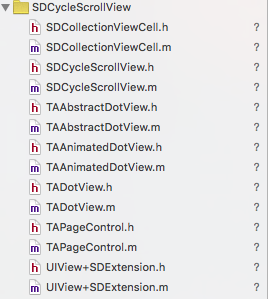
SDCollectionViewCell:用来重用的item,即显示图片的视图;
SDCycleScrollView: 对外提供的一个创建轮播器的接口类,使用者就是直接使用这个类来实现图片轮播的;
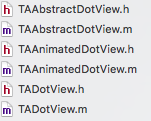 :这几个类主要是用来处理分页节点的,可以使用默认的原点分页节点,也可以使用图片节点;
TAPageControl:顾名思义,可知这个是用来设置分页的;
 :一个简化使用视图frame结构体及其结构体中属性的视图分类。
SDCycleScrollView *cycleScrollView = [cycleScrollViewWithFrame:frame delegate:delegate placeholderImage:placeholderImage];
cycleScrollView.imageURLStringsGroup = imagesURLStrings;
// 本地加载图片的轮播器
SDCycleScrollView *cycleScrollView = [SDCycleScrollView cycleScrollViewWithFrame:frame imageNamesGroup:图片数组];
更改记录:
2016.01.15 -- 兼容assets存放的本地图片
2016.01.06 -- 0.图片管理使用SDWebImage;1.优化内存,提升性能;2.添加图片contentmode接口;3.block监听点击接口;4.滚动到某张图片监听;5.增加自定义图片pageControl接口;6.其他等等。其中有一处接口改动:pagecontrol的小圆点自定义接口改为:currentPageDotColor、pageDotColor、currentPageDotImage、pageDotImage。
PS:
现已支持cocoapods导入:pod ‘SDCycleScrollView‘,‘~> 1.6‘
#import <SDCycleScrollView.h> // 我采用的是CopcoaPods管理工具导入的第三方库,所以使用<>导入头文件名

@interface ViewController ()<SDCycleScrollViewDelegate>

@property (strong,nonatomic)NSArray *localImages;//本地图片

@property (strong,nonatomic)NSArray *netImages;  //网络图片

@property (strong,nonatomic)SDCycleScrollView *cycleScrollView;//轮播器

@end
2.懒加载本地图片和网络图片
/**

 *  懒加载本地图片数据

 */

-(NSArray *)localImages{

    if (!_localImages) {

        _localImages = @[@"1.png",@"2.png",@"3.png",@"4.png"];

    }

    return _localImages;

}

/**

 *  懒加载网络图片数据

 */

-(NSArray *)netImages{

    if (!_netImages) {

        _netImages = @[

                       @"http://d.hiphotos.baidu.com/zhidao/pic/item/72f082025aafa40f507b2e99aa64034f78f01930.jpg",

                       @"http://b.hiphotos.baidu.com/zhidao/pic/item/4b90f603738da9770889666fb151f8198718e3d4.jpg",

                       @"http://g.hiphotos.baidu.com/zhidao/pic/item/f2deb48f8c5494ee4e84ef5d2cf5e0fe98257ed4.jpg",

                       @"http://d.hiphotos.baidu.com/zhidao/pic/item/9922720e0cf3d7ca104edf32f31fbe096b63a93e.jpg"

                     ];

    }

    return _netImages;

}
3-1.封装方法,轮播本地图片
/**

 *  轮播本地图片

 */

-(void)ScrollLocalImages{

    /** 测试本地图片数据*/

    CGRect rect = CGRectMake(0,150, self.view.bounds.size.width, 400);

    self.cycleScrollView = [SDCycleScrollView cycleScrollViewWithFrame:rect imageNamesGroup:self.localImages];

    //设置图片视图显示类型

    self.cycleScrollView.bannerImageViewContentMode = UIViewContentModeScaleToFill;

    //设置轮播视图的分页控件的显示

    self.cycleScrollView.showPageControl = YES;

    //设置轮播视图分也控件的位置

    self.cycleScrollView.pageControlAliment = SDCycleScrollViewPageContolAlimentCenter;

    //当前分页控件小圆标颜色

    self.cycleScrollView.currentPageDotColor = [UIColor redColor];

    //其他分页控件小圆标颜色

    self.cycleScrollView.pageDotColor = [UIColor purpleColor];

    [self.view addSubview:self.cycleScrollView];

}
3-2.封装方法,轮播网络图片
/**

 *  轮播网络图片

 */

-(void)ScrollNetWorkImages{

    /** 测试本地图片数据*/

    CGRect rect = CGRectMake(0,150, self.view.bounds.size.width, 400);

    self.cycleScrollView = [SDCycleScrollView cycleScrollViewWithFrame:rect delegate:self placeholderImage:[UIImage imageNamed:@"PlacehoderImage.png"]];

    //设置网络图片数组

    self.cycleScrollView.imageURLStringsGroup = self.netImages;

    //设置图片视图显示类型

    self.cycleScrollView.bannerImageViewContentMode = UIViewContentModeScaleToFill;

    //设置轮播视图的分页控件的显示

    self.cycleScrollView.showPageControl = YES;

    //设置轮播视图分也控件的位置

    self.cycleScrollView.pageControlAliment = SDCycleScrollViewPageContolAlimentCenter;

    //当前分页控件小圆标图片

    self.cycleScrollView.pageDotImage = [UIImage imageNamed:@"pageCon.png"];

    //其他分页控件小圆标图片

    self.cycleScrollView.currentPageDotImage = [UIImage imageNamed:@"pageConSel.png"];

    [self.view addSubview:self.cycleScrollView];

}

#pragma mark - 代理方法

/** 点击图片回调 */

- (void)cycleScrollView:(SDCycleScrollView *)cycleScrollView didSelectItemAtIndex:(NSInteger)index{

    //NSLog(@"%ld",index);

}

/** 图片滚动回调 */

- (void)cycleScrollView:(SDCycleScrollView *)cycleScrollView didScrollToIndex:(NSInteger)index{

   //NSLog(@"%ld",index);

}
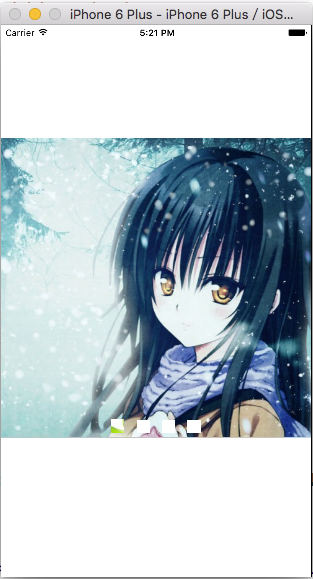
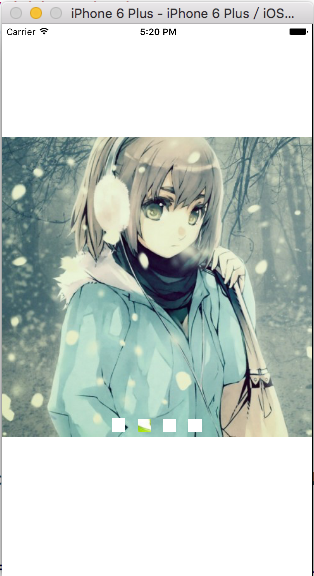
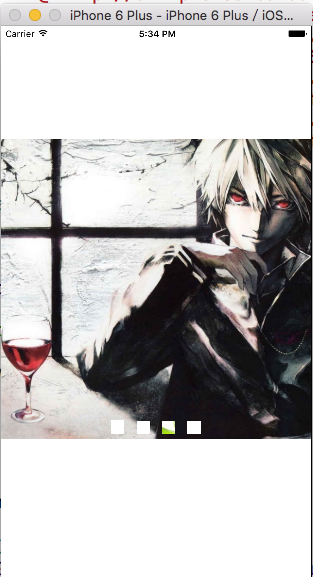
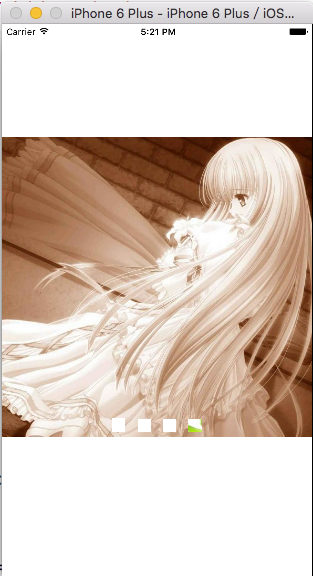
测试1:
- (void)viewDidLoad {

    [super viewDidLoad];

    [self ScrollLocalImages];

}




- (void)viewDidLoad {

    [super viewDidLoad];

    [self ScrollNetWorkImages];

}
iOS:实现图片的无限轮播---之使用第三方库SDCycleScrollView的更多相关文章
- iOS:实现图片的无限轮播之使用第三方库SDCycleScrollView
下载链接:github不断更新地址:https://github.com/gsdios/SDCycleScrollView #import "ViewController.h" # ...
- iOS实现图片无限轮播之使用第三方库SDCycleScrollView(转)
下载链接:github不断更新地址:https://github.com/gsdios/SDCycleScrollView #import "ViewController.h" # ...
- iOS:实现图片的无限轮播(二)---之使用第三方库SDCycleScrollView
iOS:实现图片的无限轮播(二)---之使用第三方库SDCycleScrollView 时间:2016-01-19 19:13:43 阅读:630 评论:0 收藏:0 ...
- iOS开发UI篇—无限轮播(循环利用)
iOS开发UI篇—无限轮播(循环利用) 一.无限轮播 1.简单说明 在开发中常需要对广告或者是一些图片进行自动的轮播,也就是所谓的无限滚动. 在开发的时候,我们通常的做法是使用一个UIScrollV ...
- iOS开发UI篇—无限轮播(新闻数据展示)
iOS开发UI篇—无限轮播(新闻数据展示) 一.实现效果 二.实现步骤 1.前期准备 (1)导入数据转模型的第三方框架MJExtension (2)向项目中添加保存有“新闻”数据的pli ...
- iOS开发UI篇—无限轮播(循环展示)
iOS开发UI篇—无限轮播(循环展示) 一.简单说明 之前的程序还存在一个问题,那就是不能循环展示,因为plist文件中只有五个数组,因此第一个和最后一个之后就没有了,下面介绍处理这种循环展示问题的小 ...
- iOS开发UI篇—无限轮播(功能完善)
iOS开发UI篇—无限轮播(功能完善) 一.自动滚动 添加并设置一个定时器,每个2.0秒,就跳转到下一条. 获取当前正在展示的位置. [self addNSTimer]; } -(void)addNS ...
- iOS:实现图片的无限轮播
为尊重原创,特注明原文链接:http://m.myexception.cn/operating-system/1949043.html 图片轮播及其无限循环效果 平时APP中的广告位或者滚动的新闻图片 ...
- iOS开发之ImageView复用实现图片无限轮播
在上篇博客中iOS开发之多图片无缝滚动组件封装与使用给出了图片无限轮播的实现方案之一,下面在给出另一种解决方案.今天博客中要说的就是在ScrollView上贴两个ImageView, 把ImageVi ...
随机推荐
- jquery11源码 animate() : 运动的方法
{ var fxNow, timerId, rfxtypes = /^(?:toggle|show|hide)$/, rfxnum = new RegExp( "^(?:([+-])=|)( ...
- c++值传递,指针传递,引用传递以及指针与引用的区别
值传递: 形参是实参的拷贝,改变形参的值并不会影响外部实参的值.从被调用函数的角度来说,值传递是单向的(实参->形参),参数的值只能传入, 不能传出.当函数内部需要修改参数,并且不希望这个改变影 ...
- Python 面向对象 —— super 的使用(Python 2.x vs Python 3.x)
注意区分当前的 Python 版本是 2.X 还是 3.X,Python 3.X 在 super 的使用上较之 Python 2.X 有较大的变化: 1. Python 2.x class Conta ...
- 正确理解Widget::Widget(QWidget *parent) :QWidget(parent)这句话(初始化列表中无法直接初始化基类的数据成员,所以你需要在列表中指定基类的构造函数)
最近有点忙,先发一篇我公众号的文章,以下是原文. /********原文********/ 最近很多学习Qt的小伙伴在我的微信公众号私信我,该如何理解下面段代码的第二行QWidget(parent) ...
- [NOI.AC#35]string 缩点+拓扑排序
链接 因为有交换相邻字母,因此给你字符串就相当于给你了这个字符串的所有排列 把等价的串映射到整数范围,再根据 \(m\) 种魔法连边,缩点后在 DAG 上DP即可 无耻地用了int128 #inclu ...
- MYSQL存储过程中 使用变量 做表名--转
原文地址:http://blog.csdn.net/business122/article/details/7528859 今天写一个对数据库做快照的存储过程,用到了动态表名,突然发现MYSQL不支持 ...
- 【Codeforces Round #452 (Div. 2) C】 Dividing the numbers
[链接] 我是链接,点我呀:) [题意] 在这里输入题意 [题解] n为偶数. l = 1, r = n (l,r)放在一组 l++,r-- 新的l,r放在另外一组 直到l+1==r 这个时候,判断两 ...
- ubuntu-安装中文拼音输入法
一下内容转载自http://blog.chinaunix.net/uid-24410388-id-3501873.html 自己验证了可用.转载了,已留做日后使用 步骤: step1:安装ibus所需 ...
- cv2.putText 文字换行('\n')无法解析换行
OpenCV putText() new line character cv2.putText 在向图像中添加文本信息时,如果在待添加的文本中含有换行转义符,一般它是无法正确处理的: cv2.putT ...
- Java – Reading a Large File Efficiently--转
原文地址:http://www.baeldung.com/java-read-lines-large-file 1. Overview This tutorial will show how to r ...