
利用SharedPreferences完成记住账号密码的功能
利用SharedPreferences完成记住账号密码的功能
效果图:
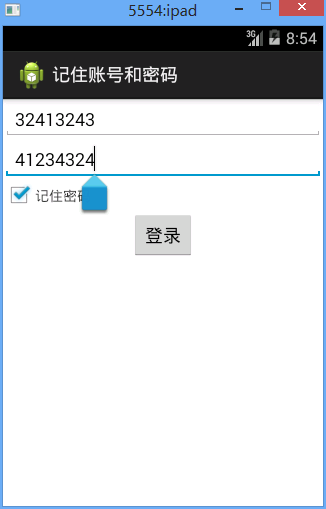
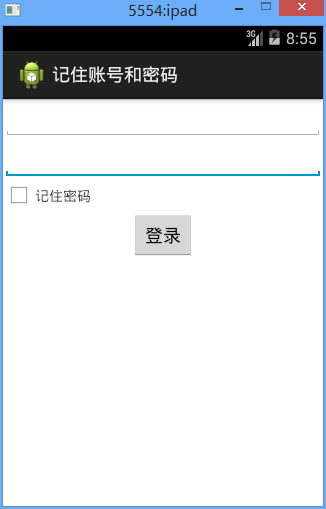
记住密码后,再次登录就会出现账号密码,否则没有。
分析:
SharedPreferences可将数据存储到本地的配置文件中
SharedPreferences会记录CheckBox的状态,如果CheckBox被选,则将配置文件中记录的账号密码信息回馈给账号密码控件,否则清空。
SharedPreferences使用方法:
1、创建名为config的配置文件,并且私有
private SharedPreferences config;
config=getSharedPreferences("config", MODE_PRIVATE);
2、添加编辑器
Editor edit=config.edit();
3、向内存中写入数据
String username=et_username.getText().toString();
String password=et_password.getText().toString();
edit.putString("username", username).putString("password", password);
4、提交到本地
edit.commit();
代码:
fry.Activity01
 package fry;

 import com.example.rememberUserAndPassword.R;

 import android.app.Activity;

 import android.content.SharedPreferences;

 import android.content.SharedPreferences.Editor;

 import android.os.Bundle;

 import android.view.View;

 import android.widget.Button;

 import android.widget.CheckBox;

 import android.widget.TextView;

 import android.widget.Toast;

 public class Activity01 extends Activity{

     private Button btn_login;

     private TextView et_username;

     private TextView et_password;

     private CheckBox cb_choose;

     private SharedPreferences config;

     @Override

     protected void onCreate(Bundle savedInstanceState) {

         // TODO Auto-generated method stub

         super.onCreate(savedInstanceState);

         setContentView(R.layout.activity01);

         config=getSharedPreferences("config", MODE_PRIVATE);

         btn_login=(Button) findViewById(R.id.btn_login);

         et_username=(TextView) findViewById(R.id.et_username);

         et_password=(TextView) findViewById(R.id.et_password);

         cb_choose=(CheckBox) findViewById(R.id.cb_choose);

         //是否记住了密码,初始化为false

         boolean isCheck=config.getBoolean("isCheck", false);

         //Toast.makeText(this, isCheck+" ", Toast.LENGTH_SHORT).show();

         if(isCheck){

             et_username.setText(config.getString("username", ""));

             et_password.setText(config.getString("password", ""));

             cb_choose.setChecked(isCheck);

         }

     }

     //权限要是public,要不然访问不到

     //因为在button控件中设置了android:onClick="onClick"

     public void onClick(View view){

         Toast.makeText(this, "登录成功", Toast.LENGTH_SHORT).show();

         Editor edit=config.edit();

         String username=et_username.getText().toString();

         String password=et_password.getText().toString();

         boolean isCheck=cb_choose.isChecked();

         //Toast.makeText(this, isCheck+" ", Toast.LENGTH_SHORT).show();

         //存储CheckBox的状态

         edit.putBoolean("isCheck", isCheck);

         if(isCheck){

             edit.putString("username", username).putString("password", password);

         }else{

             edit.remove("username").remove("password");

         }

         //提交到本地

         edit.commit();

     }

 }
代码逻辑部分
/记住账号和密码/res/layout/activity01.xml
 <?xml version="1.0" encoding="utf-8"?>

 <LinearLayout xmlns:android="http://schemas.android.com/apk/res/android"

     android:layout_width="match_parent"

     android:layout_height="match_parent"

     android:orientation="vertical" >

     <EditText

         android:id="@+id/et_username"

         android:layout_width="match_parent"

         android:layout_height="wrap_content"

         />

     <EditText

         android:id="@+id/et_password"

         android:layout_width="match_parent"

         android:layout_height="wrap_content"

         android:ems="10" >

         <requestFocus />

     </EditText>

     <LinearLayout

         android:layout_width="wrap_content"

         android:layout_height="wrap_content"

         >

         <CheckBox

                 android:id="@+id/cb_choose"

             android:layout_width="wrap_content"

             android:layout_height="wrap_content"

             />

         <TextView

             android:layout_width="wrap_content"

             android:layout_height="wrap_content"

             android:text="记住密码"

             />

     </LinearLayout>

     <!-- android:onClick="onClick" 点击时去class中调用onClick方法,权限要为public -->

     <Button

         android:id="@+id/btn_login"

         android:layout_width="wrap_content"

         android:layout_height="wrap_content"

         android:text="登录"

         android:layout_gravity="center_horizontal"

         android:onClick="onClick"

         />

 </LinearLayout>
界面设计部分
利用SharedPreferences完成记住账号密码的功能的更多相关文章
- css 修改placeholder字体颜色字体大小 修改input记住账号密码后的默认背景色
壹 ❀ 引 本来这个阶段的项目页面都是给实习生妹子做的,我只用写写功能接接数据,但这两天妹子要忙翻译,这个工作阶段也快结束了导致有点慌,只能自己把剩余的几个小页面给写了. 那么做页面的过程中,UI也 ...
- struts2的记住账号密码的登录设计
一个简单的基于struts2的登录功能,实现的额外功能有记住账号密码,登录错误提示.这里写上我在设计时的思路流程,希望大家能给点建设性的意见,帮助我改善设计. 登录功能的制作,首先将jsp界面搭建出来 ...
- 基于struts2的记住账号密码的登录设计
一个简单的基于struts2的登录功能,实现的额外功能有记住账号密码,登录错误提示.这里写上我在设计时的思路流程,希望大家能给点建设性的意见,帮助我改善设计. 登录功能的制作,首先将jsp界面搭建出来 ...
- C# ASP.NET MVC:使用Cookie记住账号密码
MVC记住账号密码 使用cookie操作 前端: <div> 用户名:<input type="text" id="UserName" val ...
- Linux让git记住账号密码
Linux让git记住账号密码 ——IT唐伯虎 摘要: Linux让git记住账号密码. 1.进入根目录,指令:cd / 2.创建记录账号密码的文件,指令:touch .git-credentials ...
- Git设置记住账号密码
Git设置记住账号密码 添加如下配置 [credential] helper = store
- cocos2d JS 本地缓存存储登陆记住账号密码->相当于C++中的UserDefault
在cocos-js 3.0以上的版本中,当我们用到本地存储的时候,发现以前用到的UserDefault在JS中并没有导出,而是换成了LocalStorage. 在LocalStorage.h文件中我们 ...
- OpenVPN记住账号密码自动连接
说明:在增加了证书+账号密码之后,安全性确实提高了,但是面临的问题也有,每次重启时必须输入账号密码才能连接,这也造成了无人值守的问题. 解决: 1.在Client的client.ovpn末尾添加一行a ...
- 利用python破解sqlserver账号密码
一.编写密码测试函数 在用python连接mssql数据库的时候,通常会使用pymssql模板中的connect函数,格式如下: connect(server,user,password,databa ...
随机推荐
- Jenkins自动化部署.net程序
一.安装Jenkins 百度上一大堆就不做说明了. 二.构建.net前的准备 1.安装MSBUILD.EXE插件 1.1.进去jenkins->系统管理->插件管理 1.2.配置MSBUI ...
- 45.4.7 序列:USER_SEQUENCES(SEQ)
45.4.7 序列:USER_SEQUENCES(SEQ) 要显示序列的属性,可以查询USER_SEQUENCES 数据字典视图.该视图也能用公有同义词SEQ 进行查询.USER_SEQUENCES ...
- Deutsch lernen (07)
1. die Einführung, -en 介绍:引言,导论 Könnten Sie uns zuerst eine kleine Einführung über das Klonen geben. ...
- Deutsch lernen (05)
1. die Wahrheit, -en 真理: - 真言,实情 Wir sollen die Wahrheit festhalten. 坚持:紧握 Im Wein liegt Wahrheit. ...
- SQL Server之存储过程
存储过程的概念 存储过程Procedure是一组为了完成特定功能的SQL语句集合,经编译后存储在数据库中,用户通过指定存储过程的名称并给出参数来执行. 存储过程中可以包含逻辑控制语句和数据操纵语句,它 ...
- 相机标定:PNP基于单应面解决多点透视问题
利用二维视野内的图像,求出三维图像在场景中的位姿,这是一个三维透视投影的反向求解问题.常用方法是PNP方法,需要已知三维点集的原始模型. 本文做了大量修改,如有不适,请移步原文: ...
- 在Android 上运行 openCV ,并做灰度变化的一个例子
OpenCVImageProcessing1. 导入Opencv的 androrid SDK灰度算法 OpenCVImageProcessing 导入opencv Jar包,配置OpenCVLibra ...
- Nginx服务器部署SSL证书手机不信任解决方法
在wosign申请证书并按指南正确部署证书后,如果发现PC浏览器访问正常,手机或safari浏览器提示证书不受信任,那肯定是在文件传输解压过程中导致证书文件中出现空格.乱码之类的情况,这里教您轻松四步 ...
- Selenium3+python自动化 -JS处理滚动条
selenium并不是万能的,有时候页面上操作无法实现的,这时候就需要借助JS来完成了. 常见场景: 当页面上的元素超过一屏后,想操作屏幕下方的元素,是不能直接定位到,会报元素不可见的. 这时候需要借 ...
- win10环境下配置django+Apache2.4.38+python3.6项目
1.)Apache-2.4.38-win64-vc15下载地址: https://www.apachelounge.com/download/VC14/ 解压httpd-2.4.38-win64-VC ...