
spring boot系列02--Thymeleaf+Bootstrap构建页面
上一篇说了一下怎么构建spring boot 项目
接下来我们开始讲实际应用中需要用到的 先从页面说起
页面侧打算用Thymeleaf+Bootstrap来做
先共通模板页
<!DOCTYPE html>

<html xmlns="http://www.w3.org/1999/xhtml"

    xmlns:th="http://www.thymeleaf.org">

<body>

    <!-- Header -->

    <div th:fragment="header(title)">

        <div>

            <h2>Guaishushu</h2>

        </div>

    </div>

    <!-- Footer -->

    <div th:fragment="footer" class="navbar-fixed-bottom">

        <div class="container text-center">

            Copyright © GuaiShuShu

        </div>

    </div>

</body>

</html>
暂且定义两个共通 Header 和 Footer 之后还会再有 比如 menu 的
这里能说的就是th:fragment 开始说了 页面用 Thymeleaf+Bootstrap 来做
th就是Thymeleaf的缩写了 它用【th:】来告诉解析器这里是Thymeleaf的东西了
(关于Thymeleaf的东西这里打算是用哪儿写哪儿 不打算系统写 之后可能会系统写一个Thymeleaf的系列)
说一下代码里的两个 两个模板
th:fragment="header(title) 是表示 名叫 header 有参 的模板
th:fragment="footer" 这个就是 无参的了
接下来看看调用的地方 L21,L79
模板画面名(common)+模板名(header)+参数( 'login')
 <!DOCTYPE HTML>

 <!-- thymeleaf 导入 -->

 <html xmlns:th="http://www.thymeleaf.org">

 <head>

 <title>登录</title>

 <meta http-equiv="Content-Type" content="text/html; charset=UTF-8" />

 <script type="text/javascript" src="../static/js/jquery-3.2.1.min.js"></script>

 <link rel="stylesheet" href="../static/css/bootstrap.min.css"

     type="text/css"></link>

 <script type="text/javascript">

     $(function() {

     })

 </script>

 <body>

     <!-- common 的 定义好的 header模板 引用  参数 title  -->

     <!--

      Bootstrap的容器Class使用

      container :用于固定宽度并支持响应式布局的容器

      container-fluid :用于 100% 宽度,占据全部视口(viewport)的容器。

     -->

     <div class="container" th:replace="common :: header('login') "></div>

     <div class="container">

         <!--Bootstrap

             .row:行控制  一行有12列

             .clo-md-4:列控制 表示 占 4列

             .md-offfset-4:向右侧偏移4

          -->

         <div class="row">

             <div class="col-md-4 col-md-offset-4">

                 <div class="panel panel-default">

                     <div class="panel-heading">

                         <h3 class="panel-title">Login</h3>

                     </div>

                     <div class="panel-body">

                         <form th:action="@{'/login'}" method="post" th:object="${userDto}">

                             <div class="form-group form-inline">

                                 <label for="txtUserName" class="col-md-3 control-label"

                                     style="text-align: right;">用户名</label>

                                 <div class="col-md-9">

                                     <input type="text" class="col-md-9 form-control" id="txtUserName"

                                         placeholder="请输入用户名" th:field="*{userName}"

                                         required="required" />

                                 </div>

                             </div>

                             <div class="form-group form-inline" style="padding-top:45px">

                                 <label for="txtUserPwd" class="col-sm-3 control-label"

                                     style="text-align: right;">密码</label>

                                 <div class="col-md-9">

                                     <input type="password" class="col-sm-9 form-control" id="txtUserPwd"

                                         placeholder="请输入密码" th:field="*{userPsw}" />

                                 </div>

                             </div>

                             <div class="form-group">

                                 <div class="col-md-offset-3 col-md-9">

                                     <div class="checkbox">

                                         <label> <input type="checkbox" />请记住我

                                         </label>

                                     </div>

                                 </div>

                             </div>

                             <div class="form-group">

                                 <div class="col-md-offset-3 col-md-5">

                                     <button class="btn btn-primary btn-block" type="submit" name="action"

                                         value="login">登录</button>

                                 </div>

                             </div>

                             <div class="alert alert-danger" th:if="${loginError}">

                                 <strong>用户名或者用户密码不正确,请重新输入</strong>

                             </div>

                         </form>

                     </div>

                 </div>

             </div>

         </div>

     </div>

     <!-- common 的 定义好的 fotter模板引用  无参  -->

     <div class="container" th:replace="common :: footer"></div>

 </body>

 </head>

 </html>
说一下thymeleaf使用的地方
L35 使用或者说定义了一个userDto对象
说使用是因为 这个对象你得重后台传给它否则报错
说定义 是因为 在当前from作用于域内 像L41那样去访问使用userDto这个对象内属性/方法
关于Bootstrap的部分 我基本都在代码的注释里写了
这里就不赘述了 看一下Controller
 package com.sts.springboot.controller;

 import org.springframework.stereotype.Controller;

 import org.springframework.ui.Model;

 import org.springframework.web.bind.annotation.ModelAttribute;

 import org.springframework.web.bind.annotation.RequestMapping;

 import org.springframework.web.bind.annotation.RequestMethod;

 import org.springframework.web.bind.annotation.RequestParam;

 import org.springframework.web.servlet.mvc.support.RedirectAttributes;

 import com.sts.springboot.dto.UserDto;

 @Controller

 public class LoginController {

     //初期化

     @RequestMapping(value = "/login", method = RequestMethod.POST)

     public String login(Model model) {

         UserDto userDto = new UserDto();

         model.addAttribute("userDto",userDto);

         return "login";

     }

     //登录

     @RequestMapping(value = "/login",params="action=login", method = RequestMethod.POST)

     public String login(@RequestParam(value = "userName") String userName,

             @RequestParam(value = "userPsw") String userPsw,Model model,RedirectAttributes redirectAttributes ) {

         UserDto userDto = new UserDto();

         if(userName.equals(userPsw)) {

             redirectAttributes.addFlashAttribute("userName",userName);

             return "redirect:index";

         } else {

             model.addAttribute("loginError",true);

             model.addAttribute("userDto",userDto);

             return "login";

         }

     }

     @RequestMapping("/index")

     public String welcomeIndex(@ModelAttribute("userName") String userName,Model model) {

         model.addAttribute("userName",userName);

         return "index";

     }

 }
简单说一下,先说参数部分
@RequestParam 使用来接收前台穿过来的参数 不用赘述 有一点 @RequestParam的value 是要和 页面上 th:field="*{userPsw}" 的保持一致的
Model model 这是 页面的对象返回时作为传参的载体使用
RedirectAttributes 是重定向传参用的 像L30那样 set进去 L39 接受 L40 set 到新页面的model里
然后
主要逻辑是 判断 用户名是否等于用户密码
是 重定向到 index 页面 显示
否 想页面 返回error 提示
贴一下index 的代码
<!DOCTYPE html>

<html xmlns:th="http://www.thymeleaf.org">

<head>

<meta http-equiv="Content-Type" content="text/html; charset=UTF-8" />

<title>Insert title here</title>

</head>

<body>

    <div class="container"  th:replace="common :: header('login') "></div>

    <div class="container">

    欢迎,<span th:text="${userName}"></span>登录

    </div>

    <div class="container" th:replace="common :: footer"></div>

</body>

</html>
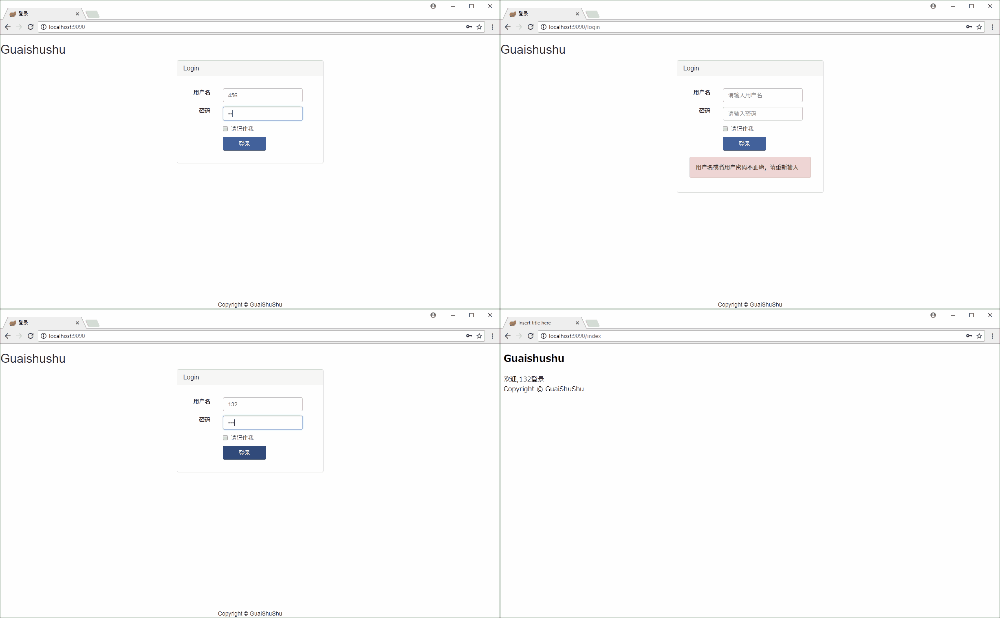
最后整体看一下效果
GitHub:spring-boot-hello
spring boot系列02--Thymeleaf+Bootstrap构建页面的更多相关文章
- spring boot系列01--快速构建spring boot项目
最近的项目用spring boot 框架 借此学习了一下 这里做一下总结记录 非常便利的一个框架 它的优缺点我就不在这背书了 想了解的可以自行度娘谷歌 说一下要写什么吧 其实还真不是很清楚,只是想记录 ...
- Spring Boot 系列教程11-html页面解析-jsoup
需求 需要对一个页面进行数据抓取,并导出doc文档 html解析器 jsoup 可直接解析某个URL地址.HTML文本内容.它提供了一套非常省力的API,可通过DOM,CSS以及类似于JQuery的操 ...
- Spring Boot 系列(五)web开发-Thymeleaf、FreeMarker模板引擎
前面几篇介绍了返回json数据提供良好的RESTful api,下面我们介绍如何把处理完的数据渲染到页面上. Spring Boot 使用模板引擎 Spring Boot 推荐使用Thymeleaf. ...
- 国内最全的Spring Boot系列之二
历史文章 <国内最全的Spring Boot系列之一> 视频&交流平台 SpringBoot视频:http://t.cn/R3QepWG Spring Cloud视频:http:/ ...
- spring boot 之如何在两个页面之间传递值(转)
原文地址:spring boot 之如何在两个页面之间传递值 问题:页面之间的跳转,通常带有值的传输,但是,在现在比较流行的SPRING MVC WEB 开发模型中,设计机制导致页面之间的直接接跳转和 ...
- spring boot 学习(二)spring boot 框架整合 thymeleaf
spring boot 框架整合 thymeleaf spring boot 的官方文档中建议开发者使用模板引擎,避免使用 JSP.因为若一定要使用 JSP 将无法使用. 注意:本文主要参考学习了大神 ...
- Spring Boot 系列教程16-数据国际化
internationalization(i18n) 国际化(internationalization)是设计和制造容易适应不同区域要求的产品的一种方式. 它要求从产品中抽离所有地域语言,国家/地区和 ...
- Spring Boot 系列教程15-页面国际化
internationalization(i18n) 国际化(internationalization)是设计和制造容易适应不同区域要求的产品的一种方式. 它要求从产品中抽离所有地域语言,国家/地区和 ...
- Spring Boot 系列教程9-swagger-前后端分离后的标准
前后端分离的必要 现在的趋势发展,需要把前后端开发和部署做到真正的分离 做前端的谁也不想用Maven或者Gradle作为构建工具 做后端的谁也不想要用Grunt或者Gulp作为构建工具 前后端需要通过 ...
- Spring Boot 系列教程8-EasyUI-edatagrid扩展
edatagrid扩展组件 edatagrid组件是datagrid的扩展组件,增加了统一处理CRUD的功能,可以用在数据比较简单的页面. 使用的时候需要额外引入jquery.edatagrid.js ...
随机推荐
- SVN版本控制图标经常延时显示或未显示问题解决方法
项目中,使用svn经常遇到,文件或文件夹图标延时显示或未显示的问题,终于找到办法解决 客户端:TortoiseSVN
- 提取多层嵌套Json数据
在.net 2.0中提取这样的json {"name":"lily","age":23,"addr":{"ci ...
- cocos2dx - Sqlite简单封装使用
前言: 一般游戏需要在手机上记录一些简单的信息,用来保存游戏的进度,玩家的分数等.SQLite作为轻量级.跨平台的关系型数据库,相当适合用于游戏数据的存储. 由于没有加密,有安全性问题,数据上还需要自 ...
- Django Cookie 和 Sessions 应用
在Django里面,使用Cookie和Session看起来好像是一样的,使用的方式都是request.COOKIES[XXX]和request.session[XXX],其中XXX是您想要取得的东西的 ...
- 谢欣伦 - 原创教程 - 使用GDI+绘制抗锯齿斜线
早些年用过GDI的同学都知道,用GDI绘图API函数画斜线那个锯齿有多恶心.就像下图第一行的三条斜线: 坦白说,45度斜线在抗锯齿以前还是蛮抗锯齿的,哈哈,抗不抗都没什么差别. 那第二行很自然就看得出 ...
- MySQL复制之理论篇
一.MySQL复制概述 MySQL支持两种复制方式:基于行的复制和基于语句的复制(逻辑复制).这两种方式都是通过在主库上记录 二进制日志.在备库重放日志的方式来实现异步的数据复制,其工作原理如下图: ...
- shell脚本学习(一):shell脚本开发的基本规范和习惯
1.脚本第一行指定脚本解释器 #!/bin/bash 或 #!/bin/sh 2.脚本开头增加作者.脚本作用描述等信息 1 #!/bin/bash 2 #Author: iskylite 3 #Blo ...
- python实现进度条和百分比同时显示
python中同时打印进度条和百分比 仅打印进度条: import sys,time for i in range(100): sys.stdout.write('>') sys.stdout. ...
- Linux_服务器_01_查看公网IP
在linux终端提示符下,输入以下命令: 精选: curl icanhazip.com/curl ifconfig.mecurl ipecho.net/plain 可以看到下图已经查询到公网IP地址了 ...
- IT连创业系列:说说苹果商店AppStore上架App应用前后遇到的那些神坑
前言: IT连创业的这个系列,又隔空了一个多月了. 不知道为什么,最近写文的冲动感下降了很多,如果不是因为特别忙,大概就因为上了年纪的原因了. 群里关注我创业的朋友,一直都在问,啥时候有新的文章讲述创 ...