
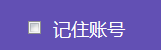
纯css兼容个浏览器input[type='radio']不能自定义样式
//html

<div class="remember-account">

      <input type="checkbox">

      <span>记住账号</span>

</div>
//css

.remember-account {

    display: inline-block;

    font-size: 18px;

    color: #fff;

    float: left;

    margin-left: 26px;

}

.remember-account input[type="checkbox"] {

    -webkit-appearance: none;

    outline: none;

    border: none;

    background-color: transparent;

    box-sizing: border-box;

    height: 24px;

    width: 24px;

    cursor: pointer;

    border: 1px solid #fff;

    box-sizing: border-box;

    border-radius: 6px;

    vertical-align: middle;

}

input[type="checkbox"]:checked {

    height: 24px;

    width: 24px;

    background-image: url(../images/login/pick.png);

    background-repeat: no-repeat;

    background-position: 0 0;

    vertical-align: middle;

    border: none;

}

.remember-account span{

    display: inline-block;

}


//html

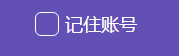
<div class="remember-account">

    <input type="checkbox">

    <div class="sub-checkbox"></div>

    <span>记住账号</span>

</div>
//css

//增加的样式代码,用/**/注释出来;可对比

.remember-account {

    position: relative;  /*父层*/

    display: inline-block;

    font-size: 18px;

    color: #fff;

    float: left;

    margin-left: 26px;

}

.remember-account input[type="checkbox"] {

    position: absolute;  /*input,相对定位*/

    -webkit-appearance: none;

    outline: none;

    border: none;

    background-color: transparent;

    box-sizing: border-box;

    height: 24px;

    width: 24px;

    cursor: pointer;

    border: 1px solid #fff;

    box-sizing: border-box;

    border-radius: 6px;

    vertical-align: middle;

    opacity: 0; /*透明度为0,隐藏掉input*/

    z-index: 2; /* 比input下面的div,z-index:1大,层叠在最上面,点击时候能点击到input */

}

/*用div模拟input的样式*/

.sub-checkbox{

    display: inline-block;

    position: absolute; /*input下面的div,相对定位*/

    -webkit-appearance: none;

    outline: none;

    border: none;

    background-color: transparent;

    box-sizing: border-box;

    height: 24px;

    width: 24px;

    cursor: pointer;

    border: 1px solid #fff;

    box-sizing: border-box;

    border-radius: 6px;

    vertical-align: middle;

    z-index: 1;/* 比input的z-index:2小,层叠在下面面 */

}

/*!!利用伪类的写法+;input选中后,下面的div的样式*/

input[type="checkbox"]:checked + div {

    height: 24px;

    width: 24px;

    background-image: url(../images/login/pick.png);

    background-repeat: no-repeat;

    background-position: 0 0;

    vertical-align: middle;

    border: none;

}

.remember-account span{

    display: inline-block;

    margin-left: 30px;/*因为input和它下面的div都相对定位脱离了文本流,所以不给距离,文字会层叠过去*/

}



纯css兼容个浏览器input[type='radio']不能自定义样式的更多相关文章
- input[type=radio]选中的样式变化
input[type=radio]:hover{ border: 2px solid #D0D0D0; } input[type=radio]:focus{ border: 2px solid #1B ...
- 如何更改 iOS 和安卓浏览器上的 input[type="radio"] 元素的默认样式?
Safari 上的默认样式是这样的, 背景颜色可以使用background-color改变,但中间那个点始终无法去掉. 我查了一些jQuery插件,如iCheck.js,但是那说明写得我都看不明白,根 ...
- 自定义input[type="radio"]的样式(支持普通浏览器,IE8以上)
对于表单,input[type="radio"] 的样式总是不那么友好,在不同的浏览器中表现不一. 对单选按钮自定义样式,我们以前一直用的脚本来实现,不过现在可以使用新的伪类 :c ...
- css 能改变input type radio和checkbox 圆圈或方框的大小
把input隐藏,外面套label,再里面加个span,样式写在span上,让label覆盖在span上面,js去改active的class <label for="remember& ...
- 自定义input[type="radio"]的样式
对于表单,input[type="radio"] 的样式总是不那么友好,在不同的浏览器中表现不一. 为了最大程度的显示出它们的差别,并且为了好看,首先定义了一些样式: <fo ...
- 定制 input[type="radio"] 和 input[type="checkbox"] 样式
表单中,经常会使用到单选按钮和复选框,但是,input[type="radio"] 和 input[type="checkbox"] 的默认样式在不同的浏览器或 ...
- 修改 input[type="radio"] 和 input[type="checkbox"] 的默认样式
表单中,经常会使用到单选按钮和复选框,但是,input[type="radio"] 和 input[type="checkbox"] 的默认样式在不同的浏览器或 ...
- 自定义input[type="radio"]
对于表单,input[type="radio"] 的样式总是不那么友好,在不同的浏览器中表现不一. 对单选按钮自定义样式,我们以前一直用的脚本来实现,不过现在可以使用新的伪类 :c ...
- CSS兼容各浏览器的hack
CSS兼容各浏览器的hack:建议:尽可能的手写代码,可以有效的提高学习效率和深度.浏览器的种类多,麻烦自然也多,主要是各种浏览器对某些属性的渲染效果并不相同,所以有时候需要专门针对特定浏览器或者特定 ...
随机推荐
- Reverse Words in a String leetcode
Given an input string, reverse the string word by word. For example,Given s = "the sky is blue& ...
- Mac上关于shell使用Python3和C++11声明
1.使用Python3 Mac上的shell上自带的Python版本是2.7,当需要使用Python3时,下载安装好Python时,在shell上敲入Python发现却还是显示Python2.7,这是 ...
- 1191: [HNOI2006]超级英雄Hero
1191: [HNOI2006]超级英雄Hero Time Limit: 10 Sec Memory Limit: 162 MBSubmit: 1996 Solved: 946[Submit][S ...
- swift -- 基础
swift -- 基础 1.常量和变量 常量: let 变量: var 2.声明常量和变量 常量的声明: let let a = 1 //末尾可以不加分号,等号两边的空格必须对应(同 ...
- Power BI Embedded 与 Bot Framework 结合的AI解决方案
最近最热门的话题莫过于AI了,之前我做过一片讲 BOTFRAMEWORK和微信 相结合的帖子 如何将 Microsoft Bot Framework 链接至微信公共号 我想今天基于这个题目扩展一下,P ...
- 零件库管理信息系统设计--part03:管理员登录部分设计
兄弟们,我又回来啦! 上次我把表建完了.今天来点干货,我们用ssm框架来先简单实现一下管理员的登录功能. 在实现之前,我对user表(管理员表)做了些简单的修改,先来看看: 忽略哪些蓝色的马赛克和乱输 ...
- git工具使用方法及常用命令
git下载地址:https://git-for-windows.github.io/git环境变量配置:增加:GIT_HOME = C:\Git (文件夹为git软件的安装文件夹)Path添加: %G ...
- Linux 上做免密码登陆
基于密钥验证1.生成一对密钥ssh-keygen -t {rsa|dsa} -f /path/to/keyfile -N 'password'2.将公钥传输至服务器某用户的家目录的.ssh/autho ...
- 序列化与反序列化的单例模式实现和readResolve()
如: public class SingleTest implements Serializable{private static final long serialVersionUID = -860 ...
- [SinGuLaRiTy] 最短路计算代码库
[SinGuLaRiTy-1002] Copyright (c) SinGuLaRiTy 2017. All Rights Reserved. Dijkstra: 题目描述 有向图的单源点最短路问题( ...