
吴裕雄 Bootstrap 前端框架开发——Bootstrap 表单:表单控件状态
<!DOCTYPE html>

<html>

    <head>

        <meta charset="utf-8">

        <title>Bootstrap 实例 - 表单控件状态</title>

        <link rel="stylesheet" href="https://cdn.staticfile.org/twitter-bootstrap/3.3.7/css/bootstrap.min.css">

        <script src="https://cdn.staticfile.org/jquery/2.1.1/jquery.min.js"></script>

        <script src="https://cdn.staticfile.org/twitter-bootstrap/3.3.7/js/bootstrap.min.js"></script>

    </head>

    <body>

        <form class="form-horizontal" role="form">

            <div class="form-group">

                <label class="col-sm-2 control-label">聚焦</label>

                <div class="col-sm-10">

                    <input class="form-control" id="focusedInput" type="text"  value="该输入框获得焦点...">

                </div>

            </div>

            <div class="form-group">

                <label for="inputPassword" class="col-sm-2 control-label">

                    禁用

                </label>

                <div class="col-sm-10">

                    <input class="form-control" id="disabledInput" type="text" placeholder="该输入框禁止输入..." disabled>

                </div>

            </div>

            <fieldset disabled>

                <div class="form-group">

                    <label for="disabledTextInput"  class="col-sm-2 control-label">禁用输入(Fieldset disabled)

                    </label>

                    <div class="col-sm-10">

                        <input type="text" id="disabledTextInput" class="form-control"  placeholder="禁止输入">

                    </div>

                </div>

                <div class="form-group">

                    <label for="disabledSelect"  class="col-sm-2 control-label">禁用选择菜单(Fieldset disabled)

                    </label>

                    <div class="col-sm-10">

                        <select id="disabledSelect" class="form-control">

                            <option>禁止选择</option>

                        </select>

                    </div>

                </div>

            </fieldset>

            <div class="form-group has-success">

                <label class="col-sm-2 control-label" for="inputSuccess">

                    输入成功

                </label>

                <div class="col-sm-10">

                    <input type="text" class="form-control" id="inputSuccess">

                </div>

            </div>

            <div class="form-group has-warning">

                <label class="col-sm-2 control-label" for="inputWarning">

                    输入警告

                </label>

                <div class="col-sm-10">

                    <input type="text" class="form-control" id="inputWarning">

                </div>

            </div>

            <div class="form-group has-error">

                <label class="col-sm-2 control-label" for="inputError">

                    输入错误

                </label>

                <div class="col-sm-10">

                    <input type="text" class="form-control" id="inputError">

                </div>

            </div>

        </form>

    </body>

</html>
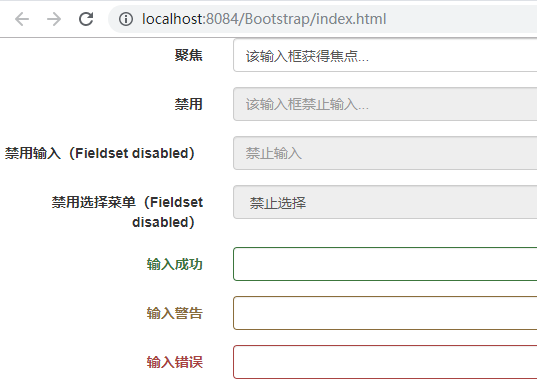
吴裕雄 Bootstrap 前端框架开发——Bootstrap 表单:表单控件状态的更多相关文章
- 吴裕雄 Bootstrap 前端框架开发——Bootstrap 表单:表单帮助文本
<!DOCTYPE html> <html> <head> <meta charset="utf-8"> <title> ...
- 吴裕雄 Bootstrap 前端框架开发——Bootstrap 表单:表单控件大小
<!DOCTYPE html> <html> <head> <meta charset="utf-8"> <title> ...
- 吴裕雄 Bootstrap 前端框架开发——Bootstrap 表单:水平表单
<!DOCTYPE html> <html> <head> <meta charset="utf-8"> <title> ...
- 吴裕雄 Bootstrap 前端框架开发——Bootstrap 表单:内联表单
<!DOCTYPE html> <html> <head> <meta charset="utf-8"> <title> ...
- 吴裕雄 Bootstrap 前端框架开发——Bootstrap 表单
<!DOCTYPE html> <html> <head> <meta charset="utf-8"> <title> ...
- 吴裕雄 Bootstrap 前端框架开发——Bootstrap 表单:静态控件
<!DOCTYPE html> <html> <head> <meta charset="utf-8"> <title> ...
- 吴裕雄 Bootstrap 前端框架开发——Bootstrap 表单:选择框(Select)
<!DOCTYPE html> <html> <head> <meta charset="utf-8"> <title> ...
- 吴裕雄 Bootstrap 前端框架开发——Bootstrap 表单:复选框(Checkbox)和单选框(Radio)
<!DOCTYPE html> <html> <head> <meta charset="utf-8"> <title> ...
- 吴裕雄 Bootstrap 前端框架开发——Bootstrap 表单:文本框(Textarea)
<!DOCTYPE html> <html> <head> <meta charset="utf-8"> <title> ...
随机推荐
- excel表格 筛选 通过mysql语句
1.整理excel表格的数据 类似的 前面有其他符号的 都可以处理. 注意下一步是2个操纵:分别设置左右: 结果: 2.在复制粘贴到excel的时候,会有一些数字被设置成了科学计数法, 例如复制到ex ...
- Vue-全局变量和方法
一.单文件引入 1.创建存放全局变量和方法的vue文件 Common.uve <script> const userName = 'yangjing'; function add(a,b) ...
- 类型不匹配 java.lang.IllegalArgumentException : argument type mismatch
异常: 解决: money的类型是 float类型(把0.8改成 0.8f 即可)
- 局域网内Linux下开启ftp服务的“曲折路”和命令复习
今天主要学习了Linux下网络配置以及vsftp(FTP)和samba的服务配置,学习起来,难度也就一般,并没有特别难,可是在可以做实验的时候,却并没有自己想像的那么顺利,可见,很多事情看起来不难,做 ...
- notepad++ java编码,输出中文字符时,编译出错
呆在公司中,最近受开发手机app的几个同事影响,想学android的开发,心血来潮,挡也挡不住,说干就干,直接看教程,发现有很多关于java的语法知识不懂,于是又来学java,学习的过程中难免出现问题 ...
- 一个arctan积分的两种解法
\[\Large\int_{0}^{1}\frac{\arctan x}{\sqrt{1-x^{2}}}\mathrm{d}x\] \(\Large\mathbf{Solution:}\) 首先第一种 ...
- JS打开浏览器新窗口
window.open(URL,name,features,replace); 参数 描述 URL 一个可选的字符串,声明了要在新窗口中显示的文档的 URL.如果省略了这个参数,或者它的值是空字符串, ...
- 第四节:Vuejs组件及组件之间的交互
一. 组件及其交互 1.组件的注册 (1).全局注册 Vue.component('组件名称', { }) 第1个参数是标签名称,第2个参数是一个选项对象. 选项参数包括 data:必须是一个func ...
- toPlainString() 和 toString()(转载)
函数 toPlainString() 和 toString() 对于 BigDecimal b ; (b=(0.4321)^ 20) String s = b.toPlainString() ; Sy ...
- spark实验(一)--linux系统常见命令及其文件互传(2)
2.使用 Linux 系统的常用命令 启动 Linux 虚拟机,进入 Linux 系统,通过查阅相关 Linux 书籍和网络资料,或者参考 本教程官网的“实验指南”的“Linux 系统常用命令”,完成 ...