
自定义 ---UICollectionViewLayout-正N变形居中布局
1. 自定义UICollectionLayout ---- 正三角形居中布局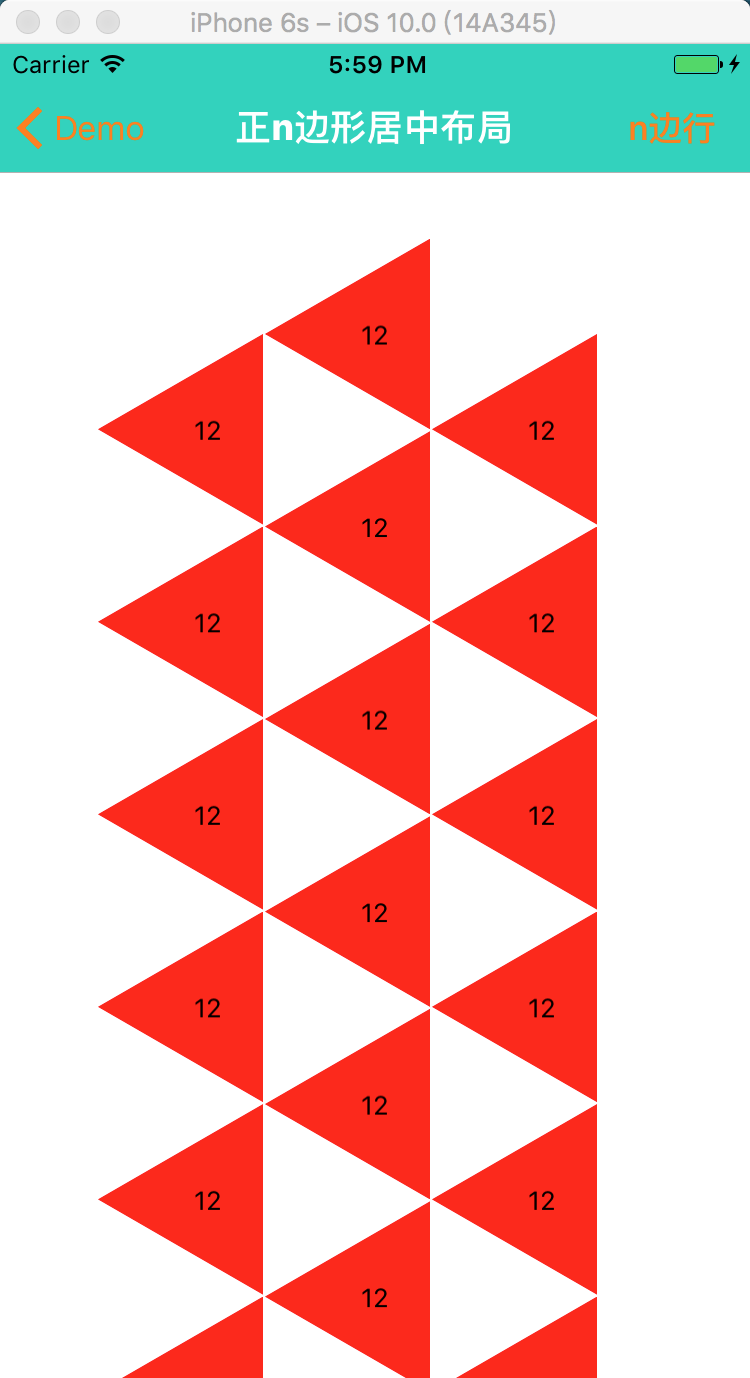
支持多个图形的自动布局

2. 自定义UICollectionLayout ---- 正方形居中布局
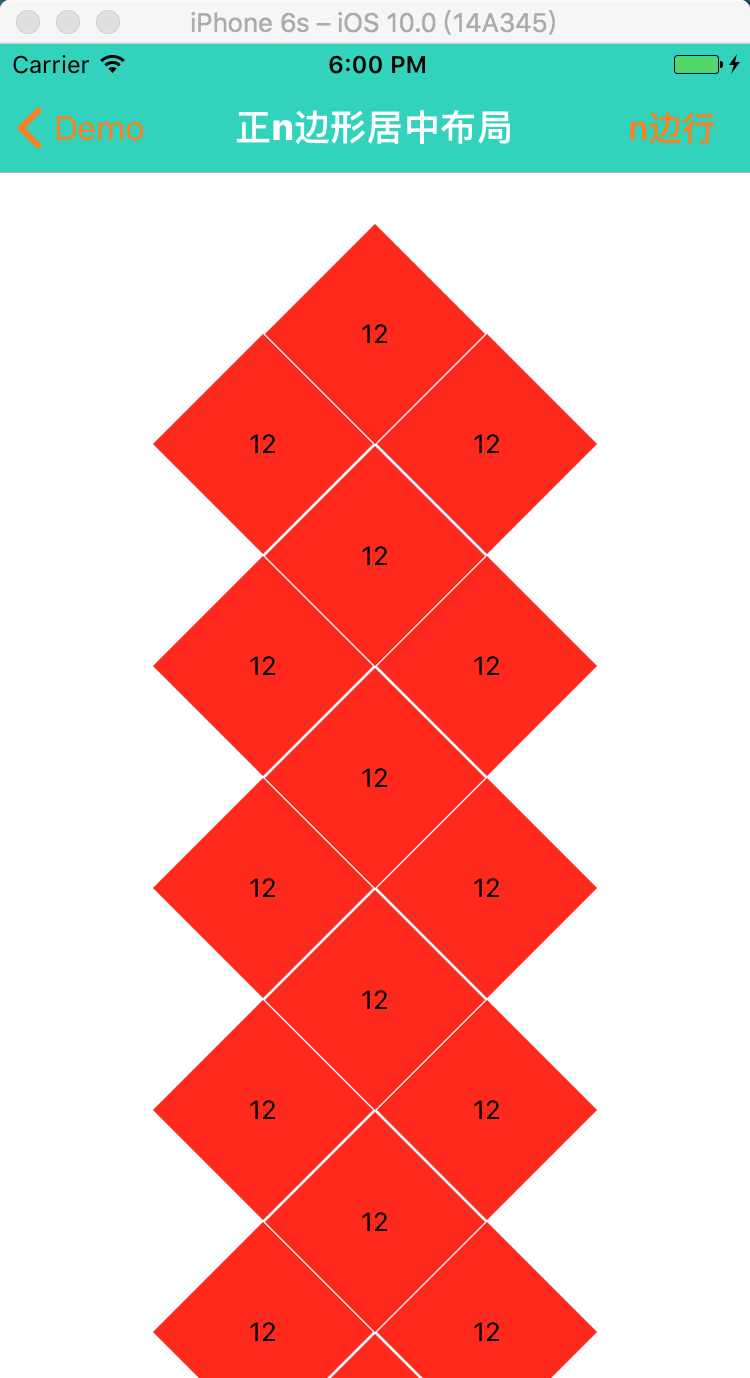
滚动展示的区域

3. 自定义UICollectionLayout ---- 正六边形居中布局(蜂窝布局)

等等正n变形布局,其中 正六边形支持 间距大小的改变,图形的旋转。

旋转 --

间距

4. 核心代码 ---- 绘制正n边形 (贝塞尔曲线)
- (void)layoutSubviews
{
    [super layoutSubviews];
    // step 1: 绘制正n变形
    CGFloat X = self.contentView.frame.size.width  * 0.5;
    CGFloat Y = self.contentView.frame.size.height * 0.5;
    UIBezierPath* bezierPath = [UIBezierPath bezierPath];
    bezierPath.lineCapStyle = kCGLineCapRound;
    bezierPath.lineJoinStyle = kCGLineCapRound;
    CGFloat angle = labs(360/self.number);
    [bezierPath moveToPoint: CGPointMake(X - mm , Y)];
    for (int i = 0; i < self.number - 1; i ++) {
        CGFloat angle1 = angle *(i + 1);
        CGFloat XX = X + (mm * (COS(angle1)))*(-1);
        CGFloat YY = Y + mm * (SIN(angle1));
        [bezierPath addLineToPoint: CGPointMake(XX, YY)];
    }
    [bezierPath addLineToPoint: CGPointMake(X - mm , Y)];
    // step 2: 根据路径生成蒙板
    CAShapeLayer *maskLayer = [CAShapeLayer layer];
    maskLayer.path = [bezierPath CGPath];

    self.backgroundColor = [UIColor redColor];
    // step 3: 给cell添加模版
    self.layer.mask = maskLayer;
    self.titleLabel.frame = self.bounds;
}
5. 核心代码 --- 自定义Layout布局
- (void)prepareLayout
{
    [super prepareLayout];
    _itemCount = [self.collectionView numberOfItemsInSection:];
    _attributeAttay = [[NSMutableArray alloc]init];
     ; i < _itemCount; i ++) {
        //设置第一个正六边形的中心位置
        CGFloat X = self.collectionView.frame.size.width*0.5;
        CGFloat Y = self.TopMargin;
         == ? -:i%;
         == ? :i%;
        X += CST(-num)*([self judgeXWithNumber:self.number]);
        Y += ([self judgeSizeWithNumber:self.number].height + self.margin)*(i/) + CST(num2)*([self judgeSizeWithNumber:self.number].height/)+self.margin;
        UICollectionViewLayoutAttributes *attribute = [UICollectionViewLayoutAttributes layoutAttributesForCellWithIndexPath:[NSIndexPath indexPathForRow:i inSection:]];
        // 设置每隔item的大小
        attribute.size = [self judgeSizeWithNumber:self.number];
        // 设置每隔item的圆心
        // 计算每个item的中心坐标
        attribute.center = CGPointMake(X, Y);
        [_attributeAttay addObject:attribute];
    }
}

// X轴方向的间隔
- (CGFloat)judgeXWithNumber:(NSInteger)xNumber
{
     ) {
        /xNumber)*mm;
    }
    )
    {
        /xNumber)*mm;
    }
    )
    {
        /xNumber)*mm - ;
    }
    )
    {
        /xNumber)*mm;
    }
    )
    {
        /xNumber)*mm;
    }
    else
    {
        *mm + self.margin ;
    }
}

// 就算正n变形的大小
- (CGSize)judgeSizeWithNumber:(NSInteger)sNumber
{
     || sNumber ==  ) {
        *mm,*SIN(/sNumber)*mm);
    }
    else
    {
        *(mm),*mm);
    }
}

//设置内容区域的大小
-(CGSize)collectionViewContentSize
{
    CGFloat hh = [self judgeSizeWithNumber:self.number].height;
    CGFloat height = (hh+self.margin)*(self.itemCount/ + ) + self.TopMargin + ;
    if (height > Device_height) {
        height = height;
    }
    else
    {
        height = Device_height;
    }

    return CGSizeMake(Device_width, height);
}

//返回设置数组
-(NSArray<UICollectionViewLayoutAttributes *> *)layoutAttributesForElementsInRect:(CGRect)rect{
    return _attributeAttay;
}
View Layout
自定义 ---UICollectionViewLayout-正N变形居中布局的更多相关文章
- 自定义UICollectionViewLayout 布局实现瀑布流
自定义 UICollectionViewLayout 布局,实现瀑布流:UICollectionView和UICollectionViewCell 另行创建,这只是布局文件, 外界控制器只要遵守协议并 ...
- iOS 关于自定义UICollectionViewLayout实现复杂布局
UICollectionView的简单介绍 UICollectionView的结构 Cells Supplementary Views 追加视图 (类似Header或者Footer) Decorati ...
- 自定义UICollectionViewLayout并添加UIDynamic - scorpiozj(转)
转载自:http://www.tuicool.com/articles/jM77Vf 自定义UICollectionViewLayout并添加UIDynamic UICollectionVie ...
- 自定义UICollectionViewLayout并添加UIDynamic
大家也可以到这里查看. UICollectionView是iOS6引入的控件,而UIDynamicAnimator是iOS7上新添加的框架.本文主要涵盖3部分: 一是简单概括UICollectionV ...
- 自定义UICollectionViewLayout 实现瀑布流
今天研究了一下自定义UICollectionViewLayout. 看了看官方文档,要自定义UICollectionViewLayout,需要创建一个UICollectionViewLayout的子类 ...
- 自定义UICollectionViewLayout之CATransform3D
1.自定义UICollectionViewLayout旋转效果 之前有自定义UICollectionViewLayout(适用于多个section),本文是一个对cell进行CATransform3D ...
- CSS居中布局总结【转】
居中布局 <div class="parent"> <div class="child">demo</div> </d ...
- CSS居中布局总结
居中布局 <div class="parent"> <div class="child">demo</div> </d ...
- sass—使用自定义function和@each实现栅格布局
/*使用自定义function和@each实现栅格布局*/ @function buildLayout($num: 5){ $map: (defaultValue: 0); //不能直接生成col,需 ...
随机推荐
- Codeforces 558E A Simple Task(计数排序+线段树优化)
http://codeforces.com/problemset/problem/558/E Examples input 1 abacdabcda output 1 cbcaaaabdd input ...
- 网络流dinic板子
bool bfs(){ memset(deep,0,sizeof(deep)); queue<int>que; que.push(s); deep[s]=1; while(!que.emp ...
- as such 位于句首
- python学习笔记(15)pymysql数据库操作
pymysql数据库操作 1.什么是PyMySQL 为了使python连接上数据库,你需要一个驱动,这个驱动是用于与数据库交互的库. PyMySQL : 这是一个使Python连接到MySQL的库,它 ...
- Wanna go back home
题目描述 Snuke lives on an infinite two-dimensional plane. He is going on an N-day trip. At the beginnin ...
- Mysql Sql 语句练习题 (50道)
MySql 语句练习50题 表名和字段 –1.学生表 Student(s_id,s_name,s_birth,s_sex) –学生编号,学生姓名, 出生年月,学生性别 –2.课程表 Course(c_ ...
- mysql远程导出
D:\phpStudy\PHPTutorial\MySQL\bin>mysqldump -h192.168.1.1 -u用户名 -p密码 --default-character-set=utf8 ...
- String截取字符串的指定字节长度
/** TODO:截取字符串的指定字节长度 * @Author wenjing * @Date 11:02 2019/5/15 * @Param [str, bengin, end] * @retur ...
- Python-scapy学习
scapy-arpspoof from scapy.all import Ether,ARP,sendp,getmacbyip Ether:用来构建以太网数据包 ARP:构建ARP数据包的类 send ...
- MIO、EMIO、AXI_GPIO区别与联系
https://blog.csdn.net/u014485485/article/details/78141594 点灯实验