
Python CMDB开发
Python CMDB开发
运维自动化路线:
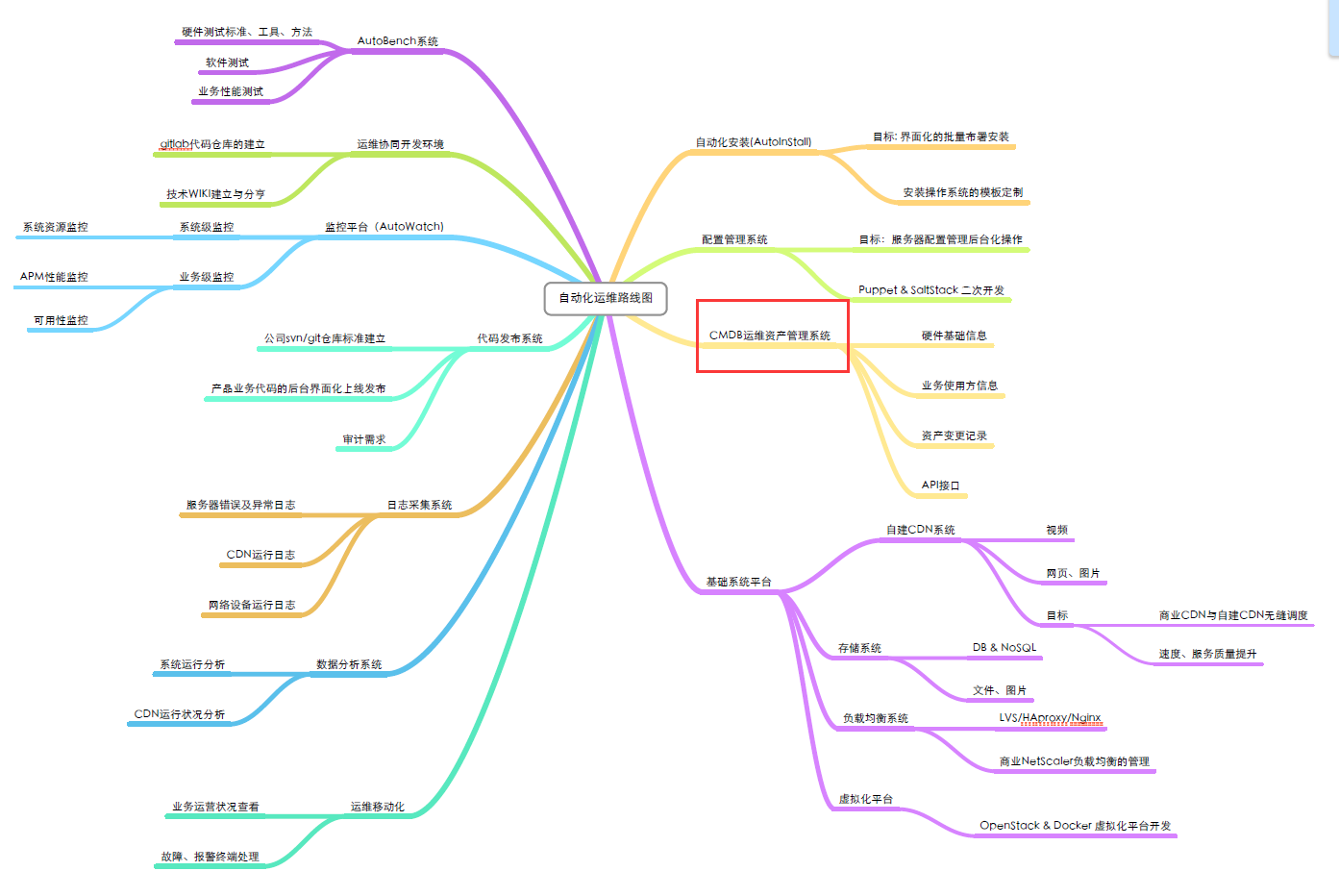
cmdb的开发需要包含三部分功能:
- 采集硬件数据
- API
- 页面管理
执行流程:服务器的客户端采集硬件数据,然后将硬件信息发送到API,API负责将获取到的数据保存到数据库中,后台管理程序负责对服务器信息的配置和展示。
采集硬件信息
采集硬件信息可以有两种方式实现:
- 利用puppet中的report功能
- 自己写agent,定时执行
两种方式的优缺点各异:方式一,优点是不需要在每台服务器上步一个agent,缺点是依赖于puppet,并且使用ruby开发;方式二,优点是用于python调用shell命令,学习成本低,缺点是需要在每台服务器上发一个agent。
方式一
默认情况下,puppet的client会在每半个小时连接puppet的master来同步数据,如果定义了report,那么在每次client和master同步数据时,会执行report的process函数,在该函数中定义一些逻辑,获取每台服务器信息并将信息发送给API
puppet中默认自带了5个report,放置在【/usr/lib/ruby/site_ruby/1.8/puppet/reports/】路径下。如果需要执行某个report,那么就在puppet的master的配置文件中做如下配置:
on master
|
1
2
3
4
5
6
|
/etc/puppet/puppet.conf[main]reports = store #默认#report = true #默认#pluginsync = true #默认 |
on client
|
1
2
3
4
5
6
7
8
|
/etc/puppet/puppet.conf[main]#report = true #默认 [agent]runinterval = 10server = master.puppet.comcertname = c1.puppet.com |
如上述设置之后,每次执行client和master同步,就会在master服务器的 【/var/lib/puppet/reports】路径下创建一个文件,主动执行:puppet agent --test
所以,我们可以创建自己的report来实现cmdb数据的采集,创建report也有两种方式。
Demo 1
1、创建report
2、应用report
Demo 2
1、创建report
在 /etc/puppet/modules 目录下创建如下文件结构:
modules └── cmdb ├── lib │ └── puppet │ └── reports │ └── cmdb.rb └── manifests └── init.pp|
1
2
3
4
5
6
7
8
9
10
11
12
13
14
15
16
17
18
19
20
21
22
23
24
|
require 'puppet'require 'fileutils'require 'puppet/util' SEPARATOR = [Regexp.escape(File::SEPARATOR.to_s), Regexp.escape(File::ALT_SEPARATOR.to_s)].join Puppet::Reports.register_report(:cmdb) do desc "Store server info These files collect quickly -- one every half hour -- so it is a good idea to perform some maintenance on them if you use this report (it's the only default report)." def process certname = self.name now = Time.now.gmtime File.open("/tmp/cmdb.json",'a') do |f| f.write(certname) f.write(' | ') f.write(now) f.write("\r\n") end endend |
2、应用report
|
1
2
3
4
5
|
/etc/puppet/puppet.conf[main]reports = cmdb#report = true #默认#pluginsync = true #默认 |
方式二
使用python调用shell命令,解析命令结果并将数据发送到API
API
- REST与技术无关,代表的是一种软件架构风格,REST是Representational State Transfer的简称,中文翻译为“表征状态转移”
- REST从资源的角度类审视整个网络,它将分布在网络中某个节点的资源通过URL进行标识,客户端应用通过URL来获取资源的表征,获得这些表征致使这些应用转变状态
- REST与技术无关,代表的是一种软件架构风格,REST是Representational State Transfer的简称,中文翻译为“表征状态转移”
- 所有的数据,不过是通过网络获取的还是操作(增删改查)的数据,都是资源,将一切数据视为资源是REST区别与其他架构风格的最本质属性
- 对于REST这种面向资源的架构风格,有人提出一种全新的结构理念,即:面向资源架构(ROA:Resource Oriented Architecture)
django中可以使用 Django rest framwork 来实现:http://www.django-rest-framework.org/
class Blog(models.Model):

    title = models.CharField(max_length=50)

    content = models.TextField()

from django.contrib.auth.models import User

from rest_framework import routers, serializers, viewsets

from app02 import models

from rest_framework.decorators import detail_route, list_route

from rest_framework import response

from django.shortcuts import HttpResponse

# Serializers define the API representation.

class UserSerializer(serializers.HyperlinkedModelSerializer):

    class Meta:

        model = User

        fields = ('url', 'username', 'email', 'is_staff')

# ViewSets define the view behavior.

class UserViewSet(viewsets.ModelViewSet):

    queryset = User.objects.all()

    serializer_class = UserSerializer

# Serializers define the API representation.

class BlogSerializer(serializers.HyperlinkedModelSerializer):

    class Meta:

        model = models.Blog

        depth = 1

        fields = ('url','title', 'content',)

# ViewSets define the view behavior.

class BLogViewSet(viewsets.ModelViewSet):

    queryset = models.Blog.objects.all()

    serializer_class = BlogSerializer

    @list_route()

    def detail(self,request):

        print request

        #return HttpResponse('ok')

        return response.Response('ok')
from django.conf.urls import patterns, include, url

from django.contrib import admin

from rest_framework import routers

from app02 import api

from app02 import views

# Routers provide an easy way of automatically determining the URL conf.

router = routers.DefaultRouter()

router.register(r'users', api.UserViewSet)

router.register(r'blogs', api.BLogViewSet)

urlpatterns = patterns('',

    url(r'^', include(router.urls)),

    url(r'index/', views.index),

    #url(r'^api-auth/', include('rest_framework.urls', namespace='rest_framework'))

)
from django.shortcuts import render

from rest_framework.decorators import api_view

from rest_framework.response import Response

# Create your views here.

@api_view(['GET', 'PUT', 'DELETE','POST'])

def index(request):

    print request.method

    print request.DATA

    return Response([{'asset': '1','request_hostname': 'c1.puppet.com' }])
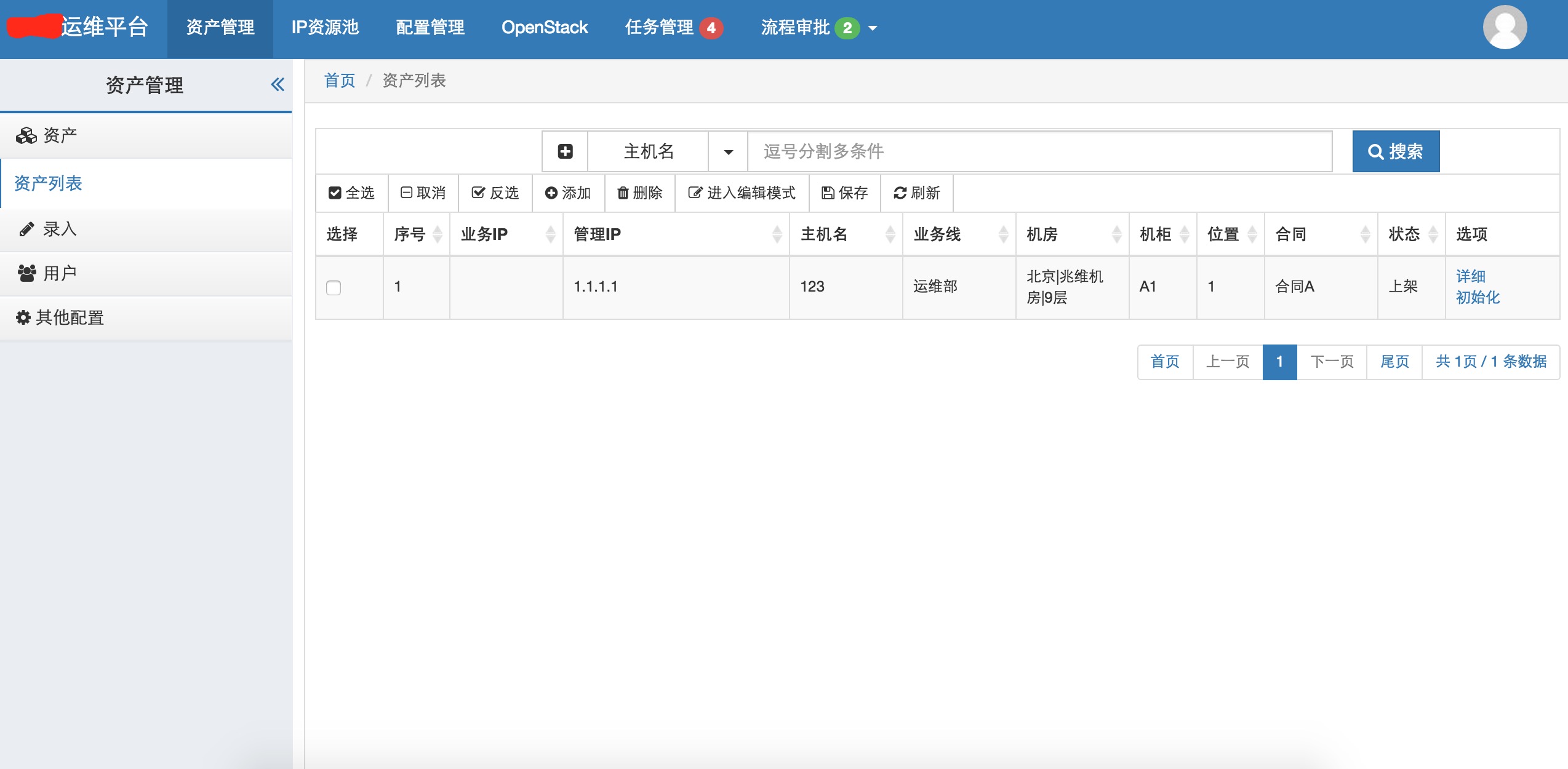
后台管理页面
后台管理页面需要实现对数据表的增删改查。
问题:
1、paramiko执行sudo
|
1
2
3
4
|
/etc/sudoersDefaults requirettyDefaults:cmdb !requiretty |
Python CMDB开发的更多相关文章
- Redis的Python实践,以及四中常用应用场景详解——学习董伟明老师的《Python Web开发实践》
首先,简单介绍:Redis是一个基于内存的键值对存储系统,常用作数据库.缓存和消息代理. 支持:字符串,字典,列表,集合,有序集合,位图(bitmaps),地理位置,HyperLogLog等多种数据结 ...
- windows和linux中搭建python集成开发环境IDE——如何设置多个python环境
本系列分为两篇: 1.[转]windows和linux中搭建python集成开发环境IDE 2.[转]linux和windows下安装python集成开发环境及其python包 3.windows和l ...
- 有意思的Python:开发和部署一览
我觉得在有时间的条件下,学习不同的开发语言,对于保持对技术的理解是有帮助的. Python是一门这样简单而且有趣的语言.网上资料已经比较多了.我这里主要对开发和部署环境所涉及的几个工具做些介绍. 1. ...
- 【转】windows和linux中搭建python集成开发环境IDE
本系列分为两篇: 1.[转]windows和linux中搭建python集成开发环境IDE 2.[转]linux和windows下安装python集成开发环境及其python包 3.windows和l ...
- 【转】linux和windows下安装python集成开发环境及其python包
本系列分为两篇: 1.[转]windows和linux中搭建python集成开发环境IDE 2.[转]linux和windows下安装python集成开发环境及其python包 3.windows和l ...
- Python企业级开发之一:基础
Python企业级开发相关内容.这里涉及到Python开发过程中的问题以及解决办法.还提供新的开发思路. 脚本开发的一些共同的问题.如:1.对OO的支持不完善,2.问题定位方式给出的信息过于晦涩,3. ...
- Python虚拟开发环境
最近,一直在不同版本的Python之间来回折腾,发现了几个Python虚拟开发环境工具,具体如下: 1. Virtualenv,可以指定开发环境的Python版本.继承已有开发环境配置,virtual ...
- [转]virtualenv建立多个Python独立开发环境
不同的人喜欢用不同的方式建立各自的开发环境,但在几乎所有的编程社区,总有一个(或一个以上)开发环境让人更容易接受. 使用不同的开发环境虽然没有什么错误,但有些环境设置更容易进行便利的测试,并做一些重复 ...
- 西秦的ACE-Python教程 一、Python本地开发环境部署
西秦的ACE-Python教程 一.Python本地开发环境部署 西秦 级别: 论坛版主 发帖 1357 云币 2782 加关注 写私信 只看楼主 更多操作楼主 发表于: 10-10 ...
随机推荐
- 领域驱动设计(Domain Driven Design)参考架构详解
摘要 本文将介绍领域驱动设计(Domain Driven Design)的官方参考架构,该架构分成了Interfaces.Applications和Domain三层以及包含各类基础设施的Infrast ...
- LightOJ_1038 Race to 1 Again
题目链接 题意: 给一个数n, 每次操作是随机的选择一个[1,N]区间内能够被n整除的数进行除法, 然后得到一个新的n. 问n变成1时的期望操作次数. 思路: 设E[n] 为 当数为x时, 变成 1 ...
- 如何使用 Java 构建微服务?
[编者按]微服务背后的大理念是将大型.复杂且历时长久的应用在架构上设计为内聚的服务,这些服务能够随着时间的流逝而演化.本文主要介绍了利用 Java 生态系统构建微服务的多种方法,并分析了每种方法的利弊 ...
- LeetCode 面试:Add Two Numbers
1 题目 You are given two linked lists representing two non-negative numbers. The digits are stored in ...
- 搜索提示時jquery的focusout和click事件沖突問題完美解决
在主流的搜索引擎上搜索時,輸入內容,往往會彈出智能提示.輸入框为input,智能提示區域为suggest.接下來一般有兩種操作: 1.選擇某一提示,則把內容复制到input中 ...
- IE 弹出"Unable to do xml/xsl" Processing
解决方法:
- House Robber II——Leetcode
After robbing those houses on that street, the thief has found himself a new place for his thievery ...
- Performance Optimization (2)
DesktopGood performance is critical to the success of many games. Below are some simple guidelines f ...
- HDOJ/HDU 2710 Max Factor(素数快速筛选~)
Problem Description To improve the organization of his farm, Farmer John labels each of his N (1 < ...
- Bzoj 3809: Gty的二逼妹子序列 莫队,分块
3809: Gty的二逼妹子序列 Time Limit: 35 Sec Memory Limit: 28 MBSubmit: 868 Solved: 234[Submit][Status][Dis ...