
Android Dialog AlertDialog

1、普通的对话框
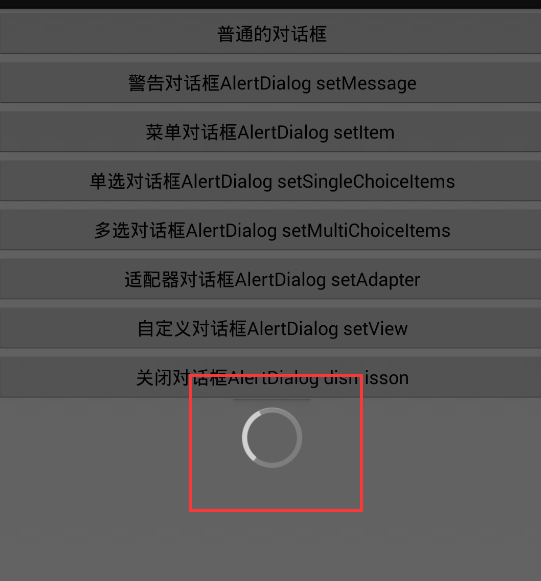
 <LinearLayout xmlns:android="http://schemas.android.com/apk/res/android"

     android:layout_width="match_parent"

     android:layout_height="match_parent"

     android:gravity="center"

     android:orientation="vertical" >

     <ProgressBar

         android:id="@+id/progressBar1"

         style="?android:attr/progressBarStyleLarge"

         android:layout_width="wrap_content"

         android:layout_height="wrap_content" />

 </LinearLayout>
Dialog_progress.xml
 public class MyDialog extends Dialog{

     //必须要给构造方法

     public MyDialog(Context context) {

         //也可以在构建Dialog对象的时候就给指定Dialog样式

         //使用主题来修改Dialog样式,在res/values/styles.xml中添加自定义主题

         super(context,R.style.DialogTheme);

     }

     @Override

     protected void onCreate(Bundle savedInstanceState) {

         super.onCreate(savedInstanceState);

         //这个可以不要标题。通过getWindow().requestFeature(featureId)方法

         //getWindow().requestFeature(Window.FEATURE_NO_TITLE);

         setContentView(R.layout.dialog_progress);

     }

     /**

      * 一个Activity或者一个Dialog刚刚出现在用户面前的时候,焦点改变调用onWindowFocusChanged

      */

     @Override

     public void onWindowFocusChanged(boolean hasFocus) {

         super.onWindowFocusChanged(hasFocus);

     }

 }
MyDialog
 // 普通对话框

     public void dialog1(View v) {

         MyDialog dialog = new MyDialog(this);

         dialog.setTitle("这是进度Dialog");

         // 显示对话框

         dialog.show();

         // 关闭对话框用

         // dialog.dismiss();

     }
普通对话框
2、警告对话框AlertDialog setMessage
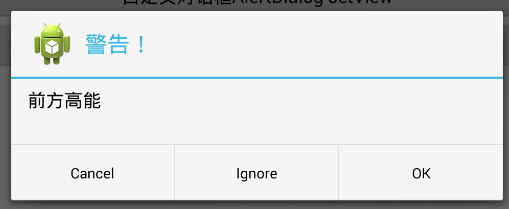
 //AlertDialog  setMessage

     public void dialog2(View v) {

         AlertDialog.Builder dialog = new AlertDialog.Builder(this);

         dialog.setTitle("警告!").setIcon(R.drawable.ic_launcher)

                 .setMessage("前方高能")

                 // 注意这个导的包是import android.content.DialogInterface.OnClickListener;

                 .setPositiveButton("OK", new OnClickListener() {

                     @Override

                     public void onClick(DialogInterface dialog, int which) {

                         Toast.makeText(MainActivity.this, "您选择了OK",

                                 Toast.LENGTH_SHORT).show();

                     }

                 })

                 .setNegativeButton("Cancel", new OnClickListener() {

                     @Override

                     public void onClick(DialogInterface dialog, int which) {

                         Toast.makeText(MainActivity.this, "您选择了Cancel",

                                 Toast.LENGTH_SHORT).show();

                     }

                 })

                 .setNeutralButton("Ignore", new OnClickListener() {

                     @Override

                     public void onClick(DialogInterface dialog, int which) {

                         Toast.makeText(MainActivity.this, "您选择了Ignore",

                                 Toast.LENGTH_SHORT).show();

                     }

                 })

                 .create().show();

     }
警告对话框,setMessage
3、菜单对话框AlertDialog setItem

 //菜单选择,  setItem 如果设置setMessage,那么只会显示Message

     String[] setting = {"声音","存储","显示","应用","语言和输入法","流量使用情况","WLAN"};

     public void dialog3(View v){

         new AlertDialog.Builder(this)

         .setTitle("设置")

         .setIcon(R.drawable.setting)

         //which代表第几项,item点击后自动关闭,不需要Button

         .setItems(setting, new OnClickListener() {

             @Override

             public void onClick(DialogInterface dialog, int which) {

                 Toast.makeText(MainActivity.this, setting[which], Toast.LENGTH_SHORT).show();

             }

         })

         .create().show();

     }
菜单对话框 setItem
4、单选对话框AlertDialog setSingleChoiceItems
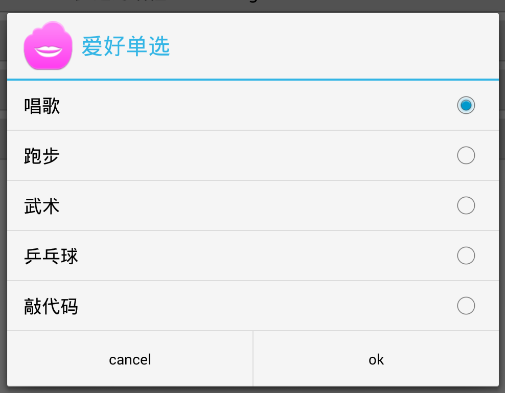
 //单选对话框,setItem

     String[] hobby = {"唱歌","跑步","武术","乒乓球","敲代码"};

     int choice = 0;

     public void dialog4(View v){

         new AlertDialog.Builder(this)

         .setTitle("爱好单选")

         .setIcon(R.drawable.hobby)

         //0代表默认选中第一个,选中不会自动关闭

         .setSingleChoiceItems(hobby, 0, new OnClickListener() {

             @Override

             public void onClick(DialogInterface dialog, int which) {

                 choice = which;

             }

         })

         //Button上的which永远为0,所以这里需要一个变量来保存选中的ItemID

         .setPositiveButton("ok", new OnClickListener() {

             @Override

             public void onClick(DialogInterface dialog, int which) {

                 Toast.makeText(MainActivity.this, hobby[choice], Toast.LENGTH_SHORT).show();

             }

         })

         .setNegativeButton("cancel",null)

         .create().show();

     }
单选对话框 setSingleChoiceItems
5、多选对话框AlertDialog setMultiChoiceItem

 String[] hobby = {"唱歌","跑步","武术","乒乓球","敲代码"};

     boolean[] bool = {false,false,false,false,false};

     List<String> list = new ArrayList<String>();

     public void dialog5(View v){

         new AlertDialog.Builder(this)

         .setTitle("爱好可多选")

         .setIcon(R.drawable.hobby)

         //默认选中了哪些,点击也不会自动关闭

         .setMultiChoiceItems(hobby, bool, new OnMultiChoiceClickListener() {

             @Override

             public void onClick(DialogInterface dialog, int which, boolean isChecked) {

                 if(isChecked){

                     list.add(hobby[which]);

                 }else{

                     list.remove(hobby[which]);

                 }

             }

         })

         .setPositiveButton("ok", new OnClickListener() {

             @Override

             public void onClick(DialogInterface dialog, int which) {

                 Toast.makeText(MainActivity.this, list.toString(), Toast.LENGTH_SHORT).show();

             }

         }).create().show();

     }
多选对话框AlertDialog setMultiChoiceItem
6、适配器对话框AlertDialog setAdapter

 public void dialog6(View v){

         ArrayAdapter<String> adapter = new ArrayAdapter<String>(this, android.R.layout.simple_list_item_1, hobby);

         new AlertDialog.Builder(this)

         .setTitle("适配器对话框")

         //和setItem一样,选中之后对话框就自动消失,不需要Button

         .setAdapter(adapter, new OnClickListener() {

             @Override

             public void onClick(DialogInterface dialog, int which) {

                 Toast.makeText(MainActivity.this, hobby[which], Toast.LENGTH_SHORT).show();

             }

         }).create().show();

     }
适配器对话框AlertDialog setAdapter
7、自定义对话框AlertDialog setView
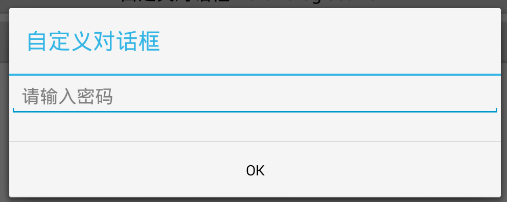
8、关闭对话框AlertDialog dismisson

 <LinearLayout xmlns:android="http://schemas.android.com/apk/res/android"

     android:layout_width="match_parent"

     android:layout_height="match_parent"

     android:orientation="vertical" >

     <ImageView

         android:layout_width="wrap_content"

         android:layout_height="wrap_content"

         android:src="@drawable/ic_launcher"/>

     <EditText

         android:layout_width="wrap_content"

         android:layout_height="wrap_content"

         android:hint="关闭对话框请点击关闭按钮"/>

     <TextView

         android:id="@+id/finish"

         android:layout_width="wrap_content"

            android:layout_height="wrap_content"

            android:text="关闭"/>

 </LinearLayout>
Dialog_dismiss.xml
 public void dialog8(View v){

         View layout = getLayoutInflater().inflate(R.layout.dialog_dismiss, null);

         TextView finish = (TextView) layout.findViewById(R.id.finish);

         final AlertDialog dialog = new AlertDialog.Builder(MainActivity.this)

         .setTitle("可关闭的对话框")

         .setView(layout)

         .create();

         dialog.show();

         finish.setOnClickListener(new View.OnClickListener() {

             @Override

             public void onClick(View v) {

                 dialog.dismiss();

             }

         });

         //有时候用户可能点到了外部,dialog就直接关闭了,而程序不知道,这时候就需要设置

         dialog.setCancelable(false);

         dialog.setOnDismissListener(new OnDismissListener() {

             @Override

             public void onDismiss(DialogInterface dialog) {

                 Toast.makeText(MainActivity.this, "关闭", Toast.LENGTH_SHORT).show();

             }

         });

     }
关闭对话框 AlertDialog setView
Android Dialog AlertDialog的更多相关文章
- android Dialog&AlertDialog
Dialog dialog = new Dialog(context,R.style.AppBaseTheme); wifiView = AppData.inflater.inflate(R.layo ...
- Android DevArt2:Android 5.0下 Dialog&AlertDialog 并不会影响Activity的生命周期
先给出结论:Dialog和AlertDialog并不会影响到Activity的生命周期,但会影响到Activity的优先级. 核心代码: onCreated中: Resources resources ...
- android dialog
/** * @Title MenuTest.java * @package com.example.standardview * @since * @version 1.0.0 * @author V ...
- Android:AlertDialog对话框
1.简单的ALertDialog: Dialog alertDialog = new AlertDialog.Builder(this) .setTitle("标题") .setM ...
- Android Dialog使用举例
在Android开发中,我们经常会需要在Android界面上弹出一些对话框,比如询问用户或者让用户选择.这些功能我们叫它Android Dialog对话框,在我们使用Android的过程中,我归纳了一 ...
- 自定义android Dialog
1.自定义Dialog: import android.app.AlertDialog; import android.app.Dialog; import android.content.Conte ...
- Android之AlertDialog.Builder详解
import android.app.Activity; import android.app.AlertDialog; import android.content.DialogInterface; ...
- 【Android】Android在AlertDialog使用大全
package com.ceac.deng; import android.R.string; import android.support.v7.app.ActionBarActivity; imp ...
- Android Dialog对话框
Dialog的基本方法 //创建Dialog AlertDialog.Builder builder = new AlertDialog.Builder(MainActivity.this); //设 ...
随机推荐
- xp snapshot.
snap current active window(alt + Print Screen SysRq). snap the whole window (Print Screen SysRq).
- iOS关于sqlite3操作
原文:http://hi.baidu.com/clickto/blog/item/0c6904f787c34125720eec87.html iPhone中支持通过sqlite3来访问iPhone本地 ...
- 最全ASCLL码
结果 描述 实体编号 space ! exclamation mark ! " quotation mark " # number sign # $ dollar sign $ ...
- linux ulimit的使用,如何产生core文件,调试段错误
---恢复内容开始--- 下面先简单介绍下ulimit命令: 1. limit -a 可以查看系统各种资源的限制,如: core文件大小,数据段的大小等. $ ulimit -a core file ...
- Java中的继承与组合
本文主要说明Java中继承与组合的概念,以及它们之间的联系与区别.首先文章会给出一小段代码示例,用于展示到底什么是继承.然后演示如何通过“组合”来改进这种继承的设计机制.最后总结这两者的应用场景,即到 ...
- Ecshop 数据库操作方法getRow、getAll、getOne区别
ECShop没有使用一些开源的数据库操作类,比如adodb或者PEAR,而是封装了自己的实现.这样做的好处是实现非常轻量,大大减小了分发包的文件大小.另外,当网站需要做memcached缓存时,也可以 ...
- Spark笔记--使用Maven编译Spark源码(windows)
1. 官网下载源码 source code,地址: http://spark.apache.org/downloads.html 2. 使用maven编译: 注意在编译之前,需要设置java堆大小以及 ...
- ctags使用详解(转载)
一. ctags是干什么的 ctags的功能:扫描指定的源文件,找出其中所包含的语法元素,并将找到的相关内容记录下来. 我用的是Exuberant Ctags,在Windows上使用,就 ...
- poj 3371 Flesch Reading Ease
http://poj.org/problem?id=3371 #include<cstdio> #include<cstring> #include<algorithm& ...
- Windows消息编程(写的不错,有前因后果)
本文主要包括以下内容: 1.简单理解Windows的消息2.通过一个简单的Win32程序理解Windows消息3.通过几个Win32程序实例进一步深入理解Windows消息4.队列消息和非队列消息5. ...