
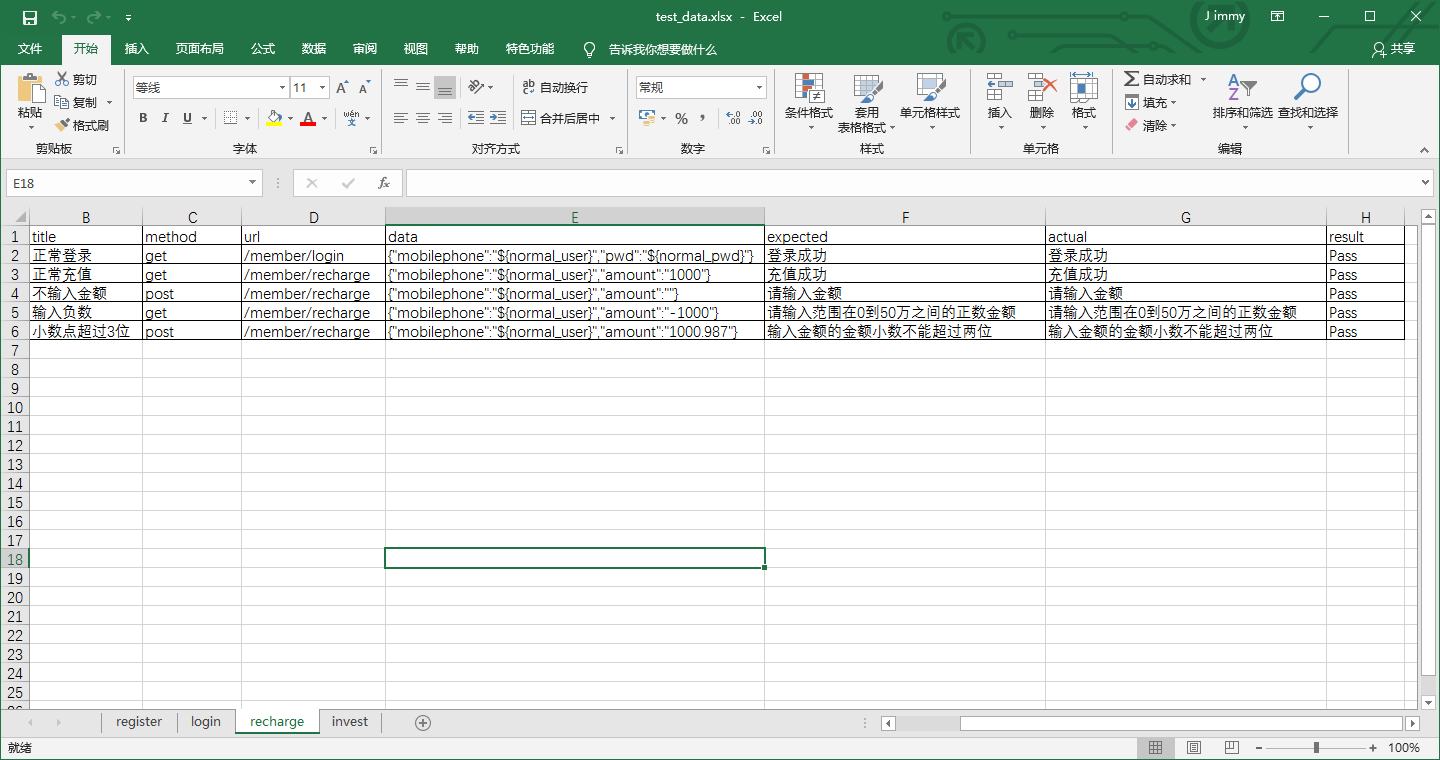
python - 接口自动化测试 - TestRecharge - 充值接口测试用例
# -*- coding:utf-8 -*-

'''

@project: ApiAutoTest

@author: Jimmy

@file: test_recharge.py

@ide: PyCharm Community Edition

@time: 2018-12-27 10:07

@blog: https://www.cnblogs.com/gotesting/

'''

import unittest

import os

from ddt import ddt,data

from Common.http_request import HttpRequest

from Common.read_excel import ReadExcel

from Common.read_config import ReadConfig

from Common.contants import *

from Common.basic_data import DoRegex,Context

from Common.get_logger import GetLog

import json

# 读取配置文件,获取当前URL前缀,用于灵活更换测试服务器地址

read_config = ReadConfig()

url_pre = read_config.get_config_str('api','url_pre')

# 读取excel,获取login测试数据

data_dir = os.path.join(data_dir,'test_data.xlsx')

read_excel = ReadExcel(data_dir)

recharge_cases = read_excel.get_cases('recharge')

get_log = GetLog()

@ddt

class TestRecharge(unittest.TestCase):

    def setUp(self):

        print('Test Start')

    def tearDown(self):

        print('Test End')

    @data(*recharge_cases)

    def test_recharge(self,case):

        url = url_pre + case.url

        # 通过正则表达式 查找/替换,将excel读出来的${normal_user}及${normal_pwd}替换为配置文件中读取出的normal_user及normal_pwd的值

        data = DoRegex.replace(case.data)

        # 将替换后的字符串转换成字典

        data = json.loads(data)

        # 判断Context中是否存在登录成功的cookies,若存在,则获取cookie,用于接口请求;若不存在,赋值为None

        if hasattr(Context,'cookies'):

            cookies = getattr(Context,'cookies')

        else:

            cookies = None

        # 记录当前测试case信息

        get_log.log_info('''Test Case Info:

        case_id : {0}

        title   : {1}

        method  : {2}

        url     : {3}

        data    : {4}

        expected: {5}

        '''.format(case.case_id,case.title,case.method,url,data,case.expected))

        response = HttpRequest(method=case.method,url=url,data=data,cookies=cookies)

        # 判断接口请求响应是否存在cookies,若存在,放入Context中

        if response.get_cookies():

            setattr(Context,'cookies',response.get_cookies())

        actual = response.get_json()['msg']

        # 记录当前测试case接口响应信息

        get_log.log_info('''Test Case Request Response Result:

        response : {0}

        actual   : {1}

        '''.format(response.get_json(),actual))

        try:

            self.assertEquals(case.expected,actual)

            read_excel.write_result('recharge',case.case_id,actual,'Pass')

            get_log.log_info('Test Result is Passed ! case_id is {0},title is {1} '.format(case.case_id,case.title))

        except Exception as e:

            read_excel.write_result('recharge',case.case_id,actual,'Fail')

            get_log.log_info('Test Result is Failed ! case_id is {0},title is {1} '.format(case.case_id,case.title))

            get_log.log_error('Error msg :{0}'.format(e))

            raise e
python - 接口自动化测试 - TestRecharge - 充值接口测试用例的更多相关文章
- 使用python进行接口自动化测试,批量执行测试用例
工作中,使用python的requests库进行接口自动化测试是一个比较不错的选择,今天就以某网站的免费接口为例,展示以get请求进行批量执行测试用例.话不多说直接开讲 分析一下接口信息, 请求地址: ...
- python - 接口自动化测试 - TestLogin - 登录接口测试用例
# -*- coding:utf-8 -*- ''' @project: ApiAutoTest @author: Jimmy @file: test_login.py @ide: PyCharm C ...
- python - 接口自动化测试 - TestRegister - 注册接口测试用例
# -*- coding:utf-8 -*- ''' @project: ApiAutoTest @author: Jimmy @file: test_register.py @ide: PyChar ...
- python web自动化测试框架搭建(功能&接口)——测试用例执行和结果收集
由于unittest框架中结果收集在不同文件中,所以此处重写结果收集方法,加入执行时间,失败信息,失败截图等 TestRunner.py # coding=utf-8 import sys impor ...
- python web自动化测试框架搭建(功能&接口)——接口用例实现
测试用例基类: # coding=utf-8 import unittest import Logger log = Logger.Loger() class BaseCase(unittest.Te ...
- python web自动化测试框架搭建(功能&接口)——接口公共方法
接口公共方法有:数据引擎.http引擎.Excel引擎 1.数据引擎:获取用例.结果检查.结果统计 # -*- coding:utf-8 -*- from XlsEngine import XlsEn ...
- python web自动化测试框架搭建(功能&接口)——接口测试模块
Python接口测试采用python读取excel的方法,通过requests库发送请求和接收响应.模块有: Data:用于存放excel用例的,用例格式: iutil: 接口公共方法,数据引擎.ht ...
- python web自动化测试框架搭建(功能&接口)——功能测试模块
功能测试使用selenium,模块有: 1.futil: 公共方法,如元素高亮显示 # coding=utf-8 """高亮显示元素""" ...
- python web自动化测试框架搭建(功能&接口)——通用模块
1.通用模块: config.conf: 公共配置文件,配置报告.日志.截图路径,以及邮件相关配置 [report] reportpath = E:\workspace\WebAutomation\s ...
随机推荐
- 报错:Program "sh" not found in PATH
参考原文:http://vin-mail.blog.163.com/blog/static/37895280201211932919513/ 如果你按照我的方法 先配置了cygwin的环境变量,在打开 ...
- 【extjs6学习笔记】1.15 初始: 关于build
调试版本 sencha app build --development 发布版本 sencha app build 说明: 使用第三方库时,目前sencha可能还有bug,会更改第三方库内容,所以发布 ...
- python数据类型、输入输出、运算符、条件判断、循环
变量以及类型 变量:存储程序运行中的数据,变量有3个要素:变量名.变量类型.变量值.python属于弱类型语言,不需要声明变量类型. [root@localhost python]# ipython3 ...
- 制作centos安装u盘
格式化 mkfs.vfat /dev/sdb1 制作 dd if=CentOS-7-x86_64-Minimal-1503-01.iso of=/dev/sdb # 1. 注意是/dev/sdb 不是 ...
- 重置SQLSERVER表的自增列,让自增列重新计数【转】
很多时候我们需要重置某个表的自增列,让自增列重新从1开始记数.最蠢的方法当然是把该表删掉再重新建表了.其实,还有其它的方法可以重置自增列的值: 方法一:使用TRUNCATE TABLE语句: TRUN ...
- AppSettings和ConnectionStrings的辨析
1.<connectionStrings> <connectionStrings> <add name="ConnectionStringName" ...
- vs2010 opencv2.4.10 配置过程出现的问题 & mfc打开图片
配置参考网址: http://blog.csdn.net/zy122121cs/article/details/49180541 无法启动程序,系统找不到指定的文件:原因是程序编译有错误(不是路径之类 ...
- Javascript显示提示信息加样式
#region JS提示============================================ /// <summary> /// 添加编辑删除提示 /// </s ...
- SQL查询出每门课都大于80 分的学生姓名
Course表如下: 查询出每门课都大于80 分的学生姓名有两种方法. 1.select distinct name from Course where name not in (select di ...
- 垂直居中一个img
{ display:table-cell; text-align:center; vertical-align:middle; }