
一个简陋的 CSS 样式
有些网友对 Smart Framewok 中的 Sample 示例的样式比较感兴趣。由于本人对前端不太精通,但为了满足网友们的需求,只好献丑了。
以下这个简陋的 CSS 样式:
|
1
2
3
4
5
6
7
8
9
10
11
12
13
14
15
16
17
18
19
20
21
22
23
24
25
26
27
28
29
30
31
32
33
34
35
36
37
38
39
40
41
42
43
44
45
46
47
48
49
50
51
52
53
54
55
56
57
58
59
60
61
62
63
64
65
66
67
68
69
70
71
72
73
74
75
76
77
78
79
80
81
82
83
84
85
86
87
88
89
90
91
92
93
94
95
96
97
98
99
100
101
102
103
104
105
106
107
108
109
110
111
112
113
114
115
116
117
118
119
120
121
122
123
124
125
126
127
128
129
130
131
132
133
134
135
136
137
138
139
140
141
142
143
144
145
146
147
148
149
150
151
152
153
154
155
156
157
158
159
160
161
162
163
164
165
166
167
168
169
170
171
172
173
174
175
176
177
178
179
180
181
182
183
184
185
186
187
188
189
190
191
192
193
194
195
196
197
198
199
200
201
202
203
204
205
206
207
208
209
210
211
212
213
214
215
216
217
218
219
220
221
222
223
224
225
226
227
228
229
230
231
232
233
234
235
236
237
238
239
240
241
242
|
* { border: 0; margin: 0; padding: 0; font-weight: normal; vertical-align: middle;}body { font-family: Verdana, sans-serif; font-size: 12px; margin: 0 auto; padding: 10px; width: 980px;}h1, h2, h3, h4 { font-weight: bold;}h1 { font-size: 18px;}h2 { font-size: 16px;}h3 { font-size: 14px;}h4 { font-size: 12px;}a,a:before,a:after { color: blue; text-decoration: underline;}a:hover { color: red;}input, select, textarea, button { font-family: inherit; font-size: 12px; outline: none;}textarea { resize: none; overflow-y: auto;}select { border: 1px solid #CCC; height: 30px; padding: 5px; width: 212px;}input[type="text"] { height: 18px;}input[type="text"],input[type="password"],textarea { border: 1px solid #CCC; padding: 5px; width: 200px;}input[type="text"]:focus,input[type="password"]:focus,textarea:focus,select:focus { border-color: #000;}input[type="file"] { border: 1px solid #CCC; padding: 3px 3px 4px 3px;}button { background-color: #EEE; border: 1px solid #CCC; cursor: pointer; height: 30px; padding: 5px; min-width: 30px;}button:hover:not(:disabled) { background-color: #DDD;}*:disabled { background-color: #FFF; cursor: not-allowed !important; opacity: 0.5;}.css-form { border: 1px solid #CCC;}.css-form-header { border-bottom: 1px solid #CCC; clear: both; height: 17px; padding: 10px;}.css-form-row { padding: 10px 20px;}.css-form-row label { cursor: pointer; float: left; padding-top: 8px; width: 100px;}.css-form-footer { border-top: 1px solid #CCC; padding: 10px;}.css-table { border: 1px solid #CCC; border-collapse: collapse; width: 100%; margin-bottom: 10px;}.css-table thead tr td { border-bottom: 1px solid #CCC; padding: 10px;}.css-table tbody tr:hover { background-color: #EEE;}.css-table tbody tr td { padding: 10px;}.css-panel { border: 1px solid #CCC;}.css-panel-header { border-bottom: 1px solid #CCC; clear: both; height: 17px; padding: 10px;}.css-panel-content { clear: both; padding: 10px 10px 0 10px;}.css-left { float: left;}.css-right { float: right;}.css-row { clear: both; height: 30px; margin-bottom: 10px;}.css-row a { line-height: 30px;}.css-search { display: table;}.css-search-button { display: table-cell;}.css-search-button button { border-left: none; height: 30px;}.css-width-10 { width: 10px !important;}.css-width-25 { width: 25px !important;}.css-width-50 { width: 50px !important;}.css-width-75 { width: 75px !important;}.css-width-100 { width: 100px !important;}.css-blank-10 { display: inline-block; width: 10px;}.css-text-center { text-align: center;}.css-button-group { border: 1px solid #CCC; display: inline-block; padding-left: 5px;}.css-button-group button { border: 1px solid transparent; margin-left: -5px; width: 30px; /* IE9 */} |
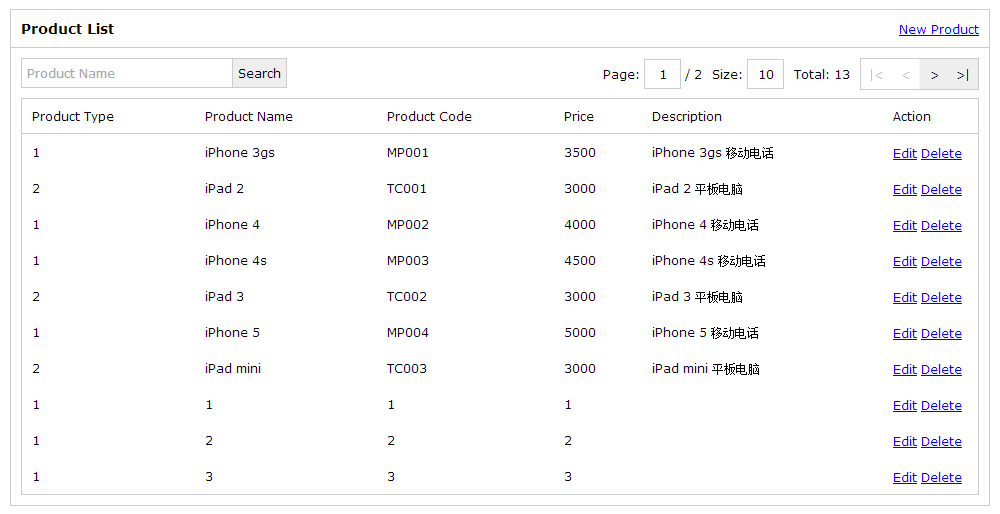
示例一:列表
|
1
2
3
4
5
6
7
8
9
10
11
12
13
14
15
16
17
18
19
20
21
22
23
24
25
26
27
28
29
30
31
32
33
34
35
36
37
38
39
40
|
<div class="css-panel"> <div class="css-panel-header"> <div class="css-left"> <h3>Product List</h3> </div> <div class="css-right"> <a href="product_create.html">New Product</a> </div> </div> <div class="css-panel-content"> <div class="css-row"> <div class="css-left"> <form id="product_search_form" method="post"> <div class="css-search"> <input type="text" id="product_name" placeholder="Product Name"/> <span class="css-search-button"> <button type="submit">Search</button> </span> </div> </form> </div> <div class="css-right"> <div id="product_pager"></div> </div> </div> <table id="product_table" class="css-table"> <thead> <tr> <td>Product Type</td> <td>Product Name</td> <td>Product Code</td> <td>Price</td> <td>Description</td> <td class="css-width-75">Action</td> </tr> </thead> <tbody></tbody> </table> </div></div> |
示例二:表单

|
1
2
3
4
5
6
7
8
9
10
11
12
13
14
15
16
17
18
19
20
21
22
23
24
25
26
27
28
29
30
31
32
33
|
<form id="product_create_form" method="post" class="css-form"> <div class="css-form-header"> <h3>Create Product</h3> </div> <div class="css-form-row"> <label for="product_type_id">Product Type:</label> <select id="product_type_id" name="productTypeId"> <option value="0"></option> <option value="1">Mobile Phone</option> <option value="2">Tablet Computer</option> </select> </div> <div class="css-form-row"> <label for="product_name">Product Name:</label> <input type="text" id="product_name" name="productName"/> </div> <div class="css-form-row"> <label for="product_code">Product Code:</label> <input type="text" id="product_code" name="productCode"/> </div> <div class="css-form-row"> <label for="price">Price:</label> <input type="text" id="price" name="price"/> </div> <div class="css-form-row"> <label for="description">Description:</label> <textarea id="description" name="description" rows="5"></textarea> </div> <div class="css-form-footer"> <button type="submit">Submit</button> <button type="button" id="cancel">Cancel</button> </div></form> |
一个简陋的 CSS 样式的更多相关文章
- 一个有意思的CSS样式库--BUTTONS
我最近发现了一个有意思的CSS样式库,和Bootstrap相似,但是它是专门的一个高度可定制的,免费的并且开源的按钮CSS样式库,这里附上它的网址:http://www.bootcss.com/p/b ...
- 在input中右边加上一个图标的css样式
https://blog.csdn.net/ffggnfgf/article/details/43384527
- css样式-ime-mode text-transform
今天遇到一个新的css样式: ime-mode text-transform 有效小作用 取值:auto : 默认值.不影响ime的状态.与不指定 ime-mode 属性时相同 active : ...
- css样式表的知识点总结
css总的来说有三种css样式可供选择: 1,行内样式表 行内样式表,直接写在了html文件的元素中,例如: <div style="color:red;"></ ...
- 关于css样式加载的问题
今天我在学习jQuery的addClass操作时遇到了一个小问题,想来跟大家分享一下,避免初学者踩坑. 我的需求是制作一个表格,并让它隔行换色,在此基础上再加上鼠标悬浮变色的效果.(主要训练jQuer ...
- CSS样式表------第一章:样式表的基本概念
CSS(Cascading Style Sheets,层叠样式表),控制页面样式外观,作用是美化HTML网页. 一. 样式表的基本概念 1.样式表的分类 (1)内联样式表 -----放在元素的开始标 ...
- css样式表---样式表分类、选择器
一.样式表分三类: 1.内联样式表.——放在元素的开始标记中.——只对当前元素起作用.<input name="txt" style="border:0px; bo ...
- 外部式css样式,写在单独的一个文件中
外部式css样式(也可称为外联式)就是把css代码写一个单独的外部文件中,这个css样式文件以“.css”为扩展名,在<head>内(不是在<style>标签内)使用<l ...
- HTML&CSS基础学习笔记1.28-给网页添加一个css样式
CSS是什么? 当HTML配合CSS一起使用时,我们发现页面变得好看了很多.那么CSS到底是什么呢? CSS指层叠样式表 (Cascading Style Sheets),它主要是用于定义HTML标签 ...
随机推荐
- Cocos2d-x学习笔记(3)
Cocos2d-x有一个包括全部其它头文件的cocos2d.h,仅仅要在使用时包括这个头文件,就能够使用引擎的全部功能.Cocos2d-x的类都放置于cocos2d的命名空间下,如引擎下的" ...
- [Angular 2] Event in deep
This lesson talks about the benefits of using the parens-based (click) syntax so that Angular 2 can ...
- KVO详解
NSKeyValueObserving非正式协议定义了一种机制,它允许对象去监听其它对象的某个属性的修改. 我们可以监听一个对象的属性,包括简单属性,一对一的关系,和一对多的关系.一对多关系的监听者会 ...
- iOS中发送xml给服务器
转载自:http://www.cocoachina.com/bbs/read.php?tid-456019.html 一.用URLSession请求 NSString *soapStr = [NSSt ...
- C# 如何获取错误所在行数
两种方法,一种是利用error.StackTrace,另外一种是try-catch找到错误行数,具体如下: 一.error.StackTrace代码 int i = ex.StackTrace.Ind ...
- 脚本化HTTP
1.HTTP: 定义:超文本传输协议 (HTTP-Hypertext transfer protocol) 是一种详细规定了浏览器和万维网服务器之间互相通信的规则,通过因特网传送万维网文档的数据传送协 ...
- Servlet编码和解码
1.request.setCharacterencoding("XXX"); 前提是POST提交 在客户端编码对value的值进行编码之前,通知客户端用什么码表(XXX)编码 2. ...
- asp.net FileUpload 控件上传文件 以二进制的形式存入数据库并将图片显示出来
图片上传事件代码如下所示: byte[] binary = upload.FileBytes; StringBuilder sqlStrSb = new StringBuilder(); sqlStr ...
- linux查看压缩包的文件列表
网上看到了一篇文章: Using bzip2 with less 这篇文章介绍了一个脚本,脚本功能就是列出压缩包所压缩的文件,本文算是原文搬运,不过减少点东西以适用我日常系统运用. #!/bin/ba ...
- JavaScript高级程序设计第14章表单脚本 (学习笔记)
第十四章 表单脚本 1.阻止默认表单提交 1.提交表单数据 1.使用type=submit提交按钮 2.使用submit():方法 注意:当用户点击提交按钮时,会触发submit事件,从而在这里我们有 ...