
Git上传代码遇到的报错
Git上传代码遇到的报错
1、git上传代码卡住(Total 7072 (delta 2508), reused 6844 (delta 2376), pack-reused 0)
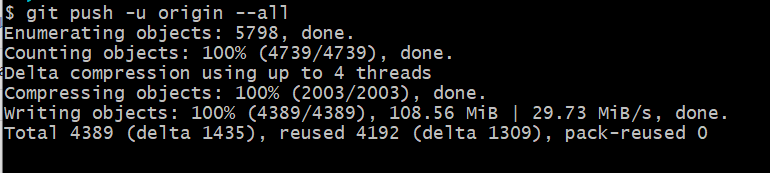
git config --global sendpack.sideband false

git config --local sendpack.sideband false

git config --global http.postBuffer 524288000

git config --global https.postbuffer 524288000

git config --global -l

git config --local -l
执行完这些命令后,再上传git push -u origin master,可能会稍微卡一会儿,然后就成功了。
2、修改保存在本地的git用户名密码
git config --global user.name "用户名"

git config --global user.password "密码"
git config --global -l   #查看
3、上传代码报错:error: failed to push some refs to 'http://git.test.com/001/test.git'
#完整报错:
error: failed to push some refs to 'http://git.test.com/001/test.git'

hint: Updates were rejected because the tip of your current branch is behind

hint: its remote counterpart. Integrate the remote changes (e.g.

hint: 'git pull ...') before pushing again.

hint: See the 'Note about fast-forwards' in 'git push --help' for details.
原因分析:这个问题是因为远程库与本地库不一致造成的
解决方法:可以把远程库同步到本地库,再把本地库推送到远程库
    git pull --rebase origin master
    git push -u origin master
4、上传代码报错:error: RPC failed; result=22, HTTP code = 413
#完整错误:

error: RPC failed; result=22, HTTP code = 413

fatal: The remote end hung up unexpectedly

fatal: The remote end hung up unexpectedly

Everything up-to-date
原因分析:上传文件太大,超过了最大限制
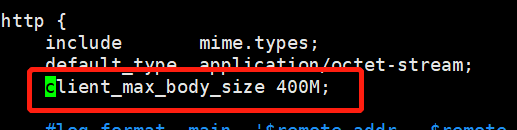
解决方法:nginx传输限制:(nginx.conf)
       client_max_body_size 400M;
     git传输限制:
       git config --global http.postBuffer 524288000
       git config --global https.postBuffer 524288000
Git上传代码遇到的报错的更多相关文章
- 解决上传代码到GitHub报错Push rejected: Push to origin/master was rejected
最近在 push 代码到 github 时,IDEA报错 Push rejected: Push to origin/master was rejected 在网友找了一圈,发现都不是想要的答案 于是 ...
- git上传到版本库报错:Pull is not possible because you have unmerged files(已解决)
问题所在:操作次数太多,第一次报错之删掉了.git并没有删除下面两个文件 才报了题述错误. 解决办法: 将这三个文件都删除在重新运行所有指令.
- VSCode通过git上传代码
最近也是在不断学习中,接触VSCode时间不长,很多东西也是在学习,所以这里记录下VSCode通过git上传代码,以防之后忘记. 我用的的VSCode版本 起初建立仓库的时候通过命令:(这个是我网上搜 ...
- git上传代码到github
git上传代码到github [root@bigdata-hadoop- ~]# git init [root@bigdata-hadoop- ~]# git add zeppelin [root@b ...
- Ubuntu 中使用git 上传代码
现在很多人都愿意把自己的代码分享给大家,所以有很多的代码管理的软件 ,比如SVN Git 等软件.今天就讲一下 git 的简单的应用,上传代码.用 git 上传代码 要有个git 账号,这是必不少的 ...
- windows中修改catalina.sh上传到linux执行报错This file is needed to run this program解决
windows中修改catalina.sh上传到linux执行报错This file is needed to run this program解决 一.发现问题 由于tomcat内存溢出,在wind ...
- 用git上传代码到新浪云
新浪云空间是国内免费的一个空间,不过有限制很多. 申请新浪云需要新浪账号,注册略. 使用新浪账号去http://sae.sina.com.cn申请一个空间 选择新建应用 可以选择使用php项目 管理应 ...
- 初次使用git上传代码到github远程仓库
https://blog.csdn.net/loner_fang/article/details/80488385 2018年05月28日 21:02:31 蒲公英上的尘埃 阅读数:697 因为最近在 ...
- 使用git上传代码到github远程仓库
一.新建代码库注册好github登录后,首先先在网页上新建代码库. 点击右上角"+"→New repository 进入如下页面:按照要求填写完成后,点击按钮创建代码库创建成功. ...
随机推荐
- 搭建LAMP环境部署opensns微博网站
搭建LAMP环境部署opensns微博网站 实验环境 centos7 ip: 192.168.121.17 一.关闭防火墙和selinux [root@localhost ~]# systemctl ...
- Linux系统(控制节点)部署环境
环境部署 重点说明:安装ansible时去控制Windows机器,由于需要在Linux系统上安装pywinrm插件,而使用yum安装锝ansible是无法调用pywinrm插件,所以整体使用pip工具 ...
- 066.Python框架DRF之序列化器Serializer
一 序列化器-Serializer 作用: 1. 序列化,序列化器会把模型对象转换成字典,经过response以后变成json字符串 2. 反序列化,把客户端发送过来的数据,经过request以后变成 ...
- brk 和 sbrk 区别
转自:https://www.cnblogs.com/chengxuyuancc/p/3566710.html brk和sbrk的定义,在man手册中定义了这两个函数: 1 #include < ...
- 项目实践之工作流引擎基本文档!Activiti工作流框架中流程引擎API和服务详解
流程引擎的API和服务 流程引擎API(ProcessEngine API)是与Activiti打交道的最常用方式 Activiti从ProcessEngine开始.在ProcessEngine中,可 ...
- 防火墙 firewall iptables
firewalld FirewallD 使用服务service 和区域zone来代替 iptables 的规则rule和链chain,默认情况下,有以下的区域zone可用: drop – 丢弃所有传入 ...
- web容器获取SSL指纹实现和ByPass
@font-face { font-family: octicons-link; src: url("data:font/woff;charset=utf-8;base64,d09GRgAB ...
- NVIDIA深度架构
NVIDIA深度架构 本文介绍A100 GPU,NVIDIA Ampere架构GPU的重要新功能. 现代云数据中心中运行的计算密集型应用程序的多样性推动了NVIDIA GPU加速的云计算的爆炸式增长. ...
- Paddle Release Note
Paddle Release Note 重要更新 飞桨paddle框架2.0.0版本有如下重要更新: 编程范式:默认开启动态图模式进行模型开发和训练,通过动转静的方式进行模型部署和训练加速.如果需要使 ...
- RGBD动作识别的多视图层融合模型
摘要 基于视觉的动作识别在实践中遇到了不同的挑战,包括从任何角度识别主题,实时处理数据以及在现实环境中提供隐私.甚至识别基于配置文件的人类动作(基于视觉的动作识别的一个子集),在计算机视觉中也是一个巨 ...