
Flutter 设置input边框
example 1

import 'package:flutter/material.dart';

void main() => runApp(MyApp());

class MyApp extends StatelessWidget {

  @override

  Widget build(BuildContext context) {

    return MaterialApp(

      home: HomePage(),

    );

  }

}

class HomePage extends StatefulWidget {

  @override

  _HomePageState createState() => _HomePageState();

}

class _HomePageState extends State<HomePage> {

  @override

  Widget build(BuildContext context) {

    return Scaffold(

      body: Center(

        child: Padding(

          padding: const EdgeInsets.all(24.0),

          child: Material(

            shape: BeveledRectangleBorder(

              borderRadius: BorderRadius.all(Radius.circular(10)),

              side: BorderSide(width: 1, color: Theme.of(context).primaryColor),

            ),

            child: Padding(

              padding: const EdgeInsets.only(left: 8.0, right: 8.0),

              child: TextField(

                decoration: InputDecoration(

                  hintText: "Username",

                  border: InputBorder.none,

                ),

              ),

            ),

          ),

        ),

      ),

    );

  }

}
example 2
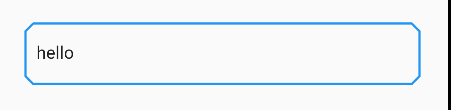
import 'package:flutter/material.dart';

import 'cut_corners_border.dart';

void main() => runApp(MyApp());

class MyApp extends StatelessWidget {

  @override

  Widget build(BuildContext context) {

    return MaterialApp(

      theme: ThemeData(

        inputDecorationTheme: InputDecorationTheme(

          border: CutCornersBorder(),

        ),

      ),

      home: HomePage(),

    );

  }

}

class HomePage extends StatefulWidget {

  @override

  _HomePageState createState() => _HomePageState();

}

class _HomePageState extends State<HomePage> {

  @override

  Widget build(BuildContext context) {

    return Scaffold(

      body: Center(

        child: Padding(

          padding: const EdgeInsets.all(24.0),

          child: TextField(

            decoration: InputDecoration(

              hintText: "Username",

            ),

          ),

        ),

      ),

    );

  }

}
cut_corners_border.dart 源码来至这里
import 'dart:ui' show lerpDouble;

import 'package:flutter/material.dart';

import 'package:flutter/widgets.dart';

class CutCornersBorder extends OutlineInputBorder {

  const CutCornersBorder({

    BorderSide borderSide: const BorderSide(),

    BorderRadius borderRadius: const BorderRadius.all(Radius.circular(2.0)),

    this.cut: 7.0,

    double gapPadding: 2.0,

  }) : super(

            borderSide: borderSide,

            borderRadius: borderRadius,

            gapPadding: gapPadding);

  @override

  CutCornersBorder copyWith({

    BorderSide borderSide,

    BorderRadius borderRadius,

    double gapPadding,

    double cut,

  }) {

    return CutCornersBorder(

      borderRadius: borderRadius ?? this.borderRadius,

      borderSide: borderSide ?? this.borderSide,

      cut: cut ?? this.cut,

      gapPadding: gapPadding ?? this.gapPadding,

    );

  }

  final double cut;

  @override

  ShapeBorder lerpFrom(ShapeBorder a, double t) {

    if (a is CutCornersBorder) {

      final CutCornersBorder outline = a;

      return CutCornersBorder(

        borderRadius: BorderRadius.lerp(outline.borderRadius, borderRadius, t),

        borderSide: BorderSide.lerp(outline.borderSide, borderSide, t),

        cut: cut,

        gapPadding: outline.gapPadding,

      );

    }

    return super.lerpFrom(a, t);

  }

  @override

  ShapeBorder lerpTo(ShapeBorder b, double t) {

    if (b is CutCornersBorder) {

      final CutCornersBorder outline = b;

      return CutCornersBorder(

        borderRadius: BorderRadius.lerp(borderRadius, outline.borderRadius, t),

        borderSide: BorderSide.lerp(borderSide, outline.borderSide, t),

        cut: cut,

        gapPadding: outline.gapPadding,

      );

    }

    return super.lerpTo(b, t);

  }

  Path _notchedCornerPath(Rect center,

      [double start = 0.0, double extent = 0.0]) {

    final Path path = Path();

    if (start > 0.0 || extent > 0.0) {

      path.relativeMoveTo(extent + start, center.top);

      _notchedSidesAndBottom(center, path);

      path..lineTo(center.left + cut, center.top)..lineTo(start, center.top);

    } else {

      path.moveTo(center.left + cut, center.top);

      _notchedSidesAndBottom(center, path);

      path.lineTo(center.left + cut, center.top);

    }

    return path;

  }

  Path _notchedSidesAndBottom(Rect center, Path path) {

    return path

      ..lineTo(center.right - cut, center.top)

      ..lineTo(center.right, center.top + cut)

      ..lineTo(center.right, center.top + center.height - cut)

      ..lineTo(center.right - cut, center.top + center.height)

      ..lineTo(center.left + cut, center.top + center.height)

      ..lineTo(center.left, center.top + center.height - cut)

      ..lineTo(center.left, center.top + cut);

  }

  @override

  void paint(

    Canvas canvas,

    Rect rect, {

    double gapStart,

    double gapExtent: 0.0,

    double gapPercentage: 0.0,

    TextDirection textDirection,

  }) {

    assert(gapExtent != null);

    assert(gapPercentage >= 0.0 && gapPercentage <= 1.0);

    final Paint paint = borderSide.toPaint();

    final RRect outer = borderRadius.toRRect(rect);

    if (gapStart == null || gapExtent <= 0.0 || gapPercentage == 0.0) {

      canvas.drawPath(_notchedCornerPath(outer.middleRect), paint);

    } else {

      final double extent =

          lerpDouble(0.0, gapExtent + gapPadding * 2.0, gapPercentage);

      switch (textDirection) {

        case TextDirection.rtl:

          {

            final Path path = _notchedCornerPath(

                outer.middleRect, gapStart + gapPadding - extent, extent);

            canvas.drawPath(path, paint);

            break;

          }

        case TextDirection.ltr:

          {

            final Path path = _notchedCornerPath(

                outer.middleRect, gapStart - gapPadding, extent);

            canvas.drawPath(path, paint);

            break;

          }

      }

    }

  }

}
Flutter 设置input边框的更多相关文章
- 27.给input边框和背景颜色设置全透明
给input边框和背景颜色设置全透明,但是里面的字不会消失 1.让背景颜色变透明(二选一) background-color:rgba(0,0,0,0); background:rgba(0,0,0, ...
- 通过CSS禁止Chrome自动为输入框添加橘黄色边框,修改/禁止 chrome input边框颜色,
1 /*Chrome浏览器 点击input 黄色边框 禁用*/ .NoOutLine:focus{outline: none} <asp:TextBox ID="txtTeleph ...
- 设置input框文字垂直居中和宽度
input { solid #999;height:22px; background:#ffffff; line-height:22px; margin:0px; padding:0px;/*表单输入 ...
- chrome内核浏览器input边框
直接给input加outline:none和设置input {outline:none}都没效 最后逼得没法,*:focus { outline: none; },然后整个世界就安静了,嚯嚯
- css设置input中placeholder字体
设置input中placeholder字体颜色 input::-webkit-input-placeholder {color:@a;} input:-moz-placeholder {color:@ ...
- 【css】a:hover 设置上下边框在 ie6 和 ie7 下失效
前段时间在写样式的时候发现了这个问题,虽然当时就解决了这个 bug 不过还是记录下,以免再次出现这样的问题. demo 代码: <!doctype html> <html lang= ...
- Qt 之 设置窗口边框的圆角(使用QSS和PaintEvent两种方法)
Qt在设置窗口边框圆角时有两种方式,一种是设置样式,另一种是在paintEvent事件中绘制窗口.下面分别叙述用这两种方式来实现窗口边框圆角的效果. 一.使用setStyleSheet方法 this- ...
- JQuery设置input属性(disabled、enabled)
document.getElementById("removeButton").disabled = false; //普通Js写法 $("#removeButton&q ...
- 设置input标签的placeholder的样式
设置input样式代码: input::-webkit-input-placeholder{ /*WebKit browsers*/ color: red; } input::-moz-input-p ...
随机推荐
- JasperReports 取消自动分页/忽略分页
因为需要将合同比价单由PDF文档形式改为HTML页面方式,虽然转换文档类型了,但是发现HTML页面中间到了一定行数就出现了空行把Detail给隔开了.之前总想着怎样消除中间空行,以为是报表top页面边 ...
- (十七)整合 Zookeeper组件,管理架构中服务协调
整合 Zookeeper组件,管理架构中服务协调 1.Zookeeper基础简介 1.1 基本理论 1.2 应用场景 2.安全管理操作 2.1 操作权限 2.2 认证方式: 2.3 Digest授权流 ...
- SpringMVC 中 @ControllerAdvice 注解
SpringMVC 中 @ControllerAdvice 注解 1.@ControllerAdvice 1.1 全局异常处理 1.2 全局数据绑定 1.3 全局数据预处理 原文地址: 江南一点雨:S ...
- Prometheus—告警altermanger
Prometheus-告警altermanger 1.告警altermanger装配 2.告警Mysql 3.Prometheus针对nodes告警规则配置 相关内容原文地址链接: 51CTO:wfw ...
- spring MVC 3.2中@ResponseBody(Post接口)返回乱码的完美解决方案
本来因为ajax跨域http远程调用时有问题,在服务端响应时用以下方式解决了,但IE8及下有问题. response.addHeader("Access-Control-Allow-Orig ...
- Flink-v1.12官方网站翻译-P003-Real Time Reporting with the Table API
利用表格API进行实时报告 Apache Flink提供的Table API是一个统一的.关系型的API,用于批处理和流处理,即在无边界的.实时的流或有边界的.批处理的数据集上以相同的语义执行查询,并 ...
- labuladong 算法小抄
<labuladong的算法小抄官方完整版> 本书目前可以手把手带你解决 110 道 LeetCode 算法问题,而且在不断更 新,全部基于 LeetCode 的题目,涵盖了所有题型和技巧 ...
- [WPF 学习] 18. 摄像头(肢解DirectShow)
公司的产品需要人脸比对,摄像头相关的需求如下(突然发现除了英文不太好外,实际上中文也不太好,所以直接上一个接口) using System; using System.Drawing; using S ...
- HDU6504 Problem E. Split The Tree【dsu on tree】
Problem E. Split The Tree Problem Description You are given a tree with n vertices, numbered from 1 ...
- 【bzoj 2467】[中山市选2010]生成树(数论--排列组合)
题目:有一种图形叫做五角形圈.一个五角形圈的中心有1个由n个顶点和n条边组成的圈.在中心的这个n边圈的每一条边同时也是某一个五角形的一条边,一共有n个不同的五角形.这些五角形只在五角形圈的中心的圈上有 ...