
Spring Security OAuth2.0认证授权二:搭建资源服务
在上一篇文章[Spring Security OAuth2.0认证授权一:框架搭建和认证测试](https://www.cnblogs.com/kuangdaoyizhimei/p/14250374.html) 详细讲解了如何搭建一个基于spring boot + oauth2.0的认证服务,这篇文章将会介绍如何搭建一个资源服务。
根据oath2.0协议内容,应当有一个资源服务管理资源服务并提供访问安全控制。
1. 引入maven依赖
<dependency>

    <groupId>org.springframework.boot</groupId>

    <artifactId>spring-boot-starter-web</artifactId>

</dependency>

<dependency>

    <groupId>org.springframework.cloud</groupId>

    <artifactId>spring-cloud-starter-security</artifactId>

</dependency>

<dependency>

    <groupId>org.springframework.cloud</groupId>

    <artifactId>spring-cloud-starter-oauth2</artifactId>

</dependency>

<dependency>

    <groupId>org.springframework.security</groupId>

    <artifactId>spring-security-jwt</artifactId>

</dependency>

<dependency>

    <groupId>com.alibaba</groupId>

    <artifactId>fastjson</artifactId>

</dependency>

<dependency>

    <groupId>org.projectlombok</groupId>

    <artifactId>lombok</artifactId>

</dependency>
这里虽然引入了jwt的依赖,但是暂时还未用到。
2. 配置配置文件
server:

  port: 30001

spring:

  application:

    name: resource-server
3. 新建启动类
@SpringBootApplication

public class ResourceServerApplication {

    public static void main(String[] args) {

        SpringApplication.run(ResourceServerApplication.class, args);

    }

}
4. Resource服务核心配置
4.1 新建ResouceServerConfig类
该类需要继承ResourceServerConfigurerAdapter类并需要使用@EnableResourceServer注解注释。
@Configuration

@EnableResourceServer

public class ResouceServerConfig extends ResourceServerConfigurerAdapter {

    ......

}
4.2 核心配置
重写ResouceServerConfig类以下方法以实现ResourceServer的基本配置:
org.springframework.security.oauth2.config.annotation.web.configuration.ResourceServerConfigurerAdapter#configure(org.springframework.security.oauth2.config.annotation.web.configurers.ResourceServerSecurityConfigurer)
@Override

public void configure(ResourceServerSecurityConfigurer resources) throws Exception {

    resources

        .resourceId(RESOURCE_ID)

        .tokenServices(resourceServerTokenServices)//令牌服务

        .stateless(true);

}
- resourceId方法标志了该服务的id,需要和在auth-center服务中配置的id一致。
- tokenServices方法指定了令牌管理的实例,Bean创建方法如下
@Bean

    public ResourceServerTokenServices resourceServerTokenServices(){

        RemoteTokenServices remoteTokenServices = new RemoteTokenServices();

        remoteTokenServices.setCheckTokenEndpointUrl("http://127.0.0.1:30000/oauth/check_token");

        remoteTokenServices.setClientId("c1");

        remoteTokenServices.setClientSecret("secret");

        return remoteTokenServices;

    }
- stateless方法指定了当前资源是否仅仅允许token验证的方法进行校验,默认为true
4.3 auth2.0安全配置
@Override

public void configure(HttpSecurity http) throws Exception {

    http

        .authorizeRequests()

        .antMatchers("/**").access("#oauth2.hasScope('all')")

        .and()

        .csrf().disable()

        .sessionManagement().sessionCreationPolicy(SessionCreationPolicy.NEVER);

}
该配置和下面的Web安全配置很像,但是不一样,这里仅仅对auth2.0的安全进行配置。这里的.antMatchers("/**").access("#oauth2.hasScope('all')")表示所有的请求携带的令牌都必须拥有all的授权范围,其中all授权范围必须和认证服务中的配置相一致。
4.4 Web安全配置
@Configuration

@EnableGlobalMethodSecurity(securedEnabled = true,prePostEnabled = true)

public class WebSecurityConfig extends WebSecurityConfigurerAdapter {

    @Override

    protected void configure(HttpSecurity http) throws Exception {

        http.csrf()

                .disable()

                .authorizeRequests()

                .antMatchers("/r/r1").hasAuthority("p2")

                .antMatchers("/r/r2").hasAuthority("p2")

                .antMatchers("/**").authenticated()//所有的r/**请求必须认证通过

                .anyRequest().permitAll();//其它所有请求都可以随意访问

    }

}
4.5 暴露资源接口
@RestController

@Slf4j

public class OrderController {

    @GetMapping("/r1")

    @PreAuthorize("hasAnyAuthority('p1')")

    public String r1(){

        return "访问资源r1";

    }

}
由于4.4启用了prePostEnabled,所以这里可以使用@PreAuthorize注解对资源安全请求进行管理。
@PreAuthorize("hasAnyAuthority('p1')")表示请求者必须拥有p1权限,p1权限定义在auth-center服务表的t_permission表。
5. 接口测试
源代码地址:https://gitee.com/kdyzm/spring-security-oauth-study/tree/v3.0.0
5.1 准备工作
首先,阅读下 https://gitee.com/kdyzm/spring-security-oauth-study/tree/v3.0.0/auth-center 项目的自述文件,配置好数据库和表、配置文件,配置完成之后分别启动认证服务auth-center服务(端口号30000)和资源服务resource-server(端口号30001)。
5.2 获取token
阅读下 https://gitee.com/kdyzm/spring-security-oauth-study/tree/v3.0.0/auth-center 项目的自述文件,有四种获取token的方式。
5.3 请求资源服务
假设在5.2已经成功获取到了token:
{

    "access_token": "11c5eaec-768f-400a-85e1-e2b52276b83d",

    "token_type": "bearer",

    "refresh_token": "34eb5d57-de7e-4f26-b35e-64162c64117e",

    "expires_in": 7199,

    "scope": "all"

}
接下来要携带着token请求资源服务:
| header | value |
|---|---|
| Authorization | Bearer 0cc2da26-b634-4ccb-a8fe-14f454a13090 |
GET请求:http://127.0.0.1:30001/r1
请求成功,结果返回:
访问资源r1
请求失败,结果返回:
{

    "error": "invalid_token",

    "error_description": "0cc2da26-b634-4ccb-a8fe-14f454a13090"

}
5.4 请求演示
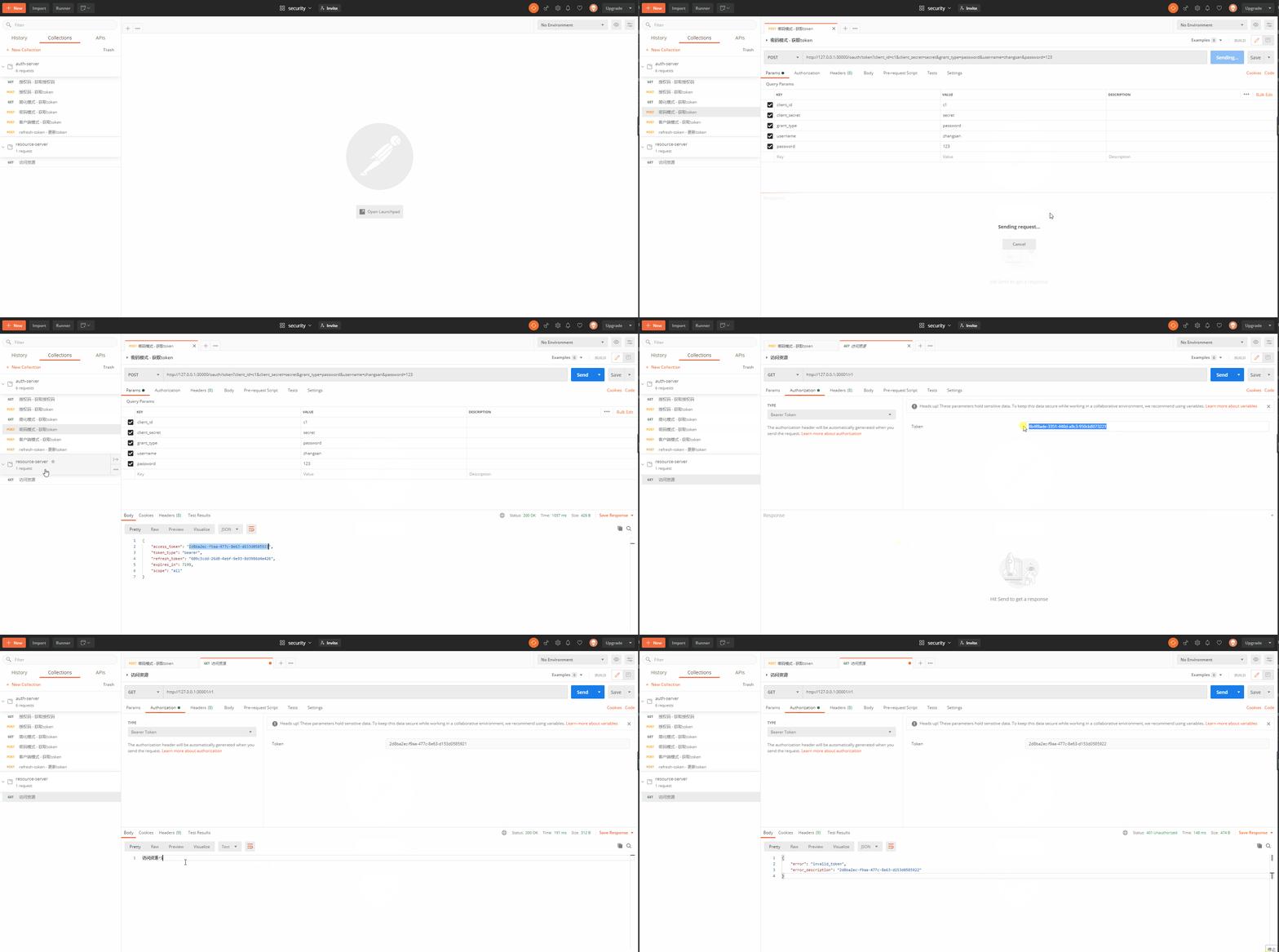
下面演示使用postman基于密码模式获取token并请求资源服务的过程:
6.源代码
源代码地址:https://gitee.com/kdyzm/spring-security-oauth-study/tree/v3.0.0
我的博客地址:https://blog.kdyzm.cn/
Spring Security OAuth2.0认证授权二:搭建资源服务的更多相关文章
- Spring Security OAuth2.0认证授权三:使用JWT令牌
Spring Security OAuth2.0系列文章: Spring Security OAuth2.0认证授权一:框架搭建和认证测试 Spring Security OAuth2.0认证授权二: ...
- Spring Security OAuth2.0认证授权四:分布式系统认证授权
Spring Security OAuth2.0认证授权系列文章 Spring Security OAuth2.0认证授权一:框架搭建和认证测试 Spring Security OAuth2.0认证授 ...
- Spring Security OAuth2.0认证授权五:用户信息扩展到jwt
历史文章 Spring Security OAuth2.0认证授权一:框架搭建和认证测试 Spring Security OAuth2.0认证授权二:搭建资源服务 Spring Security OA ...
- Spring Security OAuth2.0认证授权六:前后端分离下的登录授权
历史文章 Spring Security OAuth2.0认证授权一:框架搭建和认证测试 Spring Security OAuth2.0认证授权二:搭建资源服务 Spring Security OA ...
- Spring Security OAuth2.0认证授权一:框架搭建和认证测试
一.OAuth2.0介绍 OAuth(开放授权)是一个开放标准,允许用户授权第三方应用访问他们存储在另外的服务提供者上的信息,而不 需要将用户名和密码提供给第三方应用或分享他们数据的所有内容. 1.s ...
- Spring security OAuth2.0认证授权学习第四天(SpringBoot集成)
基础的授权其实只有两行代码就不单独写一个篇章了; 这两行就是上一章demo的权限判断; 集成SpringBoot SpringBoot介绍 这个篇章主要是讲SpringSecurity的,Spring ...
- Spring security OAuth2.0认证授权学习第三天(认证流程)
本来之前打算把第三天写基于Session认证授权的,但是后来视屏看完后感觉意义不大,而且内容简单,就不单独写成文章了; 简单说一下吧,就是通过Servlet的SessionApi 通过实现拦截器的前置 ...
- Spring security OAuth2.0认证授权学习第一天(基础概念-认证授权会话)
这段时间没有学习,可能是因为最近工作比较忙,每天回来都晚上11点多了,但是还是要学习的,进过和我的领导确认,在当前公司的技术架构方面,将持续使用Spring security,暂不做Shiro的考虑, ...
- Spring security OAuth2.0认证授权学习第二天(基础概念-授权的数据模型)
如何进行授权即如何对用户访问资源进行控制,首先需要学习授权相关的数据模型. 授权可简单理解为Who对What(which)进行How操作,包括如下: Who,即主体(Subject),主体一般是指用户 ...
随机推荐
- 图 Graph
本文主要内容为:图的定义以及基本术语 图的定义 图 图G的组成:由 数据元素的集合E 和 数据间的关系集合E 组成,记作:G = <V, E> 顶点 (vertex):数据元素,V就是顶点 ...
- 半夜删你代码队 Day5冲刺
一.每日站立式会议 1.站立式会议 成员 昨日完成工作 今日计划工作 遇到的困难 陈惠霖 跟进作业 完成注册界面 相关界面设计内容知识不充足 侯晓龙 开始双人合作 开始与数据库结合 无 周楚池 初步完 ...
- Linux下基于.NET5开发CAX应用
<<.NET5下的三维应用程序开发>>一文中介绍了如何在.NET5下使用AnyCAD开发应用程序.相比.NET4.x,.NET5一大进步便是可以跨平台,即可以在Linux.Ma ...
- mac下git连接远程仓库gitee
一.注册账号 https://gitee.com/ 二.创建仓库 三.创建后显示如下 四.根据页面上展示命令敲一遍就可以了. 备注:注意!!
- B树——插入和删除
B树--插入和删除 B树的插入 5阶B数--结点关键字个数向上取整m/2-1≤n≤m-1 即2≤n≤4 连续插入5个元素后,超出来了. 在插入key后,若导致原结点关键字数超过上限,则从中间位置(m/ ...
- DataGrid 字体垂直居中
如果用DataGridTextColumn作为DataGrid的列,字体垂直居中需要这样设置: <Style x:Key="Body_Content_DataGrid_Centerin ...
- 安装VisualStudioCode
下载VisualStudioCode https://code.visualstudio.com/ 安装插件
- 一位弱校选手的oi经历
锦瑟无端五十弦,一弦一柱思华年. 这只是一位不知道什么时候就要退役的oier在一节晚自习的时候写的无聊东西 曾经也想好好写一写自己的oi历程,也许会有人看,不过因为自己懒加上文笔差也一直没写,直到昨天 ...
- (菜鸟都能看懂的)网络最大流最小割,Ford-Fulkerson及Dinic详解
关于网络流: 1.定义 个人理解网络流的意思便是由一条条水管以及一个源点S一个汇点T和一些节点组成的一张图,现在要从S点流水到T点,问怎么流才能让流到T的流量最大.边权表示的是这条水管的最大流量,假设 ...
- SpringBoot事件监听机制及观察者模式/发布订阅模式
目录 本篇要点 什么是观察者模式? 发布订阅模式是什么? Spring事件监听机制概述 SpringBoot事件监听 定义注册事件 注解方式 @EventListener定义监听器 实现Applica ...