
《js笔记》
1.判断浏览器是否启用cookie:
if (navigator.cookieEnabled==true)

    {

    alert("已启用 cookie")

    }

else

    {

    alert("未启用 cookie")

    }

}
1.从url中获取参数的值:
<script type="text/javascript">

    function getQueryString( name ){

        var reg = new RegExp("(^|&)"+ name +"=([^&]*)(&|$)");

        var r = window.location.search.substr(1).match(reg);

        if( r!=null ) return  unescape(r[2]); return null;

    }

</script>
代码解释:
<!doctype html>

<html>

<head>

<meta charset="utf-8">

<title>js正则表达式</title>

<link rel="stylesheet" type="text/css" href="bootstrap/bootstrap.min.css">

<style type="text/css">

</style>

</head>

<body>

</body>

<script type="text/javascript">

 function getQueryString(name){

    var reg = new RegExp("(^|&)"+ name +"=([^&]*)(&|$)");

    var r = window.location.search.substr(1);

    var result = r.match(reg);

    console.log(r);

    console.log(reg);

    console.log(result);

    if(result!=null){

        return unescape(result[2]);

    }

    return null;

}

var age = getQueryString("age");

console.log(age);

//代码解释:

正则表达式为:/(^|&)age=([^&]*)(&|$)/

分析它匹配的:

^age=10&

^age=10$

&age=10&

&age=10$

待匹配的字符串:

id=123&age=10&sb=1&hu=abc

匹配的结果:

&age=10&

整个&age=10&为第0组;

第1组为&

第2组为10

第3组为&

</script>

</html>
本地调试,浏览器输入:file:///G:/test_demo/queryString.html?id=123&age=10&sb=1&hu=abc
console打印:

unescape函数:
escape("Visit W3School!")

"Visit%20W3School%21"

unescape("Visit W3School!")

"Visit W3School!"

unescape("Visit%20W3School%21")

"Visit W3School!"

encodeURIComponent("Visit W3School!")

"Visit%20W3School!"

decodeURIComponent("Visit W3School!")

"Visit W3School!"

encodeURI("Visit W3School!")

"Visit%20W3School!"

注释:ECMAScript v3 已从标准中删除了 unescape() 函数,并反对使用它,因此应该用 decodeURI() 和 decodeURIComponent() 取而代之。
2.改变窗口大小、触发改变窗口大小事件:
<body id="box">

</body>

<script type="text/javascript">

var winWidth = 0;

function addEventOnResize() {

    $(window).resize(function () {

        winWidth = $(this).width();

        var dom = document.getElementById('box');

        if (!dom) {

            return;

        }

        if (winWidth > 1366) {

            dom.className = 'box1240';

        } else {

            dom.className = 'box1000';

        }

    }).resize();

}

addEventOnResize();

</script>
w3上介绍resize的用法:
<html>

<head>

<script type="text/javascript" src="/jquery/jquery.js"></script>

<script type="text/javascript">

x=0;

$(document).ready(function(){

  $(window).resize(function() {

    $("span").text(x+=1);

  });

  $("button").click(function(){

    $(window).resize();

  });

});

</script>

</head>

<body>

<p>窗口的大小被调整了 <span>0</span> 次。</p>

<p>请试着调整浏览器窗口的大小。</p>

<button>触发窗口的 resize 事件</button>

</body>

</html>
3.动态加载js代码:
<!doctype html>

<html>

<head>

<meta charset="utf-8">

<title>js代码学习</title>

<link rel="stylesheet" type="text/css" href="bootstrap/bootstrap.min.css">

<style type="text/css">

</style>

</head>

<body>

<script type="text/javascript">

(function() {

    var hm = document.createElement("script");

    hm.src = "//hm.baidu.com/hm.js?df0a72cf81dd321c00f5baefc3c4855d";

    var s = document.getElementsByTagName("script")[0];

    s.parentNode.insertBefore(hm, s);

})();

</script>

</body>

</html>
运行完成之后:

insertBefore用法:http://www.w3school.com.cn/jsref/met_node_insertbefore.asp
insertBefore() 方法在您指定的已有子节点之前插入新的子节点。

<!DOCTYPE html>

<html>

<body>

<ul id="myList"><li>Coffee</li><li>Tea</li></ul>

<p id="demo">请点击按钮向列表插入一个项目。</p>

<button onclick="myFunction()">试一下</button>

<script>

function myFunction()

{

var newItem=document.createElement("LI")

var textnode=document.createTextNode("Water")

newItem.appendChild(textnode)

var list=document.getElementById("myList")

list.insertBefore(newItem,list.childNodes[0]);

}

</script>

<p><b>注释:</b><br>首先请创建一个 LI 节点,<br>然后创建一个文本节点,<br>然后向这个 LI 节点追加文本节点。<br>最后在列表中的首个子节点之前插入此 LI 节点。</p>

</body>

</html>
再来一个动态加载css的代码:
<!doctype html>

<html>

<head>

<meta charset="utf-8">

<title>动态加载js和css</title>

</head>

<body>

<button class="btn btn-danger">bootstrap样式按钮</button>

<script src="jquery/jquery.min.js"></script>

<script type="text/javascript">

//动态加载os.js

var js = document.createElement("script");

js.type = "text/javascript";

js.src="os.js";

document.getElementsByTagName("head")[0].appendChild(js);

//动态加载css

var css = document.createElement("link");

css.type = "text/css";

css.href = "bootstrap/bootstrap.min.css";

css.rel = "stylesheet";

document.getElementsByTagName("head")[0].appendChild(css);

</script>

</body>

</html>
其外链接的os.js:
/**

*   判断客户端操作系统类型

*/

(function() {

    var agent = navigator.userAgent.toLowerCase();

    var os_type = "";

    if (/android/i.test(navigator.userAgent)) {

        var index = agent.indexOf("android");

        version = agent.substr(index + 8, 3);

        os_type = "Android " + version;

    }

    if (/(iPhone|iPad|iPod|iOS)/i.test(navigator.userAgent)) {

        var index = agent.indexOf("os");

        version = agent.substr(index + 3, 3);

        os_type = "iOS " + version;

    }

    if (/Linux/i.test(navigator.userAgent) && !/android/i.test(navigator.userAgent) && !/(iPhone|iPad|iPod|iOS)/i.test(navigator.userAgent)) {

        os_type = "Linux";

    }

    if (/windows|win32/i.test(navigator.userAgent)) {

        os_type = "windows32";

    }

    if (/windows|win64/i.test(navigator.userAgent)) {

        os_type = "windows64";

    }

    console.log("客户端类型:" + os_type);

})();
运行结果,观察console和bootstrap样式是否生效:

4.获取客户端操作系统类型
<!doctype html>

<html>

<head>

<meta charset="utf-8">

<title>js代码学习</title>

<link rel="stylesheet" type="text/css" href="bootstrap/bootstrap.min.css">

<style type="text/css">

</style>

</head>

<body>

<script type="text/javascript">

var OSType = detectOS(); //操作系统

console.log(OSType);

//获取客户端操作系统类型

function detectOS() {

    var sUserAgent = navigator.userAgent;

    var isWin = (navigator.platform === "Win32") || (navigator.platform === "Windows");

    var isMac = (navigator.platform === "Mac68K") || (navigator.platform === "MacPPC") || (navigator.platform === "Macintosh") || (navigator.platform === "MacIntel");

    var bIsIpad = sUserAgent.match(/ipad/i) === "ipad";

    var bIsIphoneOs = sUserAgent.match(/iphone os/i) === "iphone os";

    var isUnix = (navigator.platform === "X11") && !isWin && !isMac;

    var isLinux = (String(navigator.platform).indexOf("Linux") > -1);

    var bIsAndroid = sUserAgent.toLowerCase().match(/android/i) === "android";

    var bIsCE = sUserAgent.match(/windows ce/i) === "windows ce";

    var bIsWM = sUserAgent.match(/windows mobile/i) === "windows mobile";

    if(isMac) return "Mac";

    if(isUnix) return "Unix";

    if(isLinux) {

        if(bIsAndroid) {

            return "Android";

        } else {

            return "Linux";

        }

    }

    if(bIsCE || bIsWM) {

        return 'wm';

    }

    if(isWin) {

        var isWin2K = sUserAgent.indexOf("Windows NT 5.0") > -1 || sUserAgent.indexOf("Windows 2000") > -1;

        if(isWin2K) return "Win2000";

        var isWinXP = sUserAgent.indexOf("Windows NT 5.1") > -1 || sUserAgent.indexOf("Windows XP") > -1;

        if(isWinXP) return "WinXP";

        var isWin2003 = sUserAgent.indexOf("Windows NT 5.2") > -1 || sUserAgent.indexOf("Windows 2003") > -1;

        if(isWin2003) return "Win2003";

        var isWinVista = sUserAgent.indexOf("Windows NT 6.0") > -1 || sUserAgent.indexOf("Windows Vista") > -1;

        if(isWinVista) return "WinVista";

        var isWin7 = sUserAgent.indexOf("Windows NT 6.1") > -1 || sUserAgent.indexOf("Windows 7") > -1;

        if(isWin7) return "Win7";

        var isWin8 = sUserAgent.indexOf("Windows NT 6.2") > -1 || sUserAgent.indexOf("Windows 8") > -1;

        if(isWin8) return "Win8";

        var isWin10 = sUserAgent.indexOf("Windows NT 10.0") > -1 || sUserAgent.indexOf("Windows 10") > -1;

        if(isWin10) return "Win10";

    }

    return "other";

}

/*

代码解释:

sUserAgent:

"Mozilla/5.0 (Windows NT 10.0; Win64; x64) AppleWebKit/537.36 (KHTML, like Gecko) Chrome/59.0.3071.86 Safari/537.36"

navigator.platform:

"Win32"

*/

</script>

</body>

</html>
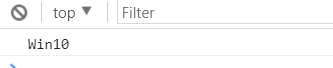
运行后,console打印:
5.判断浏览器类型和版本:
<!doctype html>

<html>

<head>

<meta charset="utf-8">

<title>js代码学习</title>

<link rel="stylesheet" type="text/css" href="bootstrap/bootstrap.min.css">

<style type="text/css">

</style>

</head>

<body>

<script src="jquery/jquery.min.js"></script>

<script type="text/javascript">

var browserType = explorerType(); //浏览器

console.log(browserType);

//判断浏览器

function explorerType() {

    var brow = getBrowser();

    var mozilla = /firefox/.test(navigator.userAgent.toLowerCase());

    // $.browser.mozilla = /firefox/.test(navigator.userAgent.toLowerCase());

    // $.browser.webkit = /webkit/.test(navigator.userAgent.toLowerCase());

    // $.browser.opera = /opera/.test(navigator.userAgent.toLowerCase());

    // $.browser.msie = /msie/.test(navigator.userAgent.toLowerCase());

    var bInfo = "非主流浏览器";

    if(brow.msie) {

        bInfo = "MicrosoftInternetExplorer" + brow.version;

    }

    if(brow.mozilla) {

        bInfo = "MozillaFirefox" + brow.version;

    }

    if(brow.safari) {

        bInfo = "AppleSafari" + brow.version;

    }

    if(brow.opera) {

        bInfo = "Opera" + brow.version;

    }

    if(brow.chrome) {

        bInfo = "chrome" + brow.version;

    }

    return bInfo;

}

//navigator.userAgent中取浏览器和版本

function uaMatch(e){

    e=e.toLowerCase();

    console.log(e);

    var t=/(chrome)[\/]([\w.]+)/.exec(e)

        ||/(webkit)[\/]([\w.]+)/.exec(e)

        ||/(opera)(?:.*version|)[\/]([\w.]+)/.exec(e)

        ||/(msie) ([\w.]+)/.exec(e)

        ||e.indexOf("compatible")<0 && /(mozilla)(?:.*? rv:([\w.]+)|)/.exec(e)

        ||[];

    console.log(t);

    return {

            browser:t[1]||"",

            version:t[2]||"0"

           }

}

//获取浏览器信息

function getBrowser(){

    var e = uaMatch(navigator.userAgent);

    var t = {};

    if(e.browser){

        t[e.browser] = !0;

        t.version = e.version;

    }

    if(t.chrome){

        t.webkit = !0;

    }else{

        t.webkit&&(t.safari=!0);        //这句话有点问题,因为我是从min.js中翻译出来的,这句话不懂。应该是判断safari

    }

    console.log(t);

    return t;

}

</script>

</body>

</html>
运行,console打印:

6.获取网站来源,从哪个网站跳转过来的:
<script type="text/javascript">

var from = ''; //来源(备选参数)

var to = window.location.host + window.location.pathname; //当前url

if(to.indexOf("http://") <= -1) {

    to = "http://" + to;

}

var fr_url = document.referrer; //来源

if(fr_url == '' || fr_url == 'null') {

    fr_url = 'null';

} else {

    fr_url = fr_url.split("?");

    fr_url = String(fr_url[0]);

}

from = fr_url;

console.log(from);

</script>
7.获取uid的一种写法:
<script type="text/javascript">

var uid = uid();

console.log(uid);    //打印 15062136704724854

//获取UID

function uid() {

    u_id = (+new Date()) + Math.random().toString(10).substring(2, 6);

    return u_id;

}

/*

(+new Date()):

1506213347503

Math.random().toString(10):

"0.44199265208142435"

toString()函数用于将当前对象以字符串的形式返回。

该方法属于Object对象,由于所有的对象都"继承"了Object的对象实例,因此几乎所有的实例对象都可以使用该方法。

所有主流浏览器均支持该函数。

number.toString(radix)

radix: 可选。规定表示数字的基数,使 2 ~ 36 之间的整数。若省略该参数,则使用基数 10。但是要注意,如果该参数是 10 以外的其他值,则 ECMAScript 标准允许实现返回任意值。

2 - 数字以二进制值显示

8 - 数字以八进制值显示

16 - 数字以十六进制值显示

例子:

var num = 15; num.toString();

"15"

var num = 15; num.toString(2);

"1111"

var num = 15; num.toString(8);

"17"

*/

</script>
8.体育网站上写的一种ajax请求,jsonp,error函数中的处理:
//请求传递数据

function getData_ajax(url) {

    $.ajax({

        type: 'get',

        url: url + '?param=' + encodeURI(param),

        dataType: 'jsonp',

        jsonp: 'callback',

        timeout: 6000,

        beforeSend: function() {

            // 加载提示

            $('#ajax_tips').show();

        },

        success: function(data) {

            //数据传递验证成功后执行的操作

            console.log("scc-data="+JSON.stringify(data));

        },

        complete: function() {},

        error: function(jqXHR, textStatus, errrorThrown) {

            if(errrorThrown == 'Not Found') {

                console.log('Your requested address is not found.');

            } else if(textStatus == 'timeout') {

                console.log('Verify the request timeout, please refresh the page and try again');

            } else {

                console.log('Your requested address is not found.');

            }

        }

    });

}
9.效仿体育网站动态加载js,加载js完成后 执行回调函数;
加载广告js等:
<script type="text/javascript">

/**

 * type 为广告类型

 * 0:百度ssp正常加载方式

 * 1:淘宝afp加载

 * 2:防屏蔽代码加载方式

 * 3:百度ssp广告异步加载方式

 * 4:防屏蔽广告立即加载方式

 * @type type

 */

function getQueryString(name) {

    var reg = new RegExp("(^|&)" + name + "=([^&]*)(&|$)");

    var r = window.location.search.substr(1).match(reg);

    if (r != null)

        return  unescape(r[2]);

    return null;

}

$.eastday = {

    qid: function () {

        return getQueryString('qid') ? getQueryString('qid') : "";

    },

    //加载js,并且js加载完成后执行回调函数

    getScript: function(url, callback, element) {

        var head = document.getElementsByTagName('head')[0],

            js = document.createElement('script');

        js.setAttribute('type', 'text/javascript');

        js.setAttribute('src', url);

        if(element){

            element.appendChild(js);

        } else {

            head.appendChild(js);

        }

        //执行回调

        var callbackFn = function(){

            if(typeof callback === 'function'){

                callback();

            }

        };

        if (document.all) { // IE

            js.onreadystatechange = function() {

                if (js.readyState === 'loaded' || js.readyState === 'complete') {

                    callbackFn();

                }

            };

        } else {

            js.onload = function() {

                callbackFn();

            };

        }

    },

    //ssp正常加载方式

    ssp_writer:function (corp_id,data_id) {

        var s = "_" + Math.random().toString(36).slice(2);

        document.write('<div class="eastday_da" data_id="' + data_id + '" id="' + s + '"></div>');

        (window.slotbydup=window.slotbydup || []).push({id: corp_id, container: s, display: 'display'});

    },

    //ssp普通加载方式

    ssp_normal : function (corp_id,data_id){

        if(data_id == 'news_content_ad_top'){

            this.ssp_writer(corp_id,data_id)

            return

        }

        var width = parseInt(__da_size[data_id]["width"]) || 0;

        if(!width){

            this.ssp_writer(corp_id,data_id)

            return

        }

        document.write('<iframe   class="iframeDA" style="border:0 none; width:'+__da_size[data_id].width+'px; height:'+0+'px; " frameborder="0"  scrolling=no src="/asspd.html?corp_id='+corp_id+'&data_id='+data_id+'"></iframe>')

    },

    //ssp JS动态加载方式

    ssp_dynamic : function (corp_id,data_id){

        return '<iframe  style="border:0 none; width:'+__da_size[data_id].width+'px; height:'+__da_size[data_id].height+'px;" frameborder="0"  scrolling=no src="/asspd.html?corp_id='+corp_id+'&data_id='+data_id+'"></iframe>';

        },

    //afp JS动态加载方式

    afp_dynamic : function(corp_id,data_id){

        //淘宝AFP广告

        var width = parseInt(__da_size[data_id]["width"]) || 0;

        var height = parseInt(__da_size[data_id]["height"]) || 0;

        var dom = $('<iframe  style=" width:'+__da_size[data_id].width+'px; height:'+__da_size[data_id].height+'px;" frameborder="0" scrolling="no"  src="/mmad.html?mmid='+corp_id+'"></iframe>');

        return dom;

    },

    //防屏蔽代码正常加载方式,本身为异步

    fangpingbi : function (corp_id,data_id){

        document.write('<script type="text/javascript" src="//tt123.eastday.com/' + corp_id + '.js"></script>');

    },

    //防屏蔽代码JS动态加载方式,本身为异步

    fangpingbi_dynamic: function (corp_id,data_id){

        var s = "_" + Math.random().toString(36).slice(2);

        var dom = $('<div id="'+data_id+'+s+'"></div>');

        dom.ready(function () {

            $.eastday.getScript('//tt123.eastday.com/' + corp_id + '.js', function(){}, dom[0]);

        });

        return dom;

    }

};

// 广告位高度自适应

window.setInterval(function () {

    $('.iframeDA').each(function (k,iframe) {

        if(iframe.contentWindow.document.body){

            var bHeight = iframe.contentWindow.document.body.scrollHeight;

            var dHeight = iframe.contentWindow.document.documentElement.scrollHeight;

            var height = Math.max(bHeight, dHeight);

            iframe.style.height = height+'px';

        }

    });

}, 200);

</script>
代码解释:
appendChild() 方法:
<!DOCTYPE html>

<html>

<body>

<ul id="myList"><li>Coffee</li><li>Tea</li></ul>

<p id="demo">请点击按钮向列表中添加项目。</p>

<button onclick="myFunction()">亲自试一试</button>

<script>

function myFunction()

{

var node=document.createElement("LI");

var textnode=document.createTextNode("Water");

node.appendChild(textnode);

document.getElementById("myList").appendChild(node);

}

</script>

<p><b>注释:</b>首先创建 LI 节点,然后创建文本节点,然后把这个文本节点追加到 LI 节点。最后把 LI 节点添加到列表中。</p>

</body>

</html>
scrollHeight: 参考网站 http://www.cnblogs.com/nanshanlaoyao/p/5964730.html
10.另一种获取客户端操作系统的方法:
<script type="text/javascript">

/**

*   判断客户端操作系统类型

*   不过没有看到windows xp的。不是很全

*/

function getOsType() {

    var agent = navigator.userAgent.toLowerCase();

    console.log(agent);

    var os_type = "";

    if (/android/i.test(navigator.userAgent)) {

        var index = agent.indexOf("android");

        version = agent.substr(index + 8, 3);

        os_type = "Android " + version;

    }

    if (/(iPhone|iPad|iPod|iOS)/i.test(navigator.userAgent)) {

        var index = agent.indexOf("os");

        version = agent.substr(index + 3, 3);

        os_type = "iOS " + version;

    }

    if (/Linux/i.test(navigator.userAgent) && !/android/i.test(navigator.userAgent) && !/(iPhone|iPad|iPod|iOS)/i.test(navigator.userAgent)) {

        os_type = "Linux";

    }

    if (/windows|win32/i.test(navigator.userAgent)) {

        os_type = "windows32";

    }

    if (/windows|win64/i.test(navigator.userAgent)) {

        os_type = "windows64";

    }

    return os_type;

};

var a = getOsType();

console.log(a);

</script>
11.效仿体育网站,一个回到顶部的例子:
<!doctype html>

<html>

<head>

<meta charset="utf-8">

<title>js代码学习</title>

<link rel="stylesheet" type="text/css" href="bootstrap/bootstrap.min.css">

<style type="text/css">

body{

    height: 2000px;

}

.back-top {

    position: fixed;

    left: 50%;

    z-index: 99;

    bottom: 50px;

}

.back-top .zd {

    width: 68px;

    height: 68px;

    float: left;

    text-align: center;

    line-height: 68px;

    border: 1px solid #ccc;

}

</style>

</head>

<body>

<div class="back-top">

    <a class="zd" id="gotop_btn">回到顶部</a>

</div>

<script src="jquery/jquery.min.js"></script>

<script type="text/javascript">

//global_sider 全局侧边栏

(function () {

    //绑定页面滚动事件

    $(window).bind('scroll', function () {

        var len = $(this).scrollTop();

        if (len >= 400) {

            //显示回到顶部按钮

            $('.back-top').show();

        } else {

            //影藏回到顶部按钮

            $('.back-top').hide();

        }

    });

    //顶部

    $('body').on('click', '#gotop_btn', function () {

        $('html').animate({scrollTop: 0})

        $("html, body").filter(':not(:animated)').animate({

            scrollTop: 0

        });

    });

})();

</script>

</body>

</html>
12.jsonp怎么用呢?
1.

    adAjax: function () {

        var self = this;

        $.ajax({

            type: 'get',

            url: self.recommend_param(),

            timeout: 3000,

            dataType: 'jsonp',

            jsonp: 'jsonp',

            success: function (data) {

                self.addDom(data, self)

            }

        })

    }
13.比较两个数组是否完全相等:
<script type="text/javascript">

var array1 = ['a', 'c', 'b'];

var array2 = ['a', 'c', 'b'];

console.log(isArrayEql(array1, array2));

console.log(array1);

//true

//["a", "b", "c"]

/* 比较两个数组是否完全相等 */

function isArrayEql(arr1, arr2){

    if(arr1 instanceof Array && arr2 instanceof Array){

        var len1 = arr1.length;

        var len2 = arr2.length;

        if(len1 == len2){

            arr1 = arrSort(arr1);

            arr2 = arrSort(arr2);

            return arr1.toLocaleString() == arr2.toLocaleString();

        }else{

            return false;

        }

    }else{

        return false;

    }

}

/*

 *    对数组排序

 *  order排序规则,asc- 升序,默认  desc - 倒序

 */

 function arrSort(arr, order){

     if(arr instanceof Array){

         arr.sort(function(v1, v2){

             if(v1 < v2){

                 return order=='desc'? 1:-1;

             }else if(v1 > v2){

                 return order=='desc'? -1:1;

             }else{

                 return 0;

             }

         });

         return arr;

     }else{

         return arr;

     }

 }

</script>
注意:上面代码的一个弊端也是:比较完大小之后,把array1的顺序排序了。
14.
---------
《js笔记》的更多相关文章
- 简单物联网:外网访问内网路由器下树莓派Flask服务器
最近做一个小东西,大概过程就是想在教室,宿舍控制实验室的一些设备. 已经在树莓上搭了一个轻量的flask服务器,在实验室的路由器下,任何设备都是可以访问的:但是有一些限制条件,比如我想在宿舍控制我种花 ...
- 利用ssh反向代理以及autossh实现从外网连接内网服务器
前言 最近遇到这样一个问题,我在实验室架设了一台服务器,给师弟或者小伙伴练习Linux用,然后平时在实验室这边直接连接是没有问题的,都是内网嘛.但是回到宿舍问题出来了,使用校园网的童鞋还是能连接上,使 ...
- 外网访问内网Docker容器
外网访问内网Docker容器 本地安装了Docker容器,只能在局域网内访问,怎样从外网也能访问本地Docker容器? 本文将介绍具体的实现步骤. 1. 准备工作 1.1 安装并启动Docker容器 ...
- 外网访问内网SpringBoot
外网访问内网SpringBoot 本地安装了SpringBoot,只能在局域网内访问,怎样从外网也能访问本地SpringBoot? 本文将介绍具体的实现步骤. 1. 准备工作 1.1 安装Java 1 ...
- 外网访问内网Elasticsearch WEB
外网访问内网Elasticsearch WEB 本地安装了Elasticsearch,只能在局域网内访问其WEB,怎样从外网也能访问本地Elasticsearch? 本文将介绍具体的实现步骤. 1. ...
- 怎样从外网访问内网Rails
外网访问内网Rails 本地安装了Rails,只能在局域网内访问,怎样从外网也能访问本地Rails? 本文将介绍具体的实现步骤. 1. 准备工作 1.1 安装并启动Rails 默认安装的Rails端口 ...
- 怎样从外网访问内网Memcached数据库
外网访问内网Memcached数据库 本地安装了Memcached数据库,只能在局域网内访问,怎样从外网也能访问本地Memcached数据库? 本文将介绍具体的实现步骤. 1. 准备工作 1.1 安装 ...
- 怎样从外网访问内网CouchDB数据库
外网访问内网CouchDB数据库 本地安装了CouchDB数据库,只能在局域网内访问,怎样从外网也能访问本地CouchDB数据库? 本文将介绍具体的实现步骤. 1. 准备工作 1.1 安装并启动Cou ...
- 怎样从外网访问内网DB2数据库
外网访问内网DB2数据库 本地安装了DB2数据库,只能在局域网内访问,怎样从外网也能访问本地DB2数据库? 本文将介绍具体的实现步骤. 1. 准备工作 1.1 安装并启动DB2数据库 默认安装的DB2 ...
- 怎样从外网访问内网OpenLDAP数据库
外网访问内网OpenLDAP数据库 本地安装了OpenLDAP数据库,只能在局域网内访问,怎样从外网也能访问本地OpenLDAP数据库? 本文将介绍具体的实现步骤. 1. 准备工作 1.1 安装并启动 ...
随机推荐
- zeptojs库解读1之整体框架
首先看的是整体框架, // zepto骨骼,这个函数的作用使得Zepto(slector, context)使用很多$.fn里面的方法 var Zepto = (function(){ // zept ...
- IIS 7.5 配置 php 5.4.22 链接 sql 2008(用PDO链接数据库)
最近在接触PHP这块,关于在wndows系统下的php配置,虽然网上已经很多文章,但有时候有些配置找起也麻烦,所以分享给大家. 一.php 5.4.22 下载地址 http://windows.php ...
- hdu 5687 Problem C trie树
Problem C Time Limit: 2000/1000 MS (Java/Others) Memory Limit: 131072/131072 K (Java/Others) Prob ...
- Idea使用(摘抄至java后端技术公众号-孤独烟)
1. idea自动编译需要手动开启: 2. 手动去掉idea自动提示时候不区分字母大小写 3. idea自动导入包 4. 悬浮开关提示:鼠标放上去就给出提示 5. 打开的所有类tabs换行显示,不单行 ...
- JVM虚拟机调优指南
本章通过阅读JVM垃圾搜集指南文档,整理虚拟机主要配置以及,理解不同的垃圾搜集器. 垃圾搜集算法 引用计数算法 根搜索算法 标记-清除算法 复制算法 标记-整理算法 分代收集算法 搜集算法网上有很多介 ...
- HDU 1969 精度二分
Pie Time Limit: 5000/1000 MS (Java/Others) Memory Limit: 65536/32768 K (Java/Others)Total Submiss ...
- 自定义jQuery的animate动画
//擦除效果 jQuery.extend(jQuery.easing, { easeOutBack : function(x, t, b, c, d, s) { s = s || 1.3; retur ...
- bzoj1073
题意: k短路 题解: A* 当然是抄了zzd的代码 然而需要特判 为什么把bool改成int爆空间!!! 代码: #include<bits/stdc++.h> using namesp ...
- bzoj3393
题解: spfa 允许多次进队 代码: #include<bits/stdc++.h> using namespace std; struct que{int x,y,dire,dist; ...
- 理解 Socket
原文链接 题外话 前几天和朋友聊天,朋友问我怎么最近不写博客了,一个是因为最近在忙着公司使用的一些控件的开发,浏览器兼容性搞死人 但主要是因为这段时间一直在看html5的东西,看到web socket ...