
UDP实现一个简易的聊天室 (Unity&&C#完成)
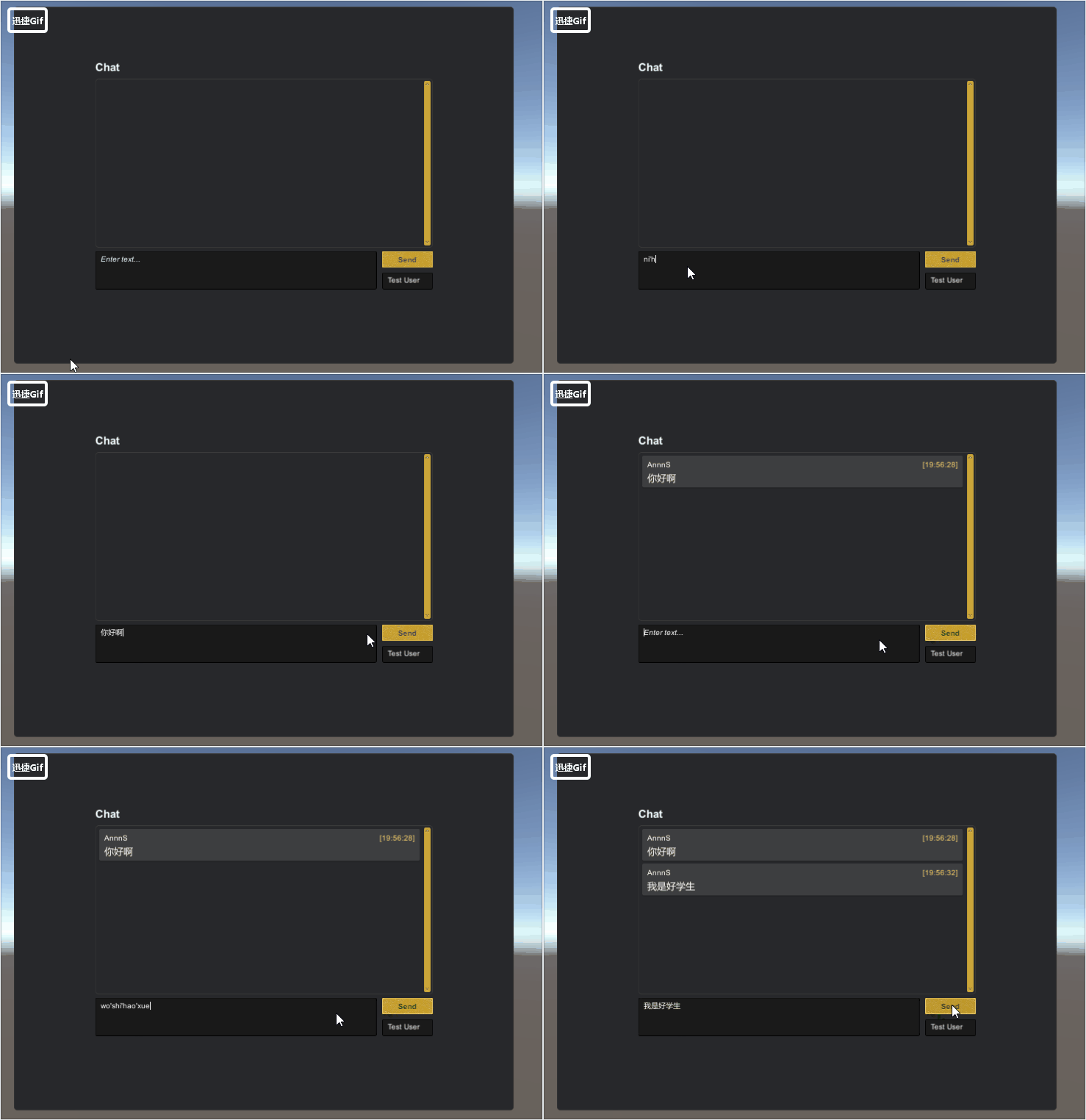
效果展示(尚未完善)
UDP
User Data Protocol 用户数据报协议
概述
UDP是不连接的数据报模式。即传输数据之前源端和终端不建立连接。使用尽最大努力交付原则,即不保证可靠交付。
数据报模式:由于不建立连接,收到的数据可能是任意主机发送的,所以接收端Read次数必须与发送端Write次数相同,每次只接收一个报文,避免多个报文合并。但如果报文过长,多出部分会被丢弃,所以注意数据最大为1472字节。
实现步骤
服务端 客户端
获取本机终结点 获取本机终结点
创建UdpClient对象 创建UdpClient对象
接收任意终结点消息 接收任意终结点消息
向客户端发送消息 向服务端发送消息
…… …
关闭连接 关闭连接
using System.Collections;

using System.Collections.Generic;

using UnityEngine;

using System.Threading;

using System.Net;

using System.Net.Sockets;

using System.Text;

using Common;

using UIWidgetsSamples;

using System;

/// <summary>

/// 服务端

/// </summary>

public class ChatUDPServerTest : MonoBehaviour

{

    public string serverIP;

    //IP地址

    public int serverPort;

    //端口

    //1.创建Scoket对象 IP Port

    private Thread thread;

    private UdpClient udpSeivic;

    public void Start()

    {

        chatView = transform.FindChildByName("ChatView").

            GetComponent<ChatView>();

        //给端口和IP

        //构建终结点  IP和一个端口

        IPEndPoint localEP = new

            IPEndPoint(IPAddress.Parse(serverIP), serverPort);

        udpSeivic = new UdpClient(localEP);

        thread = new Thread(ReceiveMessage);

        thread.Start();

    }

    /// <summary>

    /// 接收消息

    /// </summary>

    private void ReceiveMessage()

    {

        while (true)

        {

            IPEndPoint remote = new

                IPEndPoint(IPAddress.Any, );

            //创建任意终结点

            //ref

            byte[] date = udpSeivic.Receive(ref remote);

            //Receive接收消息  如果没有收到消息 线程阻塞  放在线程中

            string msg = Encoding.UTF8.GetString(date);

            //获取的客户都安信息

            Debug.Log(remote.Address + "===" + remote.Port);

            //如果接收客户端的消息,会把任意终结点修改为客户端的终结点

            ThreadCrossHelper.Instance.ExecuteOnMainThread(() => { ShowMessage(msg); });

        }

    }

    private ChatView chatView;

    /// <summary>

    /// 显示消息

    /// </summary>

    /// <param name="msg"></param>

    public void ShowMessage(string msg)

    {

        chatView.DataSource.Add(new ChatLine()

        {

            UserName = "AnnnS",

            Message = msg,

            Time = DateTime.Now,

            Type = ChatLineType.User,

        });

    }

    private void OnApplicationQuit()

    {

        udpSeivic.Close();

        thread.Abort();

    }

}
ChatUDPServerTest
脚本引用的工具箱
- MonoSingleton (泛型单例)
- ThreadCrossHelper (为子线程提供,可以在主线程中执行的方法)
- TransformHelper(根据名称查找后代元素)
using System.Collections;

using System.Collections.Generic;

using UnityEngine;

namespace Common

{

    /// <summary>

    ///

    /// </summary>

    public class MonoSingleton<T> : MonoBehaviour where T : MonoSingleton<T>

    {

        //public static T Instance

        //{

        //    get;

        //    private set;

        //}

        //private void Awake()

        //{

        //    Instance = this as T;

        //}

        //按需加载

        private static T instance;

        public static T Instance

        {

            get

            {

                if (instance == null)

                {

                    //在场景中查找对象

                    instance = FindObjectOfType<T>();

                    if (instance == null)

                    {

                        //创建游戏对象 附加 脚本对象

                        new GameObject("Singleton of " + typeof(T)).AddComponent<T>();//立即执行Awake

                    }

                    else

                    {

                        instance.Initialized();

                    }

                }

                return instance;

            }

        }

        protected virtual void Initialized()

        {

        }

        [Tooltip("是否需要跨场景不销毁")]

        public bool isDontDestroy = true;

        //如果管理类自行附加到物体中

        //在Awake中为instance赋值

        protected void Awake()

        {

            if (isDontDestroy)

            {

                DontDestroyOnLoad(gameObject);

            }

            if (instance == null)

            {

                instance = this as T;

                instance.Initialized();

            }

        }

    }

}
MonoSingleton
using System;

using System.Collections;

using System.Collections.Generic;

using UnityEngine;

namespace Common

{

    /// <summary>

    ///

    /// </summary>

    public class ThreadCrossHelper : MonoSingleton<ThreadCrossHelper>

    {

        /// <summary>

        /// 延迟项

        /// </summary>

        class DelayedItem

        {

            public Action CurrentAction { get; set; }

            public DateTime Time { get; set; }

        }

        private List<DelayedItem> actionList;

        //private List<Action> actionList;

        //private List<float> timeList;

        protected override void Initialized()

        {

            base.Initialized();

            actionList = new List<DelayedItem>();

        }

        private void Update()

        {

            for (int i = actionList.Count - ; i >= ; i--)

            {

                //到时间

                if (actionList[i].Time <= DateTime.Now)

                {

                    lock (actionList)

                    {

                        actionList[i].CurrentAction();//执行

                        actionList.RemoveAt(i);//从列表中移除

                    }

                }

            }

        }

        /// <summary>

        /// 为子线程提供,可以在主线程中执行的方法

        /// </summary>

        /// <param name="action"></param>

        /// <param name="dealy"></param>

        public void ExecuteOnMainThread(Action action, float dealy = )

        {

            DelayedItem item = new DelayedItem()

            {

                CurrentAction = action,

                //Time = Time.time + dealy

                Time = DateTime.Now.AddSeconds(dealy)

            };

            lock (actionList)

            {

                actionList.Add(item);

            }

        }

    }

}
ThreadCrossHelper
using System.Collections;

using System.Collections.Generic;

using UnityEngine;

namespace Common

{

    /// <summary>

    /// 变换组件助手类

    /// </summary>

    public static  class TransformHelper

    {

        /// <summary>

        /// 未知层级,根据名称查找后代元素

        /// </summary>

        /// <param name="currentTF"></param>

        /// <param name="childName"></param>

        /// <returns></returns>

        public static Transform FindChildByName(this Transform currentTF, string childName)

        {

            Transform childTF = currentTF.Find(childName);

            if (childTF != null) return childTF;

            //将问题推迟给子物体

            for (int i = ; i < currentTF.childCount; i++)

            {

                //在方法体内部,又遇到了相同的问题,所以需要调用自身。

                childTF = FindChildByName(currentTF.GetChild(i), childName);

                if (childTF != null) return childTF;

            }

            return null;

        }

    }

}
TransformHelper
UDP实现一个简易的聊天室 (Unity&&C#完成)的更多相关文章
- C 基于UDP实现一个简易的聊天室
引言 本文是围绕Linux udp api 构建一个简易的多人聊天室.重点看思路,帮助我们加深 对udp开发中一些api了解.相对而言udp socket开发相比tcp socket开发注意的细节要少 ...
- TCP实现一个简易的聊天室 (Unity&&C#完成)
效果展示 TCP Transmission Control Protocol 传输控制协议 TCP是面向连接的流模式(俗称:网络流).即传输数据之前源端和终端建立可靠的连接,保证数据传输的正确性. 流 ...
- 与众不同 windows phone (31) - Communication(通信)之基于 Socket UDP 开发一个多人聊天室
原文:与众不同 windows phone (31) - Communication(通信)之基于 Socket UDP 开发一个多人聊天室 [索引页][源码下载] 与众不同 windows phon ...
- 与众不同 windows phone (30) - Communication(通信)之基于 Socket TCP 开发一个多人聊天室
原文:与众不同 windows phone (30) - Communication(通信)之基于 Socket TCP 开发一个多人聊天室 [索引页][源码下载] 与众不同 windows phon ...
- [SignalR]一个简单的聊天室
原文:[SignalR]一个简单的聊天室 1.说明 开发环境:Microsoft Visual Studio 2010 以及需要安装NuGet. 2.添加SignalR所需要的类库以及脚本文件: 3. ...
- 用ServletContext做一个简单的聊天室
这里主要是ServletContext的一个特性:ServletContext是一个公共的空间,可以被所有的客户访问.由此可见ServletContext比cookie和session的作用范围要大[ ...
- 基于websocket实现的一个简单的聊天室
本文是基于websocket写的一个简单的聊天室的例子,可以实现简单的群聊和私聊.是基于websocket的注解方式编写的.(有一个小的缺陷,如果用户名是中文,会乱码,不知如何处理,如有人知道,请告知 ...
- [XMPP]简易的聊天室实现[二](使用CocoaAsyncSocket)
@import url(http://i.cnblogs.com/Load.ashx?type=style&file=SyntaxHighlighter.css);@import url(/c ...
- 利用JavaUDPSocket+多线程模拟实现一个简单的聊天室程序
对Socket的一点个人理解:Socket原意是指插座.家家户户都有五花八门的家用电器,但它们共用统一制式的插座.这样做的好处就是将所有家用电器的通电方式统一化,不需要大费周章地在墙壁上凿洞并专门接电 ...
随机推荐
- 给iOS开发新手送点福利,简述UIView的属性和用法
UIView 1.alpha 设置视图的透明度.默认为1. // 完全透明 view.alpha = 0; // 不透明 view.alpha = 1; 2.clipsToBounds // 默认是N ...
- 读Understanding the Linux Kernel, 3rd Edition有感
14.3.2.2. Avoiding request queue congestion Each request queue has a maximum number of allowed pendi ...
- MongoDB 3.0 常见集群的搭建(主从复制,副本集,分片....)
一.mongodb主从复制配置 主从复制是mongodb最常用的复制方式,也是一个简单的数据库同步备份的集群技术,这种方式很灵活.可用于备份,故障恢复,读扩展等. 最基本的设置方式就是建立一个主节 ...
- (1/24) 认识webpack
1.什么是webpack (1)webpack是一个模块打包工具,它做的事情是,分析你的项目结构,找到JavaScript模块以及其它的一些浏览器不能直接运行的拓展语言(Scss,TypeScript ...
- echarts x轴文字显示不全(解决方案)
echarts x轴标签文字过多导致显示不全 如图: 解决办法1:xAxis.axisLabel 属性 axisLabel的类型是object ,主要作用是:坐标轴刻度标签的相关设置.(当然yAxis ...
- 10个免费的在线Markdown编辑器
1. StackEdit StackEdit是一个很用特色的免费在线Markdown编辑器. 有一个非常不错的工具栏,可与云存储同步,以URL形式导入文件或者直接从硬盘打入.他还有一个亮点就是,可以减 ...
- 7 MySQL--记录的增删改查
MySQL数据操作: DML ======================================================== 在MySQL管理软件中,可以通过SQL语句中的DML语言 ...
- protobuf's extension
[protobuf's extension] extension允许第三方扩展协议,开发方需要像下面这样定义: 扩展方需要像下面这样扩展: 使用的时候必须用SetExtension方法: 参考:htt ...
- 动量Momentum梯度下降算法
梯度下降是机器学习中用来使模型逼近真实分布的最小偏差的优化方法. 在普通的随机梯度下降和批梯度下降当中,参数的更新是按照如下公式进行的: W = W - αdW b = b - αdb 其中α是学习率 ...
- SDL编程
一.简介 SDL是一个用C编写的跨平台的多媒体库,它通过OpenGL和Direct3D,提供了针对音频.视频.键盘.鼠标.控制杆及3D硬件的低级别的访问接口.它在MPEG播放软件.模拟器以及许多游戏中 ...