
几组不错的X264自定义编码<转>
转帖地址:http://tieba.baidu.com/p/4201033507
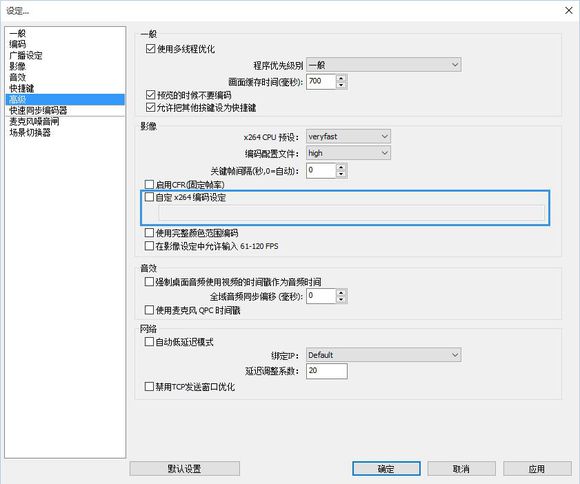
一般直播时使用A设定即可。
你尝试设置并找出你最满意的设定
A为最需最低CPU资源,E为最高。
A
8x8dct=1 aq-mode=2 bframes=1 chroma-qp-offset=1 colormatrix=smpte170m deblock=0:0 direct=auto ipratio=1.41 keyint=240 level=3.1 me=hex merange=16 min-keyint=auto mixed-refs=1 no-mbtree=0 partitions=i4x4,p8x8,b8x8 profile=main psy-rd=0.5:0.0 qcomp=0.6 qpmax=51 qpmin=10 qpstep=4 ratetol=10 rc-lookahead=30 ref=1 scenecut=40 subme=5 threads=0 trellis=2 weightb=1 weightp=2
B
8x8dct=1 aq-mode=2 bframes=1 chroma-qp-offset=1 colormatrix=smpte170m deblock=0:0 direct=auto ipratio=1.41 keyint=240 level=3.1 me=hex merange=16 min-keyint=auto mixed-refs=1 no-mbtree=0 partitions=i4x4,p8x8,b8x8 profile=main psy-rd=0.5:0.0 qcomp=0.6 qpmax=51 qpmin=10 qpstep=4 ratetol=10 rc-lookahead=30 ref=1 scenecut=40 subme=6 threads=0 trellis=2 weightb=1 weightp=2
C
8x8dct=1 aq-mode=2 bframes=1 chroma-qp-offset=2 colormatrix=smpte170m deblock=0:0 direct=auto ipratio=1.41 keyint=240 level=3.1 me=hex merange=16 min-keyint=auto mixed-refs=1 no-mbtree=0 partitions=i4x4,p8x8,b8x8 profile=main psy-rd=0.5:0.0 qcomp=0.6 qpmax=51 qpmin=10 qpstep=4 ratetol=10 rc-lookahead=30 ref=1 scenecut=40 subme=7 threads=0 trellis=2 weightb=1 weightp=2
D
8x8dct=1 aq-mode=2 b-adapt=2 bframes=1 chroma-qp-offset=2 colormatrix=smpte170m deblock=0:0 direct=auto ipratio=1.41 keyint=240 level=3.1 me=umh merange=16 min-keyint=auto mixed-refs=1 no-mbtree=0 partitions=all profile=high psy-rd=0.5:0.0 qcomp=0.6 qpmax=51 qpmin=10 qpstep=4 ratetol=10 rc-lookahead=30 ref=1 scenecut=40 subme=8 threads=0 trellis=2 weightb=1 weightp=2
E
8x8dct=1 aq-mode=2 b-adapt=2 bframes=1 chroma-qp-offset=2 colormatrix=smpte170m deblock=0:0 direct=auto ipratio=1.41 keyint=240 level=3.1 me=umh merange=16 min-keyint=auto mixed-refs=1 no-mbtree=0 partitions=all profile=high psy-rd=0.5:0.0 qcomp=0.6 qpmax=51 qpmin=10 qpstep=4 ratetol=10 rc-lookahead=30 ref=1 scenecut=40 subme=10 threads=0 trellis=2 weightb=1 weightp=2
================================================
这给PC极差用户.. 不推荐超过1000kbps..
L
8x8dct=1 aq-mode=2 bframes=1 chroma-qp-offset=1 colormatrix=smpte170m deblock=0:0 direct=auto ipratio=1.41 keyint=240 level=3.1 me=hex merange=16 min-keyint=auto mixed-refs=1 no-mbtree=0 partitions=i4x4,p8x8,b8x8 profile=main psy-rd=0.5:0.0 qcomp=0.6 qpmax=51 qpmin=10 qpstep=4 ratetol=10 rc-lookahead=30 ref=1 scenecut=40 subme=1 threads=0 trellis=2 weightb=1 weightp=2
================================================
这给网宽不足者使用,上传不足1m者..
设置500kbps,并使用以下自定义x264编码
8x8dct=1 aq-mode=2 b-adapt=2 bframes=1 chroma-qp-offset=2 colormatrix=smpte170m deblock=0:0 direct=auto ipratio=1.41 keyint=240 level=3.1 me=umh merange=16 min-keyint=auto mixed-refs=1 no-mbtree=0 partitions=all profile=high psy-rd=0.5:0.0 qcomp=0.6 qpmax=51 qpmin=10 qpstep=4 ratetol=10 rc-lookahead=30 ref=1 scenecut=40 subme=10 threads=0 trellis=2 weightb=1 weightp=2
↑國外有人使用這組,並以500kbps的上傳,以720P直播BF3...
几组不错的X264自定义编码<转>的更多相关文章
- 基于 WebRTC 实现自定义编码分辨率发送
2020年如果问什么技术领域最火?毫无疑问:音视频.2020年远程办公和在线教育的强势发展,都离不开音视频的身影,视频会议.在线教学.娱乐直播等都是音视频的典型应用场景. 更加丰富的使用场景更需要我们 ...
- netty系列之:自定义编码和解码器要注意的问题
目录 简介 自定义编码器和解码器的实现 ReplayingDecoder 总结 简介 在之前的系列文章中,我们提到了netty中的channel只接受ByteBuf类型的对象,如果不是ByteBuf对 ...
- 【LINT】cpplint修改版:自定义编码风格检查工具lint
github:https://github.com/skullboyer/code-check Code Check 本仓介绍的内容涉及代码静态检查和编码风格检查 但主要放在编码风格检查,lint是基 ...
- FFmpeg X264 H264编码指南[译]
本文目标:如何创建一个高质量的H.264视频 x264 是一个 H.264 编码器. 通常有2种码率控制(rate control)模式:Constant Rate Factor (CRF) or T ...
- 视频编解码---x264用于编码,ffmpeg用于解码
项目要用到视频编解码,最近半个月都在搞,说实话真是走了很多弯路,浪费了很多时间.将自己的最终成果记录于此,期望会给其他人提供些许帮助. 参考教程: http://ffmpeg.org/trac/ffm ...
- 160912、工具类:spring+springmvc自定义编码转换
一.自定义的类(注意其中的属性,web.xml中的配置就是根据这个类的) import org.springframework.web.filter.OncePerRequestFilter; imp ...
- 测试x264编码器的低延时编码和非延时编码
最近在学x264的编码,经过大量的测试,编码1080P的视频,编码10000帧数据. 在设置为低延时编码的时候: 编码线程0,一帧耗时:7.000000 ms.编码线程0,一帧耗时:8.000000 ...
- 视频x264编码浅析
声明 x264_param_t 结构体变量: x264_param_t params; x264_param_default_preset(¶ms, "ultrafast&q ...
- x264 编码数配置
记录项目中用到一组x264快速编码参数配置,具体如下: param->i_frame_reference = 1; param->i_scenecut_threshold = 0; par ...
随机推荐
- UVALive-3645 Objective: Berlin (最大流:时序模型)
题目大意:有n个城市,m条航班.已知每条航班的起点和终点,还有每条航班的载客量.出发时间.到达时间.并且要求在任何一个城市(起点.终点除外)都至少要有30分钟的中转时间,求起点到终点的最大客流量. 题 ...
- localStorage(本地存储)使用总结
1.https://www.cnblogs.com/st-leslie/p/5617130.html (localStorage使用总结)
- 也来说说C#异步委托 (转自 Rising_Sun)
前些日子,看到园子里面有人用老王喝茶的例子讲解了一下同步和异步,虽然没有代码实现,但是能够通俗易懂的讲解了同步.异步.阻塞.非阻塞的关系了,今天借题发挥,用一个热水器加热洗澡的例子来具体演示一下C#使 ...
- 如何使用Win8系统自带杀毒软件
首先我们要说明的是,Windows Defender并不是我们杀毒首选,这只是微软在用户没有安装仍和杀软时提供的备用防护机制.因此我们如果安装了第三方的杀毒软件,系统就会将Windows Defend ...
- 同一sql表,在页面展示多级菜单
2.
- bzoj1224
题解: 暴力+剪纸 判断一下最大行不行,最小行不行 代码: #include<bits/stdc++.h> ; using namespace std; ],q; int n,m,x,y, ...
- springboot---数据整合篇
本文讲解 Spring Boot 基础下,如何使用 JDBC,配置数据源和通过 JdbcTemplate 编写数据访问. 环境依赖 修改 POM 文件,添加spring-boot-starter-jd ...
- (转)Web系统大规模并发——电商秒杀与抢购
电商的秒杀和抢购,对我们来说,都不是一个陌生的东西.然而,从技术的角度来说,这对于Web系统是一个巨大的考验.当一个Web系统,在一秒钟内收到数以万计甚至更多请求时,系统的优化和稳定至关重要.这次我们 ...
- Ubuntu系统安装,适用于14.04,16.04和17.10
本文以14.04为案例进行安装,其他版本相关问题会做注解 1.选择要安装的系统语言 本界面建议选择English,之后再选择中文安装 注意: 安装服务器版时,对于14.x版本第一步选择中文没有问题,但 ...
- 新转移注意(caffe):ImportError: libcudart.so.7.0: cannot open shared object file: No such file or directory
https://github.com/NVIDIA/DIGITS/issues/8 For this error ImportError: libcudart.so.7.0: cannot open ...