
VSPackge插件系列:简单文本编辑器的实现
相比其它开发环境,VS的好用就不用多说了,尽管VS很人性化,但是针对具体的我们想实现的功能时,会力不从心,也许会有很多现成的插件,但是作为一名程序员,我还是喜欢自己去写一些东西,因为这样能随心所欲的想做什么就做什么。
开始做事之前,我们不得不做很多的准备工作,比如说VS sp1我们得安装,理解vs插件有哪些,我们也都查不少文章,看很多哪些令人讨厌的msdn, 这些都不重要,重要的是,结果我们总会做出一个vs插件,哪些只是在磨刀而已。为什么我们会选VSPackge插件,而不是宏命令,或者addin。我们如何快速建立一个工程,我们的会花费不少时间去解决这些疑问。
下面是我参考的文章,希望对大家有所帮助。这里就不具体的一步步写那些疑问步骤了。
http://www.cnblogs.com/default/archive/2010/07/17/1779563.html
好吧,今天的主题就是开发一个简单的文本编辑器插件。没有视觉的文章看起来总是让人头疼,尤其是看了几十页的文字最终不知道到底说什么。来看下做编辑器最少需要做什么。
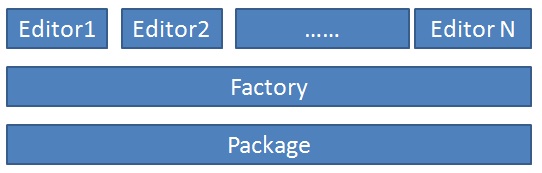
做VS的编辑器,我们得建立一个Package,这个向导会帮我们生成的,另外,我们要做的就是建立一个EditFactory,再建立一个Editor即可。当然从图上可以看到,我们可以在一个Package里面建立多个Editor。为了将共性的东西放在一起,我对Factory与Editor都建立了基类,这样Factory与Editor里的东西就会少不少,于是就有了下图的结构。
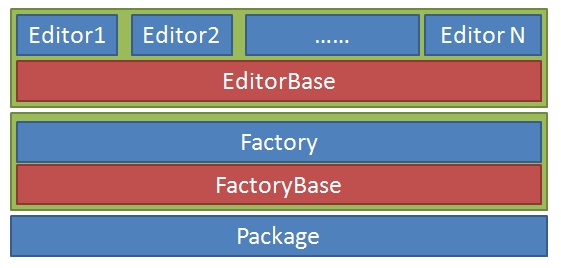
大体上结构有了,我们的目标明确了,下一步,为了和VS交互我们不得不继承一些接口。

这些接口都是干什么的,我们得简单的介绍下,更详细的我已经把msdn的地址粘贴的下面了,方便大家访问
IVsEditorFactory 接口,编辑器工厂类的接口,用于创建编辑器实例。
| 名称 | 说明 | |
|---|---|---|
 |
Close | 释放所有缓存的接口指针,所有事件接收的注销。 |
|
CreateEditorInstance | 用于使编辑工厂体系结构创建支持数据/视图分开的编辑器。 |
|
MapLogicalView | 映射逻辑视图到一个物理视图。 |
|
SetSite | 在环境中初始化的编辑器。 |
IVsPersistDocData 接口 文档处理接口
| 名称 | 说明 | |
|---|---|---|
|
Close | 关闭 IVsPersistDocData 对象。 |
|
GetGuidEditorType | 返回创建 IVsPersistDocData 编辑对象工厂的唯一标识符。 |
|
IsDocDataDirty | 确定文档是否已更改,因为次保存。 |
|
IsDocDataReloadable | 确定文档是否可重新加载。 |
|
LoadDocData | 从给定 MkDocument 将文档加载数据。 |
|
OnRegisterDocData | 调用通过运行文档表 (RDT),则注册在 RDT 的文档数据。 |
|
ReloadDocData | 重新加载文档数据,并在此过程中确定是否忽略一个后续文件更改。 |
|
RenameDocData | 将文档数据重命名。 |
|
SaveDocData | 将文档保存数据。 |
|
SetUntitledDocPath | 设置初始名称 (或路径) 未保存的,新创建文档数据。 |
IOleCommandTarget 接口 命令处理接口
| 名称 | 说明 | |
|---|---|---|
|
Exec | 执行指定的命令。 |
|
QueryStatus | 查询该对象以获得由用户界面事件生成的一个或多个命令的状态。 |
IPersistFileFormat 接口 文件处理接口
| 名称 | 说明 | |
|---|---|---|
|
GetClassID(Guid) | (继承自 IPersist。) |
|
GetClassID(Guid) | |
|
GetCurFile | 返回路径到对象的当前工作文件,或者,如果没有一种当前工作文件,对象的默认文件名提示。 |
|
GetFormatList | 提供该调用方提供必要的信息委托对象打开标准常见 保存 对话框 (使用 GetSaveFileNameViaDlg 函数)。 |
|
InitNew | 在没有权限的状态指示对象初始化自身。 |
|
IsDirty | 确定对象是否以保存更改为其当前文件。 |
|
Load | 打开已指定的文件并初始化从文件内容的对象。 |
|
Save | 将该对象的副本保存到指定文件。 |
|
SaveCompleted | 通知对象可以推断保存事务,并且对象可以写入它的文件。 |
   [PackageRegistration(UseManagedResourcesOnly = true)]

    [ProvideEditorFactory(typeof(ContextEditorFactory), , TrustLevel = __VSEDITORTRUSTLEVEL.ETL_AlwaysTrusted)]

    [ProvideEditorExtension(typeof(ContextEditorFactory), ".cs", , DefaultName = "file")]

    [ProvideEditorLogicalView(typeof(ContextEditorFactory), GuidList.GuidGL_IDE_VSPackageEditorFactoryString)]

    [Guid(GuidList.guidGL_IDE_VSPackagePkgString)]

    public sealed class GL_IDE_VSPackagePackage : Package

    {

        public GL_IDE_VSPackagePackage()

        {

        }

        #region Package Members

        protected override void Initialize()

        {

            base.Initialize();

            RegisterEditorFactory(new ContextEditorFactory(this));

        }

        #endregion

    }
这里又引出一些新的东西,对于新鲜的事物,小的时候我们总是充满了好奇,现在的我们却对新的东西失去了兴趣,甚至有时拒绝去理解。是什么时候我们改变了,已经记不起。
关于这些特性介绍,就是注册编辑器工厂类,编辑器扩展文件名,编辑器视图什么的,这里有篇文章大家可以参考。
http://www.cnblogs.com/default/archive/2011/06/11/2078501.html
更多的特性有兴趣的可以查msdn。
下面看下我们工厂基类的实现:
 public abstract class EditorFactoryBase<TEditorPane> : IVsEditorFactory, IDisposable

        where TEditorPane : WindowPane, IOleCommandTarget, IVsPersistDocData, IPersistFileFormat, new()

    {

        private ServiceProvider _ServiceProvider;

        public int Close()

        {

            return VSConstants.S_OK;

        }

        public int CreateEditorInstance(uint grfCreateDoc, string pszMkDocument, string pszPhysicalView, IVsHierarchy pvHier, uint itemid, IntPtr punkDocDataExisting,

            out IntPtr ppunkDocView, out IntPtr ppunkDocData, out string pbstrEditorCaption, out Guid pguidCmdUI, out int pgrfCDW)

        {

            ppunkDocView = IntPtr.Zero;

            ppunkDocData = IntPtr.Zero;

            pbstrEditorCaption = null;

            pguidCmdUI = GetType().GUID;

            pgrfCDW = ;

            // --- Validate inputs

            if ((grfCreateDoc & (VSConstants.CEF_OPENFILE | VSConstants.CEF_SILENT)) == )

            {

                return VSConstants.E_INVALIDARG;

            }

            if (punkDocDataExisting != IntPtr.Zero)

            {

                return VSConstants.VS_E_INCOMPATIBLEDOCDATA;

            }

            // --- Create the Document (editor)

            TEditorPane newEditor = new TEditorPane();

            ppunkDocView = Marshal.GetIUnknownForObject(newEditor);

            ppunkDocData = Marshal.GetIUnknownForObject(newEditor);

            pbstrEditorCaption = "";

            return VSConstants.S_OK;

        }

        public int MapLogicalView(ref Guid rguidLogicalView, out string pbstrPhysicalView)

        {

            pbstrPhysicalView = null;

            if (VSConstants.LOGVIEWID_Primary == rguidLogicalView)

            {

                return VSConstants.S_OK;

            }

            else

            {

                return VSConstants.E_NOTIMPL;

            }

        }

        public int SetSite(Microsoft.VisualStudio.OLE.Interop.IServiceProvider psp)

        {

            _ServiceProvider = new ServiceProvider(psp);

            return VSConstants.S_OK;

        }

        public void Dispose()

        {

            if (_ServiceProvider != null)

            {

                _ServiceProvider.Dispose();

            }

        }

        public object GetService(Type serviceType)

        {

            return _ServiceProvider.GetService(serviceType);

        }

    }
接下来就是编辑器基类的实现:有很多功能还未实现,但这已经足够我们简单编辑器的功能了
 public abstract class EditorPaneBase<TFactory, TUIControl> : WindowPane, IOleCommandTarget, IVsPersistDocData, IPersistFileFormat

        where TFactory : IVsEditorFactory

        where TUIControl : Control, ISimpleEditor, new()

    {

        private Guid _factoryGuid = typeof(TFactory).GUID;

        private IVsUIShell _vsUiShell = null;

        private TUIControl _editor = null;

        private const char endline = '\n';

        private const uint FormatIndex = ;

        private string FileName { get; set; }

        public EditorPaneBase()

        {

            _vsUiShell = ServiceProvider.GlobalProvider.GetService(typeof(SVsUIShell)) as IVsUIShell;

        }

        #region IVsPersistDocData

        public int Close()

        {

            return VSConstants.S_OK;

        }

        public int GetGuidEditorType(out Guid pClassID)

        {

            pClassID = _factoryGuid;

            return VSConstants.S_OK;

        }

        public int IsDocDataDirty(out int pfDirty)

        {

            pfDirty = ;

            return VSConstants.S_OK;

        }

        public int IsDocDataReloadable(out int pfReloadable)

        {

            pfReloadable = ;

            return VSConstants.S_OK;

        }

        public int LoadDocData(string pszMkDocument)

        {

            _editor.LoadDocData(pszMkDocument);

            this.FileName = pszMkDocument;

            return VSConstants.S_OK;

        }

        public int OnRegisterDocData(uint docCookie, IVsHierarchy pHierNew, uint itemidNew)

        {

            _editor = this.Content as TUIControl;

            return VSConstants.S_OK;

        }

        public int ReloadDocData(uint grfFlags)

        {

            return VSConstants.S_OK;

        }

        public int RenameDocData(uint grfAttribs, IVsHierarchy pHierNew, uint itemidNew, string pszMkDocumentNew)

        {

            return VSConstants.S_OK;

        }

        public int SaveDocData(VSSAVEFLAGS dwSave, out string pbstrMkDocumentNew, out int pfSaveCanceled)

        {

            pbstrMkDocumentNew = null;

            pfSaveCanceled = ;

            return VSConstants.S_OK;

        }

        public int SetUntitledDocPath(string pszDocDataPath)

        {

            return VSConstants.S_OK;

        }

        #endregion IVsPersistDocData

        #region IPersistFileFormat

        public int GetClassID(out Guid pClassID)

        {

            pClassID = typeof(TFactory).GUID;

            return VSConstants.S_OK;

        }

        public int GetCurFile(out string ppszFilename, out uint pnFormatIndex)

        {

            pnFormatIndex = FormatIndex;

            ppszFilename = FileName;

            return VSConstants.S_OK;

        }

        public int GetFormatList(out string ppszFormatList)

        {

            var formatList = string.Format(CultureInfo.InvariantCulture, "My Editor (*{0}){1}*{0}{1}{1}", ".cs", endline);

            ppszFormatList = formatList;

            return VSConstants.S_OK;

        }

        public int InitNew(uint nFormatIndex)

        {

            if (nFormatIndex != FormatIndex)

            {

                return VSConstants.E_INVALIDARG;

            }

            _editor.IsDirty = false;

            return VSConstants.S_OK;

        }

        public int IsDirty(out int pfIsDirty)

        {

            pfIsDirty = _editor.IsDirty ?  : ;

            return VSConstants.S_OK;

        }

        public int Load(string pszFilename, uint grfMode, int fReadOnly)

        {

            if (pszFilename == null)

            {

                return VSConstants.E_INVALIDARG;

            }

            _vsUiShell.SetWaitCursor();

            throw new NotImplementedException();

        }

        public int Save(string pszFilename, int fRemember, uint nFormatIndex)

        {

            _editor.Save();

            return VSConstants.S_OK;

        }

        public int SaveCompleted(string pszFilename)

        {

            //TODO:Editor SaveCompleted

            return VSConstants.S_OK;

        }

        #endregion IPersistFileFormat

        #region IEditorCommonCommand

        public void DoSelectAll(object sender, EventArgs e)

        {

            _editor.DoSelectAll();

        }

        public void DoCopy(object sender, EventArgs e)

        {

            _editor.DoCopy();

        }

        public void DoCut(object sender, EventArgs e)

        {

            _editor.DoCut();

        }

        public void DoPaste(object sender, EventArgs e)

        {

            _editor.DoPaste();

        }

        public void DoRedo(object sender, EventArgs e)

        {

            _editor.DoRedo();

        }

        public void DoUndo(object sender, EventArgs e)

        {

            _editor.DoUndo();

        }

        public void OnSelectAll(object sender, EventArgs e)

        {

            var command = (OleMenuCommand)sender;

            command.Enabled = _editor.SupportsSelectAll;

        }

        public void OnCopy(object sender, EventArgs e)

        {

            var command = (OleMenuCommand)sender;

            command.Enabled = _editor.SupportsCopy;

        }

        public void OnCut(object sender, EventArgs e)

        {

            var command = (OleMenuCommand)sender;

            command.Enabled = _editor.SupportsCut;

        }

        public void OnPaste(object sender, EventArgs e)

        {

            var command = (OleMenuCommand)sender;

            command.Enabled = _editor.SupportsPaste;

        }

        public void OnUndo(object sender, EventArgs e)

        {

            var command = (OleMenuCommand)sender;

            command.Enabled = _editor.SupportsUndo;

        }

        public void OnRedo(object sender, EventArgs e)

        {

            var command = (OleMenuCommand)sender;

            command.Enabled = _editor.SupportsRedo;

        }

        #endregion IEditorCommonCommand

    }
下面就是Editor的实现
    [ComVisible(true)]

    [Guid("f0cdb6b8-ed9f-4cb5-9b4d-e8afc6a177a3")]

    public class MyEditPane :EditorPaneBase<ContextEditorFactory, MyControl>

    {

        public MyEditPane()

        {

            base.Content = new MyControl();

        }

    }
这里又得说一下,那个Guid的事情,与VS交互使用的是COM,所以GUID哪些事,你懂得。
其中MyControl就是一个UserControl,就是我们编辑器的主界面了:
public partial class MyControl : UserControl ,ISimpleEditor

    {

        public MyControl()

        {

            InitializeComponent();

        }

        public bool SupportsSelectAll { get { return true; } }

        public bool SupportsCopy { get { return true; } }

        public bool SupportsCut { get { return true; } }

        public bool SupportsPaste { get { return true; } }

        public bool SupportsRedo { get { return true; } }

        public bool SupportsUndo { get { return true; } }

        public void DoSelectAll()

        {

            content.SelectAll();

        }

        public void DoCopy()

        {

            content.Copy();

        }

        public void DoCut()

        {

            content.Cut();

        }

        public void DoPaste()

        {

            content.Paste();

        }

        public void DoRedo()

        {

            content.Redo();

        }

        public void DoUndo()

        {

            content.Undo();

        }

        public bool IsDirty { get; set; }

        public void SetInstanceContext(IEditorContext context)

        {

            throw new NotImplementedException();

        }

        public bool CanSave()

        {

            throw new NotImplementedException();

        }

        public void Save()

        {

            throw new NotImplementedException();

        }

        public void SaveAs(string fileName)

        {

            throw new NotImplementedException();

        }

        public void OnSaveCompleted(string fileName)

        {

            throw new NotImplementedException();

        }

        public void OnClose()

        {

            throw new NotImplementedException();

        }

        public void LoadDocData(string fileName)

        {

            if (File.Exists(fileName))

            {

                content.Text = File.ReadAllText(fileName);

            }

        }

        private void content_TextChanged(object sender, TextChangedEventArgs e)

        {

            this.IsDirty = true;

        }

    }
前台界面,很简单,就是一个TextBox
<UserControl x:Class="Company.GL_IDE_VSPackage.MyControl"

             xmlns="http://schemas.microsoft.com/winfx/2006/xaml/presentation"

             xmlns:x="http://schemas.microsoft.com/winfx/2006/xaml"

             xmlns:mc="http://schemas.openxmlformats.org/markup-compatibility/2006"

             xmlns:d="http://schemas.microsoft.com/expression/blend/2008"

             xmlns:vsfx="clr-namespace:Microsoft.VisualStudio.Shell;assembly=Microsoft.VisualStudio.Shell.10.0"

             mc:Ignorable="d"

             d:DesignHeight="300" d:DesignWidth="300"

             Name="MyToolWindow"

             Background="{DynamicResource {x:Static vsfx:VsBrushes.ToolWindowBackgroundKey}}">

    <Grid>

        <ScrollViewer>

            <TextBox Name="content" TextChanged="content_TextChanged" AcceptsReturn="True">

            </TextBox>

        </ScrollViewer>

    </Grid>

</UserControl>
好吧,我承认我比较懒惰,文字不多,希望大家有所掌握。有什么么疑问的可以发留言给我,今天就到这里了。
VSPackge插件系列:简单文本编辑器的实现的更多相关文章
- VSPackge插件系列:常用IDE功能的封装
继上一篇VSPackge插件系列简单介绍如何正确的获取DTE之后,就一直没发VSPackge插件系列的文章了,最近同事也想了解如何在代码中与VS交互,特发一篇文章示例一些简单功能是如何调用,也以备以后 ...
- 文本框 textarea 动态显示行数(简单文本编辑器)
工作需求做一个文本编辑器简单的. 右边输入文字,左边会显示相应的代码行.清空也会变为1. 废话不多说上代码,自己理解. <style type="text/css"> ...
- Linux命令之nano(简单文本编辑器)
nano 字符终端文本编辑器 补充说明 nano 是一个字符终端的文本编辑器,有点像DOS下的editor程序.它比vi/vim要简单得多,比较适合Linux初学者使用.某些Linux发行版的默认编辑 ...
- VSPackge插件系列:如何正确获取DTE
做VS插件开发,不得不了解DTE,有了DTE我们就可以与VS交互了,比如说获取当前选择的文件,比如说获取当前主窗口,比如说获取编译器等等,关于DTE接口更多的说明我把接口地址贴出来方便大家查阅. ht ...
- Java实现"命令式"简易文本编辑器原型
源自早先想法, 打算从界面方向做些尝试. 找到个简单文本编辑器的实现: Simple Text Editor - Java Tutorials. 原本的菜单/按钮界面如下. 包括基本功能: 新建/打开 ...
- 【重点突破】—— React实现富文本编辑器
前言:富文本编辑器Rich Text Editor, 简称 RTE, 是一种可内嵌于浏览器,所见即所得的文本编辑器. 一.安装插件 react-draft-wysiwyg: 文本编辑器插件 dra ...
- Vue系列:wangEditor富文本编辑器简单例子
考虑到该富文本编辑器可能会在后续项目中继续使用,因此单独将其做成一个组件,把wangeditor作为组件的形式使用. 以下是参考代码 子组件部分: 父组件引用子组件: 以上就是 wangEditor ...
- 基于jquery的bootstrap在线文本编辑器插件Summernote
Summernote是一个基于jquery的bootstrap超级简单WYSIWYG在线编辑器.Summernote非常的轻量级,大小只有30KB,支持Safari,Chrome,Firefox.Op ...
- Jquery的bootstrap在线文本编辑器插件Summernote
http://www.jqcool.net/demo/201407/bootstrap-summernote/ Summernote是一个基于jquery的bootstrap超级简单WYSIWYG在线 ...
随机推荐
- DNS(三)DNS SEC(域名系统安全扩展)
工作需要今天了解了下DNS SEC,现把相关内容整理如下: 一.DNS SEC 简介 域名系统安全扩展(英语:Domain Name System Security Extensions,缩写为DNS ...
- as3+java+mysql(mybatis) 数据自动工具(六)
这篇来写一些常量定义的实例.我一般在配置常量的时候,都会让 bitOffset = 20,这样是一个比较好的分配,就是每个分组可以有 0xFFFFF(1048575) 个常量,0xFFF(4095) ...
- IE兼容性问题解决方案1--ajax请求不发送到后台
相信很多小伙伴会遇到这种问题,用ajax做异步请求的时候,在IE浏览器下,并没有发送出去.但是相关程序确实执行了.为什么呢? 原来这是IE缓存方式的原因,所以呢,用下边的解决方案吧. 1.在请求的UR ...
- 2016"百度之星" - 复赛(Astar Round3) 1003 拍照
拍照 思路:先静态,离线树状数组,分别统计每个点向左向右能看到的船的数量.再枚举整个区间求最大值. 应为人和船都是动态的,假设船往左走,处理每个点看到向左最大船的数量,满足动态条件.就是向左的船一开始 ...
- 题目1043:Day of Week(输入日期与当前日起天数差%7,在做相关星期调整)
题目描述: We now use the Gregorian style of dating in Russia. The leap years are years with number divis ...
- JavaScript中值的真真假假(true and false)
值为flase的有: false 0 "" //空串 null undefined NaN 除了以上的之外的都是ture,包括"0" (zero in quot ...
- leetcode@ [116/117] Populating Next Right Pointers in Each Node I & II (Tree, BFS)
https://leetcode.com/problems/populating-next-right-pointers-in-each-node-ii/ Follow up for problem ...
- leetcode@ [134] Gas station (Dynamic Programming)
https://leetcode.com/problems/gas-station/ 题目: There are N gas stations along a circular route, wher ...
- Android的Spinner
使用Spinner遇到不少坑啊 3.自定义spinner样式 <style name="AppTheme" parent="Theme.AppCompat.Ligh ...
- Java多线程——Semaphore信号灯
Semaphore可以维护当前访问自身的线程个数,并提供了同步机制.使用Semaphore可以控制同时访问资源的线程个数(即允许n个任务同时访问这个资源),例如,实现一个文件允许的并发访问数. Sem ...