
【转】Android fill_parent和wrap_content分析
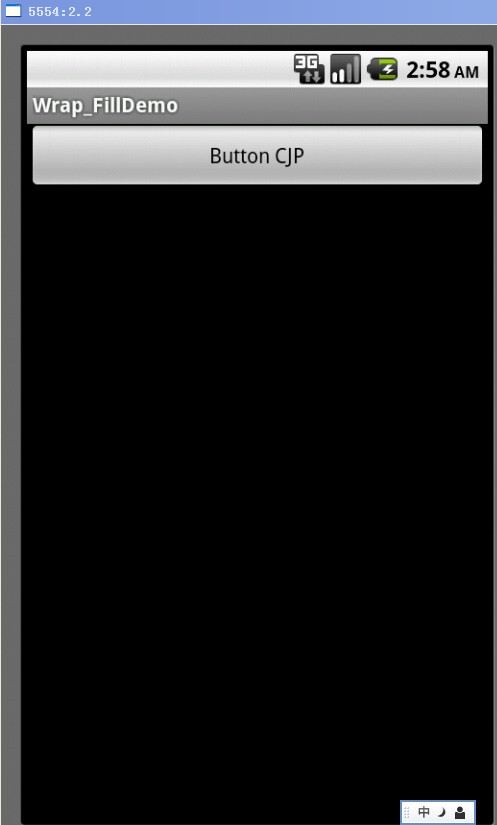
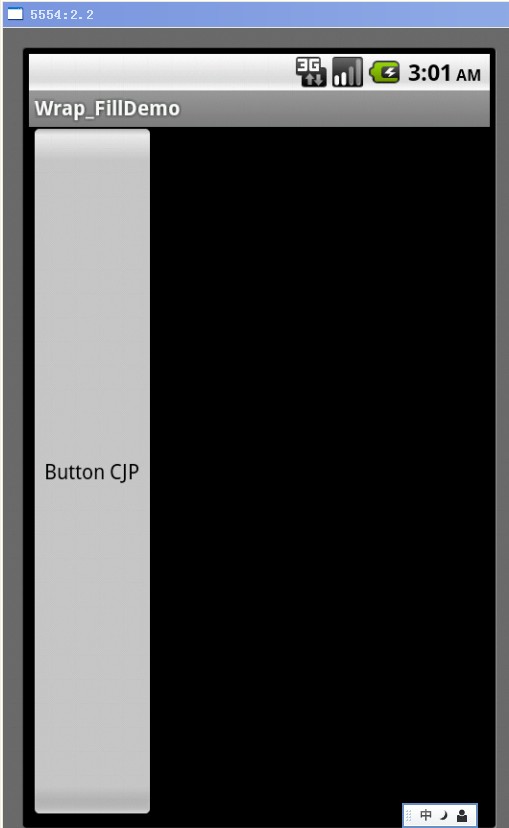
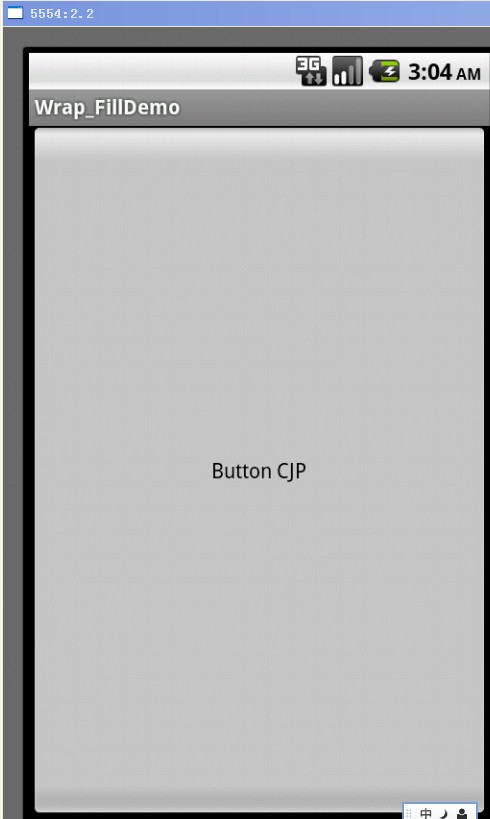
fill_parent设置一个顶部布局或控件强制性让它布满整个屏幕。
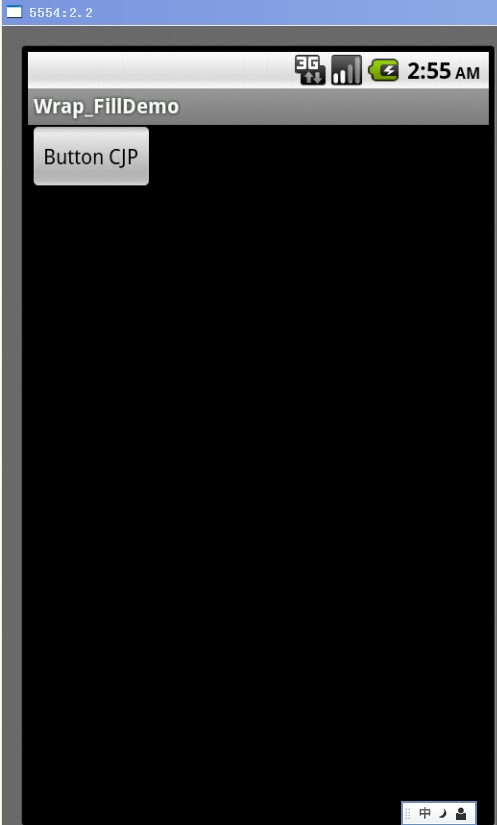
wrap_content布局指根据视图内部内容自动扩展以适应其大小。
1. wrap_content
<?xml version="1.0" encoding="utf-8"?>
<RelativeLayout xmlns:android="http://schemas.android.com/apk/res/android"
android:layout_width="fill_parent"
android:layout_height="fill_parent" >
<Button
android:id="@+id/btnButton1"
android:layout_width="wrap_content"
android:layout_height="wrap_content"
android:text="Button CJP"/>
</RelativeLayout>
2. fill_parent – width
<?xml version="1.0" encoding="utf-8"?>
<RelativeLayout xmlns:android="http://schemas.android.com/apk/res/android"
android:layout_width="fill_parent"
android:layout_height="fill_parent" >
<Button
android:id="@+id/btnButton1"
android:layout_width="fill_parent"
android:layout_height="wrap_content"
android:text="Button CJP"/>
</RelativeLayout>
3. fill_parent – height
<?xml version="1.0" encoding="utf-8"?>
<RelativeLayout xmlns:android="http://schemas.android.com/apk/res/android"
android:layout_width="fill_parent"
android:layout_height="fill_parent" >
<Button
android:id="@+id/btnButton1"
android:layout_width="wrap_content"
android:layout_height="fill_parent"
android:text="Button CJP"/>
</RelativeLayout>
4. fill_parent – width, height
<?xml version="1.0" encoding="utf-8"?>
<RelativeLayout xmlns:android="http://schemas.android.com/apk/res/android"
android:layout_width="fill_parent"
android:layout_height="fill_parent" >
<Button
android:id="@+id/btnButton1"
android:layout_width="fill_parent"
android:layout_height="fill_parent"
android:text="Button CJP"/>
</RelativeLayout>
from :http://blog.csdn.net/jumping_android/article/details/7397991
【转】Android fill_parent和wrap_content分析的更多相关文章
- Android fill_parent和wrap_content分析
fill_parent设置一个顶部布局或控件强制性让它布满整个屏幕.(这是不管内容大小,直接适应整个屏幕的大小,例长度设置了这,就只有长度适应屏幕的长度) wrap_content布局指根据视图内部内 ...
- android布局--Android fill_parent、wrap_content和match_parent的区别
来自:http://www.cnblogs.com/nikyxxx/archive/2012/06/15/2551390.html 三个属性都用来适应视图的水平或垂直大小,一个以视图的内容或尺寸为基础 ...
- Android fill_parent、wrap_content和match_parent的区别
三个属性都用来适应视图的水平或垂直大小,一个以视图的内容或尺寸为基础的布局比精确地指定视图范围更加方便. 1)fill_parent 设置一个构件的布局为fill_parent将强制性地使构件扩展,以 ...
- 【转】android布局--Android fill_parent、wrap_content和match_parent的区别
三个属性都用来适应视图的水平或垂直大小,一个以视图的内容或尺寸为基础的布局比精确地指定视图范围更加方便. 1)fill_parent 设置一个构件的布局为fill_parent将强制性地使构件扩展,以 ...
- fill_parent和wrap_content的区别
在Android布局文件中定义视图垂直或水平大小: android:layout_width和android_layout_height的属性有fill_parent.wrap_content和mat ...
- android wifi ANR问题分析总结
android wifi ANR问题分析总结 1 看看main进程阻塞在那里? 2 调用关系的函数阻塞在那里? 3 最终阻塞函数的阻塞前的log以及状态
- 从Android系统出发,分析Android控件构架
从Android系统出发,分析Android控件构架 Android中所有的控件追溯到根源,就是View 和ViewGroup,相信这个大家都知道,但是大家也许会不太清楚它们之间的具体关系是什么,在A ...
- [转] Android实时抓包分析 : 善用adb调试桥
Android实时抓包分析 : 善用adb调试桥 谈到android网络抓包,很多人都能想到牛逼轰轰的神器tcpdump.方法就是在android机器上面安装tcpdump,然后通过-w参数把抓包 ...
- [置顶] Android开发之serviceManager分析
Android 开发之serviceManager分析 在Android系统中用到最多的通信机制就是Binder,Binder主要由Client.Server.ServiceManager和Binde ...
随机推荐
- sql2008安装时提示重启计算机失败解决方法
安装sql 2008的时候,在检测安装环境中有一项是”重新启动计算机”显示的结果是“失败”.上网看了半天,找到了解决方案,虽然我没弄明白具体原因,但问题是解决了,解决方案如下: 一.Windows+R ...
- uva 10771
思路题 K的人数只能以2减少 #include <cstdio> #include <cstdlib> #include <cmath> #include < ...
- Selenium网址
Selenium官网:http://www.seleniumhq.org/ Selenium火狐插件地址:http://release.seleniumhq.org/selenium-ide/ 浏览器 ...
- 2013 Multi-University Training Contest 1 Partition
这题主要是推公式…… ;}
- hdu2544 最短路
题目:http://acm.hdu.edu.cn/showproblem.php?pid=2544 最短路径DIJKSTRA #include<stdio.h> #include<m ...
- 查看mininet交换机中的流表
官网文档http://mininet.org/walkthrough/#xterm-display Xterms are also useful for running interactive com ...
- JS创建对象
本人常用的创建对象的方式,仅供参考,欢迎吐槽,谢谢! 创建对象1.对象字面量,即使用大括号,如下: (function(){ var obj = { id: 1, desc: '创建对象测试开始啦!' ...
- Compare_Connect_Letter
题目描述: 比较两个数字mn和nm(如果mn<nm则m<n, 如果nm<mn则n<m,否则n=m) 连接这两个数字 如(mnnm) //比较两个数字mn和nm(如果mn< ...
- Java学习笔记之:Java构造函数
一.引言 构造函数是一种特殊的函数.其主要功能是用来在创建对象时初始化对象, 即为v对象成员变量赋初始值,总与new运算符一起使用在创建对象的语句中.构造函数与类名相同,可重载多个不同的构造函数. 构 ...
- 告别无止境的增删改查:Java代码生成器
对于一个比较大的业务系统,我们总是无止境的增加,删除,修改,粘贴,复制,想想总让人产生一种抗拒的心里.那有什么办法可以在正常的开发进度下自动生成一些类,配置文件,或者接口呢? 有感于马上要做个比较 ...