
Maven错误Failed to read artifact descriptor for xxx:jar 和 missing artifact maven dependency
可参考:http://stackoverflow.com/questions/6111408/maven2-missing-artifact-but-jars-are-in-place
http://stackoverflow.com/questions/6642146/maven-failed-to-read-artifact-descriptor
在MyEclipse中执行Maven的install命令时或者Maven项目中的pom.xml增加新的依赖时,报“Failed to read artifact descriptor for xxx:jar ”或者"missing artifact maven dependency"的错误。这可能是在下载过程中文件出现错误。
解决办法:从本地的maven库中删除相关的jar包,然后右单击项目,Maven4MyEclipse->Update Project,在弹出的对话框中选择“Force Update Of Snapshots/Releases"
然后点击“OK”。这样就会重新下载这个jar包。
不同的Eclipse版本项目右键Maven只有会有不同的子菜单:
我的如下图:
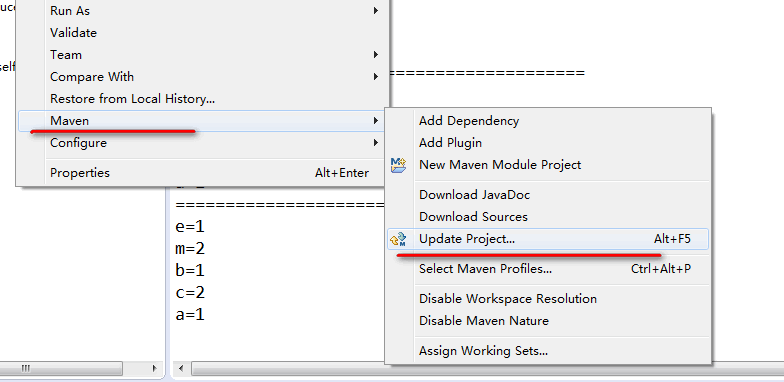
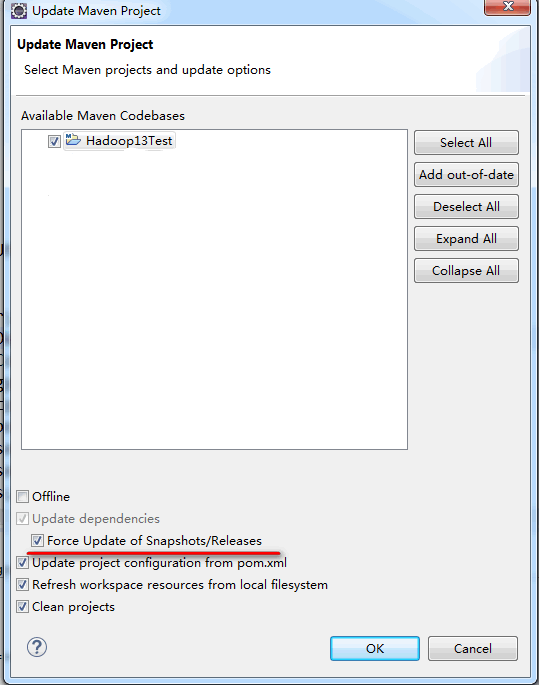
然后点击"OK" 就可以了........
//=================================================
此外还有提供的另外几种方式....(个人尝试没有效果)
There are a few other options apart from Project->Clean, some of which are more along the lines of turning it off and on again.
- Try right-clicking on the project and selecting Maven->Update Project Configuration.
- Disable then re-enable dependency management (right-click Maven->Disable Dependency Management then Maven->Enable Dependency Management
- Close the project and reopen it.
- Check that your Maven settings are configured correctly. If you are behind a proxy you'll need toconfigure the proxy settings in the global or user settings.
- Check you're using the Maven installation you expect. By default m2eclipse uses the embedder, if you have a separate installation you may want to configure m2eclipse to use the external installation so that CLI and Eclipse builds are consistent. This also ensures you're configured to connect through any proxy as above.
Maven错误Failed to read artifact descriptor for xxx:jar 和 missing artifact maven dependency的更多相关文章
- Failed to read artifact descriptor for xxx:jar 的Maven项目jar包依赖配置的问题解决
在开发的过程中,尤其是新手,我们经常遇到Maven下载依赖jar包的问题,也就是遇到“Failed to read artifact descriptor for xxx:jar”的错误. 对于这种非 ...
- Failed to read artifact descriptor for xxx:jar的问题解决
在开发的过程中,尤其是新手,我们经常遇到Maven下载依赖jar包的问题,也就是遇到“Failed to read artifact descriptor for xxx:jar”的错误. 对于这种非 ...
- Failed to read artifact descriptor for xxx:jar
在MyEclipse中执行Maven的install命令时,报“Failed to read artifact descriptor for xxx:jar ”的错误.这可能是在下载过程中文件出现错误 ...
- artifactdescriptorexception:Failed to read artifact descriptor for xxx:jar ”
在Eclipse中执行Maven的install命令时,报“Failed to read artifact descriptor for xxx:jar ”的错误.这可能是在下载过程中文件出现错误.或 ...
- Maven项目强制更新,解决Failed to read artifact descriptor for xxx.jar问题
导入的maven项目pom.xml现红叉 分析原因:在maven本地仓库中找不到相应的jar包. 解决方案:让maven强制更新依赖. 项目右击菜单,Maven -> Update Projec ...
- Failed to read artifact descriptor for xxx:jar:版本号
解决步骤: 1.先删除对应的本地仓库下的文件夹,比如org.apache.maven.plugins:maven-resource,删掉plugins文件夹 2.项目右键-->Maven--&g ...
- Maven:Failed to read artifact descriptor for xxx
Maven多模块项目jar包引用问题: Failed to execute goal on project xxx-service: Could not resolve dependencies fo ...
- Maven错误“Failed to execute goal org.apache.maven.plugins:maven-archetype-plugin:2.4:create ”解决
用maven3新建一个项目时,输入的命令如下: mvn archetype:create 出现错误如下: [ERROR] Failed to execute goal org.apache.maven ...
- Idea Failed to read artifact descriptor for xx:jar:unknown
网上的解决方案: 根据网上说明添加了maven命令clean compile install -Dmaven.test.skip=true,与我遇到的问题不同 有的方法猜测可以通过,但是没时间测试了 ...
随机推荐
- Flex XML
一.创建XML类 1.把字符串对象转换为XML: var xmlStr:String="<students><student><name>吕布</n ...
- java/android线程池详解
一,简述线程池: 线程池是如何工作的:一系列任务出现后,根据自己的线程池安排任务进行. 如图: 线程池的好处: 重用线程池中的线程,避免因为线程的创建和销毁所带来的性能开销. 能有效控制线程池的最大并 ...
- C#实现XML文件数据库存储
C#实现文件数据库 http://www.cnblogs.com/gaochundong/archive/2013/04/24/csharp_file_database.html#3100076 应用 ...
- 在linux下修改oracle的sys和system的密码和用户解锁
修改oracle的sys和system的密码和用户解锁 1.再linux系统上sqlplus '/as sysdba' 进入sqlplus后就可以修改sys和system的密码了 2.alter us ...
- poj3250 Bad Hair Day
Description Some of Farmer John's N cows (1 ≤ N ≤ 80,000) are having a bad hair day! Since each cow ...
- C++ 转型
1.const_static的使用场景:接收一个const对象,但是想改变对象内容,使用const_static去除对象的常量性,然后可以修改对象. 2.dynamic_static的使用场景:从子类 ...
- [RDLC]报表根据字段列动态加载图片(二)
参照:http://www.cnblogs.com/hcbin/archive/2010/03/26/1696803.html 改动地方value的值可以用报表的字段进行编辑. 效果:
- ecmall widgets 挂件开发详解
Ecmall挂件开发 实质上是后台开发很多页面,分别去调用程序展示这些页面,达到首页内容更换很快的目的,这样做减少后续开发,开发人员只需开发挂件就可以了,至于位置可随意定.(还需调整html,但是起码 ...
- JSP中Session的使用
JSP session使用方法 <%@page contentType="text/html;charset=GB2312"%><html> <he ...
- ios开发——实用技术篇&数据保存于恢复
数据保存于恢复 用户操作(输入数据)之后,应用程序退出并且终止之后,当用户再次打开应用的时候还是保持原来的状态 一:在storyBoard中设置恢复标志符 二:在AppDalegate中代理方法 -( ...