
(WPF, MVVM) Slider Binding.
对于Button的Command的绑定可以通过实现ICommand接口来进行,但是Slider并没有Command属性。
另外如果要实现MVVM模式的话,需要将一些Method和Slider的Event进行绑定,如何进行呢?
(对于UIElement的一些Event进行绑定一定有一些通用的方法,目前还没有深入研究。)
首先,Slider Value的绑定是很简单的, 绑定Slider的Value属性即可。
(1)ViewModel
    public class SliderViewModel : ViewModelBase

    {

        private string selectedValue;

        public SliderViewModel()

        {

        }

        public string SelectedValue

        {

            get

            {

                return this.selectedValue;

            }

            set

            {

                if (this.selectedValue != value)

                {

                    this.selectedValue = value;

                    base.OnPropertyChanged("SelectedValue");

                }

            }

        }

    }
(2) View, 设定 DataContext 为ViewModel, 绑定SelectValue到 Slider的Value 和TextBlock的Text属性上。
这样当拖动Slider时,Slider的值会传给SelectedValue, 然后SelectValue会传给TexBlock上。
 x:Class="WpfApplication2.View.SliderView"

             xmlns="http://schemas.microsoft.com/winfx/2006/xaml/presentation"

             xmlns:x="http://schemas.microsoft.com/winfx/2006/xaml"

             xmlns:mc="http://schemas.openxmlformats.org/markup-compatibility/2006"

             xmlns:d="http://schemas.microsoft.com/expression/blend/2008"

             xmlns:vm="clr-namespace:WpfApplication2.ViewModel"

             mc:Ignorable="d"

             d:DesignHeight="300" d:DesignWidth="300">

    <UserControl.DataContext>

        <vm:SliderViewModel />

    </UserControl.DataContext>

    <Grid>

        <Slider HorizontalAlignment="Left"

                Margin="28,102,0,0"

                VerticalAlignment="Top"

                Width="158"

                Minimum="0"

                Maximum="100"

                Value="{Binding SelectedValue}"/>

        <TextBlock HorizontalAlignment="Left"

                   Margin="203,102,0,0"

                   TextWrapping="Wrap"

                   Text="{Binding SelectedValue}"

                   VerticalAlignment="Top" />

    </Grid>

</UserControl>
效果如下:
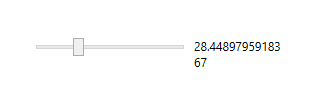
如果不想显示double值,可以设定Slider的属性。
                TickFrequency="1"

                IsSnapToTickEnabled="True"

                TickPlacement="None" />
其次, 当用鼠标或者键盘移动滑块结束的时候,需要进行一些处理。如果不用MVVM的方式的话,可以在Slider的Event里面增加处理。
用MVVM的话,就稍微麻烦一些。
(1)下载或者复制C:\Program Files (x86)\Microsoft SDKs\Expression\Blend\.NETFramework\v4.0\Libraries\System.Windows.Interactivity.dll
在工程中Reference 这个dll,命名空间里面增加:using System.Windows.Interactivity
(2)新写个SliderValueChangedBehavior 继承Behavior<Slider>
    /// <summary>

    /// Helps find the user-selected value of a slider only when the keyboard/mouse gesture has ended.

    /// </summary>

    public class SliderValueChangedBehavior : Behavior<Slider>

    {

        /// <summary>

        /// Keys down.

        /// </summary>

        private int keysDown;

        /// <summary>

        /// Indicate whether to capture the value on latest key up.

        /// </summary>

        private bool applyKeyUpValue;

        #region Dependency property Value

        /// <summary>

        /// DataBindable value.

        /// </summary>

        public double Value

        {

            get { return (double)GetValue(ValueProperty); }

            set { SetValue(ValueProperty, value); }

        }

        public static readonly DependencyProperty ValueProperty = DependencyProperty.Register(

            "Value",

            typeof(double),

            typeof(SliderValueChangedBehavior),

            new PropertyMetadata(default(double), OnValuePropertyChanged));

        #endregion

        #region Dependency property Value

        /// <summary>

        /// DataBindable Command

        /// </summary>

        public ICommand Command

        {

            get { return (ICommand)GetValue(CommandProperty); }

            set { SetValue(CommandProperty, value); }

        }

        public static readonly DependencyProperty CommandProperty = DependencyProperty.Register(

            "Command",

            typeof(ICommand),

            typeof(SliderValueChangedBehavior),

            new PropertyMetadata(null));

        #endregion

        /// <summary>

        /// On behavior attached.

        /// </summary>

        protected override void OnAttached()

        {

            this.AssociatedObject.KeyUp += this.OnKeyUp;

            this.AssociatedObject.KeyDown += this.OnKeyDown;

            this.AssociatedObject.ValueChanged += this.OnValueChanged;

            base.OnAttached();

        }

        /// <summary>

        /// On behavior detaching.

        /// </summary>

        protected override void OnDetaching()

        {

            base.OnDetaching();

            this.AssociatedObject.KeyUp -= this.OnKeyUp;

            this.AssociatedObject.KeyDown -= this.OnKeyDown;

            this.AssociatedObject.ValueChanged -= this.OnValueChanged;

        }

        /// <summary>

        /// On Value dependency property change.

        /// </summary>

        private static void OnValuePropertyChanged(DependencyObject d, DependencyPropertyChangedEventArgs e)

        {

            var me = (SliderValueChangedBehavior)d;

            if (me.AssociatedObject != null)

                me.Value = (double)e.NewValue;

        }

        /// <summary>

        /// Occurs when the slider's value change.

        /// </summary>

        /// <param name="sender"></param>

        /// <param name="e"></param>

        private void OnValueChanged(object sender, RoutedPropertyChangedEventArgs<double> e)

        {

            if (Mouse.Captured != null)

            {

                this.AssociatedObject.LostMouseCapture += this.OnLostMouseCapture;

            }

            else if (this.keysDown != )

            {

                this.applyKeyUpValue = true;

            }

            else

            {

                this.ApplyValue();

            }

        }

        private void OnLostMouseCapture(object sender, MouseEventArgs e)

        {

            this.AssociatedObject.LostMouseCapture -= this.OnLostMouseCapture;

            this.ApplyValue();

        }

        private void OnKeyUp(object sender, KeyEventArgs e)

        {

            if (this.keysDown-- != )

            {

                this.ApplyValue();

            }

        }

        private void OnKeyDown(object sender, KeyEventArgs e)

        {

            this.keysDown++;

        }

        /// <summary>

        /// Applies the current value in the Value dependency property and raises the command.

        /// </summary>

        private void ApplyValue()

        {

            this.Value = this.AssociatedObject.Value;

            if (this.Command != null)

                this.Command.Execute(this.Value);

        }

    }
(3) 在View中为Slider的行为添加Command
            <i:Interaction.Behaviors>

                <helper:SliderValueChangedBehavior Command="{Binding ValueChangedCommand}"

                                                  />

            </i:Interaction.Behaviors>
(4)在ViewModel中实现当Slider值个改变的时候进行一些处理。
        public ICommand ValueChangedCommand

        {

            get

            {

                if (this.valueChangedCommmand == null)

                {

                    this.valueChangedCommmand = new RelayCommand(

                        param => this.PopValue(),

                        null);

                }

                return this.valueChangedCommmand;

            }

        }

        private void PopValue()

        {

            MessageBox.Show(String.Format("Selected value is {0}", this.selectedValue));

        }
最后,进行调试,发现ValueChangedCommand当每次Silder值变更的时候都会被执行。
那么如何实现最后一次值变更时,才执行Command呢?
(WPF, MVVM) Slider Binding.的更多相关文章
- (WPF, MVVM) Textbox Binding
参考:http://msdn.microsoft.com/en-us/library/system.windows.data.updatesourcetrigger(v=vs.110).aspx Te ...
- (WPF) MVVM: DataGrid Binding
Binding到DataGrid的时候,需要用到ObservableCollection. public ObservableCollection<Customer> Customers ...
- (WPF) MVVM: ComboBox Binding, XML 序列化
基本思路还是在View的Xmal里面绑定ViewModel的属性,虽然在View的后台代码中也可以实现binding,但是还是在Xmal里面相对的代码量要少一些. 此例子要实现的效果就是将一个List ...
- WPF MVVM实例三
在没给大家讲解wpf mwm示例之前先给大家简单说下MVVM理论知识: WPF技术的主要特点是数据驱动UI,所以在使用WPF技术开发的过程中是以数据为核心的,WPF提供了数据绑定机制,当数据发生变化时 ...
- WPF MVVM 验证
WPF MVVM(Caliburn.Micro) 数据验证 书接前文 前文中仅是WPF验证中的一种,我们暂且称之为View端的验证(因为其验证规是写在Xaml文件中的). 还有一种我们称之为Model ...
- WPF MVVM初体验
首先MVVM设计模式的结构, Views: 由Window/Page/UserControl等构成,通过DataBinding与ViewModels建立关联: ViewModels:由一组命令,可以绑 ...
- [转]WPF/MVVM快速开始手册
I will quickly introduce some topics, then show an example that explains or demonstrates each point. ...
- WPF MVVM实现TreeView
今天有点时间,做个小例子WPF MVVM 实现TreeView 只是一个思路大家可以自由扩展 文章最后给出了源码下载地址 图1 图2 模版加上了一个checkbox,选中父类的checkb ...
- WPF/MVVM 快速开始指南(译)(转)
WPF/MVVM 快速开始指南(译) 本篇文章是Barry Lapthorn创作的,感觉写得很好,翻译一下,做个纪念.由于英文水平实在太烂,所以翻译有错或者译得不好的地方请多指正.另外由于原文是针对W ...
随机推荐
- Lock锁
Lock lock = new ReentrantLock(); lock.lock(); try { } finally { } 注意:不要将获取锁的过程写在try块中,因为如果在获取锁(自定义锁的 ...
- Base64编码的实现(三种方式)
package com.smart.base; import org.apache.commons.codec.binary.Base64; public class Base64Test { pri ...
- zoj3623 Battle Ships ——完全背包?简单DP!|| 泛化背包
link:http://acm.zju.edu.cn/onlinejudge/showProblem.do?problemCode=3623 看起来像完全背包,但是物品价值是变化的,所以很多人搞的很复 ...
- jQuery中的ajax服务端返回方式详细说明
http://blog.sina.com.cn/s/blog_6f92e3a70100u3b6.html 上次总结了下ajax的所有参数项,其中有一项dataType是设置具体的服务器返回方式 ...
- Linux文件系统目录标准
FHS(Filesystem Hierarchy Standard):文件层次标准 操作系统自身运行使用的 /bin: 存放可执行的二进制程序,管理员和普通用户都可以使用 /sbin:管理员才能执行的 ...
- jQuery 1.10.3 参考手册
Jquery是轻量级的js库 ,它兼容CSS3,还兼容各种浏览器(IE 6.0+, FF 1.5+, Safari 2.0+, Opera 9.0+),jQuery2.0及后续版本将不再支持IE6/7 ...
- Android Studio + gradle多渠道打包
通过工具栏的Build->Build Apk 好像只能打包第一个Module(eclipse里面是Project的概念),怎么多渠道打包呢?目前好像只能一个一个的打 首先在清单文件里设置个变量: ...
- CENTOS GUI
http://unix.stackexchange.com/questions/181503/how-to-install-desktop-environments-on-centos-7 How t ...
- Valgrind使用[转]
简介 调试程序有很多方法,例如向屏幕上打印消息,使用调试器,或者只需仔细考虑程序如何运行,并对问题进行有根有据的猜测. 在修复 bug 之前,首先要确定在源程序中的位置.例如,当一个程序产生崩溃或生成 ...
- java 将长度很长的字符串(巨大字符串超过4000字节)插入oracle的clob字段时会报错的解决方案
直接很长的字符串插入到clob字段中会报字符过长的异常,相信大家都会碰到这种情况 String sql = "insert into table(request_id,table_name, ...