
30.怎样在Swift中添加运行时属性?
和OC一样,Swift中也可以添加运行时属性。下面将提供一个完整的例子,演示如何给按钮点击事件添加运行时属性。
1.示例
import UIKit

var s_GofButtonTouchDownKey = "s_GofButtonTouchDownKey";

var s_GofButtonTouchUpKey = "s_GofButtonTouchUpKey";

extension UIControl

{

    /// 按钮TouchDown

    var gof_touchDown: GofBtnClickBlock? {

        get{

            let touchDown = objc_getAssociatedObject(self, &s_GofButtonTouchDownKey);

            let dealTouchDown = unsafeBitCast(touchDown, GofBtnClickBlock.self);

            return dealTouchDown;

        }

        set(touchDown)

        {

            let dealTouchDown: AnyObject = unsafeBitCast(touchDown, AnyObject.self);

            objc_setAssociatedObject(self, &s_GofButtonTouchDownKey, dealTouchDown, .OBJC_ASSOCIATION_COPY);

            self.removeTarget(self, action: #selector(onTouchDown(_:)), forControlEvents: .TouchDown);

            self.addTarget(self, action: #selector(onTouchDown(_:)), forControlEvents: .TouchDown)

        }

    }

    /// 按钮TouchUpInside

    var gof_touchUpInside: GofBtnClickBlock? {

        get{

            let touchUp = objc_getAssociatedObject(self, &s_GofButtonTouchUpKey);

            let dealTouchUp = unsafeBitCast(touchUp, GofBtnClickBlock.self);

            return dealTouchUp;

        }

        set(touchUp)

        {

            let dealTouchUp: AnyObject = unsafeBitCast(touchUp, AnyObject.self);

            objc_setAssociatedObject(self, &s_GofButtonTouchUpKey, dealTouchUp, .OBJC_ASSOCIATION_COPY);

            self.removeTarget(self, action: #selector(onTouchUp(_:)), forControlEvents: .TouchUpInside);

            self.addTarget(self, action: #selector(onTouchUp(_:)), forControlEvents: .TouchUpInside)

        }

    }

    /**

     按钮TouchDown事件处理

     - parameter btn: 按钮

     */

    func onTouchDown(btn: UIButton) -> Void

    {

        let touchDown = self.gof_touchDown;

        if touchDown != nil

        {

            touchDown!(btn);

        }

    }

    /**

     按钮TouchUpInside事件处理

     - parameter btn: 按钮

     */

    func onTouchUp(btn: UIButton) -> Void

    {

        let touchUp = self.gof_touchUpInside;

        if touchUp != nil

        {

            touchUp!(btn);

        }

    }

}
2.示例说明
在Swift中,闭包不属于AnyObject,因此,需要做一个相互转换。如下所示:
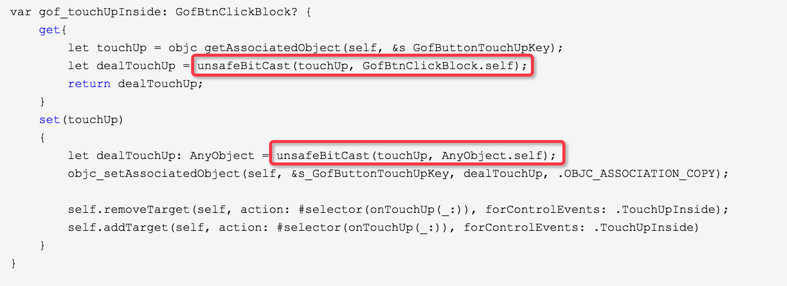
使用方式如下:
extension UIButton

{

    /**

     创建UIButton控件

     - parameter title:       按钮标题

     - parameter superView:   按钮父视图

     - parameter constraints: 约束

     - parameter touchup:     按钮点击事件

     - returns: UIButton控件

     */

    static func gof_buttonWithTitle(title: String?, superView: UIView?, constraints: GofConstraintMaker?, touchup: GofBtnClickBlock?) -> UIButton

    {

        let button = UIButton(type: .Custom);

        if title != nil

        {

            button.setTitle(title, forState: .Normal);

            button.titleLabel?.font = kTitleFont;

        }

        button.backgroundColor = kCColor;

        if superView != nil

        {

            superView!.addSubview(button);

            if constraints != nil

            {

                button.snp_makeConstraints(closure: { (make) in

                    constraints!(make);

                })

            }

        }

        if touchup != nil

        {

            button.gof_touchUpInside = touchup!;

        }

        return button;

    }

}
30.怎样在Swift中添加运行时属性?的更多相关文章
- servers中添加server时,看不到运行环境的选择。
servers中添加server时,看不到运行环境的选择. 主要原因是tomcat目录中的配置文件格式不对.
- 在Amazon FreeRTOS V10中使用运行时统计信息
在MCU on Eclipse网站上看到Erich Styger在8月2日发的博文,一篇关于在Amazon FreeRTOS V10中使用运行时统计信息的文章,本人觉得很有启发,特将其翻译过来以备参考 ...
- Visual C++中对运行时库的支持
原文地址:http://blog.csdn.net/wqvbjhc/article/details/6612099 一.什么是C运行时库 1)C运行时库就是 C run-time library,是 ...
- Android Tips: 在给drawable中添加图片资源时,文件名必须全小写
在给drawable中添加图片资源时,文件名必须全小写
- Visual Studio 2008中添加运行按钮 转载
在Visual Studio 2008中添加运行按钮 默认情况下,VS2008中的工具栏上没有运行按钮,只有调试(Debug)按钮,可按照以下方法添加 1.点击菜单Tools(工具)->Cust ...
- [C++]C++中的运行时类型检测
Date:2014-1-3 Summary: 使用C++中的运行时类型检测.(文章重点在于记录本人的使用情况,并非深层讨论RTTI) Contents:写习惯C#的我,在C++依然存在哪些.NET的惯 ...
- 翻译:JVM虚拟机规范1.7中的运行时常量池部分(二)
本篇为JVM虚拟机规范1.7中的运行时常量池部分系列的第二篇. 4.4.4. The CONSTANT_Integer_info and CONSTANT_Float_info Structures ...
- Android中Activity运行时屏幕方向与显示方式详解
现在我们的手机一般都内置有方向感应器,手机屏幕会根据所处位置自动进行横竖屏切换(前提是未锁定屏幕方向).但有时我们的应用程序仅限在横屏或者竖屏状态下才可以运行,此时我们需要锁定该程序Activity运 ...
- HTML5Viewer中如何运行时绑定多数据源
很多报表控件提供HTML5Viewer 支持跨设备的报表系统,当然在很多情况下,一个系统可包含多个报表文件,这些报表的数据有可能均为运行时绑定数据源,那么在html5viewer中对一张报表通过重写W ...
随机推荐
- 10327 - Flip Sort
原文链接:http://uva.onlinejudge.org/index.php?option=com_onlinejudge&Itemid=8&category=24&pa ...
- JBPM4入门——9.自动节点单线执行
JBPM入门系列文章: JBPM4入门——1.jbpm简要介绍 JBPM4入门——2.在eclipse中安装绘制jbpm流程图的插件 JBPM4入门——3.JBPM4开发环境的搭建 JBPM4入门—— ...
- window 7 下一台cp 两个mysql 配置主从
环境 : 个人 pc windows7 一台 ; 使用 : 官方下载: mysql-noinstall-5.5.11-win32.zip 1. 解压 成2个 (文件夹) mysql_master (主 ...
- flash wmode参数详解
在做web开发中可能会遇到flash遮挡页面中元素的情况,无论怎么设置flash容器和层的深度(z-index)也无济于事,现有的解决方案是在插入flash的embed或object标签中加入”wmo ...
- Bootstrap学习之路(3)---列表组件
列表是几乎所有网站都会用到的一个组件,正好bootstrap也给我们提供了这个组件的样式,下面我给大家简单介绍一下bootstrap中的列表组件的用法! 首先,重提一下引用bootstrap的核心文件 ...
- hdu 2476(第一道区间dp)
题意:就是给定两个字符串,第一个是初始串,第二个是目标串,问你把初始串变到目标串最少需要多少串! 分析:此题分两步,第一步是假设开始的初始串是空串,然后就进行区间dp,dp[i][j]代表把区间[i, ...
- lookupedit清空选择 z
lookupedit绑定数据,选择以后.怎么点击按钮使lookupedit回到初始位置,即nulltext的值.注意,是点击按钮,不是按默认的CTRL+DELETE. txtKHXX.EditValu ...
- Monitor traffic to localhost from IE or .NET
原文:http://docs.telerik.com/fiddler/Configure-Fiddler/Tasks/MonitorLocalTraffic Monitor traffic to lo ...
- Tex使用
表格标题改变成中文的"表": \renewcommand{\tablename}{表} 同样图片的Figure改为中文的“图”: \renewcommand{\figurename ...
- Chapter15:派生类
在C++语言中,基类将类型相关的函数与派生类不做改变直接继承的函数区别对待,对于某些函数,基类希望它的派生类各自定义适合自身的版本,此时基类就将这些函数声明为虚函数. 派生类必须将其继承而来的成员函数 ...