
UI学习笔记---第十一天UITableView表视图高级-自定义cell
自定义cell,多类型cell混合使用,cell自适应高度
自定义cell就是创建一个UITableViewCell的子类
把cell上的空间创建都封装在子类中,简化viewController中的代码
cell中的空间如何显示Model中的信息
cell中声明一个Model类型的属性,viewController中获取到Model对象后赋值给cell的Model属性
cell中重写Model的setter方法,把Model对象中的内容重新赋值给各个控件
M和V不直接通信,C负责M和V之间进行通信
多类型cell混合使用
通常我们会在tableView:cellForRowAtIndexPath:方法中根据不同的Model来决定使用什么类型的cell
每种类型的cell要定义不同的重用标识符
cell重用的时候会根据重用标识从重用队列中取用那种类型的cell
cell自适应高度
实际开发中经常要让cell根据Model中文本的长短动态的更改高度
获取文本高度 ---计算一段文本在限定宽高内所占矩形大小
- (CGRect)boundingRectWithSize:(CGSize)size options:(NSStringDrawingOptions)options attributes:(NSDictionary*)attributes context:(NSStringDrawingContext *)context
计算文本高度是所用字体要和label显示时所用的字体一致
label的宽度要和计算时所用的限定宽度一致这样才能保证文本显示在label中时,label的高度恰巧够
cell自适应高度
tableView:heightForRowAtIndexPath:⽅法要比
tableView:cellForRowAtIndexPath先执行。
所以要提前计算好每行cell需要多少高度
练习代码
AppDalegate.m中创建根表视图控制器,导航控制器
    RootTableViewController *rootVC = [[RootTableViewController alloc] initWithStyle:UITableViewStyleGrouped];

    UINavigationController *ngVc = [[UINavigationController alloc] initWithRootViewController:rootVC];

    self.window.rootViewController = ngVc;

    [ngVc release];

    [rootVC release];
RootTableViewController控制器类中代码
//.h中代码

#import <UIKit/UIKit.h>

@interface RootTableViewController : UITableViewController

{

    NSMutableArray *_studentsArray;

}

@end

//.m中代码

#import "RootTableViewController.h"

#import "StudentCell.h"

#import "Student.h"

#import "SecondCell.h"

@interface RootTableViewController ()

@end

@implementation RootTableViewController

- (id)initWithStyle:(UITableViewStyle)style

{

    self = [super initWithStyle:style];

    if (self) {

        self.navigationItem.title =@"通讯录";

        // Custom initialization

    }

    return self;

}

- (void)viewDidLoad

{

    [super viewDidLoad];

    //这是一个单例,用来取文件路径

    NSString *filePath = [[NSBundle mainBundle] pathForResource:@"Students" ofType:@"plist"];

    NSArray *students = [[NSArray alloc] initWithContentsOfFile:filePath];

    _studentsArray = [[NSMutableArray alloc] initWithCapacity:[students count]];

    for (int i = ; i<[students count]; i++) {

        NSDictionary *dic = [students objectAtIndex:i];

        Student *stu = [[Student alloc] init];

        //使用kvc

        [stu setValuesForKeysWithDictionary:dic];

        [_studentsArray addObject:stu];

        [stu release];

    }

    [students release];

    NSLog(@"%@",_studentsArray);

    // Uncomment the following line to preserve selection between presentations.

    // self.clearsSelectionOnViewWillAppear = NO;

    // Uncomment the following line to display an Edit button in the navigation bar for this view controller.

    // self.navigationItem.rightBarButtonItem = self.editButtonItem;

}

- (void)didReceiveMemoryWarning

{

    [super didReceiveMemoryWarning];

    // Dispose of any resources that can be recreated.

}

#pragma mark - Table view data source

- (NSInteger)numberOfSectionsInTableView:(UITableView *)tableView

{

#warning Potentially incomplete method implementation.

    // Return the number of sections.

    return ;

}

- (NSInteger)tableView:(UITableView *)tableView numberOfRowsInSection:(NSInteger)section

{

#warning Incomplete method implementation.

    // Return the number of rows in the section.

    return [_studentsArray count];

}

/////********************一种方法************************

//- (UITableViewCell *)tableView:(UITableView *)tableView cellForRowAtIndexPath:(NSIndexPath *)indexPath

//{

//    static NSString *identifier = @"cell";

//

//    UITableViewCell *cell = [tableView dequeueReusableCellWithIdentifier:identifier];

//    if (cell == nil) {

//        cell = [[[UITableViewCell alloc] initWithStyle:UITableViewCellStyleDefault reuseIdentifier:identifier] autorelease];

//    }

//    //创建一个label

//    [[cell.contentView viewWithTag:1000] removeFromSuperview];

//    UILabel *sexlabel = [[UILabel alloc] initWithFrame:CGRectMake(100, 0, 100, 40)];

//    sexlabel.tag = 1000;

//    [cell.contentView addSubview:sexlabel];

//    [sexlabel release];

//

//

//    NSDictionary *student = [_studentsArray objectAtIndex:indexPath.row];

//

//    cell.textLabel.text = [student objectForKey:@"name"];

//    sexlabel.text = [student objectForKey:@"sex"];

//

//    // Configure the cell...

//

//    return cell;

//}

//

////********************方法二*********************

//- (UITableViewCell *)tableView:(UITableView *)tableView cellForRowAtIndexPath:(NSIndexPath *)indexPath

//{

//    static NSString *identifier = @"cell";

//

//    UITableViewCell *cell = [tableView dequeueReusableCellWithIdentifier:identifier];

//    if (cell == nil) {

//        cell = [[[UITableViewCell alloc] initWithStyle:UITableViewCellStyleDefault reuseIdentifier:identifier] autorelease];

//        //创建一个cell创建一个label,第一种方法的优化,第一种方法一直开辟空间释放空间,占用系统资源

//    [[cell.contentView viewWithTag:1000] removeFromSuperview];

//    UILabel *sexlabel = [[UILabel alloc] initWithFrame:CGRectMake(100, 0, 100, 40)];

//    sexlabel.tag = 1000;

//    [cell.contentView addSubview:sexlabel];

//    [sexlabel release];

//    }

//    //if中的sexlabel是一个局部变量,需要在外面重写一个label接受tag=1000的label

//    UILabel *sexlabel = (UILabel *)[cell.contentView viewWithTag:1000];

//

//    NSDictionary *student = [_studentsArray objectAtIndex:indexPath.row];

//

//    cell.textLabel.text = [student objectForKey:@"name"];

//    sexlabel.text = [student objectForKey:@"sex"];

//

//

//    // Configure the cell...

//

//    return cell;

//}

/////***************第三种建一个UITableViewCell子类*******************

- (UITableViewCell *)tableView:(UITableView *)tableView cellForRowAtIndexPath:(NSIndexPath *)indexPath

{

    Student *stu = [_studentsArray objectAtIndex:indexPath.row];

    if ([stu.sex isEqualToString:@"男"]) {

        static NSString *identifier = @"cell1";

        StudentCell *cell = [tableView dequeueReusableCellWithIdentifier:identifier];

        if (cell == nil) {

            cell = [[[StudentCell alloc] initWithStyle:UITableViewCellStyleDefault reuseIdentifier:identifier] autorelease];

        }

        cell.stu = _studentsArray[indexPath.row];

        return cell;

    }else{

        static NSString *identifier = @"cell";

        SecondCell *cell = [tableView dequeueReusableCellWithIdentifier:identifier];

        if (cell == nil) {

            cell = [[[SecondCell alloc] initWithStyle:UITableViewCellStyleDefault reuseIdentifier:identifier] autorelease];

        }

        cell.stu = _studentsArray[indexPath.row];

        // Configure the cell...

        return cell;

    }

//    static NSString *identifier = @"cell";

//

//    SecondCell *cell = [tableView dequeueReusableCellWithIdentifier:identifier];

//    if (cell == nil) {

//        cell = [[[SecondCell alloc] initWithStyle:UITableViewCellStyleDefault reuseIdentifier:identifier] autorelease];

//

//    }

//

//

////    Student *student = [_studentsArray objectAtIndex:indexPath.row];

////    [cell setStu:student];

//    cell.stu = _studentsArray[indexPath.row];

////    cell.nameLabel.text = student.name;

////    cell.sexLabel.text = student.sex;

////    cell.phoneLabel.text = student.phone;

////    cell.photoImageView.image = [UIImage imageNamed:student.photo];

//

//

//

//

//    // Configure the cell...

//

//    return cell;

}

- (CGFloat)tableView:(UITableView *)tableView heightForRowAtIndexPath:(NSIndexPath *)indexPath

{

//    CGFloat height = Studentcell;

    Student *stu = [_studentsArray objectAtIndex:indexPath.row];

    CGRect rect = [stu.hobby boundingRectWithSize:CGSizeMake(, ) options:NSStringDrawingUsesLineFragmentOrigin attributes:[NSDictionary dictionaryWithObjectsAndKeys:[UIFont systemFontOfSize:],NSFontAttributeName, nil] context:nil];

    if ([stu.sex isEqualToString:@"男"]) {

        return +rect.size.height+;

    }else{

     return +rect.size.height+;

    }

}

/*

// Override to support conditional editing of the table view.

- (BOOL)tableView:(UITableView *)tableView canEditRowAtIndexPath:(NSIndexPath *)indexPath

{

    // Return NO if you do not want the specified item to be editable.

    return YES;

}

*/

/*

// Override to support editing the table view.

- (void)tableView:(UITableView *)tableView commitEditingStyle:(UITableViewCellEditingStyle)editingStyle forRowAtIndexPath:(NSIndexPath *)indexPath

{

    if (editingStyle == UITableViewCellEditingStyleDelete) {

        // Delete the row from the data source

        [tableView deleteRowsAtIndexPaths:@[indexPath] withRowAnimation:UITableViewRowAnimationFade];

    } else if (editingStyle == UITableViewCellEditingStyleInsert) {

        // Create a new instance of the appropriate class, insert it into the array, and add a new row to the table view

    }

}

*/

/*

// Override to support rearranging the table view.

- (void)tableView:(UITableView *)tableView moveRowAtIndexPath:(NSIndexPath *)fromIndexPath toIndexPath:(NSIndexPath *)toIndexPath

{

}

*/

/*

// Override to support conditional rearranging of the table view.

- (BOOL)tableView:(UITableView *)tableView canMoveRowAtIndexPath:(NSIndexPath *)indexPath

{

    // Return NO if you do not want the item to be re-orderable.

    return YES;

}

*/

/*

#pragma mark - Navigation

// In a storyboard-based application, you will often want to do a little preparation before navigation

- (void)prepareForSegue:(UIStoryboardSegue *)segue sender:(id)sender

{

    // Get the new view controller using [segue destinationViewController].

    // Pass the selected object to the new view controller.

}

*/

@end
自定义cell----StudentCell中代码
//.h中代码

#import <UIKit/UIKit.h>

#import "Student.h"

@interface StudentCell : UITableViewCell

@property (nonatomic,retain) UILabel *nameLabel;

@property (nonatomic,retain) UILabel *sexLabel;

@property (nonatomic,retain) UILabel *phoneLabel;

@property (nonatomic,retain) UIImageView *photoImageView;

@property (nonatomic,retain) UILabel *hobbyLabel;

//对cell中需要显示的数据进行封装,创建一个Student  Model类

@property (nonatomic,retain) Student *stu;

@end

//.m中代码

#import "StudentCell.h"

@implementation StudentCell

-(void)dealloc

{

    [_photoImageView release];

    [_nameLabel release];

    [_sexLabel release];

    [_phoneLabel release];

    [super dealloc];

}

- (id)initWithStyle:(UITableViewCellStyle)style reuseIdentifier:(NSString *)reuseIdentifier

{

    self = [super initWithStyle:style reuseIdentifier:reuseIdentifier];

    if (self) {

        //自定义cell

        self.photoImageView = [[[UIImageView alloc] initWithFrame:CGRectMake(, , , )] autorelease];

        self.nameLabel = [[[UILabel alloc] initWithFrame:CGRectMake(, , , )] autorelease];

        self.sexLabel = [[[UILabel alloc] initWithFrame:CGRectMake(, , , )] autorelease];

        self.phoneLabel = [[[UILabel alloc] initWithFrame:CGRectMake(, , , )] autorelease];

        self.hobbyLabel = [[[UILabel alloc] initWithFrame:CGRectMake(, , , )] autorelease];

        //给hobbylabel设定一个字号,在表视图控制器里面直接可以使用

        self.hobbyLabel.font = [UIFont systemFontOfSize:];

        //让它自适应高度,把行数设为0

        self.hobbyLabel.numberOfLines = ;

        [self.contentView addSubview:_photoImageView];

        [self.contentView addSubview:_nameLabel];

        [self.contentView addSubview:_sexLabel];

        [self.contentView addSubview:_phoneLabel];

        [self.contentView addSubview:_hobbyLabel];

        // Initialization code

    }

    return self;

}

- (void)awakeFromNib

{

    // Initialization code

}

- (void)setSelected:(BOOL)selected animated:(BOOL)animated

{

    [super setSelected:selected animated:animated];

    // Configure the view for the selected state

}

//重写setter方法

- (void)setStu:(Student *)stu

{

    self.nameLabel.text = stu.name;

    self.sexLabel.text = stu.sex;

    self.phoneLabel.text = stu.phone;

    self.photoImageView.image = [UIImage imageNamed:stu.photo];

    //设置爱好自定义高度

    CGRect rect = [stu.hobby boundingRectWithSize:CGSizeMake(, ) options:NSStringDrawingUsesLineFragmentOrigin attributes:[NSDictionary dictionaryWithObjectsAndKeys:self.hobbyLabel.font,NSFontAttributeName, nil] context:nil];

    self.hobbyLabel.frame = CGRectMake(, , , rect.size.height);

    self.hobbyLabel.text = stu.hobby;

}

@end
自定义另一个cell----SecondCell
//.h中代码

#import <UIKit/UIKit.h>

#import "Student.h"

@interface SecondCell : UITableViewCell

@property (nonatomic,retain) UILabel *nameLabel;

@property (nonatomic,retain) UILabel *sexLabel;

@property (nonatomic,retain) UILabel *phoneLabel;

@property (nonatomic,retain) UIImageView *photoImageView;

@property (nonatomic,retain) UILabel *hobbyLabel;

@property (nonatomic,retain) Student *stu;

@end

//.m中代码

#import "SecondCell.h"

@implementation SecondCell

-(void)dealloc

{

    [_photoImageView release];

    [_nameLabel release];

    [_sexLabel release];

    [_phoneLabel release];

    [_hobbyLabel release];

    [super dealloc];

}

- (id)initWithStyle:(UITableViewCellStyle)style reuseIdentifier:(NSString *)reuseIdentifier

{

    self = [super initWithStyle:style reuseIdentifier:reuseIdentifier];

    if (self) {

        //自定义cell

        self.photoImageView = [[[UIImageView alloc] initWithFrame:CGRectMake(, , , )] autorelease];

        self.nameLabel = [[[UILabel alloc] initWithFrame:CGRectMake(, , , )] autorelease];

        self.sexLabel = [[[UILabel alloc] initWithFrame:CGRectMake(, , , )] autorelease];

        self.phoneLabel = [[[UILabel alloc] initWithFrame:CGRectMake(, , , )] autorelease];

        self.hobbyLabel = [[[UILabel alloc] initWithFrame:CGRectMake(, , , )] autorelease];

        self.hobbyLabel.font = [UIFont systemFontOfSize:];

        [self.contentView addSubview:_photoImageView];

        [self.contentView addSubview:_nameLabel];

        [self.contentView addSubview:_sexLabel];

        [self.contentView addSubview:_phoneLabel];

        [self.contentView addSubview:_hobbyLabel];

        // Initialization code

    }

    return self;

}

- (void)awakeFromNib

{

    // Initialization code

}

- (void)setSelected:(BOOL)selected animated:(BOOL)animated

{

    [super setSelected:selected animated:animated];

    // Configure the view for the selected state

}

//重写setter方法

- (void)setStu:(Student *)stu

{

    self.nameLabel.text = stu.name;

    self.sexLabel.text = stu.sex;

    self.phoneLabel.text = stu.phone;

    self.photoImageView.image = [UIImage imageNamed:stu.photo];

    CGRect rect = [stu.hobby boundingRectWithSize:CGSizeMake(, ) options:NSStringDrawingUsesLineFragmentOrigin attributes:[NSDictionary dictionaryWithObjectsAndKeys:[UIFont systemFontOfSize:],NSFontAttributeName, nil] context:nil];

    self.hobbyLabel.frame = CGRectMake(, , , rect.size.height);

    self.hobbyLabel.text = stu.hobby;

}

@end
Model类-----Student
//.h中代码

#import <Foundation/Foundation.h>

@interface Student : NSObject

@property (nonatomic,retain) NSString *name;

@property (nonatomic,retain) NSString *sex;

@property (nonatomic,retain) NSString *phone;

@property (nonatomic,retain) NSString *photo;

@property (nonatomic,retain) NSString *hobby;

//- (instancetype)initWithName:(NSString *)name sex:(NSString *)sex phone:(NSString *)phone photo:(NSString *)photo hobby:(NSString *)hobby;

//

//- (instancetype)initWithDictionary:(NSDictionary *)stuInfoDic;

@end

//.m中代码

#import "Student.h"

@implementation Student

-(void)dealloc

{

    [_name release];

    [_sex release];

    [_phone release];

    [_photo release];

    [_hobby release];

    [super dealloc];

}

//用KVC取值,不用初始化方法

//- (instancetype)initWithName:(NSString *)name sex:(NSString *)sex phone:(NSString *)phone photo:(NSString *)photo hobby:(NSString *)hobby

//{

//    self = [super init];

//    if (self) {

//        self.name = name;

//        self.sex = sex;

//        self.phone = phone;

//        self.photo = photo;

//        self.hobby = hobby;

//    }

//    return self;

//}

//

//- (instancetype)initWithDictionary:(NSDictionary *)stuInfoDic

//{

//    self = [super init];

//    if (self) {

//        self.name = [stuInfoDic objectForKey:@"name"];

//        self.sex = [stuInfoDic objectForKey:@"sex"];

//        self.phone = [stuInfoDic objectForKey:@"phone"];

//        self.photo = [stuInfoDic objectForKey:@"photo"];

//        self.hobby = [stuInfoDic objectForKey:@"hobby"];

//    }

//    return self;

//}

-(void)setValue:(id)value forUndefinedKey:(NSString *)key

{

}

@end
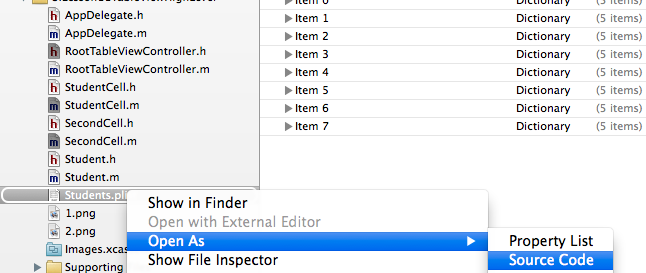
数据来源是创建一个plist文件

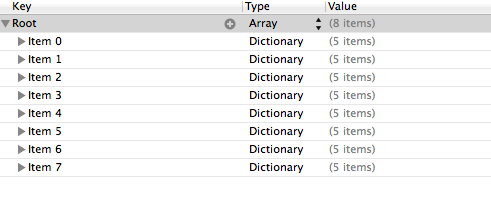
查看plist源代码
UI学习笔记---第十一天UITableView表视图高级-自定义cell的更多相关文章
- UI学习笔记---第十天UITableView表视图编辑
UITableView表视图编辑 表视图编辑的使用场景 当我们需要手动添加或者删除某条数据到tableView中的时候,就可以使用tableView编辑.比如微信 扣扣中删除和某人的通话 当我们需要手 ...
- UI学习笔记---第九天UITableView表视图
UITableView表视图 一.表视图的使用场景 表视图UITableView是iOS中最重要的视图,随处可见,通常用来管理一组具有相同数据结构的数据 表视图继承自UIScrollView,所以可以 ...
- VSTO 学习笔记(十一)开发Excel 2010 64位自定义公式
原文:VSTO 学习笔记(十一)开发Excel 2010 64位自定义公式 Excel包含很多公式,如数学.日期.文本.逻辑等公式,非常方便,可以灵活快捷的对数据进行处理,达到我们想要的效果.Exce ...
- Python学习笔记(十一)
Python学习笔记(十一): 生成器,迭代器回顾 模块 作业-计算器 1. 生成器,迭代器回顾 1. 列表生成式:[x for x in range(10)] 2. 生成器 (generator o ...
- angular学习笔记(三十一)-$location(2)
之前已经介绍了$location服务的基本用法:angular学习笔记(三十一)-$location(1). 这篇是上一篇的进阶,介绍$location的配置,兼容各版本浏览器,等. *注意,这里介绍 ...
- angular学习笔记(三十一)-$location(1)
本篇介绍angular中的$location服务的基本用法,下一篇介绍它的复杂的用法. $location服务的主要作用是用于获取当前url以及改变当前的url,并且存入历史记录. 一. 获取url的 ...
- python3.4学习笔记(二十一) python实现指定字符串补全空格、前面填充0的方法
python3.4学习笔记(二十一) python实现指定字符串补全空格.前面填充0的方法 Python zfill()方法返回指定长度的字符串,原字符串右对齐,前面填充0.zfill()方法语法:s ...
- EF学习笔记(十二):EF高级应用场景
学习总目录:ASP.NET MVC5 及 EF6 学习笔记 - (目录整理) 上篇链接:EF学习笔记(十一):实施继承 本篇原文链接:Advanced Entity Framework Scenari ...
- UITableView表视图以及重建机制
表视图UITableView 表视图UITableView,是IOS中最重要的视图,随处可见 表视图通常用来管理一组具有相同数据结构的数据 UITableView继承自UIScrollView,所 ...
随机推荐
- Android 浮动搜索框 searchable 使用(转)。
Android为程序的搜索功能提供了统一的搜索接口,search dialog和search widget,这里介绍search dialog使用.search dialog 只能为于activity ...
- HDU 3076 ssworld VS DDD 概率dp,无穷级数,oj错误题目 难度:2
http://acm.hdu.edu.cn/showproblem.php?pid=3076 不可思议的题目,总之血量越少胜率越高,所以读取时把两人的血量交换一下 明显每一轮的胜率和负率都是固定的,所 ...
- 多线程第一次亲密接触 CreateThread与_beginthreadex本质区别
本文将带领你与多线程作第一次亲密接触,并深入分析CreateThread与_beginthreadex的本质区别,相信阅读本文后你能轻松的使用多线程并能流畅准确的回答CreateThread与_beg ...
- JavaScript中Date的一些细节
对于开发人员来说,Date有时候或许会很重要,我们可以通过new Date()来创建一个日期对象.例如: var start = new Date(), //获取当前时间 today = new Da ...
- HTML特殊符号对应代码
HTML中的特殊符号所对应代码,收藏使用 符号 HTML 符号 HTML & & < < > > ⁄ ⁄ " " ¸ ¸ ° ° ½ ...
- jQuery 常用动画
<!DOCTYPE html> <html> <head> <meta charset="UTF-8"> <title> ...
- 《day18_String练习_基本类型包装类_集合入门》
package cn.itcast.api.String.test; public class StringTest_1 { public static void main(String[] args ...
- Ogre 1.8 terrain 和 paging 组件
以下转自:http://hi.baidu.com/xocoder/item/e8d87cf53d87612b753c4cfd OGRE地形生成 OGRE可以通过两个接口来生成地形,分别是void Te ...
- Hadoop MRUnit使用(一)
之前在写MR job的时候,由于要在云梯,或者一淘的开发集群上运行:所以处理方法是,在本地打成jar包,然后scp到客户端网关机上,然后在提交job运行.这样的问题时,有时候如果遇到一些逻辑上的问题, ...
- spring mvc + freemarker优雅的实现邮件定时发送
1. spring mvc工程中引入相关freemarker\mail的包 如:pom.xml中加入类似 <dependency> <groupId>javax.mail< ...