
基于【CentOS-7+ Ambari 2.7.0 + HDP 3.0】搭建HAWQ数据仓库01 —— 准备环境,搭建本地仓库,安装ambari
一、集群软硬件环境准备:
操作系统: centos 7 x86_64.1804
Ambari版本:2.7.0
HDP版本:3.0.0
HAWQ版本:2.3.0
5台PC作为工作站:
| ep-bd01 | ep-bd02 | ep-bd03 | ep-bd04 | ep-bd05 |
其中ep-bd01作为主节点,用于安装ambari-server。
二、配置操作系统,安装必备软件
1,安装CentOS 7操作系统:环境配置,安装必备软件。
2,安装配置NTP服务,保证集群时间保持同步,以防止由于时间不同而造成掉线故障。
详细看随笔:基于【CentOS-7+ Ambari 2.7.0 + HDP 3.0】搭建HAWQ数据仓库之——安装配置NTP服务,保证集群时间保持同步
见《安装配置NTP服务》
3,安装MariaDB Server用于Ambari server以及Hue和Hive
详细过程,参见:基于【CentOS-7+ Ambari 2.7.0 + HDP 3.0】搭建HAWQ数据仓库之一 —— MariaDB 安装配置
4,安装yum priorities plugin
yum install yum-plugin-priorities -y
三、搭建本地仓库:
1,下载软件包:
cd /root

mkdir downloads

cd downloads

wget http://public-repo-1.hortonworks.com/HDP-GPL/centos7/3.x/updates/3.0.0.0/HDP-GPL-3.0.0.0-centos7-gpl.tar.gz

wget http://public-repo-1.hortonworks.com/HDP/centos7/3.x/updates/3.0.0.0/hdp.repo

wget http://public-repo-1.hortonworks.com/HDP/centos7/3.x/updates/3.0.0.0/HDP-3.0.0.0-1634.xml

wget http://public-repo-1.hortonworks.com/ambari/centos7/2.x/updates/2.7.0.0/ambari.repo

wget http://public-repo-1.hortonworks.com/HDP-UTILS-1.1.0.22/repos/centos7/HDP-UTILS-1.1.0.22-centos7.tar.gz

wget http://public-repo-1.hortonworks.com/HDP/centos7/3.x/updates/3.0.0.0/HDP-3.0.0.0-centos7-rpm.tar.gz

wget http://public-repo-1.hortonworks.com/ambari/centos7/2.x/updates/2.7.0.0/ambari-2.7.0.0-centos7.tar.gz
2、搭建本地仓库:
安装并开启Apache HTTP服务
yum install httpd -y

systemctl enable httpd

systemctl start httpd
安装HTTPD服务
确保/var/www/html目录存在,没有的话创建。
mkdir -p /var/www/html
创建HDP,HDF子目录
cd /var/www/html

mkdir hdp  hdf
解开下载的软件包:
cd /var/www/html

tar -zxvf  /root/downloads/ambari-2.7.0.0-centos7.tar.gz    -C .

tar -zxvf  /root/downloads/HDP-3.0.0.0-centos7-rpm.tar.gz   -C ./hdp

tar -zxvf  /root/downloads/HDP-GPL-3.0.0.0-centos7-gpl.tar.gz  -C ./hdp

tar -zxvf  /root/downloads/HDP-UTILS-1.1.0.22-centos7.tar.gz   -C ./hdp
修改下载的ambari.repo,
vim ambari.repo
安装如下内容修改,[注意版本号,需要根据具体下载的版本不同修改,解压后自己查看一下]:
#VERSION_NUMBER=2.7.0.0-
[ambari-2.7.0.0]
#json.url = http://public-repo-1.hortonworks.com/HDP/hdp_urlinfo.json
name=ambari Version - ambari-2.7.0.0
baseurl=http://ep-bd01/ambari/centos7/2.7.0.0-897
gpgcheck=1
gpgkey=http://ep-bd01/ambari/centos7/2.7.0.0-897/RPM-GPG-KEY/RPM-GPG-KEY-Jenkins
enabled=1
priority=1
复制到/etc/yum.repos.d
cp ambari.repo /etc/yum.repos.d/ambari.repo
修改下载的hdp.repo,
vim hdp.repo
安装如下内容修改,[注意版本号,需要根据具体下载的版本不同修改,解压后自己查看一下]:
#VERSION_NUMBER=3.0.0.0-1634
[HDP-3.0]
name=HDP Version - HDP-3.0.0.0
baseurl=http://ep-bd01/hdp/HDP/centos7/3.0.0.0-1634
gpgcheck=1
gpgkey=http://ep-bd01/hdp/HDP/centos7/3.0.0.0-1634/RPM-GPG-KEY/RPM-GPG-KEY-Jenkins
enabled=1
priority=1
[HDP-3.0-GPL]
name=HDP GPL Version - HDP-GPL-3.0.0.0
baseurl=http://ep-bd01/hdp/HDP-GPL/centos7/3.0.0.0-1634
gpgcheck=1
gpgkey=http://ep-bd01/hdp/HDP-GPL/centos7/3.0.0.0-1634/RPM-GPG-KEY/RPM-GPG-KEY-Jenkins
enabled=1
priority=1
[HDP-UTILS-1.1.0.22]
name=HDP-UTILS Version - HDP-UTILS-1.1.0.22
baseurl=http://ep-bd01/hdp/HDP-UTILS/centos7/1.1.0.22
gpgcheck=1
gpgkey=http://ep-bd01/hdp/HDP-UTILS/centos7/1.1.0.22/RPM-GPG-KEY/RPM-GPG-KEY-Jenkins
enabled=1
priority=1
保存退出,复制到/etc/yum.repos.d/
cp hdp.repo /etc/yum.repos.d/hdp.repo
四、主节点安装ambari server
1,使用刚才配置好的本地仓库,直接yum命令安装。
yum install ambari-server -y
2,查看ambari server 状态
 systemctl status ambari-server

● ambari-server.service - LSB: ambari-server daemon

   Loaded: loaded (/etc/rc.d/init.d/ambari-server; bad; vendor preset: disabled)

   Active: inactive (dead)

     Docs: man:systemd-sysv-generator()
看到ambari server已成功安装了。
3,配置mariadb,建立用户和数据库供ambari使用
建立数据库用户ambari
mysql -uroot -p
MariaDB [(none)]> use mysql;
Reading table information for completion of table and column names
You can turn off this feature to get a quicker startup with -A
Database changed
MariaDB [mysql]> grant all privileges on *.* to 'ambari'@'%' identified by 'ambari';
Query OK, 0 rows affected (0.06 sec)
MariaDB [mysql]> flush privileges;
Query OK, 0 rows affected (0.00 sec)
MariaDB [mysql]>
建立数据库ambari,并运行ambari数据库建表sql命令文件。
MariaDB [mysql]> create database ambari;

Query OK,  row affected (0.01 sec)

MariaDB [mysql]> use ambari;

Database changed

MariaDB [ambari]> source /var/lib/ambari-server/resources/Ambari-DDL-MySQL-CREATE.sql;

Query OK,  rows affected (0.01 sec)

Query OK,  rows affected (0.00 sec)

Query OK,  rows affected (0.00 sec)

Query OK,  rows affected (0.06 sec)

Query OK,  rows affected (0.00 sec)

Statement prepared

... ...
4,配置ambari server
执行命令
ambari-server setup
回答选择项,其中JDK选择“”Custom“”,给出系统安装目录,数据库一定要选择高级配置,指定mariadb数据库和用户,本人系统中详细过程如下:
Using python  /usr/bin/python

Setup ambari-server

Checking SELinux...

SELinux status is 'disabled'

Customize user account for ambari-server daemon [y/n] (n)? n

Adjusting ambari-server permissions and ownership...

Checking firewall status...

Checking JDK...

[] Oracle JDK 1.8 + Java Cryptography Extension (JCE) Policy Files

[] Custom JDK

==============================================================================

Enter choice ():

To download the Oracle JDK and the Java Cryptography Extension (JCE) Policy Files you must accept the license terms found at http://www.oracle.com/technetwork/java/javase/terms/license/index.html and not accepting will cancel the Ambari Server setup and you must install the JDK and JCE files manually.

Do you accept the Oracle Binary Code License Agreement [y/n] (y)? ^C

Aborting ... Keyboard Interrupt.

[root@ep-bd01 downloads]# ambari-server setup

Using python  /usr/bin/python

Setup ambari-server

Checking SELinux...

SELinux status is 'disabled'

Customize user account for ambari-server daemon [y/n] (n)? n

Adjusting ambari-server permissions and ownership...

Checking firewall status...

Checking JDK...

[] Oracle JDK 1.8 + Java Cryptography Extension (JCE) Policy Files

[] Custom JDK

==============================================================================

Enter choice ():

WARNING: JDK must be installed on all hosts and JAVA_HOME must be valid on all hosts.

WARNING: JCE Policy files are required for configuring Kerberos security. If you plan to use Kerberos,please make sure JCE Unlimited Strength Jurisdiction Policy Files are valid on all hosts.

Path to JAVA_HOME: ^C

Aborting ... Keyboard Interrupt.

[root@ep-bd01 downloads]# echo $JAVA_HOME

/usr/java/jdk1..0_181-amd64

[root@ep-bd01 downloads]# $JAVA_HOME/bin/java -version

java version "1.8.0_181"

Java(TM) SE Runtime Environment (build 1.8.0_181-b13)

Java HotSpot(TM) -Bit Server VM (build 25.181-b13, mixed mode)

[root@ep-bd01 downloads]# ambari-server setup

Using python  /usr/bin/python

Setup ambari-server

Checking SELinux...

SELinux status is 'disabled'

Customize user account for ambari-server daemon [y/n] (n)? n

Adjusting ambari-server permissions and ownership...

Checking firewall status...

Checking JDK...

[] Oracle JDK 1.8 + Java Cryptography Extension (JCE) Policy Files

[] Custom JDK

==============================================================================

Enter choice ():

WARNING: JDK must be installed on all hosts and JAVA_HOME must be valid on all hosts.

WARNING: JCE Policy files are required for configuring Kerberos security. If you plan to use Kerberos,please make sure JCE Unlimited Strength Jurisdiction Policy Files are valid on all hosts.

Path to JAVA_HOME: ^C

Aborting ... Keyboard Interrupt.

[root@ep-bd01 downloads]# ambari-server setup

Using python  /usr/bin/python

Setup ambari-server

Checking SELinux...

SELinux status is 'disabled'

Customize user account for ambari-server daemon [y/n] (n)? n

Adjusting ambari-server permissions and ownership...

Checking firewall status...

Checking JDK...

[] Oracle JDK 1.8 + Java Cryptography Extension (JCE) Policy Files

[] Custom JDK

==============================================================================

Enter choice ():

To download the Oracle JDK and the Java Cryptography Extension (JCE) Policy Files you must accept the license terms found at http://www.oracle.com/technetwork/java/javase/terms/license/index.html and not accepting will cancel the Ambari Server setup and you must install the JDK and JCE files manually.

Do you accept the Oracle Binary Code License Agreement [y/n] (y)? y

Downloading JDK from http://public-repo-1.hortonworks.com/ARTIFACTS/jdk-8u112-linux-x64.tar.gz to /var/lib/ambari-server/resources/jdk-8u112-linux-x64.tar.gz

ERROR: Exiting with exit code .

REASON: Downloading or installing JDK failed: 'Fatal exception:  Failed to download JDK: <urlopen error [Errno -2] Name or service not known>. Please check that the JDK is available at http://public-repo-1.hortonworks.com/ARTIFACTS/jdk-8u112-linux-x64.tar.gz. Also you may specify JDK file location in local filesystem using --jdk-location command line argument., exit code 1'. Exiting.

[root@ep-bd01 downloads]# ambari-server setup

Using python  /usr/bin/python

Setup ambari-server

Checking SELinux...

SELinux status is 'disabled'

Customize user account for ambari-server daemon [y/n] (n)? n

Adjusting ambari-server permissions and ownership...

Checking firewall status...

Checking JDK...

[] Oracle JDK 1.8 + Java Cryptography Extension (JCE) Policy Files

[] Custom JDK

==============================================================================

Enter choice ():

WARNING: JDK must be installed on all hosts and JAVA_HOME must be valid on all hosts.

WARNING: JCE Policy files are required for configuring Kerberos security. If you plan to use Kerberos,please make sure JCE Unlimited Strength Jurisdiction Policy Files are valid on all hosts.

Path to JAVA_HOME: /usr/java/jdk1..0_181-amd64

Validating JDK on Ambari Server...done.

Check JDK version for Ambari Server...

JDK version found:

Minimum JDK version is  for Ambari. Skipping to setup different JDK for Ambari Server.

Checking GPL software agreement...

GPL License for LZO: https://www.gnu.org/licenses/old-licenses/gpl-2.0.en.html

Enable Ambari Server to download and install GPL Licensed LZO packages [y/n] (n)? n

Completing setup...

Configuring database...

Enter advanced database configuration [y/n] (n)? y

Configuring database...

==============================================================================

Choose one of the following options:

[] - PostgreSQL (Embedded)

[] - Oracle

[] - MySQL / MariaDB

[] - PostgreSQL

[] - Microsoft SQL Server (Tech Preview)

[] - SQL Anywhere

[] - BDB

==============================================================================

Enter choice ():

Hostname (localhost): ep-bd01

Port ():

Database name (ambari): ambari

Username (ambari): ambari

Enter Database Password (bigdata):

Re-enter password:

Configuring ambari database...

Should ambari use existing default jdbc /usr/share/java/mysql-connector-java.jar [y/n] (y)? y

Configuring remote database connection properties...

WARNING: Before starting Ambari Server, you must run the following DDL against the database to create the schema: /var/lib/ambari-server/resources/Ambari-DDL-MySQL-CREATE.sql

Proceed with configuring remote database connection properties [y/n] (y)? y

Extracting system views...

ambari-admin-2.7.0.0..jar

....

Ambari repo file doesn't contain latest json url, skipping repoinfos modification

Adjusting ambari-server permissions and ownership...

Ambari Server 'setup' completed successfully.
5,命令行方式设置mysql数据库连接库,用于oozie和ranger连接mariadb时使用(上面设置后不起作用,必须如下操作):
ambari-server setup --jdbc-db=mysql --jdbc-driver=/usr/share/java/mysql-connector-java.jar
6,配置ambari-server自启动,启动ambari-server
[root@ep-bd01 downloads]# systemctl enable ambari-server

[root@ep-bd01 downloads]# systemctl start ambari-server

[root@ep-bd01 downloads]# systemctl status ambari-server

● ambari-server.service - LSB: ambari-server daemon

   Loaded: loaded (/etc/rc.d/init.d/ambari-server; bad; vendor preset: disabled)

   Active: active (running) since Tue -- :: CST; 2min 36s ago

     Docs: man:systemd-sysv-generator()

  Process:  ExecStart=/etc/rc.d/init.d/ambari-server start (code=exited, status=/SUCCESS)

   CGroup: /system.slice/ambari-server.service

           └─ /usr/java/jdk1..0_181-amd64/bin/java -server -XX:NewRatio= -XX:+UseConcMarkSweepGC -XX:-UseGCOverheadLimit -XX:CMSInitiatingOccupancyFraction= -XX:+CMSClassUnloadingEnabled -Dsun.zip.disableMemoryMapping=true -...

Aug  :: ep-bd01 ambari-server[]: Organizing resource files at /var/lib/ambari-server/resources...

Aug  :: ep-bd01 ambari-server[]: Ambari database consistency check started...

Aug  :: ep-bd01 ambari-server[]: Server PID at: /var/run/ambari-server/ambari-server.pid

Aug  :: ep-bd01 ambari-server[]: Server out at: /var/log/ambari-server/ambari-server.out

Aug  :: ep-bd01 ambari-server[]: Server log at: /var/log/ambari-server/ambari-server.log

Aug  :: ep-bd01 ambari-server[]: Waiting for server start.....................

Aug  :: ep-bd01 ambari-server[]: Server started listening on

Aug  :: ep-bd01 ambari-server[]: DB configs consistency check: no errors and warnings were found.

Aug  :: ep-bd01 ambari-server[]: Ambari Server 'start' completed successfully.

Aug  :: ep-bd01 systemd[]: Started LSB: ambari-server daemon.systemctl status ambari-server

● ambari-server.service - LSB: ambari-server daemon

   Loaded: loaded (/etc/rc.d/init.d/ambari-server; bad; vendor preset: disabled)

   Active: active (running) since Tue -- :: CST; 2min 36s ago

     Docs: man:systemd-sysv-generator()

  Process:  ExecStart=/etc/rc.d/init.d/ambari-server start (code=exited, status=/SUCCESS)

   CGroup: /system.slice/ambari-server.service

           └─ /usr/java/jdk1..0_181-amd64/bin/java -server -XX:NewRatio= -XX:+UseConcMarkSweepGC -XX:-UseGCOverheadLimit -XX:CMSInitiatingOccupancyFraction= -XX:+CMSClassUnloadingEnabled -Dsun.zip.disableMemoryMapping=true -...

Aug  :: ep-bd01 ambari-server[]: Organizing resource files at /var/lib/ambari-server/resources...

Aug  :: ep-bd01 ambari-server[]: Ambari database consistency check started...

Aug  :: ep-bd01 ambari-server[]: Server PID at: /var/run/ambari-server/ambari-server.pid

Aug  :: ep-bd01 ambari-server[]: Server out at: /var/log/ambari-server/ambari-server.out

Aug  :: ep-bd01 ambari-server[]: Server log at: /var/log/ambari-server/ambari-server.log

Aug  :: ep-bd01 ambari-server[]: Waiting for server start.....................

Aug  :: ep-bd01 ambari-server[]: Server started listening on

Aug  :: ep-bd01 ambari-server[]: DB configs consistency check: no errors and warnings were found.

Aug  :: ep-bd01 ambari-server[]: Ambari Server 'start' completed successfully.

Aug  :: ep-bd01 systemd[]: Started LSB: ambari-server daemon.
ok,Ambari-server安装完成。浏览器访问ambari-server服务:
http://ep-bd01:8080
默认用户名/密码为:admin/admin,登陆后界面如下:
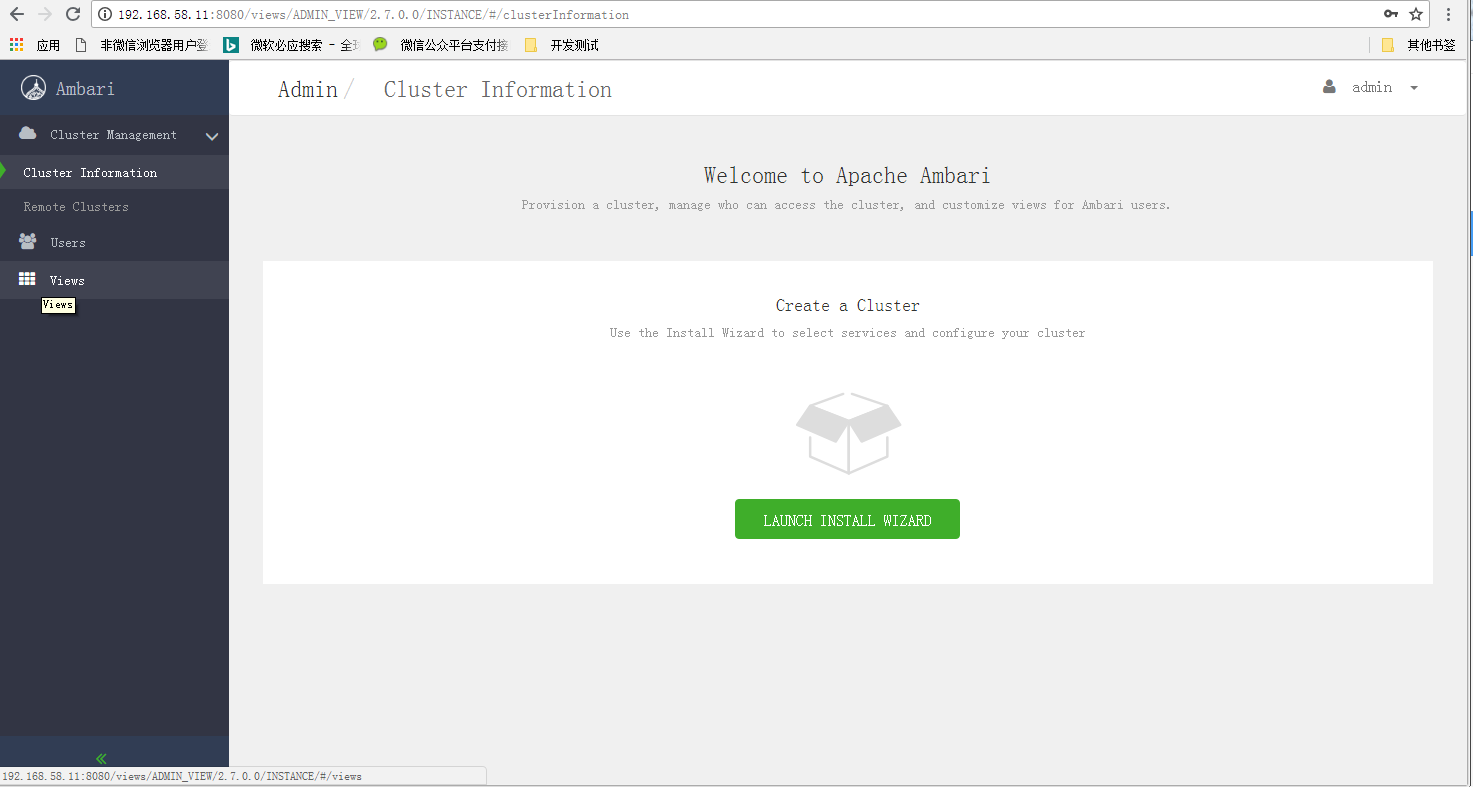
五、所有主机节点,安装ambari-agent,并配置自启动
yum install ambari-agent -y
systemctl enable ambari-agent
systemctl restart ambari-agent && systemctl status ambari-agent
基于【CentOS-7+ Ambari 2.7.0 + HDP 3.0】搭建HAWQ数据仓库01 —— 准备环境,搭建本地仓库,安装ambari的更多相关文章
- 基于【CentOS-7+ Ambari 2.7.0 + HDP 3.0】搭建HAWQ数据仓库——操作系统配置,安装必备软件
注意未经说明,所有本文中所有操作都默认需要作为root用户进行操作. 一.安装zmodem,用于远程上传下载文件,安装gedit,方便重定向到远程windows上编辑文件(通过xlanuch) [ro ...
- Solr4.8.0源码分析(4)之Eclipse Solr调试环境搭建
Solr4.8.0源码分析(4)之Eclipse Solr调试环境搭建 由于公司里的Solr调试都是用远程jpda进行的,但是家里只有一台电脑所以不能jpda进行调试,这是因为jpda的端口冲突.所以 ...
- 基于【CentOS-7+ Ambari 2.7.0 + HDP 3.0】搭建HAWQ数据仓库02 ——使用ambari-server安装HDP
本文记录使用ambari-server安装HDP的过程,对比于使用cloudera-manager安装CDH,不得不说ambari的易用性差的比较多~_~,需要用户介入的过程较多,或者说可定制性更高. ...
- 基于【CentOS-7+ Ambari 2.7.0 + HDP 3.0】搭建HAWQ数据仓库04 —— 安装HAWQ插件PXF3.3.0.0
一. 安装PXF3.3.0.0,这里所安装的pxf的包文件都包含在apache-hawq-rpm-2.3.0.0-incubating.tar.gz里面下面步骤都是以root身份执行这里注意,pxf插 ...
- HDP2.0.6+hadoop2.2.0+eclipse(windows和linux下)调试环境搭建
花了好几天,搭建好windows和linux下连接HDP集群的调试环境,在此记录一下 hadoop2.2.0的版本比hadoop0.x和hadoop1.x结构变化很大,没有eclipse-hadoop ...
- 基于WDF的PCI/PCIe接口卡Windows驱动程序(1)-WDF概述及开发环境搭建
原文出处:http://www.cnblogs.com/jacklu/p/4619110.html 本科毕业设计是这方面的工作,所以想开几篇博客来介绍使用WDF开发PCI/PCIe接口卡的驱动程序方法 ...
- vs2012+qt5.2.0环境搭建/vs2013 + qt5.3.2 环境搭建
分类: Windows Qt2014-01-17 00:50 15434人阅读 评论(18) 收藏 举报 此文章已作废,请参考我的新文章: vs2013 + qt5.3.2 环境搭建 ( http:/ ...
- Cocos2d-x v3.0正式版尝鲜体验【1】 环境搭建和新建项目
Cocos2d-x v3.0在前天最终公布正式版了,等了大半年最终出来了.一直没去碰之前的3.0各种beta,rc版本号,就想等正式版出来再尝试. 昨天也參加了触控科技在成都举办的沙龙活动.看到作者王 ...
- .net core 2.0小白笔记(一):开发运行环境搭建
小白一枚,有任何不妥之处敬请指教 这里不讨论什么设计模式,什么架构,什么什么,就是入门,简单的入门,虽然能跨平台,但是这里还是在win的环境下进行,不扯的那么远 其实官网文档写的挺不错的了,就是偶尔有 ...
随机推荐
- Ubuntu下无法输入中文问题解决
首先是要安装了中文输入法,下面以搜狗为例. 从system settings 进入language support ,在keyboard input method system 中是看不到自己安装的搜 ...
- pythonweb服务器编程(四)
Web动态服务器-1 #coding=utf-8 import socket import sys from multiprocessing import Process import re clas ...
- c++语言的设计和演化---在线函数
开始的c++语言中引入inline函数的目的是处理一些实时的情况,而普通的函数调用的开销无法被接受. 起初是在类的声明中定义inline函数,也只支持成员函数,后来才支持非成员函数:
- app的创建和注册
APP是用来存放代码的 创建APP 命令行创建,切换到项目目录下 python manage.py startapp appo1 #app01为项目名,创建完刷新即可 目录结构 把函数放到views后 ...
- js float运算精度问题
先放个前辈的文章:JavaScript数字精度丢失问题总结 今天遇到了19.99*100的问题,答案不等于1999,因为在javascript中浮点数的计算是以2进制计算的.自己写了一波解决方法(不能 ...
- Python之函数第三篇
一.匿名函数 匿名函数是lambda定义的没有名字的具有一些小功能的函数 具体形式是 lambda x: X**2 # 求平方操作 lambda x: x>100 # 判断参数是否大于100 二 ...
- 11、python阶段测试
1.执行Python脚本的两种方式 如果想要永久保存代码,就要用文件的方式 如果想要调试代码,就要用交互式的方式 2.Pyhton单行注释和多行注释分别用什么? 单行注释:# 多行注释: '' &qu ...
- canvas/CSS仪表盘效果
<!DOCTYPE html> <html> <head> <meta charset="UTF-8"> <title> ...
- golang time打印出的值是62135596800的来源
' 减去62135596800是将"以公元1年1月1日0点为基准"改成"以1970年1月1日0点"为基准 所以,数据库datetime的默认值 : 0000-0 ...
- DevSecOps 运维模式中的安全性
本文想从技术的角度谈谈我对云计算数据中心 DevSecOps 运维模式中的安全性的理解,和过去几年我在云服务业务连续性管理方面的探索. 现在公有云服务商都不约而同地转向 DevSecOps 模式.De ...