
如何制作一个Nginx镜像
1,从这里你将学到编写Dockerfile的4个重要指令RUN,EXPOSE,ADD,ENTRYPOINT
2,在Dockerfile中编写拷贝文件至容器的方法
3, 安装一个nginx server,并修改默认的站点路径
环境:CentOS7,Docker CE
1,Use below commands to prepare folders and testing files.
使用如下指令准备文件夹和测试文件
sudo mkdir -p firstnginx/test

sudo chmod -Rf  firstnginx

cd  firstnginx

echo  this is the test1.html > test1.html

echo  this is the test2.html > test/test2.html
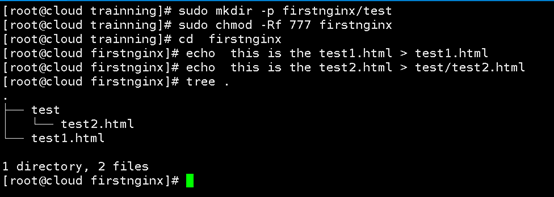
2,Edit Dockerfile
编辑Dockerfile
sudo mkdir -p docker

sudo chmod -Rf  docker

sudo vi docker/Dockerfile
Copy the the content below to the dockerfile:
#拷贝如下内容至Dockerfile
FROM centos:

MAINTAINER Liping<tlping@.com>

#add nginx repo and install nginx package

RUN bash -c "rpm -ivh http://nginx.org/packages/centos/6/noarch/RPMS/nginx-release-centos-6-0.el6.ngx.noarch.rpm && \

yum install -y nginx.x86_64"

#copy your customized nginx.conf to the container

ADD ./docker/nginx.conf /etc/nginx/nginx.conf

#create nginx log folder

RUN mkdir -p /etc/nginx/logs

#copy full project to nginx web site folder

ADD ./ /var/www/html/public/

# publish the container port

EXPOSE

#copy your shell script to the container

COPY ./docker/my-init.sh /usr/bin/my-init.sh

#set execution access right

RUN chmod +x /usr/bin/my-init.sh

#refresh the the container folder files

RUN bash -c 'touch /var/www/html/*'

#execute the initializaton script

ENTRYPOINT ["my-init.sh"]
3,Edit nginx.conf file ,we need change the default website location of nginxserver
sudo vi docker/nginx.conf
Copy below content to the nginx.conf and Save.
#拷贝如下内容至nginx.conf 并且保存
user  nginx;

worker_processes  1;

error_log  /var/log/nginx/error.log warn;

pid        /var/run/nginx.pid;

events {

    worker_connections  1024;

}

http {

    include       /etc/nginx/mime.types;

    default_type  application/octet-stream;

    log_format  main  '$remote_addr - $remote_user [$time_local] "$request" '

                      '$status $body_bytes_sent "$http_referer" '

                      '"$http_user_agent" "$http_x_forwarded_for"';

    access_log  /var/log/nginx/access.log  main;

    sendfile        on;

    #tcp_nopush     on;

    keepalive_timeout  65;

    #gzip  on;

     server {

        listen       80;

        server_name  localhost;

        #charset koi8-r;

        #access_log  logs/host.access.log  main;

        set $root    "/var/www/html/public";

		root $root;

        location / {

		    root    $root;

            index  index.html index.htm index.php l.php;

            try_files  $uri  /index.php$uri;

        }

        error_log    /var/www/html/err.txt    error;

        #error_page  404              /404.html;

        error_page   500 502 503 504  /50x.html;

        location = /50x.html {

            root  "/var/www/html";

        }

        location ~ \.php(.*)$  {

	        root    $root;

            fastcgi_pass   127.0.0.1:9000;

            fastcgi_index  index.php;

            fastcgi_split_path_info  ^((?U).+\.php)(/?.+)$;

            fastcgi_param  SCRIPT_FILENAME  $document_root$fastcgi_script_name;

            fastcgi_param  PATH_INFO  $fastcgi_path_info;

            fastcgi_param  PATH_TRANSLATED  $document_root$fastcgi_path_info;

            include        fastcgi_params;

        }

    }

#this statement must be put as the last line

include /etc/nginx/conf.d/*.conf;

}
4,edit my-init.sh file
编辑my-init.sh
sudo vi docker/my-init.sh
copy the content below to the file and save(拷贝如下内容至文件并保存)
#!/bin/sh

echo 'start nginx message now'

service nginx start

echo 'finish'

read
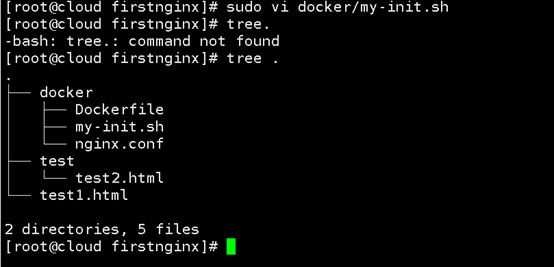
after you finish all above ,your current folder structure should be like this,
在你完成所有以上操作后,当前文件夹结构如下,
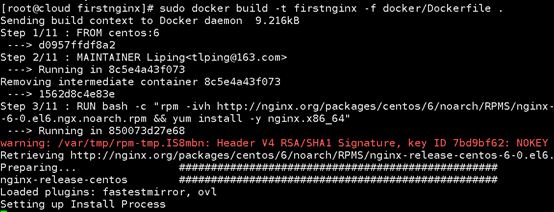
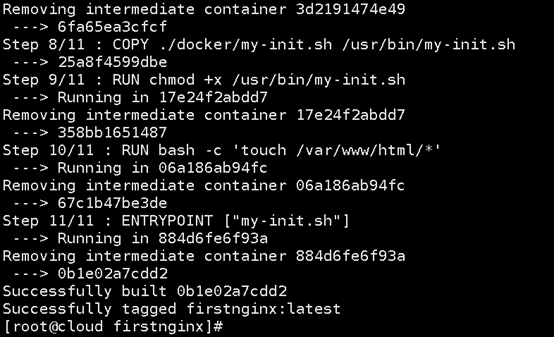
5,build the dockerfile(编译Dockerfile)
sudo docker build -t firstnginx -f docker/Dockerfile .
6,run the image to start a container(运行Docker镜像以启动容器)
sudo docker run -td --name first_nginx -p : firstnginx
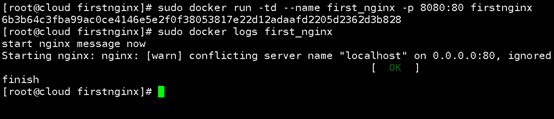
7,
sudo docker ps -a | grep first_nginx

8,
Verfiy the test1.html and test/test2.html
Open browser
http://localhost:8080/test1.html
http://localhost:8080/test/test2.html
here use your docker host ip address to replace sys.beserp.com
打开浏览器验证test1.html, test/test2.html文件是否可以被正常访问


The nginx container is working!!
Nginx 运行起来了!
文章版权归属千分网络科技(重庆)有限公司
如何制作一个Nginx镜像的更多相关文章
- 【URLOS应用开发基础】10分钟制作一个nginx静态网站环境应用
URLOS开发者功能已上线有一段时间了,目前通过部分开发者的使用体验来看,不得不说URLOS在服务器软件开发效率方面确实有着得天独厚的优势,凭借docker容器技术与其良好的应用生态环境,URLOS必 ...
- 制作一个docker镜像:mysql-8-x64-linux
因为个人学习需要,为软件系统的虚拟容器化,以下将mysql制作为docker镜像,并记录下详细步骤. 欢迎大家学习交流和转载,同时写作不易,如果各位觉得不错,请点赞支持. 备注:以下代码和文章,欢迎复 ...
- Docker下制作一个容器镜像
操作过程描述: (1)先基于centos的镜像启动一个centos容器 (2)在这个容器中安装nginx (3)然后把这个已经安装了nginx的容器制作成一个docker的镜像 操作:docker c ...
- vagrant package制作一个box镜像
1.进入virtualbox安装目录,查看虚拟机的名称(第一列为虚拟机名称) # vboxmanage list vms 2. vagrant package 打包命令 vagrant packag ...
- 使用Dockerfile创建一个tomcat镜像,并运行一个简单war包
docker已经看了有一段时间了,对镜像和容器也有了一个大致了解,参考书上的例子制作一个tomcat镜像,并简单运行一个HelloWorld.war 1.首先下载linux环境的tomcat和jdk, ...
- Docker: docker 启动一个Nginx容器
本文演示从官方镜像仓库拉取一个nginx镜像并启动docker run -d –p 8800:80 nginx (同一个镜像,可以启动N个容器, 比如说,一个nginx服务,可以在这个docker主机 ...
- docker学习之路-nginx镜像(翻译)
本篇来自https://hub.docker.com/_/nginx/?tab=description 它是docker hub上nginx的官方网站,上面有关于nginx的使用描述等.从这里你可以找 ...
- 最简单的dockerfile使用教程 - 创建一个支持SSL的Nginx镜像
什么是dockerfile?简单的说就是一个文本格式的脚本文件,其内包含了一条条的指令(Instruction),每一条指令负责描述镜像的当前层(Layer)如何构建. 下面通过一个具体的例子来学习d ...
- Docker 制作Nginx镜像
参考文章:https://www.jianshu.com/p/dc4cd0547d1e 镜像的制作方式有两种,一种是下载别人的镜像之后再制作成自己的镜像,一种是从头开始制作自己的镜像 第一种,下载别人 ...
随机推荐
- 在.net core web 项目中操作MySql数据库(非ORM框架,原生sql语句方式)
本案例通过MySql.Data和Dapper包执行原生sql,实现对数据库的操作. 操作步骤: 第1步:在MySql数据库中新建表User(使用Navicat For MySql工具) 建表语句: c ...
- Kubernetes 入门必备云原生发展简史
作者|张磊 阿里云容器平台高级技术专家,CNCF 官方大使 "未来的软件一定是生长于云上的"这是云原生理念的最核心假设.而所谓"云原生",实际上就是在定义一条能 ...
- FEL,项目实装记录
FEL,即Fast EL ,版本0.8,具体内容我就不贴了,自行百度 实装遇到的问题: Spring Boot 打包后无法进行表达式编译. 根据百度以及源码,确定这东西是在用JavaCompiler将 ...
- gym/102021/J GCPC18 模拟拼图
模拟拼图 题意: 给定n块拼图,每个拼图为四方形,对应四条边有四个数字,如果为0,表示这个边是在边界的,其他数字表示和另一个拼图的一条边相接.保证每个非零数只出现两次. 思路: 模拟,但是要注意几个情 ...
- CodeForces 639C Bear and Polynomials
Bear and Polynomials 题解: 如果改变一个其中的一个数,那么需要知道的是,前面的数都可以进到当前位来,如果过不来的话,那么就会因为前面有数导致无法变成0. 所以我们将前面的数不断向 ...
- CF937B Vile Grasshoppers
Vile Grasshoppers time limit per test 1 second memory limit per test 256 megabytes input standard in ...
- 2017 ACM/ICPC Asia Regional Qingdao Online 1003 The Dominator of Strings hdu 6208
The Dominator of Strings Time Limit: 3000/3000 MS (Java/Others) Memory Limit: 65535/32768 K (Java ...
- 【Nginx】实现负载均衡的几种方式
要理解负载均衡,必须先搞清楚正向代理和反向代理. 注: 正向代理,代理的是用户. 反向代理,代理的是服务器 什么是负载均衡 当一台服务器的单位时间内的访问量越大时,服务器压力就越大,大到超过自身承受能 ...
- 【Offer】[9] 【用两个栈实现队列】
题目描述 思路分析 Java代码 代码链接 题目描述 用两个栈实现队列 思路分析 栈--> 先进后出 队列--> 先进先出 进队列操作,选择栈s1进栈,关键在与实现出队列操作,要考虑到队列 ...
- Python基础:Python运行的两种基本方式
完成Python的安装之后,我们可以开始编写Python代码以及运行Python程序了.我们来看一下运行Python具体有哪几种方式 1.REPL 所谓REPL即read.eva.print.loop ...