
Asp.net Core 系列之--5.认证、授权与自定义权限的实现
ChuanGoing 2019-11-24
asp.net core系列已经来到了第五篇,通过之前的基础介绍,我们了解了事件订阅/发布的eventbus整个流程,初探dapper ORM实现,并且简单的介绍了领域模型、领域仓储及服务实现,结合上一篇的日志、错误处理及事务和本篇将要介绍的权限,大致的可以形成一个简单的后端系统架构。当然这些都是零散的一些技术概念的介绍,后面如果有时间的话,我想详细的介绍下如何利用领域驱动来实现一个实际案例。
话不多讲,下面来看下本篇的学习曲线:
1.认识Identityserver4
2.Identityserver4实现认证与授权
3.自定义权限的实现
认识Identityserver4
关于Identityserver4(ids4)的概念介绍,请查看IdentityServer4 知多少-简书一文。我这里要说的是,asp.net core 下的ids4集成了认证与授权两大功能,使得我们非常方便的实现一个开放的认证与授权平台,比如公司内部多个系统的集成登录(单点登录)/第三方系统数据共享/统一的认证中心等。整个业务流程大致为:
1.用户首先的有用户中心的账号信息,因此需要注册一个账号
2.用户访问某个站点应用,需要去到用户中心认证
3.认证通过,用户得到其在用户中心注册的相应信息及其权限时限、范围、大小
4.认证不通过,即非法用户,提示用户注册
5.在第3步的前提下,若用户访问到另一个站点(采用同一认证平台),这时用户可以用之前认证通过后拿到的访问令牌访问此站点,若此令牌中包含此站点的相应权限即可之前登录。
Identityserver4实现认证与授权
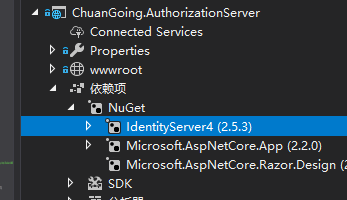
首先,新建一个asp.net core web 空项目,并且添加如下IdentityServer4 Nuget包
在ConfigureServices添加如下代码
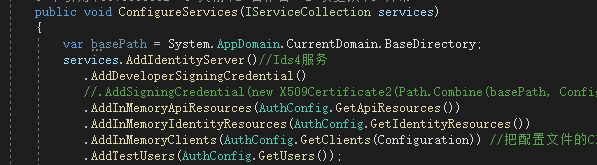
注册IdentityServer中间件,如下5个配置分别表示:
1.AddDeveloperSigningCredential:开发模式下的签名证书,开发环境启用即可
2.AddInMemoryApiResources:相关资源配置
public static IEnumerable<ApiResource> GetApiResources()

        {

            return new List<ApiResource>

            {

                new ApiResource("WebApi", "ChuanGoingWebApi"),

                new ApiResource("ProductApi", "ChuanGoingWebProduct")

            };

        }
GetApiResources
这里配置了两个Api资源
3.AddInMemoryIdentityResources:OpenID Connect相关认证信息配置
 public static IEnumerable<IdentityResource> GetIdentityResources()

        {

            return new List<IdentityResource>

            {

                new IdentityResources.OpenId(),

                new IdentityResources.Profile()

            };

        }
GetIdentityResources
4.AddInMemoryClients:客户端信息配置
 public static IEnumerable<Client> GetClients(IConfiguration Configuration)

        {

            var OnlineConfig = Configuration.GetSection("OnlineClient");

            var List = new List<Client>

            {

                new Client()

                {

                    ClientId = "ClientCredentials",

                    AllowedGrantTypes = GrantTypes.ClientCredentials,

                    ClientSecrets = { new Secret("ClientSecret".Sha256()) },

                    AllowedScopes =

                    {

                        IdentityServerConstants.StandardScopes.OpenId,

                        IdentityServerConstants.StandardScopes.Profile,

                        "WebApi",

                        "ProductApi"

                    },

                    AccessTokenLifetime =  *  *

                },

                new Client()

                {

                    ClientId = "ResourceOwnerPassword",

                    AllowedGrantTypes = GrantTypes.ResourceOwnerPassword,

                    ClientSecrets = { new Secret("ClientSecret".Sha256()) },

                    AllowedScopes =

                    {

                        IdentityServerConstants.StandardScopes.OpenId,

                        IdentityServerConstants.StandardScopes.Profile,

                        "WebApi",

                        "ProductApi"

                    },

                    AccessTokenLifetime =  *  *

                },

                  /*

                  隐式模式:https://localhost:6005/connect/authorize?client_id=Implicit&redirect_uri=http://localhost:5000/Home&response_type=token&scope=WebApi

                  */

                new Client()

                {

                    ClientId = "Implicit",

                    ClientName = "ImplicitClient",

                    AllowedGrantTypes = GrantTypes.Implicit,

                    ClientSecrets = { new Secret("ImplicitSecret".Sha256()) },

                    RedirectUris ={OnlineConfig.GetValue<string>("RedirectUris") },

                    PostLogoutRedirectUris = {OnlineConfig.GetValue<string>("LogoutRedirectUris") },

                    AllowedScopes =

                    {

                        IdentityServerConstants.StandardScopes.OpenId,

                        IdentityServerConstants.StandardScopes.Profile,

                        "WebApi",

                        "ProductApi"

                    },

                    AccessTokenLifetime =  *  * ,

                    //允许将token通过浏览器传递

                     AllowAccessTokensViaBrowser=true

                },

                /*

                 * 授权码模式:https://localhost:6005/connect/authorize?client_id=GrantCode&redirect_uri=http://localhost:5000/Home&response_type=code&scope=WebApi

                 */

                new Client()

                {

                   //客户端Id

                    ClientId="GrantCode",

                    ClientName="GrantCodeClient",

                    //客户端密码

                    ClientSecrets={new Secret("CodeSecret".Sha256()) },

                    //客户端授权类型,Code:授权码模式

                    AllowedGrantTypes=GrantTypes.Code,

                    //允许登录后重定向的地址列表,可以有多个

                     RedirectUris ={OnlineConfig.GetValue<string>("RedirectUris") },

                    //允许访问的资源

                    AllowedScopes={

                        "WebApi",

                        "ProductApi"

                    }

                }

            };

            return List;

        }
GetClients
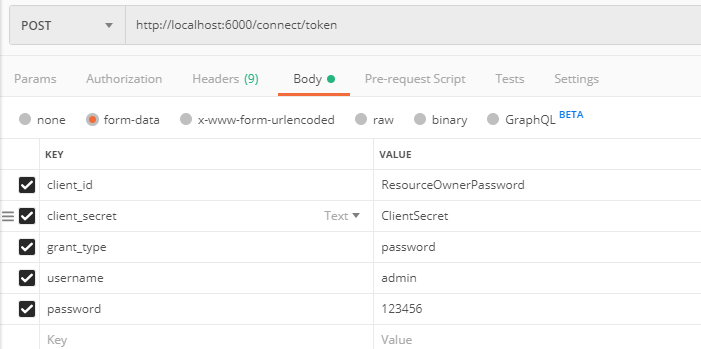
分别对象Auth2.0的四种模式,本篇将用到的是ResourceOwnerPassword模式,其他几种可在篇尾github链接查看源码的实现
5.AddTestUsers:用户配置,可结合缓存/持久化
public static List<TestUser> GetUsers()

        {

            return new List<TestUser>

            {

                new TestUser

                {

                    SubjectId = Guid.NewGuid().ToString(),

                    Username = "admin",

                    Password = ""

                    //Claims = new List<Claim>

                    //{

                    //    new Claim("name", "admin"),

                    //    new Claim("website", "https://www.cnblogs.com/chuangoing")

                    //}

                },

                new TestUser

                {

                    SubjectId = Guid.NewGuid().ToString(),

                    Username = "chuangoing",

                    Password = ""

                    //Claims = new List<Claim>

                    //{

                    //    new Claim("name", "chuangoing"),

                    //    new Claim("website", "https://github.com/chuangoing")

                    //}

                }

            };

        }
GetUsers
定义两个测试用户,注意这里的SubjectId,用作用户中心注册的openid(认证唯一),后面将会用到
然后,Configure中添加app.UseIdentityServer();//启用ids4
至此,ids4 服务完成
用postman测试下:
返回jwt accesstoken:
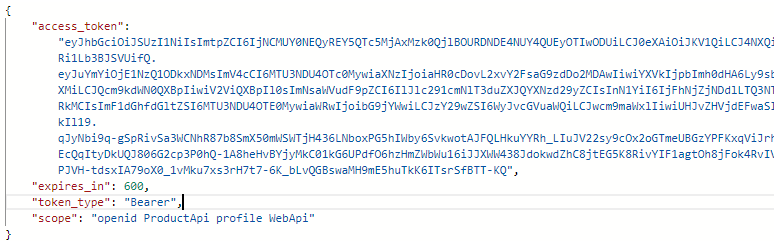
将token内容解码,如下:
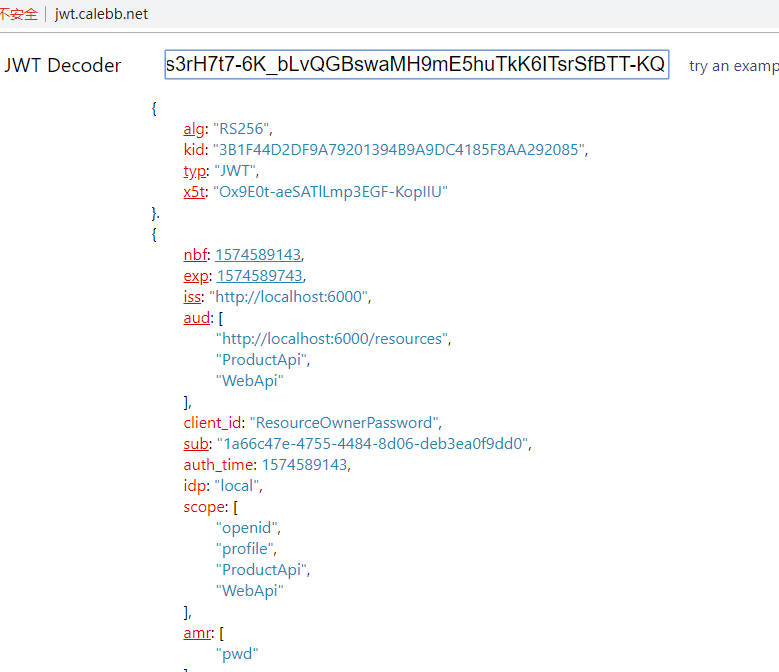
可以看到,里面包含我们配置的ProductApi/WebApi的权限
将token信息加入到http的header中:
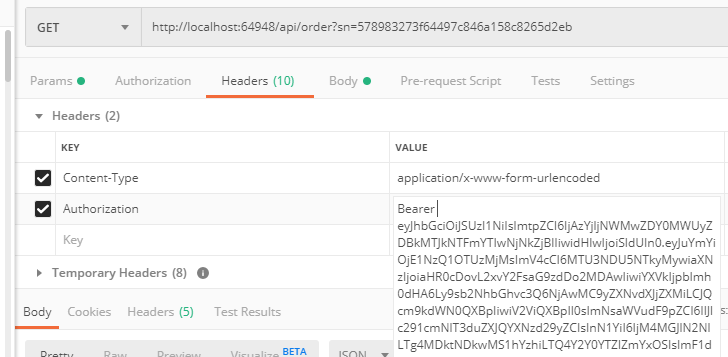
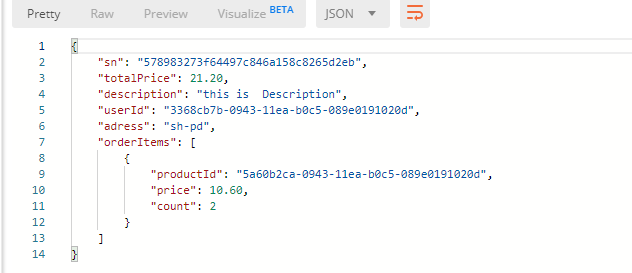
注意Bearer后面有个空格,访问order的获取订单信息:
自定义权限的实现
这里,我们将api中的action分别定义一个权限代码,用户拥有了此action访问权限(拥有此权限代码)即可访问,简单实现如下:
1.定义权限特性标识,api的action指定某个标识
public class PermissionAttribute : Attribute

    {

        /// <summary>

        /// 权限代码

        /// </summary>

        public string Code { get; }

        /// <summary>

        ///

        /// </summary>

        /// <param name="code">权限代码</param>

        public PermissionAttribute(string code)

        {

            Code = code;

        }

    }
PermissionAttribute
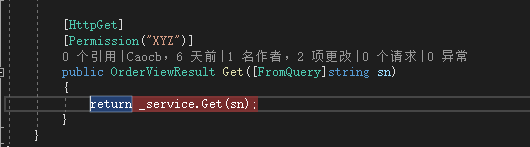
此处,get action定义了访问权限标识为"XYZ"
同样,我们这里需要用到一个权限过滤器,利用过滤器的Aop实现权限过滤业务处理:
 public class PermissionFilter : ActionFilterAttribute

    {

        public override void OnActionExecuting(ActionExecutingContext context)

        {

            var user = context.HttpContext.User;

            if (user.Identity.IsAuthenticated)

            {

                //TODO:用户自定义权限验证

                Guid userId = context.HttpContext.GetId();

                bool right;

                #region 自定义权限验证

                //根据userId判断用户内部系统权限信息

                //var userPermissions = repo.GetUserPermissions(userId);

                //var permissions = repo.GetPermissions();

                var metas = context.ActionDescriptor.EndpointMetadata;

                foreach (var meta in metas)

                {

                    if (meta is PermissionAttribute permission)

                    {

                        //if (!permissions.Any(p => permission.Code.Any(c => c == p.Code))

                        //    && !userPermissions.Any(p => permission.Code.Any(c => c == p.Code)))

                        //{

                        //    throw new WebException(HttpStatusCode.Forbidden, MessageCodes.AccessDenied, "你没有访问该资源的权限");

                        //}

                        //break;

                    }

                }

                right = false;

                #endregion

                if (!right)

                {

                    context.Result = new ContentResult() { StatusCode = (int)HttpStatusCode.Forbidden, Content = "你没有访问该资源的权限" };

                }

            }

        }
PermissionFilter
同时,启用权限过滤器配置
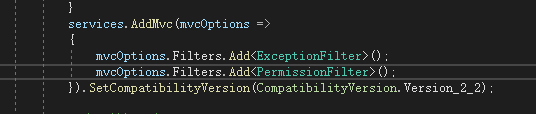
部分代码略过,详细的请查看篇尾的源码链接
利用第二节的认证授权得到的token,我们用postman测试下:
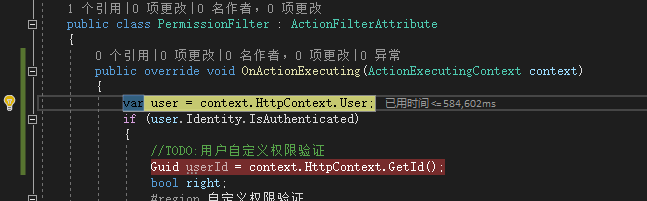
过滤器切面成功工作
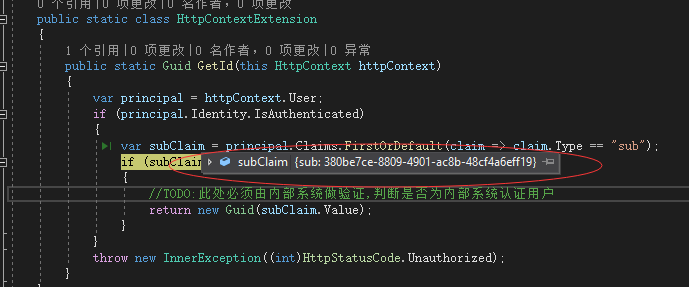
还记得第一节说的SubjectId么?这里利用这个openid,去内部系统去匹配相关用户信息,相关业务就不深入了,有兴趣的朋友可以下载示例完善下
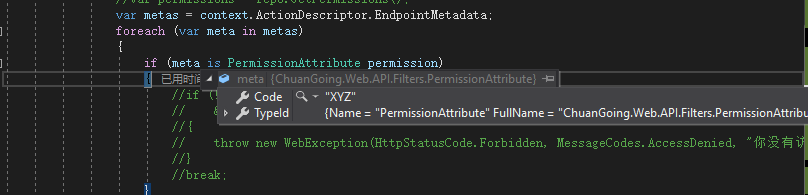
至此,整个权限认证、授权、自定义权限介绍完。
WebApi详细代码在Github的https://github.com/ChuanGoing/Start.git 的Domain分支可以找到,AuthServer详细代码在https://github.com/ChuanGoing/Demo/tree/master/ChuanGoing.AuthorizationServer中。
Asp.net Core 系列之--5.认证、授权与自定义权限的实现的更多相关文章
- asp.net core 系列之用户认证(authentication)
ASP.NET Core 的 identity 是一种需要用户登录的会员系统,用户可以创建一个登录信息存储在 Identity 的的账号, 或者也可以使用第三方登录,支持的第三方登录包括:Facebo ...
- asp.net core 系列之用户认证(1)-给项目添加 Identity
对于没有包含认证(authentication),的项目,你可以使用基架(scaffolder)把 Identity的程序集包加入到项目中,并且选择性的添加Identity的代码进行生成. 虽然基架已 ...
- asp.net core 系列之中间件进阶篇-编写自定义中间件(middleware)
中间件是被用到管道(pipeline)上来处理请求(request)和响应的(response). asp.net core 本身提供了一些内置的中间件,但是有一些场景,你可能会需要写一些自定义的中间 ...
- 【转】ASP.NET Core WebAPI JWT Bearer 认证失败返回自定义数据 Json
应用场景:当前我们给微信小程序提供服务接口,接口中使用了权限认证这一块,当我使用 JWT Bearer 进行接口权限认证的时候,返回的结果不是我们客户端想要的,其它我们想要给客户端返回统一的数据结构, ...
- asp.net core 2.0的认证和授权
在asp.net core中,微软提供了基于认证(Authentication)和授权(Authorization)的方式,来实现权限管理的,本篇博文,介绍基于固定角色的权限管理和自定义角色权限管理, ...
- 【转载】asp.net core 2.0的认证和授权
在asp.net core中,微软提供了基于认证(Authentication)和授权(Authorization)的方式,来实现权限管理的,本篇博文,介绍基于固定角色的权限管理和自定义角色权限管理, ...
- 【ASP.NET Core】运行原理(4):授权
本系列将分析ASP.NET Core运行原理 [ASP.NET Core]运行原理(1):创建WebHost [ASP.NET Core]运行原理(2):启动WebHost [ASP.NET Core ...
- ASP.NET Core系列(二):创建第一个.Net Core 项目
前面讲过 .NET Core简介及开发环境安装,本章会讲一讲ASP.NET Core 2.0的项目结构,查看完整的ASP.NET Core系列文章:https://www.cnblogs.com/zh ...
- 【目录】asp.net core系列篇
随笔分类 - asp.net core系列篇 asp.net core系列 68 Filter管道过滤器 摘要: 一.概述 本篇详细了解一下asp.net core filters,filter叫&q ...
随机推荐
- DES算法与四种加密模式的代码实现(C++语言)
版权声明:本文为博主原创文章,遵循CC 4.0 BY-SA版权协议,转载请附上原文出处链接和本声明. 本文链接:https://blog.csdn.net/Love_Irelia97/article/ ...
- Helm神器,让管理Kubernetes像yum安装包一样简单
目录 一.什么是Helm 二.安装 1.安装helm客户端 2.安装Tiller 3.创建服务端 4.给Tiller授权 5.为 Tiller 设置帐号 6.验证Tiller是否安装成功 三.Helm ...
- Solr入门(一)
一丶Solr入门1.Solr的启动Solr各版本下载老版本的时候,需要将war包放到tomcat中,现在只需解压,由于自带jetty容器,可以直接启动 [root@aaa bin]# ./solr s ...
- MSF系列--MS17_010利用模块笔记
1. auxiliary/scanner/smb/smb_ms17_010 //扫描检测漏洞辅助模块 扫描结果这里可以看到 2,3,4这几台主机存在此漏洞! 2. auxilia ...
- Java线程池ThreadPoolExecutor初略探索
在操作系统中,线程是一个非常重要的资源,频繁创建和销毁大量线程会大大降低系统性能.Java线程池原理类似于数据库连接池,目的就是帮助我们实现线程复用,减少频繁创建和销毁线程 ThreadPoolExe ...
- pymssql默认关闭自动模式开启事务行为浅析
使用Python采集SQL Server数据库服务器磁盘信息时,遇到了一个错误"CONFIG statement cannot be used inside a user transacti ...
- Centos6 Tengine开启http2传输协议
1.前言 最近在优化网站的访问速度,为网站开启http2协议,这个协议有什么优点呢?如下: http2是下一代的传输协议,以后都会普遍用它,是一个趋势. http2有多路复用特性,意思是访问一个域名下 ...
- C++学习笔记11_STL
STL又叫标准模板库,提供各种容器. STL是C++一部分,不休要额外安装什么,它被内建在编译器之内. STL重要特点是,数据结构和实现分离. *所谓迭代器,类似一个游标,使用++指向下一个元素,使用 ...
- Java 实现一个 能够 进行简单的增删改查的 超市管理系统
1. 首先编写一个 Fruitltem 的商品类, 描述 商品的基本信息. 代码如下: 保证详细, 运行的起来, 有什么 问题也可以评论留言. /* * 自定义类, 描述商品信息 * * 商品的属性: ...
- PHP 精典面试题(附答案)
1.输出Mozilla/4.0(compatible;MISIE5.01;Window NT 5.0)是,可能输出的语句是? A:$_SERVER['HTTP_USER_AGENT_TYPE']; B ...