
6-MVC结构简介
一。javeEE的项目结构层次:MVC
1.Model:模型层(DAO+业务层)
2.View:视图层 jsp
3.Control:控制层 servlet
二。分层的原则:
1.层与层之间松耦合,层内保持高内聚性
2.不跨层访问
3.层与层之间的访问是通过接口来调用
4.上层调用下层,不能反过来
注意:关于页面中写路径的问题:
将页面中加入:
<%
String path = request.getContextPath();
String basePath = request.getScheme()+"://"+request.getServerName()+":"+request.getServerPort()+path+"/";
%>
<head> <base href="<%=basePath%>"/></head>这句话的作用是将当前网页中的所有连接属性加上了完整路径的前缀。
好处:就是页面的所有路径都从根目录开始写起,包括css,js,img,action,超链接
为了方便页面的编辑,可以将eclipse中的jsp模板修改:点击window--preference--web--jsp files--editor--templates
在右边的列表中找到New Jsp file(html)--点击editor--修改模板--apply
实例:用MVC的结构实现一个学生系统的增删改查
后台代码结构(\src\com\目录下、\src\com\control目录下)+前端代码结构(\WebContent\student目录下)
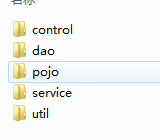


其他代码就不贴出,仅贴出control层+jsp层
QueryStudentServlet.java
package com.control;

import java.io.IOException;

import java.util.List;

import javax.servlet.ServletException;

import javax.servlet.annotation.WebServlet;

import javax.servlet.http.HttpServlet;

import javax.servlet.http.HttpServletRequest;

import javax.servlet.http.HttpServletResponse;

import com.pojo.Student;

import com.service.IStudentService;

import com.service.StudentService;

@WebServlet("/queryStu")

public class QueryStudentServlet extends HttpServlet{

    IStudentService stuSer = new StudentService();

    @Override

    protected void doGet(HttpServletRequest req, HttpServletResponse resp) throws ServletException, IOException {

        doPost(req, resp);

    }

    @Override

    protected void doPost(HttpServletRequest req, HttpServletResponse resp) throws ServletException, IOException {

        //1.调用业务查询数据

        List<Student> list = stuSer.getAllStu();

        //2.将数据保存到request中传递到页面

        req.setAttribute("list", list);

        //3.转发页面

        req.getRequestDispatcher("student/listStudent.jsp").forward(req, resp);

    }

}
AddStudentServlet.java
package com.control;

import java.io.IOException;

import javax.servlet.ServletException;

import javax.servlet.annotation.WebServlet;

import javax.servlet.http.HttpServlet;

import javax.servlet.http.HttpServletRequest;

import javax.servlet.http.HttpServletResponse;

import com.service.IStudentService;

import com.service.StudentService;

@WebServlet("/stu")

public class AddStudentServlet extends HttpServlet{

    IStudentService stuSer = new StudentService();

    @Override

    protected void doGet(HttpServletRequest req, HttpServletResponse resp) throws ServletException, IOException {

        doPost(req, resp);

    }

    @Override

    protected void doPost(HttpServletRequest req, HttpServletResponse resp) throws ServletException, IOException {

        req.setCharacterEncoding("utf-8");

        //1.获取页面的参数

        String stuname = req.getParameter("stuname");

        String stusex = req.getParameter("stusex");

        String stuage = req.getParameter("stuage");

        String studate = req.getParameter("studate");

        String stuprofess = req.getParameter("stuprofess");

        //2.调用业务层保存数据

        int result = stuSer.addStu(stuname, stusex, stuage, studate, stuprofess);

        //3.跳转页面

        if(result==1){//成功

            req.setAttribute("mess", "添加成功!");

        }else{

            req.setAttribute("mess", "添加失败!");

        }

        req.getRequestDispatcher("student/addStudent.jsp").forward(req, resp);

    }

}
UpdateStudentServlet.java
package com.control;

import java.io.IOException;

import javax.servlet.ServletException;

import javax.servlet.annotation.WebServlet;

import javax.servlet.http.HttpServlet;

import javax.servlet.http.HttpServletRequest;

import javax.servlet.http.HttpServletResponse;

import com.pojo.Student;

import com.service.IStudentService;

import com.service.StudentService;

@WebServlet("/updateStu")

public class UpdateStudentServlet extends HttpServlet{

    IStudentService stuSer = new StudentService();

    @Override

    protected void doGet(HttpServletRequest req, HttpServletResponse resp) throws ServletException, IOException {

        doPost(req, resp);

    }

    @Override

    protected void doPost(HttpServletRequest req, HttpServletResponse resp) throws ServletException, IOException {

        req.setCharacterEncoding("utf-8");

        String type = req.getParameter("type");

        if("del".equals(type)){//删除学员信息

            String id = req.getParameter("id");

            stuSer.delStu(id);

            //删除数据后重定向到查询的servlet中去完成查询

            resp.sendRedirect("queryStu");

            return;//一个请求中只能有一次跳转,所有每个if结束都要return

        }

        if("toupdate".equals(type)){//查询单个学员跳转到修改页面

            String id = req.getParameter("id");

            Student stu = stuSer.getStuById(id);

            req.setAttribute("stu", stu);

            //查询出要修改的学员信息传到页面去展示以便修改

            req.getRequestDispatcher("student/updateStudent.jsp").forward(req, resp);

            return;

        }

        if("update".equals(type)){//修改学员信息

            //1.获取页面的参数

            String stuid = req.getParameter("stuid");

            String stuname = req.getParameter("stuname");

            String stusex = req.getParameter("stusex");

            String stuage = req.getParameter("stuage");

            String studate = req.getParameter("studate");

            String stuprofess = req.getParameter("stuprofess");

            //2.调用业务层修改数据

            stuSer.updateStu(stuid, stuname, stusex, stuage, studate, stuprofess);

            //3.跳转查询页面 刷新页面数据

            resp.sendRedirect("queryStu");

            return;

        }

    }

}
index.jsp
<%@ page language="java" contentType="text/html; charset=UTF-8"

    pageEncoding="UTF-8"%>

<%

    String path = request.getContextPath();

    String basePath = request.getScheme()+"://"+request.getServerName()+":"+request.getServerPort()+path+"/";

%>

<!DOCTYPE html>

<html>

<head>

<base href="<%=basePath%>"/>

<meta http-equiv="Content-Type" content="text/html; charset=UTF-8">

<title>Insert title here</title>

</head>

<body>

<div style="height: 90px; width:1200px;float: left;">

    <iframe src="student/top.jsp" style="width: 100%;border: 0"></iframe>

</div>

<div style="float: left;height: 700px;width:200px;">

    <iframe src="student/left.jsp" style="border: 0" height="700px"></iframe>

</div>

<div style="float: left;height: 700px;width:1100px;">

    <iframe name="main_" src="student/main.jsp" style="border: 0" height="700px" width="1100px"></iframe>

</div>

</body>

</html>
top.jsp
<%@ page language="java" contentType="text/html; charset=UTF-8"

    pageEncoding="UTF-8"%>

<%

    String path = request.getContextPath();

    String basePath = request.getScheme()+"://"+request.getServerName()+":"+request.getServerPort()+path+"/";

%>

<!DOCTYPE html>

<html>

<head>

<base href="<%=basePath%>"/>

<meta http-equiv="Content-Type" content="text/html; charset=UTF-8">

<title>Insert title here</title>

</head>

<body>

    <img src="img/logo.gif" width="100%" height="90px">

</body>

</html>
left.jsp
<%@ page language="java" contentType="text/html; charset=UTF-8"

    pageEncoding="UTF-8"%>

<%

    String path = request.getContextPath();

    String basePath = request.getScheme()+"://"+request.getServerName()+":"+request.getServerPort()+path+"/";

%>

<!DOCTYPE html>

<html>

<head>

<base href="<%=basePath%>"/>

<meta http-equiv="Content-Type" content="text/html; charset=UTF-8">

<title>Insert title here</title>

</head>

<body>

<div>

        <a href="student/addStudent.jsp" target="main_">新增学员信息</a>

        <p><a href="queryStu" target="main_">查询学员信息</a></p>

</div>

</body>

</html>
main.jsp
<%@ page language="java" contentType="text/html; charset=UTF-8"

    pageEncoding="UTF-8"%>

<%

    String path = request.getContextPath();

    String basePath = request.getScheme()+"://"+request.getServerName()+":"+request.getServerPort()+path+"/";

%>

<!DOCTYPE html>

<html>

<head>

<base href="<%=basePath%>"/>

<meta http-equiv="Content-Type" content="text/html; charset=UTF-8">

<title>Insert title here</title>

</head>

<body>

    <div align="center">

        <h1>欢迎使用学员管理系统</h1>

    </div>

</body>

</html>
list.jsp
<%@page import="com.pojo.Student"%>

<%@page import="java.util.List"%>

<%@ page language="java" contentType="text/html; charset=UTF-8"

    pageEncoding="UTF-8"%>

<%

    String path = request.getContextPath();

    String basePath = request.getScheme()+"://"+request.getServerName()+":"+request.getServerPort()+path+"/";

%>

<!DOCTYPE html>

<html>

<head>

<base href="<%=basePath%>"/>

<meta http-equiv="Content-Type" content="text/html; charset=UTF-8">

<title>Insert title here</title>

<style type="text/css">

</style>

</head>

<script type="text/javascript">

    function del(id){

        if(confirm("是否确定要删除该数据?")){

            window.location.href="updateStu?type=del&id="+id;

        }

    }

</script>

<%

    List<Student> list = (List)request.getAttribute("list");

%>

<body>

<div align="center">

    <table style="width: 500px;" border="1">

    <tr>

        <th>编号</th>

        <th>姓名</th>

        <th>年龄</th>

        <th>性别</th>

        <th>生日</th>

        <th>专业</th>

        <th>操作</th>

    </tr>

        <%

            if(list!=null)

                for(Student stu:list){

        %>

        <tr>

            <td><%=stu.getStuId() %></td>

            <td><%=stu.getStuName() %></td>

            <td><%=stu.getStuAge() %></td>

            <td><%=stu.showStuSex() %></td>

            <td><%=stu.showStuDate() %></td>

            <td><%=stu.showStuProfess() %></td>

            <td><a href="javascript:del('<%=stu.getStuId() %>')">删除</a>

            <a href="updateStu?type=toupdate&id=<%=stu.getStuId() %>">修改</a></td>

        </tr>

        <%

                }

        %>

    </table>

</div>

</body>

</html>
addStudent.jsp
<%@page import="java.sql.PseudoColumnUsage"%>

<%@page import="com.util.Profession"%>

<%@ page language="java" contentType="text/html; charset=UTF-8"

    pageEncoding="UTF-8"%>

<%

    String path = request.getContextPath();

    String basePath = request.getScheme()+"://"+request.getServerName()+":"+request.getServerPort()+path+"/";

%>

<!DOCTYPE html>

<html>

<head>

<base href="<%=basePath%>"/>

<meta http-equiv="Content-Type" content="text/html; charset=UTF-8">

<title>Insert title here</title>

</head>

<%

    //用枚举来维护专业下拉列表

    Profession[] ps = Profession.values();//拿到枚举中的所有类型

    String mess = (String)request.getAttribute("mess");

    if(mess==null){

        mess= "";

    }

%>

<body>

    <div align="center">

        <h1>新增学员信息</h1>

        <form action="stu" method="post">

        <table style="width: 500px;">

            <tr>

                <td align="right">学员姓名:</td>

                <td><input name="stuname"></td>

            </tr>

            <tr>

                <td align="right">学员性别:</td>

                <td>

                    男<input checked="checked" type="radio" name="stusex" value="1">

                    女<input type="radio" name="stusex" value="2">

                </td>

            </tr>

            <tr>

                <td align="right">学员年龄:</td>

                <td><input name="stuage"></td>

            </tr>

            <tr>

                <td align="right">生日:</td>

                <td><input type="date" name="studate"></td>

            </tr>

            <tr>

                <td align="right">专业:</td>

                <td>

                    <select name="stuprofess">

                        <%for(int i=0;i<ps.length;i++){

                            Profession p = ps[i];

                        %>

                        <option value="<%=p.getValue()%>"><%=p.getName() %></option>

                        <%} %>

                    </select>

                </td>

            </tr>

            <tr>

                <td colspan="2" align="center">

                    <input type="submit" value="提交"><span style="color: red"><%=mess %></span>

                </td>

            </tr>

        </table>

        </form>

    </div>

</body>

</html>
updateStudeng.java
<%@page import="com.pojo.Student"%>

<%@page import="com.util.Profession"%>

<%@ page language="java" contentType="text/html; charset=UTF-8"

    pageEncoding="UTF-8"%>

<%

    String path = request.getContextPath();

    String basePath = request.getScheme()+"://"+request.getServerName()+":"+request.getServerPort()+path+"/";

%>

<!DOCTYPE html>

<html>

<head>

<base href="<%=basePath%>"/>

<meta http-equiv="Content-Type" content="text/html; charset=UTF-8">

<title>Insert title here</title>

</head>

<%

    //用枚举来维护专业下拉列表

    Profession[] ps = Profession.values();//拿到枚举中的所有类型

    String mess = (String)request.getAttribute("mess");

    if(mess==null){

        mess= "";

    }

    Student stu = (Student)request.getAttribute("stu");

%>

<body>

<div align="center">

        <h1>修改学员信息</h1>

        <form action="updateStu?type=update" method="post">

        <input type="hidden" name="stuid" value="<%=stu.getStuId()%>">

        <table style="width: 500px;">

            <tr>

                <td align="right">学员姓名:</td>

                <td><input name="stuname" value="<%=stu.getStuName()%>"></td>

            </tr>

            <tr>

                <td align="right">学员性别:</td>

                <td>

                <%

                    if("1".equals(stu.getStuSex())){

                %>

                男<input checked="checked" type="radio" name="stusex" value="1">

                女<input type="radio" name="stusex" value="2">

                <%

                    }else{

                %>

                男<input type="radio" name="stusex" value="1">

                女<input checked="checked" type="radio" name="stusex" value="2">

                <%

                    }

                %>

                </td>

            </tr>

            <tr>

                <td align="right">学员年龄:</td>

                <td><input name="stuage" value="<%=stu.getStuAge()%>"></td>

            </tr>

            <tr>

                <td align="right">生日:</td>

                <td><input type="date" name="studate" value="<%=stu.showStuDate()%>"></td>

            </tr>

            <tr>

                <td align="right">专业:</td>

                <td>

                    <select name="stuprofess">

                        <%for(int i=0;i<ps.length;i++){

                            Profession p = ps[i];

                            if(stu.getStuProfess().equals(p.getValue()+"")){

                        %>

                        <option value="<%=p.getValue()%>" selected="selected"><%=p.getName() %></option>

                        <%}else{%>

                        <option value="<%=p.getValue()%>"><%=p.getName() %></option>

                        <%} } %>

                    </select>

                </td>

            </tr>

            <tr>

                <td colspan="2" align="center">

                    <input type="submit" value="提交"><span style="color: red"><%=mess %></span>

                </td>

            </tr>

        </table>

        </form>

    </div>

</body>

</html>
<%@page import="com.pojo.Student"%>

<%@page import="com.util.Profession"%>

<%@ page language="java" contentType="text/html; charset=UTF-8"

    pageEncoding="UTF-8"%>

<%

    String path = request.getContextPath();

    String basePath = request.getScheme()+"://"+request.getServerName()+":"+request.getServerPort()+path+"/";

%>

<!DOCTYPE html>

<html>

<head>

<base href="<%=basePath%>"/>

<meta http-equiv="Content-Type" content="text/html; charset=UTF-8">

<title>Insert title here</title>

</head>

<%

    //用枚举来维护专业下拉列表

    Profession[] ps = Profession.values();//拿到枚举中的所有类型

    String mess = (String)request.getAttribute("mess");

    if(mess==null){

        mess= "";

    }

    Student stu = (Student)request.getAttribute("stu");

%>

<body>

<div align="center">

        <h1>修改学员信息</h1>

        <form action="updateStu?type=update" method="post">

        <input type="hidden" name="stuid" value="<%=stu.getStuId()%>">

        <table style="width: 500px;">

            <tr>

                <td align="right">学员姓名:</td>

                <td><input name="stuname" value="<%=stu.getStuName()%>"></td>

            </tr>

            <tr>

                <td align="right">学员性别:</td>

                <td>

                <%

                    if("1".equals(stu.getStuSex())){

                %>

                男<input checked="checked" type="radio" name="stusex" value="1">

                女<input type="radio" name="stusex" value="2">

                <%

                    }else{

                %>

                男<input type="radio" name="stusex" value="1">

                女<input checked="checked" type="radio" name="stusex" value="2">

                <%

                    }

                %>

                </td>

            </tr>

            <tr>

                <td align="right">学员年龄:</td>

                <td><input name="stuage" value="<%=stu.getStuAge()%>"></td>

            </tr>

            <tr>

                <td align="right">生日:</td>

                <td><input type="date" name="studate" value="<%=stu.showStuDate()%>"></td>

            </tr>

            <tr>

                <td align="right">专业:</td>

                <td>

                    <select name="stuprofess">

                        <%for(int i=0;i<ps.length;i++){

                            Profession p = ps[i];

                            if(stu.getStuProfess().equals(p.getValue()+"")){

                        %>

                        <option value="<%=p.getValue()%>" selected="selected"><%=p.getName() %></option>

                        <%}else{%>

                        <option value="<%=p.getValue()%>"><%=p.getName() %></option>

                        <%} } %>

                    </select>

                </td>

            </tr>

            <tr>

                <td colspan="2" align="center">

                    <input type="submit" value="提交"><span style="color: red"><%=mess %></span>

                </td>

            </tr>

        </table>

        </form>

    </div>

</body>

</html>
Profession.java
package com.util;

public enum Profession {

    YUWEN(1),SHUXUE(2),YINGYU(3),SHENGWU(4),TIYU(5);

    Profession(int v){

        this.value = v;

    }

    Profession(){

    }

    String name;

    int value;

    public String getName() {

        if(value==1){

            return "语文";

        }else if(value==2){

            return "数学";

        }else if(value==3){

            return "英语";

        }else if(value==4){

            return "生物";

        }else if(value==5){

            return "体育";

        }

        return "";

    }

    public void setName(String name) {

        this.name = name;

    }

    public int getValue() {

        return value;

    }

    public void setValue(int value) {

        this.value = value;

    }

    public Profession getProfessionByValue(int value){

        for (Profession p : Profession.values()) {

            if(p.getValue()==value){

                return p;

            }

        }

        return null;

    }

}
6-MVC结构简介的更多相关文章
- MVC结构简介
本文编译自J2EE的相关文档.MVC(Model-View-Controller)应用程序结构被用来分析分布式应用程序的特征.这种抽象结构能有助于将应用程序分割成若干逻辑部件,使程序设计变得更加容易. ...
- Java的MVC模式简介
Java的MVC模式简介 MVC(Model View Control)模型-视图-控制器 首先我们需要知道MVC模式并不是javaweb项目中独有的,MVC是一种软件工程中的一种软件架构模式,把软件 ...
- MVC结构
MVC结构是其它三个经典的设计模式的演变:观察者模式(Observer)(Pub/Sub), 策略模式(Strategy)和组合模式(Composite). 来自为知笔记(Wiz)
- ExtJS MVC结构
概述 大型的应用在开发和运维上都存在着困难.应用功能的调整和开发人员的调动都会影响对项目的掌控.ExtJS4带来了一种新的应用结构.这种结构不止用于组织代码,也能有效的减少必要的代码量. 这次ExtJ ...
- ASP.NET MVC Boilerplate简介
ASP.NET MVC Boilerplate简介 ASP.NET MVC Boilerplate是专业的ASP.NET MVC模版用来创建安全.快速.强壮和适应性强的Web应用或站点.它在微软默认M ...
- 关于MVC结构
简单的记录,只是想记录一下现在对MVC的理解. MVC,即模型(MODEL),视图(VIEW),控制器(CONTROLLER) 模型是数据模型 视图是图形界面 控制器是在两个之间的控制部分,用来将数据 ...
- 老李分享:jvm结构简介 1
老李分享:jvm结构简介 poptest是国内唯一一家培养测试开发工程师的培训机构,以学员能胜任自动化测试,性能测试,测试工具开发等工作为目标.如果对课程感兴趣,请大家咨询qq:9088214 ...
- 更加清楚理解mvc结构
更加清楚理解mvc结构 文章来源:刘俊涛的博客 地址:http://www.cnblogs.com/lovebing 欢迎关注,有问题一起学习欢迎留言.评论.
- discuz X论坛技术架构 MVC结构浅析
摘自:http://yeyuan.iteye.com/blog/930727 PS:本人刚接触discuz论坛,php水平有限,当中的理解,如有不正确之处,欢迎指出 ----------------- ...
- Laravel 文件夹结构简介
表 1.1:Laravel 文件夹结构简介 文件夹名称 简介 app 应用程序的业务逻辑代码存放文件夹 app/Console 存放自定义 Artisian 命令文件 app/Http/Control ...
随机推荐
- cf438E. The Child and Binary Tree(生成函数 多项式开根 多项式求逆)
题意 链接 Sol 生成函数博大精深Orz 我们设\(f(i)\)表示权值为\(i\)的二叉树数量,转移的时候可以枚举一下根节点 \(f(n) = \sum_{w \in C_1 \dots C_n} ...
- 将HTML页面自动保存为PDF文件并上传的两种方式(一)-前端(react)方式
一.业务场景 公司的样本检测报告以React页面的形式生成,已调整为A4大小的样式并已实现分页,业务上需要将这个网页生成PDF文件,并上传到服务器,后续会将这个文件发送给客户(这里不考虑). 二.原来 ...
- Echarts纵坐标显示为整数小数
chart.DoubleDeckBarChart = function (getIDParam, Legend, xAxisData, seriesName1, seriesName2, series ...
- Kotlin入门(21)活动页面的跳转处理
Activity的活动页面跳转是App最常用的功能之一,在前几章的demo源码中便多次见到了,常常是点击界面上的某个按钮,然后跳转到与之对应的下一个页面.对于App开发者来说,该功能的实现非常普通,使 ...
- 章节二、2-String 引用数据类型-字符串类
一.创建String(字符串对象)的两种方式 1.String str1 = "nihao"("nihao"值存储在常量值中) 2.String str2 = ...
- Bayboy功能详解
Bayboy功能详解 一.Badboy中的检查点 1.1以sogou.com搜索为例,搜索测试 步骤:打开Badboy工具,在地址栏中输入搜狗网址:输入 测试 进行搜索:点击红色按钮停止录制 1.2添 ...
- Java-- String源码分析
版权声明:本文为博主原创文章,未经博主允许不得转载 本篇博文基于java8,主要探讨java中的String源码. 首先,将一个类分为几个部分,分别是类定义(继承,实现接口等),全局变量,方法,内部类 ...
- weblogic系列漏洞整理 -- 5. weblogic SSRF 漏洞 UDDI Explorer对外开放 (CVE-2014-4210)
目录 五. weblogic SSRF 漏洞 UDDI Explorer对外开放 (CVE-2014-4210) 1. 利用过程 2. 修复建议 一.weblogic安装 http://www.cnb ...
- SQL中常用字符串函数
--CHARINDEX 返回指定字符的位置--2个参数,第一个是要查找的字符串 第二个参数:要搜索的字符串 参数3:开始查找的位置--查找位置从1开始,返回结果为0时表示为结果为空 SELECT CH ...
- C# 枚举转列表
using System; using System.Collections.Generic; using System.ComponentModel; namespace Common.Utils ...