
sass安装和语法
1.简介
sass 它的基本思想是,用一种专门的编程语言,进行网页样式设计,然后再编译成正常的CSS文件。这被叫做“css预处理器”(css preprocessor)。它提供了很便利的语法,节省了我们写css的时间。
2.安装
(1)首先确保你的电脑安装了 ruby (传送门 https://www.ruby-lang.org/zh_cn/downloads/)
// 控制台查看是否安装成功

ruby -v
(2)安装 sass
gem install sass
3.使用
(1)用编辑器 新建文件夹 demo ,在demo里新建文件 demo.scss ,代码如下
.list_1 {

    ul {padding-left: 1.6rem;}

    li {

        border-bottom: 1px solid #ddd;padding-right: 1.6rem;

        a {

            display: block;height: 4rem;line-height: 4rem;overflow: hidden;font-size: 1.4rem;

            background:url("../image/icon_goto.png") right center no-repeat;

            background-size: auto 1.4rem;

            padding-right: 1.5rem;

        }

        time {float: right;color: #999;}

    }

}
(2)控制台 进入demo文件夹下
// demo.css 是生成后的css文件名

sass demo.scss demo.css
4.sass提供的四种编译风格
// nested:嵌套缩进的css代码,它是默认值。

// expanded:没有缩进的、扩展的css代码。

// compact:简洁格式的css代码。

// compressed:压缩后的css代码。
比如
sass --style compressed test.sass test.css
5.sass 语法
我觉得sass的格式和jade书写格式很像,结合sass的语法写了个demo,希望能帮助大家。
注意 : 这里的是在控制台下直接用sass编译下的语法(不需要{}和;等),但是如果你需要在grunt下使用,请参考 http://www.w3cplus.com/sassguide/syntax.html
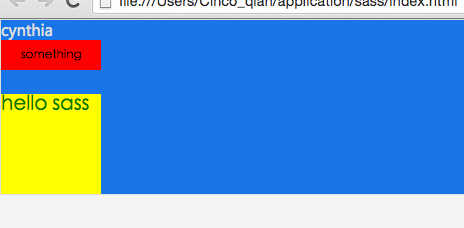
页面结构很简单,这里主要讲scss的常用语法,我写在注释里了。
丑丑页面预览:
index.html
<!DOCTYPE html>

<html>

  <head>

    <meta charset="utf-8">

    <title></title>

    <link rel="stylesheet" href="index.css" media="screen" title="no title" charset="utf-8">

  </head>

  <body>

    <div class="lay01">

      <a href="#">cynthia</a>

      <label for="">something</label>

      <br>

      <br>

      <div class="lay01-1">

        <h1>hello sass</h1>

      </div>

    </div>

  </body>

</html>
css.scss
*

  padding: 0

  margin: 0

  border: 0

  outline: 0

  font-size: 12px

body

  background: #f4f4f4

a

  text-decoration: none

  &:hover

    cursor: pointer

// each循环

$headings: (h1:2em,h2:1.5em,h3:1.2em)

@each $header,$size in $headings

  #{$header}

    font-size: $size

// for循环

@for $i from 1 through 3

  .item-#{$i}

    width: 2em * $i

// 多个字段的数据循环

$animal-data: (puma,black,default),(sea-sulg,blue,pointer),(egret,white,move)

@each $animal,$color,$cursor in $animal-data

  .#{$animal}-icon

    background: url(img/#{$animal}.png)

    border: 1px #ddd solid

    cursor: $cursor
css.scss生成的css.css
* {

  padding: 0;

  margin: 0;

  border: 0;

  outline: 0;

  font-size: 12px; }

body {

  background: #f4f4f4; }

a {

  text-decoration: none; }

  a:hover {

    cursor: pointer; }

h1 {

  font-size: 2em; }

h2 {

  font-size: 1.5em; }

h3 {

  font-size: 1.2em; }

.item-1 {

  width: 2em; }

.item-2 {

  width: 4em; }

.item-3 {

  width: 6em; }

.puma-icon {

  background: url(img/puma.png);

  border: 1px #ddd solid;

  cursor: default; }

.sea-sulg-icon {

  background: url(img/sea-sulg.png);

  border: 1px #ddd solid;

  cursor: pointer; }

.egret-icon {

  background: url(img/egret.png);

  border: 1px #ddd solid;

  cursor: move; }

/*# sourceMappingURL=css.css.map */
index.scss
// 引入外部css文件

@import "css.css"

// 变量

$blue:#1875e7

// 代码块

@mixin font1

  font-family: 'Microsoft Yahei'

  color: #ddd

// 嵌套

.lay01

  background: $blue

  border: 1px #ddd solid

  a

    @include font1

    // 计算

    font-size: 16px - 1px

  label

    background: red

    font-size: 12px

    display: block

    width: 100px

    height: 30px

    line-height: 30px

    text-align: center

  .lay01-1

    width: 100px

    height: 100px

    background: yellow

    h1

      font-size: 20px

      color: green
index.scss生成的index.css
@import url(css.css);

.lay01 {

  background: #1875e7;

  border: 1px #ddd solid; }

  .lay01 a {

    font-family: "Microsoft Yahei";

    color: #ddd;

    font-size: 15px; }

  .lay01 label {

    background: red;

    font-size: 12px;

    display: block;

    width: 100px;

    height: 30px;

    line-height: 30px;

    text-align: center; }

  .lay01 .lay01-1 {

    width: 100px;

    height: 100px;

    background: yellow; }

    .lay01 .lay01-1 h1 {

      font-size: 20px;

      color: green; }

/*# sourceMappingURL=index.css.map */
sass安装和语法的更多相关文章
- sass安装 使用
一 什么是sass sass是一种css开发工具.提供了很多便利的写法,使得css开发变得简单 易维护 sass有两种后缀名文件:一种后缀名为sass,不使用大括号和分号:另一 ...
- SASS安装的那些事
*:first-child { margin-top: 0 !important; } body>*:last-child { margin-bottom: 0 !important; } /* ...
- 【css预处理器】------sass的基本语法------【巷子】
001.安装sass 1.删除gem源:gem sources --remove https://rubygems.org/ 2.添加国内源:gem sources -a http://gems.ru ...
- Sass 安装到使用
sass学习 Sass 可以通过以下三种方式使用:作为命令行工具:作为独立的 Ruby 模块 (Ruby module):或者作为 Rack-enabled 框架的插件(例如 Ruby on Rail ...
- sass 安装、配置,css规则
http://blog.csdn.net/oyuemijindu/article/details/51036096 --sass 安装 一安装 1.ruby下载,可以到官网下载 ,注意如果是系统如果 ...
- Sass安装(windows版)
Sass安装(windows版) 在 Windows 平台下安装 Ruby 需要先有 Ruby 安装包,大家可以到 Ruby 的官网(http://rubyinstaller.org/download ...
- win下sass安装失败的一种可能
首先声明,本篇转自CSDN的LZGS_4. 今天我也遇到这个问题,就把文章擅自转载了,方便自己也方便更多的人吧. 因为sass和compass依赖于ruby环境,所以装之前先确认装了ruby.可到官网 ...
- windows下sass安装 以及一些要注意的问题
都说sass 环境难配其时也没那么难 按照以下步骤一下一下来还是挺快的 如果你是喜欢less 那就当我没说 233333 1.sass 是基于ruby这门语言的需要使用 rubygem这个包管理器安装 ...
- sass安装及使用
在Mac系统下,Ruby一般已内置在其中,如果您不能确认是否已安装,或者说你不知道你的Ruby使用的版本,你可以打开你的命令工具: $ ruby -v 安装sass 在大多数情况和大部分人群中,还是喜 ...
随机推荐
- nginx安装配置并布置网站
之前做的网站都是用的apache,关于apache和Nginx的区别也不说了,百度上也都有,而且apche和nginx可以共存,这个之后再说. 首先安装nginx,我用的云主机,直接用yum安装 #y ...
- post上传和压缩、插件模拟请求
gzip gzip一种压缩方式,或者是文件形式,它主要用于网络传输数据的压缩 gzip压缩好不好用 浏览器:网速一定.内容越小.请求响应的速度是不是更快 手机server:返回数据类型是json/ ...
- 吴恩达机器学习笔记22-正则化逻辑回归模型(Regularized Logistic Regression)
针对逻辑回归问题,我们在之前的课程已经学习过两种优化算法:我们首先学习了使用梯度下降法来优化代价函数
- Python学习笔记【第八篇】:Python内置模块
什么时模块 Python中的模块其实就是XXX.py 文件 模块分类 Python内置模块(标准库) 自定义模块 第三方模块 使用方法 import 模块名 form 模块名 import 方法名 说 ...
- 【Spark调优】大表join大表,少数key导致数据倾斜解决方案
[使用场景] 两个RDD进行join的时候,如果数据量都比较大,那么此时可以sample看下两个RDD中的key分布情况.如果出现数据倾斜,是因为其中某一个RDD中的少数几个key的数据量过大,而另一 ...
- iTerm2 使用笔记
iTerm2 使用了1年多了,一些功能其实还没有主动去发现,这次接着项目忙完的空闲时间整理一下tips,提高工作效率,方便以后查阅. 一.几个术语 从小到大:session > pane > ...
- Ubuntu 16.04下GDB调试
在linux中还有一个更受大家欢迎的调试工具:GDB.GDB是一个由GNU开源组织发布的.UNIX/LINUX操作系统下的.基于命令行的.功能强大的程序调试工具.可以用来调试C,C++程序. GDB功 ...
- 参考信息 - 云计算与Kubernetes
基本概念 基础设施即服务(Infrastructure as a service) 通常指的是在云端为用户提供基础设施,如:虚拟机.服务器.存储.负载均衡.网络等等.亚马逊的AWS就是这个领域的佼佼者 ...
- 【jdbc】连接数据库从浅入深
一.回想 还记得以前自学的时候,刚接触到数据库,讲解的连接数据库的最基本的理论知识和方法,现在温习一下基础知识并总结如下! 1.JDBC连接数据库的基本流程 加载JDBC驱动程序 —> 提供JD ...
- Mac OS Eclipse 调试快捷键不好使(失效)的情况
Eclipse调试使用的F5 F6 F8一直都好用,结果一次调试后忽然不好使. 问题原因,尚未知晓. 解决办法,重启机器.