
jQuery -- 光阴似箭(四):jQuery 遍历
jQuery -- 知识点回顾篇(四):jQuery 遍历
通过 jQuery 遍历,您能够从被选(当前的)元素开始,轻松地在家族树中向上移动(祖先),向下移动(子孙),水平移动(同胞)。这种移动被称为对 DOM 进行遍历。
1. 向上遍历 DOM 树,查找元素的祖先。
parent() 方法,parents() 方法,parentsUntil() 方法。
<!DOCTYPE html>

<html>

<head>

<meta http-equiv="Content-Type" content="text/html; charset=utf-8"/>

<title>My Test JQuery</title>

    <script type="text/javascript" src="./js/jquery-1.10.2.min.js"></script>

    <script type="text/javascript" >

        $(function(){

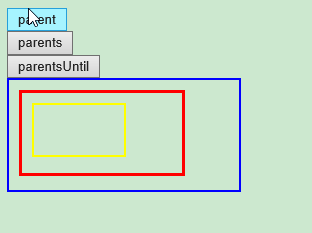
            //parent() 方法返回被选元素的直接父元素。该方法只会向上一级对 DOM 树进行遍历。

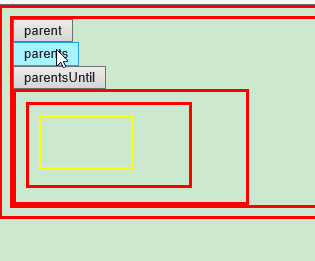
            //parents() 方法返回被选元素的所有祖先元素,它一路向上直到文档的根元素 (<html>)。

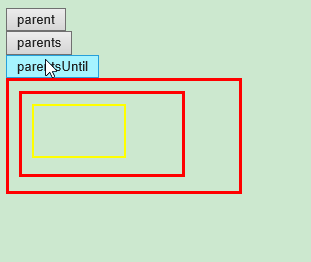
            //parentsUntil() 方法返回介于两个给定元素之间的所有祖先元素。

            $("#btn_parent").click(function(){

                $("#myDiv3").parent().css({"color":"red","border":"3px solid red"});

            });

            $("#btn_parents").click(function(){

                $("#myDiv3").parents().css({"color":"red","border":"3px solid red"});

            });

            $("#btn_parentsUntil").click(function(){

                $("#myDiv3").parentsUntil("body").css({"color":"red","border":"3px solid red"});

            });

        });

    </script>

</head>

<body>

    <button type="button" id="btn_parent">parent</button><br/>

    <button type="button" id="btn_parents">parents</button><br/>

    <button type="button" id="btn_parentsUntil">parentsUntil</button><br/>

    <div id="myDiv1" style="width:210px;height:90px;padding: 10px;border:2px solid blue;">

        <div id="myDiv2" style="width:140px;height:60px;padding: 10px;border:2px solid green;" >

            <div id="myDiv3" style="width:70px;height:30px;padding: 10px;border:2px solid yellow;" >

            </div>

        </div>

    </div>

</body>

</html>

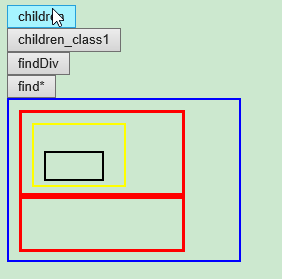
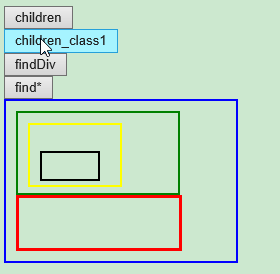
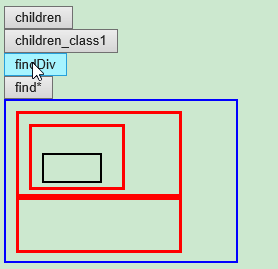
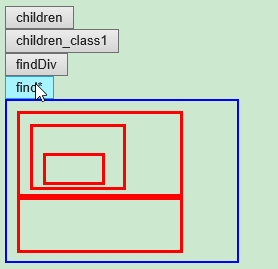
2. 向下遍历 DOM 树,查找元素的后代。children() 方法,find() 方法。
<html>

<head>

<meta http-equiv="Content-Type" content="text/html; charset=utf-8"/>

<title>My Test JQuery</title>

    <script type="text/javascript" src="./js/jquery-1.10.2.min.js"></script>

    <script type="text/javascript" >

        $(function(){

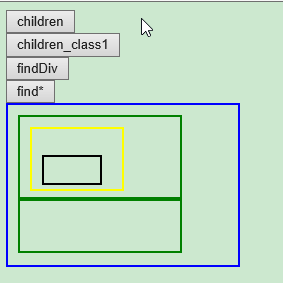
            //children() 方法返回被选元素的所有直接子元素。该方法只会向下一级对 DOM 树进行遍历。

            //find() 方法返回被选元素的后代元素,一路向下直到最后一个后代。

            $("#btn_children1").click(function(){

                $("#myDiv1").children().css({"color":"red","border":"3px solid red"});

            });

            $("#btn_children2").click(function(){

                $("#myDiv1").children("div.class1").css({"color":"red","border":"3px solid red"});

            });

            $("#btn_find1").click(function(){

                $("#myDiv1").find("div").css({"color":"red","border":"3px solid red"});

            });

            $("#btn_find2").click(function(){

                $("#myDiv1").find("*").css({"color":"red","border":"3px solid red"});

            });

        });

    </script>

</head>

<body>

    <button type="button" id="btn_children1">children</button><br/>

    <button type="button" id="btn_children2">children_class1</button><br/>

    <button type="button" id="btn_find1">findDiv</button><br/>

    <button type="button" id="btn_find2">find*</button><br/>

    <div id="myDiv1" style="width:210px;height:140px;padding: 10px;border:2px solid blue;">

        <div id="myDiv2" style="width:140px;height:60px;padding: 10px;border:2px solid green;" >

            <div id="myDiv3" style="width:70px;height:40px;padding: 10px;border:2px solid yellow;" >

                <p id="myP1" style="width:50px;height:20px;padding: 3px;border:2px solid black;" >

                </p>

            </div>

        </div>

        <div Class="class1" style="width:140px;height:30px;padding: 10px;border:2px solid green;" >

        </div>

    </div>

</body>

</html>
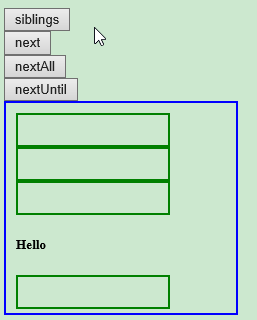
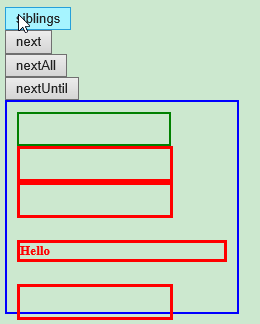
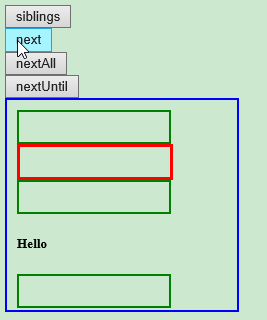
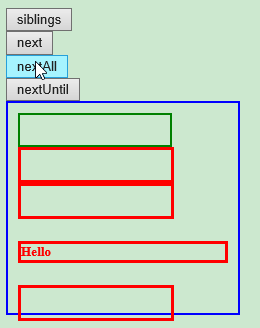
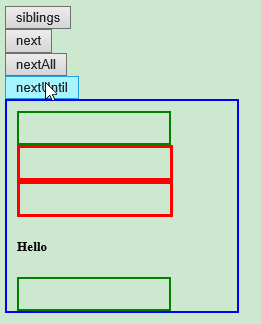
3. 遍历元素的同胞元素:siblings() 方法,next() 方法,nextAll() 方法,nextUntil() 方法。
<!DOCTYPE html>

<html>

<head>

<meta http-equiv="Content-Type" content="text/html; charset=utf-8"/>

<title>My Test JQuery</title>

    <script type="text/javascript" src="./js/jquery-1.10.2.min.js"></script>

    <script type="text/javascript" >

        $(function(){

            //children() 方法返回被选元素的所有直接子元素。该方法只会向下一级对 DOM 树进行遍历。

            //find() 方法返回被选元素的后代元素,一路向下直到最后一个后代。

            $("#btn_siblings").click(function(){

                $("#myDiv21").siblings().css({"color":"red","border":"3px solid red"});

            });

            $("#btn_next").click(function(){

                $("#myDiv21").next().css({"color":"red","border":"3px solid red"});

            });

            $("#btn_nextAll").click(function(){

                $("#myDiv21").nextAll().css({"color":"red","border":"3px solid red"});

            });

            $("#btn_nextUntil").click(function(){

                $("#myDiv21").nextUntil("h5").css({"color":"red","border":"3px solid red"});

            });

        });

    </script>

</head>

<body>

    <button type="button" id="btn_siblings">siblings</button><br/>

    <button type="button" id="btn_next">next</button><br/>

    <button type="button" id="btn_nextAll">nextAll</button><br/>

    <button type="button" id="btn_nextUntil">nextUntil</button><br/>

    <div id="myDiv1" style="width:210px;height:190px;padding: 10px;border:2px solid blue;">

        <div id="myDiv21" style="width:140px;height:20px;padding: 5px;border:2px solid green;" >

        </div>

        <div id="myDiv22" style="width:140px;height:20px;padding: 5px;border:2px solid green;" >

        </div>

        <div id="myDiv23" style="width:140px;height:20px;padding: 5px;border:2px solid green;" >

        </div>

        <h5>Hello</h5>

        <div id="myDiv24" style="width:140px;height:20px;padding: 5px;border:2px solid green;" >

        </div>

    </div>

</body>

</html>
4. 过滤方法:基于其在一组元素中的位置来选择一个特定的元素。
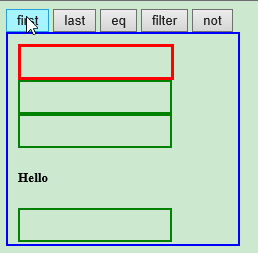
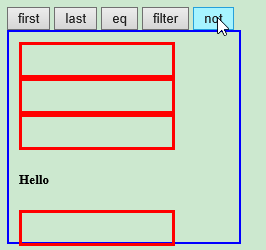
first() 方法,last() 方法,eq() 方法,filter() 方法,not() 方法
<!DOCTYPE html>

<html>

<head>

<meta http-equiv="Content-Type" content="text/html; charset=utf-8"/>

<title>My Test JQuery</title>

    <script type="text/javascript" src="./js/jquery-1.10.2.min.js"></script>

    <script type="text/javascript" >

        $(function(){

            //first() 方法返回被选元素的首个元素。

            //last() 方法返回被选元素的最后一个元素。

            //eq() 方法返回被选元素中带有指定索引号的元素。

            //filter() 方法允许您规定一个标准。不匹配这个标准的元素会被从集合中删除,匹配的元素会被返回。

            //not() 方法返回不匹配标准的所有元素。

            $("#btn_first").click(function(){

                $("#myDiv1 div").first().css({"color":"red","border":"3px solid red"});

            });

            $("#btn_last").click(function(){

                $("#myDiv1 div").last().css({"color":"red","border":"3px solid red"});

            });

            $("#btn_eq").click(function(){

                $("#myDiv1 div").eq(2).css({"color":"red","border":"3px solid red"});

            });

            $("#btn_filter").click(function(){

                $("#myDiv1 *").filter("h5").css({"color":"red","border":"3px solid red"});

            });

            $("#btn_not").click(function(){

                $("#myDiv1 *").not("h5").css({"color":"red","border":"3px solid red"});

            });

        });

    </script>

</head>

<body>

    <button type="button" id="btn_first">first</button>

    <button type="button" id="btn_last">last</button>

    <button type="button" id="btn_eq">eq</button>

    <button type="button" id="btn_filter">filter</button>

    <button type="button" id="btn_not">not</button>

    <div id="myDiv1" style="width:210px;height:190px;padding: 10px;border:2px solid blue;">

        <div id="myDiv21" style="width:140px;height:20px;padding: 5px;border:2px solid green;" >

        </div>

        <div id="myDiv22" style="width:140px;height:20px;padding: 5px;border:2px solid green;" >

        </div>

        <div id="myDiv23" style="width:140px;height:20px;padding: 5px;border:2px solid green;" >

        </div>

        <h5>Hello</h5>

        <div id="myDiv24" style="width:140px;height:20px;padding: 5px;border:2px solid green;" >

        </div>

    </div>

</body>

</html>



jQuery -- 光阴似箭(四):jQuery 遍历的更多相关文章
- JavaScript学习总结(四)——jQuery插件开发与发布
jQuery插件就是以jQuery库为基础衍生出来的库,jQuery插件的好处是封装功能,提高了代码的复用性,加快了开发速度,现在网络上开源的jQuery插件非常多,随着版本的不停迭代越来越稳定好用, ...
- python 学习笔记十四 jQuery案例详解(进阶篇)
1.选择器和筛选器 案例1 <!DOCTYPE html> <html lang="en"> <head> <meta charset=& ...
- 第四十四课:jQuery UI和jQuery easy UI
jQuery UI是jQuery官方提供的功能效果和UI样式.作为官方出的东西,它一直没有被人们看重,一是它没有datagrid,tree等UI库必备的东西,二是它修改太过频繁,体积庞大.其实它所有以 ...
- jQuery组织您钞四----jQuery操作DOM
一.采用jQuery创建节点 节点是DOM基础设施.依据DOM产品规格,Node是一个很宽泛的概念,包含元素.属性.正文.档..实际开发过程中,要创建动态内容,主要操作的节点包括元素. 属性和文本. ...
- jQuery通用的全局遍历方法$.each()用法实例
1.jQuery通用的全局遍历方法$.each()用法 2. test.json文件代码: 3. html代码 4.jQuery代码 <script src="jquery-1.3.1 ...
- 原生JS forEach()和map()遍历,jQuery$.each()和$.map()遍历
一.原生JS forEach()和map()遍历 共同点: 1.都是循环遍历数组中的每一项. 2.forEach() 和 map() 里面每一次执行匿名函数都支持3个参数:数组中的当前项item,当前 ...
- jQuery 第四章 实例方法 DOM操作之data方法
jquery 里面 的 data 方法比较重要, 所以成一个模块写: 首先, 得知道 data() 干嘛用的, 看淘宝上 有自定义的属性, 为data - 什么什么, 这是为了dom 跟数据有 ...
- JavaScript学习笔记(四)——jQuery插件开发与发布
jQuery插件就是以jQuery库为基础衍生出来的库,jQuery插件的好处是封装功能,提高了代码的复用性,加快了开发速度,现在网络上开源的jQuery插件非常多,随着版本的不停迭代越来越稳定好用, ...
- python 全栈开发,Day53(jQuery的介绍,jQuery的选择器,jQuery动画效果)
js总结 js: 1.ECMAScript5 ES5语法 2.DOM CRUD 获取 3种方式 id tag className //面向对象 对象 : 属性和方法 某个对象中 function $( ...
- JQuery:JQuery基本语法,JQuery选择器,JQuery DOM,综合案例 复选框,综合案例 随机图片
知识点梳理 课堂讲义 1.JQuery快速入门 1.1.JQuery介绍 jQuery 是一个 JavaScript 库. 框架:Mybatis (jar包) 大工具 插件:PageHelper (j ...
随机推荐
- 给HTML页面指定元素添加属性,添加父元素
给HTML页面指定元素添加属性,添加父元素 下面拿一个给富文本中所有的图片增加layer弹窗效果. 思路: 给富文本父元素设置属性. 获取父元素里所有的img 此处用到querySelectorA ...
- python语法风格
这里只给出其它文章里不适合出现部分语法风格. python有几种类型的复合语句:if.for.while.def.class.try/except.with/as等.这些复合类型的语句在编写时,要遵循 ...
- 基于SpringMVC+Spring+MyBatis实现秒杀系统【概况】
前言 本教程使用SpringMVC+Spring+MyBatis+MySQL实现一个秒杀系统.教程素材来自慕课网视频教程[https://www.imooc.com/learn/631].有感兴趣的可 ...
- Docker在Linux上运行NetCore系列(二)把本地编译好的镜像发布到线上阿里云仓库
转发请注明此文章作者与路径,请尊重原著,违者必究. 系列文章:https://www.cnblogs.com/alunchen/p/10121379.html 开始 本篇文章结束在本地创建完成镜像后, ...
- 第一册:lesson fifty five。
原文: The Sawyer family. The Sawyers live at 87 King street. In the morning Mr.Sawyer goes to work and ...
- HTML学习感悟
HTML是一个超文本语言,原本并不打算做网站的我发现学习信息根本离不开web前端的掌握,因此需要对HTML进行一定程度的学习.对了,它可以说是网页的一个标志,打开任何网页我们看到的都是HTML的文本, ...
- 线程 线程池 Task
首先声明 这是读了 愉悦的绅士 文章 <菜鸟之旅——学习线程(线程和线程池)> <Task与线程> 的一些个人总结,还是那句话,如有不对,欢迎指正 文章以代码加注释的方法展示. ...
- SpringBoot中异步请求和异步调用(看这一篇就够了)
原创不易,如需转载,请注明出处https://www.cnblogs.com/baixianlong/p/10661591.html,否则将追究法律责任!!! 一.SpringBoot中异步请求的使用 ...
- 用js实现博客打赏功能
前几天在一个博客中看到有一个打赏功能.其实简单说来就是在页面中加入动态DOM节点,使用的也是简单的HTML.CSS.JS这些前端的一些简单知识.在GitHub上有开源的代码,这里稍加改造就可以用在自己 ...
- react-router 嵌套路由 内层route找不到
今天在做嵌套路由的时候,没有报错,但是页面显示为空,搜索了一下资料,有两个原因: 1.exact精确匹配 <Route component={xxx} path="/" /& ...