
Node.js 从零开发 web server博客项目[数据存储]
web server博客项目
- Node.js 从零开发 web server博客项目[项目介绍]
- Node.js 从零开发 web server博客项目[接口]
- Node.js 从零开发 web server博客项目[数据存储]
- Node.js 从零开发 web server博客项目[登录]
- Node.js 从零开发 web server博客项目[日志]
- Node.js 从零开发 web server博客项目[安全]
- Node.js 从零开发 web server博客项目[express重构博客项目]
- Node.js 从零开发 web server博客项目[koa2重构博客项目]
- Node.js 从零开发 web server博客项目[上线与配置]
文章目录
nodejs链接 mysql 封装成工具
安装
MySQL
cnpm i mysql -S
创建
src/conf/db.js
const env = process.env.NODE_ENV // 环境参数

// 配置

let MYSQL_CONF

if (env === 'dev') {

  MYSQL_CONF = {

    host: 'localhost',

    user: 'root',

    password: 'root',

    port: '3306',

    database: 'myblog'

  }

}

if (env === 'production') {

  MYSQL_CONF = {

    host: 'localhost',

    user: 'root',

    password: 'root',

    port: '3306',

    database: 'myblog'

  }

}

module.exports = { MYSQL_CONF }
- 创建
scr/db/mysql.js
const mysql = require('mysql')

const { MYSQL_CONF } = require('../conf/db')

// 创建链接对象

var con = mysql.createConnection(MYSQL_CONF);

// 开始链接

con.connect();

// 统一执行 sql 的函数

function exec(sql) {

  const promise = new Promise((resolve, reject) => {

    con.query(sql, function (error, result) {

      if (error) {

        reject(error)

        return

      }

      resolve(result)

    })

  })

  return promise

}

module.exports = {

  exec

}
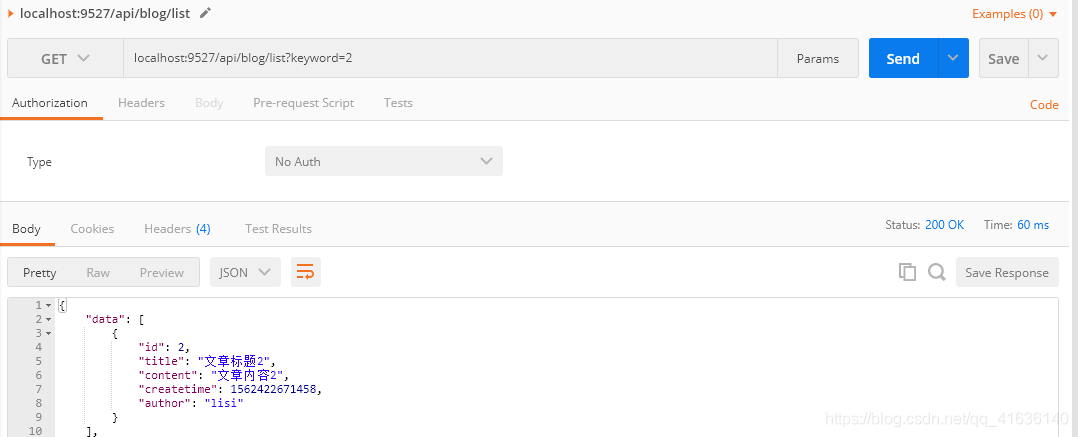
API对接MySQL (博客列表)
controller/blog.js
// 博客列表

const getList = (author, keyword) => {

  let sql = `select * from blogs where 1=1 `

  if (author) {

    sql += `and author='${author}' `

  }

  if (keyword) {

    sql += `and title like '%${keyword}%' `

  }

  sql += `order by createtime desc;`

  return exec(sql)

  // [{

  //   id: 1,

  //   title: '标题a',

  //   content: '内容a',

  //   createTime: 1562085127324,

  //   suthor: 'zhangsan'

  // }]

}
router/blog.js
// 获取博客列表

  if (method === 'GET' && path === '/api/blog/list') {

    const {

      author,

      keyword

    } = req.query || ''

    // const listData = getList(author, keyword)

    // return new SuccessModel(listData)

    const result = getList(author, keyword)

    return result.then(listData => {

      return new SuccessModel(listData)

    })

  }
app.js
getPostData(req).then(postData => {

  req.body = postData

  // 处理 blog 路由

  // const blogData = handleBlogRouter(req, res)

  // if (blogData) {

  //   res.end(

  //     JSON.stringify(blogData)

  //   )

  //   return

  // }

  const blogResult = handleBlogRouter(req, res)

  if (blogResult) {

    blogResult.then(blogData => {

      res.end(

        JSON.stringify(blogData)

      )

    })

    return

  }

  ...

  // 未命中路由, 返回404

  res.writeHead(404, {

    "content-type": "text/plain"

  })

  res.write("404 Not Found\n")

  res.end()

})
API对接MySQL (博客详情和新建)
controller/blog.js
const { exec } = require('../db/mysql')

// 博客内容

const getDtail = (id) => {

  // return {

  //   id: 1,

  //   title: '标题a',

  //   content: '内容a',

  //   createTime: 1562085127324,

  //   suthor: 'zhangsan'

  // }

  let sql = `select * from blogs where id='${id}'`

  return exec(sql).then(rows => {

    return rows[0]

  })

}

// 新增一篇博客

const newBlog = (blogData) => {

  // 赋予id

  // return {

  //   id: 3

  // }

  const {title, content, author} = blogData

  const createtime = Date.now()

  let sql = `insert into blogs (title, content, createtime, author) values ('${title}', '${content}', '${createtime}', '${author}');`

  return exec(sql)

}
router/blog.js
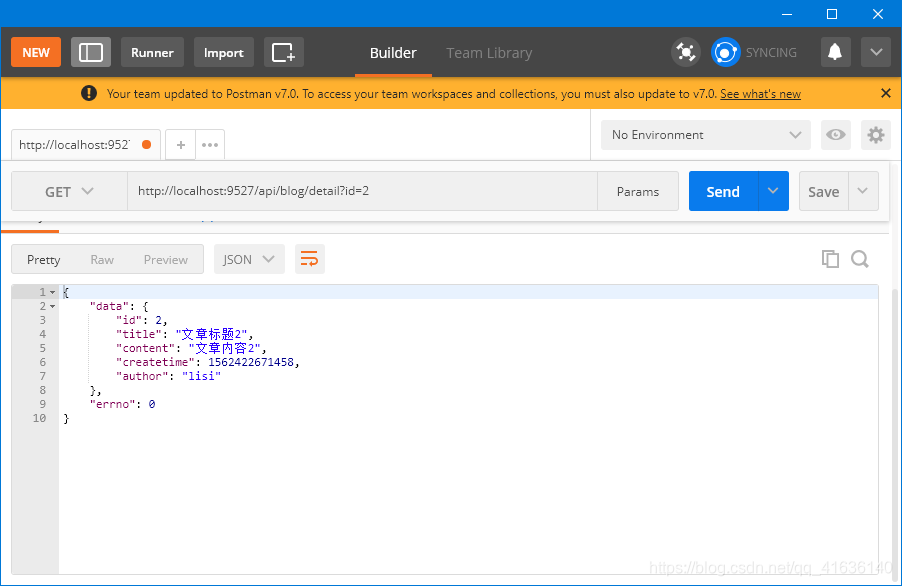
  // 获取一篇博客的内容

  if (method === 'GET' && path === '/api/blog/detail') {

    // const data = getDtail(id)

    // return new SuccessModel(data)

    const result = getDtail(id)

    return result.then(data => {

      return new SuccessModel(data)

    })

  }

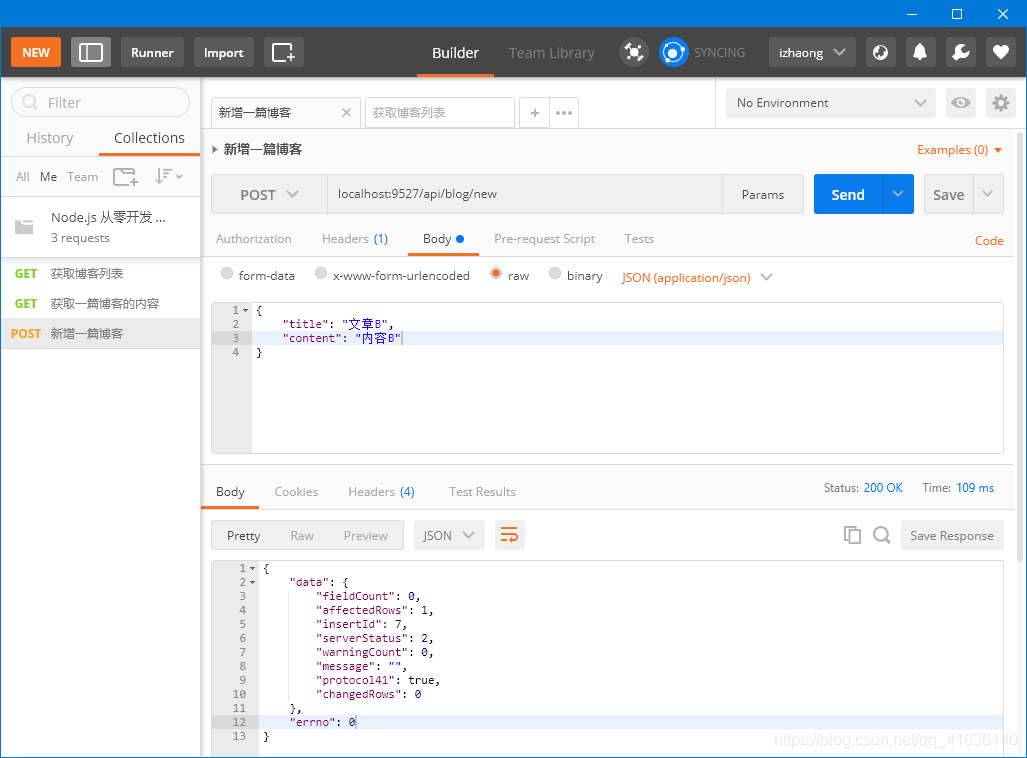
  // 新增一篇博客

  if (method === 'POST' && path === '/api/blog/new') {

    // const data = newBlog(req.body)

    // return new SuccessModel(data)

    req.body.author = 'zhangsan' // 假数据, 待开发登陆时再改成真实数据

    const result = newBlog(req.body)

    return result.then(data => {

      return new SuccessModel(data)

    })

  }
API对接MySQL (更新和删除)
更新
// 更新一篇博客

const updateBlog = (id, blogData = {}) => {

  // console.log(`更新一篇博客, ID:${id}, 内容:${blogData}`)

  // return true

  const {title, content} = blogData

  const sql = `update blogs set title='${title}', content='${content}' where id=${id}`

  return exec(sql).then(updateData => {

    console.log('updateData is ', updateData);

    if (updateData.affectedRows > 0) {

      return true

    }

    return false

  })

}

*********************

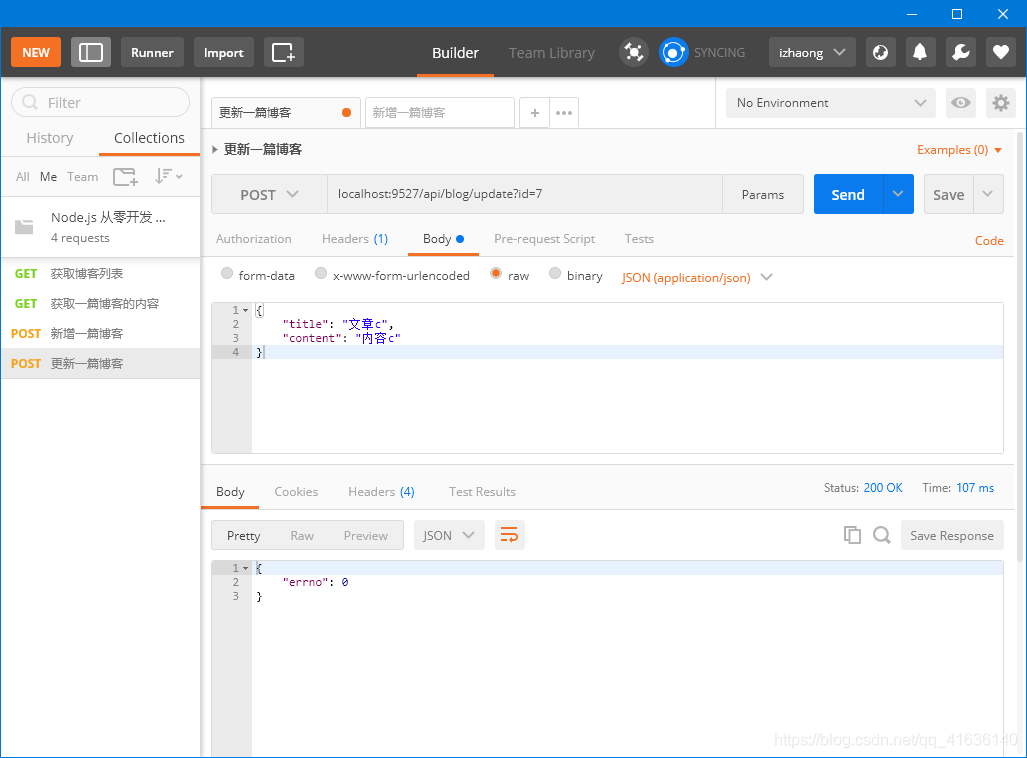
  // 更新一篇博客

  if (method === 'POST' && path === '/api/blog/update') {

    const result = updateBlog(id, req.body)

    // if (result) {

    //   return new SuccessModel(data)

    // } else {

    //   return ErrorModel('更新博客失败')

    // }

    return result.then(val => {

      if (val) {

        return new SuccessModel()

      } else {

        return ErrorModel('更新博客失败')

      }

    })

  }
删除
// 删除一篇博客

const delBlog = (id, author) => {

  // console.log(`删除一篇博客, ID:${id}`)

  // return true

  const sql = `delete from blogs where id='${id}' and author='${author}'`

  return exec(sql).then(delData => {

    if (delData.affectedRows > 0) {

      return true

    }

    return false

  })

}

*********************

  // 删除一篇博客

  if (method === 'POST' && path === '/api/blog/del') {

    // const result = delBlog(id)

    // if (result) {

    //   return new SuccessModel(result)

    // } else {

    //   return new ErrorModel('删除博客失败')

    // }

    const author = 'zhangsan'

    const result = delBlog(id, author)

    return result.then(val => {

      if (val) {

        return new SuccessModel(result)

      } else {

        return new ErrorModel('删除博客失败')

      }

    })

  }
API对接MySQL (登录)
controller/user.js
const { exec } = require('../db/mysql')

const loginCheck = (username, password) => {

  // if (username === 'zhangsan' && password === '1234') {

  //   return true

  // }

  const sql = `select username, realname from users where username='${username}' and password='${password}'`

  return exec(sql).then(rows => {

    return rows[0] || {}

  })

}

module.exports = {

  loginCheck

}
router/user.js
const {

  loginCheck

} = require('../controller/user')

const { SuccessModel, ErrorModel } = require('../model/resModel')

const handleUserRouter = (req, res) => {

  const {

    method,

    path

  } = req

  // 登录

  if (method === 'POST' && path === '/api/user/login') {

    const {

      username,

      password

    } = req.body

    const result = loginCheck(username, password)

    // if (result) {

    //   return new SuccessModel(result)

    // } else {

    //   return new ErrorModel('登录失败')

    // }

    return result.then(data => {

      if (data.username) {

        return new SuccessModel()

      }

      return new ErrorModel('登录失败')

    })

  }

}

module.exports = handleUserRouter
app.js
// 处理 user 路由

    // const userData = handleUserRouter(req, res)

    // if (userData) {

    //   res.end(

    //     JSON.stringify(userData)

    //   )

    //   return

    // }

    const userResult = handleUserRouter(req, res)

    if (userResult) {

      userResult.then(userData => {

        res.end(

          JSON.stringify(userData)

        )

      })

      return

    }

    ```
Node.js 从零开发 web server博客项目[数据存储]的更多相关文章
- Node.js 从零开发 web server博客项目[express重构博客项目]
web server博客项目 Node.js 从零开发 web server博客项目[项目介绍] Node.js 从零开发 web server博客项目[接口] Node.js 从零开发 web se ...
- Node.js 从零开发 web server博客项目[koa2重构博客项目]
web server博客项目 Node.js 从零开发 web server博客项目[项目介绍] Node.js 从零开发 web server博客项目[接口] Node.js 从零开发 web se ...
- Node.js 从零开发 web server博客项目[安全]
web server博客项目 Node.js 从零开发 web server博客项目[项目介绍] Node.js 从零开发 web server博客项目[接口] Node.js 从零开发 web se ...
- Node.js 从零开发 web server博客项目[日志]
web server博客项目 Node.js 从零开发 web server博客项目[项目介绍] Node.js 从零开发 web server博客项目[接口] Node.js 从零开发 web se ...
- Node.js 从零开发 web server博客项目[登录]
web server博客项目 Node.js 从零开发 web server博客项目[项目介绍] Node.js 从零开发 web server博客项目[接口] Node.js 从零开发 web se ...
- Node.js 从零开发 web server博客项目[接口]
web server博客项目 Node.js 从零开发 web server博客项目[项目介绍] Node.js 从零开发 web server博客项目[接口] Node.js 从零开发 web se ...
- Node.js 从零开发 web server博客项目[项目介绍]
web server博客项目 Node.js 从零开发 web server博客项目[项目介绍] Node.js 从零开发 web server博客项目[接口] Node.js 从零开发 web se ...
- Vue+node.js实现一个简洁的个人博客系统
本项目是一个用vue和node以及mysql实现的一个简单的个人博客系统,整体逻辑比较简单.但是可以我们完整的了解一个项目从数据库到后端到前端的实现过程,适合不太懂这一块的朋友们拿来练手. 本项目所用 ...
- github pages + Hexo + node.js 搭建属于自己的个人博客网站
之前我写过一篇用Github实现个人主页的博客:https://www.cnblogs.com/tu-0718/p/8081288.html 后来看到某个大佬写的文章:[5分钟 0元搭建个人独立 ...
随机推荐
- Python 使用BrowserMob Proxy + selenium 获取Ajax加密数据
BrowserMob Proxy,简称 BMP,它是一个 HTTP 代理服务,我们可以利用它截获 HTTP 请求和响应内容. 第一步:先安装 BrowserMob Proxy 的包. pip inst ...
- SpringBoot 集成SpringSecurity JWT
目录 1. 简介 1.1 SpringSecurity 1.2 OAuth2 1.3 JWT 2. SpringBoot 集成 SpringSecurity 2.1 导入Spring Security ...
- PythonCrashCourse 第九章习题
创建一个名为Restaurant 的类,其方法__init__() 设置两个属性: restaurant_name 和cuisine_type 创建一个名为describe _restaurant ( ...
- Fisher Coffee 测评(非严格控温控水)
Fisher Coffee 测评(非严格控温控水) 咖啡生产批次:2020-05-29 打分区间:1~5,0.5间隔 批次:2020.6.3 酸为主,苦为主. 无甘,有甘,微甘,较甜,甘甜. 不苦,有 ...
- JDK14-ZGC调研初探
原创声明:作者:Arnold.zhao 博客园地址:https://www.cnblogs.com/zh94 背景 公司ElasticSearch准备进行升级,而ElasticSearch7以上则是已 ...
- mac安装conda后,终端的用户名前面有一个(base),最佳解决方案
mac安装了conda后,前面会有一个(base),很烦人,终于找到最佳解决方案了: $ conda config --set auto_activate_base false 原因: 安装conda ...
- jmeter参数化之 【CSV Data Set Config/CSV数据配置文件】
这里以登录功能为例: 1.新建.txt文件,将参数值写入到txt文件中(多个参数值如:用户名,密码 之间以逗号隔开),将文件放置在想要放置的目录下 2.添加csv数据文件设置 右键线程组->添加 ...
- java23种设计模式——五、建造者模式
源码在我的github和gitee中获取 目录 java23种设计模式-- 一.设计模式介绍 java23种设计模式-- 二.单例模式 java23种设计模式--三.工厂模式 java23种设计模式- ...
- quartz表(11张)
/* Navicat Premium Data Transfer Source Server : 本地连接 Source Server Type : MySQL Source Server Versi ...
- luogu_P3373 solution
luogu_P3373 solution Problme Description Now, you have a known series, there are three operations: ...