
支付宝手机网站支付(基于Java实现支付宝手机网站支付)
- 支付宝支付核心需要的参数是(APPID,PRIVATE_KEY,ALIPAY_PUBLIC_KEY)
- APPID:创建应用后就有的APPID。
- PRIVATE_KEY:应用私钥
- ALIPAY_PUBLIC_KEY:支付宝公钥
- 上面的2,3的参数得自己弄到,参考文档:https://docs.open.alipay.com/291/105971/
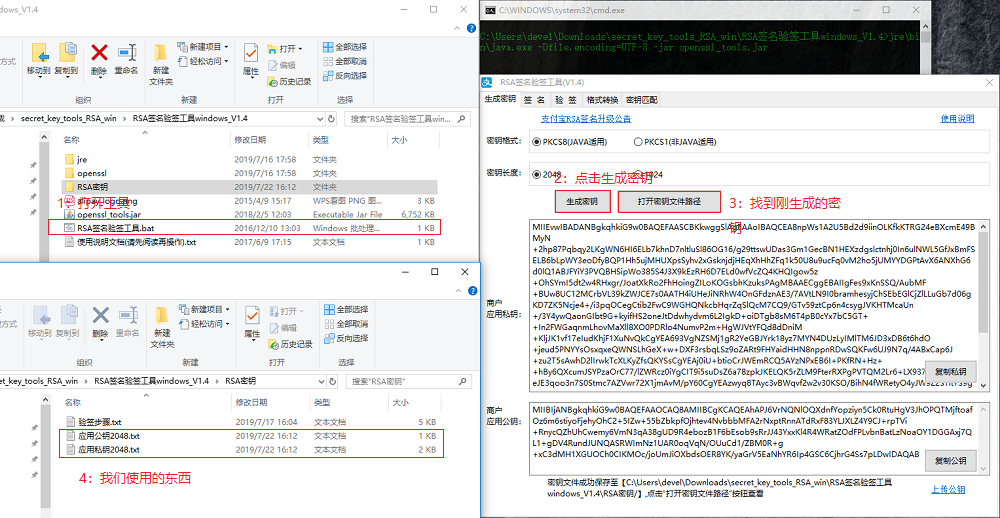
- 下载好工具后所需要干的事情:(获取到的应用公钥配置到:蚂蚁金服开放平台中在 “应用信息” - “开发设置” - “加签方式”处点击 “设置应用公钥”。获取到的应用私钥就是:PRIVATE_KEY。支付宝公钥ALIPAY_PUBLIC_KEY:当设置应用公钥完成后就可以查看支付宝公钥内容。)
    <!-- 支付宝SDK -->

    <dependency>

      <groupId>com.alipay.sdk</groupId>

      <artifactId>alipay-sdk-java</artifactId>

      <version>3.7.4.ALL</version>

    </dependency>
- 配置支付所需配置文件
/**

 * 支付宝支付配置文件

 */

public class AlipayConfig {

    // 1.商户创建应用后获取的appid

    public static String APPID = "********";

    // 2.应用私钥

    public static String PRIVATE_KEY ="*******";

    // 3.支付宝公钥

    public static String ALIPAY_PUBLIC_KEY = "******";

    // 4.回调接口全路径(支付完成异步通知)

    public static String notify_url = "https://******";

    // 5.页面跳转同步通知页面路径(支付完成后跳转的页面)

    public static String return_url = "https://******";

    // 6.请求支付宝的网关地址

    public static String URL = "https://openapi.alipay.com/gateway.do";

    // 7.编码

    public static String CHARSET = "UTF-8";

    // 8.返回格式

    public static String FORMAT = "json";

    // 9.加密类型

    public static String SIGNTYPE = "RSA2";

}
- 业务层预下单
import com.aone.app.common.ali.pay.AlipayConfig;

import com.aone.app.service.AliH5PayService;

import javax.servlet.http.HttpServletRequest;

import java.util.HashMap;

import java.util.Map;

import com.alipay.api.AlipayClient;

import com.alipay.api.DefaultAlipayClient;

import com.alipay.api.request.AlipayTradeWapPayRequest;

import org.slf4j.Logger;

import org.slf4j.LoggerFactory;

import org.springframework.stereotype.Service;

import org.springframework.util.StringUtils;

@Service

public class AliH5PayServiceImpl implements AliH5PayService {

    private static final Logger logger = LoggerFactory.getLogger("AliH5PayServiceImpl");

    //H5支付宝支付预下单(预下单)

    public Map<String, String> dounifiedOrder(String type, String out_trade_no, String money, HttpServletRequest request) throws Exception{

        Map<String, String> map=new HashMap<>();

        //获得初始化的AlipayClient

        AlipayClient alipayClient = new DefaultAlipayClient(AlipayConfig.URL, AlipayConfig.APPID,

                AlipayConfig.PRIVATE_KEY, AlipayConfig.FORMAT, AlipayConfig.CHARSET, AlipayConfig.ALIPAY_PUBLIC_KEY,

                AlipayConfig.SIGNTYPE);

        //设置请求参数passback_params

        String content = "{\"out_trade_no\":\""+ out_trade_no +"\","

                + "\"total_amount\":\""+ "0.01" +"\","

                + "\"subject\":\""+ "订单" +"\","

                + "\"timeout_express\":\""+ "30m" +"\","

                + "\"body\":\""+ "支付宝H5支付" +"\","

                + "\"passback_params\":\""+type +"\","

                + "\"product_code\":\""+"QUICK_WAP_WAY"+"\"}";

        AlipayTradeWapPayRequest alipayRequest = new AlipayTradeWapPayRequest();

        alipayRequest.setReturnUrl(AlipayConfig.return_url);

        alipayRequest.setNotifyUrl(AlipayConfig.notify_url);

        alipayRequest.setBizContent(content);

        //请求

        String result = alipayClient.pageExecute(alipayRequest).getBody();

        logger.error("result{}",request.toString());

        if(StringUtils.isEmpty(request)){

            map.put("code","201");

            map.put("msg","请求失败");

            map.put("result",null);

        }else{

            map.put("code","200");

            map.put("msg","请求成功");

            map.put("result",result);

        }

        return map;

    }

}
- 控制层下单接口以及回调接口
import com.aone.app.common.wx.XMLUtils;

import com.aone.app.service.AliH5PayService;

import io.swagger.annotations.Api;

import org.slf4j.Logger;

import org.slf4j.LoggerFactory;

import org.springframework.beans.factory.annotation.Autowired;

import org.springframework.util.StringUtils;

import org.springframework.web.bind.annotation.*;

import javax.servlet.http.HttpServletRequest;

import javax.servlet.http.HttpServletResponse;

import java.io.BufferedReader;

import java.util.HashMap;

import java.util.Map;

@RestController

@RequestMapping("h5pay")

@Api("H5支付")

public class PayH5Controller {

    private static final Logger log = LoggerFactory.getLogger("PayH5Controller");

    @Autowired

    private AliH5PayService aliH5PayService;

    /**

     * H5支付统一下单

     * @param request

     * @return

     * @throws Exception

     */

    @ResponseBody

    @RequestMapping(value = "wxPay")

    public Map<String, String> weixinPay(HttpServletRequest request) throws Exception{

        String  type= request.getParameter("type");

        String  orderNo= request.getParameter("orderNo");

        String  money= request.getParameter("money");

        return aliH5PayService.dounifiedOrder(type,orderNo,money,request);

    }

    /**

     * H5微信支付异步结果通知

     * @param request

     * @param response

     * @throws Exception

     */

    @RequestMapping(value = "notify")

    public void weixinPayNotify(HttpServletRequest request, HttpServletResponse response) throws Exception {

        BufferedReader reader = request.getReader();

        String line = "";

        Map map = new HashMap();

        String xml = "<xml><return_code><![CDATA[FAIL]]></xml>";;

        StringBuffer inputString = new StringBuffer();

        while ((line = reader.readLine()) != null) {

            inputString.append(line);

        }

        request.getReader().close();

        log.error("----接收到的报文---{}",inputString.toString());

        if(inputString.toString().length()>0){

            map = XMLUtils.parseXmlToList(inputString.toString());

        }else{

            log.error("接受微信报文为空");

        }

        log.error("map={}",map);

        if(map!=null && "SUCCESS".equals(map.get("result_code"))){

            //成功的业务。。。

            xml = "<xml><return_code><![CDATA[SUCCESS]]></return_code><return_msg><![CDATA[OK]]></return_msg></xml>";

            String type=map.get("attach").toString();

            String orderNo=map.get("out_trade_no").toString();

            log.error("订单号{}",map.get("out_trade_no"));log.error("其它必须参数{}",map.get("attach"));

            if(StringUtils.isEmpty(type)||StringUtils.isEmpty(orderNo)){

                log.error("当前参数类型异常");

            }else{

                //回调业务逻辑

            }

        }else{

            //失败的业务。。。

        }

        //告诉微信端已经确认支付成功

        response.getWriter().write(xml);

    }

}
- 回调接口中解析微信通知XML的工具类XMLUtils,参考微信H5支付,缺少其它东西也可参考其它记录。
支付宝手机网站支付(基于Java实现支付宝手机网站支付)的更多相关文章
- 支付宝APP支付(基于Java实现支付宝APP支付)
贴一下支付核心代码,以供后续参考: 业务层 import com.alipay.api.AlipayApiException; import com.alipay.api.AlipayClient; ...
- 微信APP支付(基于Java实现微信APP支付)
步骤: 导入maven依赖 <!--微信支付--> <dependency> <groupId>com.github.wxpay</groupId> & ...
- 微信H5支付(基于Java实现微信H5支付)
微信的H5支付区别与APP支付,主要在于预下单(返回的参数不一样),其它大体相同(基本没什么区别,区别在于有些人加密喜欢用MD5有些人喜欢用官方提供的加密方式加密,我用的是官方的),贴一下H5支付预下 ...
- Azure 网站上的 Java
编辑人员注释:本文章由Windows Azure 网站团队的项目经理Chris Compy 撰写. Microsoft 已推出针对 Azure 网站上基于 Java 的网站的支持.此功能旨在通过 ...
- pay-spring-boot 开箱即用的Java支付模块,整合支付宝支付、微信支付
关于 使用本模块,可轻松实现支付宝支付.微信支付对接,从而专注于业务,无需关心第三方逻辑. 模块完全独立,无支付宝.微信SDK依赖. 基于Spring Boot. 依赖Redis. 我能做什么 支付宝 ...
- Java第三方支付接入案例(支付宝)
开源项目链接 Kitty 开源权限管理系统 项目地址:https://gitee.com/liuge1988/kitty 演示地址:http://139.196.87.48:9002/kitty 用户 ...
- java实现支付宝电脑支付(servlet版本)
前期准备: 蚂蚁金融开放平台 进行登录操作 进入我的开放平台 在上方找到沙箱,进入沙箱(网络编程虚拟执行环境). 这里的RSA2密钥设置下,我已经设置好了,所以便有了支付宝公钥(公钥是对外公开的,私钥 ...
- java实现微信支付宝等多个支付平台合一的二维码支付(maven+spring springmvc mybatis框架)
首先申明,本人实现微信支付宝等支付平台合多为一的二维码支付,并且实现有效时间内支付有效,本人采用的框架是spring springmvc mybatis 框架,maven管理.其实如果支付,不需要my ...
- 手把手教你完成App支付JAVA后台-支付宝支付JAVA
接着上一篇博客,我们暂时完成了手机端的部分支付代码,接下来,我们继续写后台的代码. 后台基本需要到以下几个参数,我都将他们写在了properties文件中: 支付宝参数 AliPay.payURL = ...
随机推荐
- replicationController 使用
[root@lab2 nginx-harbor]# cat http-test.yaml apiVersion: v1 kind: ReplicationController metadata: na ...
- 【k8s label】对node添加删除label,并根据label筛选节点
添加 kubectl label nodes kube-node label_name=label_value kubectl label nodes 1.1.1.1 label_name=label ...
- golang 使用kcp实例
简介kcp的具体概念与定义自行百度,特性可以浓缩为一句话,和tcp一样可靠,速度比tcp快,是一个用带宽换速度的新型协议.网上的示例代码很少,特此写一篇golang下的kcp实例. PS本文仅对ksp ...
- js 判断字符串是否为JSON格式
function isJSON(str) { if (typeof str == 'string') { try { var obj=JSON.parse(str); if(typeof obj == ...
- WCF之Windows宿主(可安装成服务自动并启动)
WCF之Windows宿主(可安装成服务自动并启动) 创建解决方案WCFServiceDemo 创建WCF服务库(类库或WCF服务库)WCFService ,添加引用System.ServiceMo ...
- tornodo学习之路
tornodo的ioloop是什么?(A) A.事件循环 B.对象循环 C.没有对象不用循环 别人是否可以分析放在本地的cookie?(B) A.否 B.是 WSGI是什么?(A) A.web服务器网 ...
- linux中硬盘分区、格式化、挂载
已经接触了小半年的linux,基本命令用的还行,就是涉及到深入操作,就显得不够看了,比如linux中的硬盘操作,于是整理了这篇博客. 1. 主分区,扩展分区,逻辑分区的联系和区别 一个硬盘可以有1 ...
- 因修改/etc/sudoers权限导致sudo和su不能使用的解决方法(转)
转自: 因修改/etc/sudoers权限导致sudo和su不能使用的解决方法 系统环境:ubuntu 12.04 状况: 因为修改了/etc/sudoers以及相关权限,导致sudo无法使用,恰 ...
- Tomcat中不能通过访问自己IP,但可以通过localhost/127.0.0.1访问
一.问题如下:局域网内,自己机器部署了一个tomcat应用,在本机上可以通过如下方式访问引用. http://localhost:8080/xxxx http://127.0.0.1:8080/xx ...
- C++程序的多文件组成
C++程序的多文件组成 [例3.32] 一个源程序按照结构划分为3个文件 // 文件1 student.h (类的声明部分) #include<iostream.h> #include&l ...