
[Laravel] 08 - Auth & Data Migration
登录注册框架
一、加载Auth模块
Step 1, 安装Auth模块
生成相关 laravel 框架内部的代码模块:
$ php artisan make:auth
- 自动添加了路由代码
在laravel情况下,routes/web.php内多了auth相关的代码:
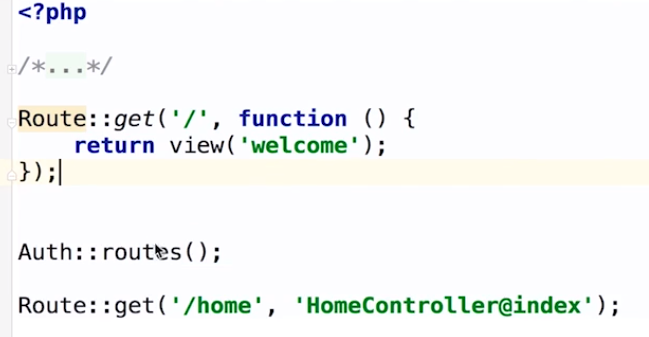
对应的Route的代码:【追根溯源】
    /**

     * Register the typical authentication routes for an application.

     *

     * @return void

     */

    public function auth()

    {

        // Authentication Routes...

        $this->get('login', 'Auth\AuthController@showLoginForm');

        $this->post('login', 'Auth\AuthController@login');

        $this->get('logout', 'Auth\AuthController@logout');

        // Registration Routes...

        $this->get('register', 'Auth\AuthController@showRegistrationForm');

        $this->post('register', 'Auth\AuthController@register');

        // Password Reset Routes...

        $this->get('password/reset/{token?}', 'Auth\PasswordController@showResetForm');

        $this->post('password/email', 'Auth\PasswordController@sendResetLinkEmail');

        $this->post('password/reset', 'Auth\PasswordController@reset');

    }
- HomeController类的构造函数
public function __contruct()

{

  $this->middleware('auth');

}
中间件,请见:[Laravel] 14 - REST API: starter
- 自动添加了视图代码
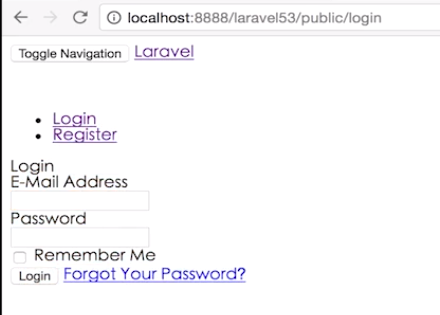
Step 2, 手动改变样式
[1] 找到 resources/views/layouts/app.blade.php。
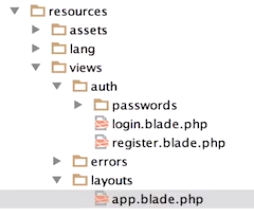
[2] 修改相关代码


[3] 效果展示
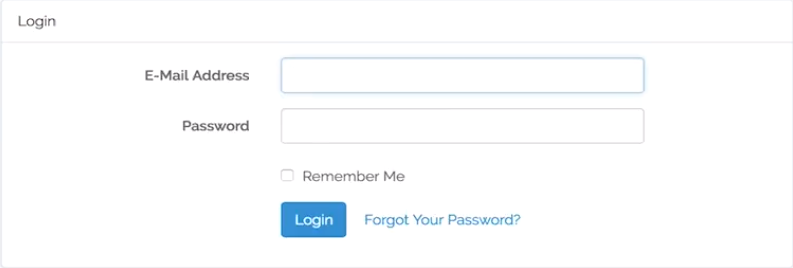
登录注册实现
一、连接数据库
- 配置.env 文件

- 用户与密码
[1] 配置好,只是连接好了,但不能用。
此时,需要配置好模型,包括相应的数据库内容。
[2] 执行migration命令
$ php artisan migrate
创建好了 Migration table,包括:
1. users_table
2. password_resets_table
[3] 多出来三张表,如下所示。

[4] 到此,登录和注册功能生效!
二、Laravel中的 数据迁移
- 概念与理解
Migration方便于团队开发,它就像 数据库的版本控制一样,它的功能就是可以 和别人共享你的数据库结构。
使用Laravel后,创建一张表的时候就直接生成迁移;一个迁移文件对应一张表。
Ref: [Laravel 5 教程学习笔记] 七、数据库迁移 Migrations
迁移是一种数据库的版本控制。可以让团队在修改数据库结构的同时,保持彼此的进度一致。它是 Laravel 5 最强大的功能之一。
一般我们可以通过phpmyadmin或者Navicat等数据库管理工具来创建、修改数据表结构。
如果就自己一个人的话还好,但是如果团队中有多个人,我们就需要导出表结构,然后传给团队中其他人,他们再把数据表结构导入他们的数据库,这时如果表中原来有数据的话就可能出现一些问题。
而 Laravel 5 中的 Migrations 很好的避免了此问题。
一个migration类包含两个方法 up & down。
up中主要包含创建表的具体内容。down中和前者相反,删除表。Schema::create接受两个参数。第一个是你要创建表的表名;第二个是一个闭包(匿名函数),获取用于定义新表的 Blueprint 对象。
- 生成 迁移文件
生成迁移文件:create_students_table.php
$ php artisan make:migration create_user_table --create=users
生成迁移文件在目录:[./database/migrations/...]
class CreateUsersTable extends Migration

{

    /**

     * Run the migrations.

     *

     * @return void

     */

    public function up()

    {

        Schema::create('users', function (Blueprint $table) {

            $table->increments('id');

            $table->string('name');

            $table->string('email')->unique();

            $table->string('password', 60);

            $table->rememberToken();

            $table->timestamps();

        });

    }

    /**

     * Reverse the migrations.

     *

     * @return void

     */

    public function down()

    {

        Schema::drop('users');  // 删除一张表

    }

}
- 生成模型 附带 迁移文件
创建Model的时候,同时创建Migration文件。
$ php artisan make:model Article -m

生成:<timm>_create_articles_table.php 迁移文件
- 完善 迁移文件
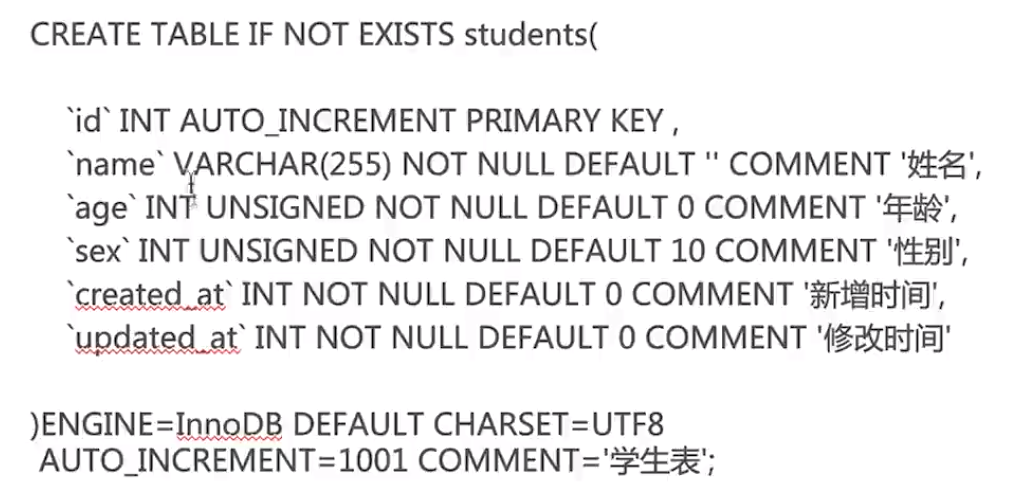
Complete migration file like this:
public function up()

{

  Schema::create('students', function (Blueprint $table)

    $table->increment('id');

    $table->string('name');

    $table->integer('age')->unsigned()->default(0);

    $table->integer('sex')->unsigned()->default(10);

    $table->integer('created_at')->default(0);

    $table->integer('updated_at')->default(0);

  });

}
based on this sql table as following:
- 执行 迁移文件
根据迁移文件,在数据库创建对应的数据表。
php artisan migration
三、Laravel中的 数据填充
- 概念与理解
当我们创建好表结构后,通常都要生成一些测试用的数据来测试。为了应对这个场景,Laravel 提供了相当好的服务 --seed
Laravel 的 seeder 都会放在:/database/seeders 目录中,
并且会提供一个DatabaseSeeder 在 DatabaseSeeder的run 方法中。
Ref: Laravel5.1 填充数据库
之前已经有了表,现在当然需要有个“概念”来处理表中的数据,也就是“数据填充”。
在run中可以用构建器 也可以用模型工厂。
- 基本操作

- 生成 填充文件
$ php artisan make:seeder StudentTableSeeder
在 laravel 中提供了一个解决方案, 我们可以创建额外的填充器来专门针对一张表。
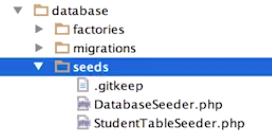
生成了seeds文件夹内的文件: StudentTableSeeder.php
[1] 内容如下:【通过构造器操作数据库】
class StudentTableSeeder extends Seeder

{

  public function run()

  {

    DB::table('students')->insert([

      ['name' => 'sean',  'age' => 18],

      ['name' => 'immoc', 'age' => 20],

  }

}
[2] 或者使用 “模型工厂填充”。
Ref: laravel数据库迁移详解
方法一和我们以前用sql语句插入一条数据是一样的效果,所以并没有多大的提升。
我们想追求的是一次性填充多条测试数据,那么我们可以使用方法二。
手动指定每一个模型填充的属性是很笨重累赘的,在laravel中取而代之,我们可以使用模型工厂来方便地生成大量的数据库记录。
class StudentTableSeeder extends Seeder
{
  public function run()

  {

    factory(\App\User::class, 10)->create();

  }
}
另一个实例,基于 https://github.com/fzaninotto/Faker
<?php

/**

 * 运行数据库填充

 * @return void

 */

$factory->define(App\User::class, function (Faker\Generator $faker) {
    static $password;

    return [

        'name'            => $faker->name,

        'email'           => $faker->unique()->safeEmail,

        'password'        => $password ?: $password = bcrypt('secret'),

        'remember_token'  => str_random(10),

    ];

});
- 执行 填充文件
指定执行
执行 ArticlesSeeder 这个填充器 可以这样写:
php artisan db:seed --class=StudentTableSeeder
默认执行
默认执行就是执行 DatabaseSeeder 这个填充器:
php artisan db:seed
[Laravel] 08 - Auth & Data Migration的更多相关文章
- Core Data Migration 之拆分Entity
参考文章:http://blog.slalom.com/2010/01/08/splitting-an-entity-in-a-coredata-migration/ 最近自己做的背单词软件,在之前的 ...
- laravel 删除一条migration后要执行composer命令
Laravel 删除一条migration 字数29 阅读30 评论0 喜欢0 如果迁移已经执行,先回滚php artisan migrate:rollback 然后删除迁移文件,运行composer ...
- Laravel 之Auth用户认证
(1)生成Auth所需文件 打开phpstorm的命令行: php artisan make:auth 生成成功后,打开web.php, 发现多了如下代码: Auth::routes(); Route ...
- django 1.7 新特性 --- data migration
官方文档:https://docs.djangoproject.com/en/dev/topics/migrations/ 1.7 之前大家可能会用south用于管理数据库的模型的同步.1.7之后dj ...
- laravel的auth用户认证的例子
参考http://www.cnblogs.com/yjf512/p/4042356.html 需要注意的是,生成的测试数据,password部分必须用laravel自带的hash一下 Hash::ma ...
- laravel 验证码 auth方式登录 中间件判断session是否存在
首先下载laravel的插件 composer下载 实现验证码 composer require mews/captcha 在config/app.php进行配置 'providers' ...
- Entity Framework mvc Code First data migration
1. Code First 可以先在代码里写好数据模型,自动生成DB.下一次启动的时候会根据__MigrationHistory判断 数据库是否和模型一致. 详情参考:http://blogs.msd ...
- php的laravel数据库版本管理器migration
第一步:连接数据库 打开.env文件.配置DB_HOST DB_PORT DB_DATABASE=LARAVEL DB_USERNAME DB_PASSWORD 注意DB_DATABASE这一项需要自 ...
- DMA(Data Migration Assistant)迁移SQLServer数据库
DMA适用于 本地SQLServer向Azure SQL Database迁移 两台不同的数据库服务器之间迁移 高版本->低版本 或 低版本->高版本 本文以两台不同服务器的低版本(SQL ...
随机推荐
- linux和CentOS下网卡启动、配置等ifcfg-eth0教程(转自)
转自:http://www.itokit.com/2012/0415/73593.html it 动力总结系统安装好后,通过以下二个步骤就可以让你的系统正常上网(大多正常情况下).步骤1.配置/etc ...
- Linux学习笔记15—RPM包的安装OR源码包的安装
RPM安装命令1. 安装一个rpm包rpm –ivh 包名“-i” : 安装的意思“-v” : 可视化“-h” : 显示安装进度另外在安装一个rpm包时常用的附带参数有:--force : 强制安装, ...
- 微软官方的.net命令行参数库
虽然现在是图形化大行其道的时代,但让程序支持命令行启动对于专业的领域还是有不少需求的..net本身并没有内置对命令行解析的支持,我之前就写过一篇文章让.Net程序支持命令行启动介绍了几个第三方的命令行 ...
- nginx 负载均衡集群解决方案 healthcheck_nginx_upstreams模块测试 (二)
在这里详细讲解healthcheck_nginx_upstreams模块中存在的bug,对于healthcheck_nginx_upstreams模块的安装和使用请阅读上一篇blog进行学习. 测试环 ...
- java线程安全之并发Queue
关闭 原 java线程安全之并发Queue(十三) 2017年11月19日 23:40:23 小彬彬~ 阅读数:12092更多 所属专栏: 线程安全 版权声明:本文为博主原创文章,未经博主允许不 ...
- Android APK反编译详解(附图) (转)
这段时间在学Android应用开发,在想既然是用Java开发的应该很好反编译从而得到源代码吧,google了一下,确实很简单,以下是我的实践过程. 在此郑重声明,贴出来的目的不是为了去破解人家的软件, ...
- 教育单元测试mock框架优化之路(中)
转载:https://sq.163yun.com/blog/article/169564470918451200 三.间接依赖的bean的mock替换 对于前面提供的@Mock,@Spy+@Injec ...
- windows多线程--原子操作
推荐参考博客:秒杀多线程第三篇 原子操作 Interlocked系列函数 原子操作 VS 非原子操作 原子操作就是不会被线程调度机制打断的操作,这种操作一旦开始,就一直运行到结束,中间不会有任何线程切 ...
- winform的combox下拉框绑定数据源
List<Site> list = new List<Site>(); foreach (DataRow srcDr in srcDt.Rows) { list.Add(new ...
- mysqlcheck与myisamchk的区别
mysqlcheck和myisamchk都可以用来检测和修复表.(主要是MyISAM表)但是也有以下不同点:1.都可以检查.分析和修复myisam表.但是mysqlcheck也可以检查.分析innod ...