
python 全栈开发,Day134(爬虫系列之第1章-requests模块)
一、爬虫系列之第1章-requests模块
爬虫简介
概述

近年来,随着网络应用的逐渐扩展和深入,如何高效的获取网上数据成为了无数公司和个人的追求,在大数据时代,谁掌握了更多的数据,谁就可以获得更高的利益,而网络爬虫是其中最为常用的一种从网上爬取数据的手段。
网络爬虫,即Web Spider,是一个很形象的名字。如果把互联网比喻成一个蜘蛛网,那么Spider就是在网上爬来爬去的蜘蛛。网络蜘蛛是通过网页的链接地址来寻找网页的。从网站某一个页面(通常是首页)开始,读取网页的内容,找到在网页中的其它链接地址,然后通过这些链接地址寻找下一个网页,这样一直循环下去,直到把这个网站所有的网页都抓取完为止。如果把整个互联网当成一个网站,那么网络蜘蛛就可以用这个原理把互联网上所有的网页都抓取下来。
爬虫的价值
互联网中最有价值的便是数据,比如天猫商城的商品信息,链家网的租房信息,雪球网的证券投资信息等等,这些数据都代表了各个行业的真金白银,可以说,谁掌握了行业内的第一手数据,谁就成了整个行业的主宰,如果把整个互联网的数据比喻为一座宝藏,那我们的爬虫课程就是来教大家如何来高效地挖掘这些宝藏,掌握了爬虫技能, 你就成了所有互联网信息公司幕后的老板,换言之,它们都在免费为你提供有价值的数据。
爬虫的基本流程

在爬虫的基本流程中,最难的不是解析数据,而是发送请求。为什么这么说呢?因为某些页面做了防爬虫机制,你连访问,都访问不了,那么剩下的流程就走不通了!
预备知识
HTTP请求由三部分组成,分别是:请求行,消息报头,请求正文。
HTTP响应也是由三个部分组成,分别是:状态行,消息报头,相应正文。
httpbin
如果一个人想学习爬虫技术,我会首先推荐他学会使用httpbin!
httpbin(官网|github)是一个很不错测试工具,你可以放心大胆的黑他,而不用担心他报复你。他有点像一个蜜罐,时刻等待着你的光临,然后根据你的请求,给你返回你想要的东西
直接访问页面: http://httpbin.org/get
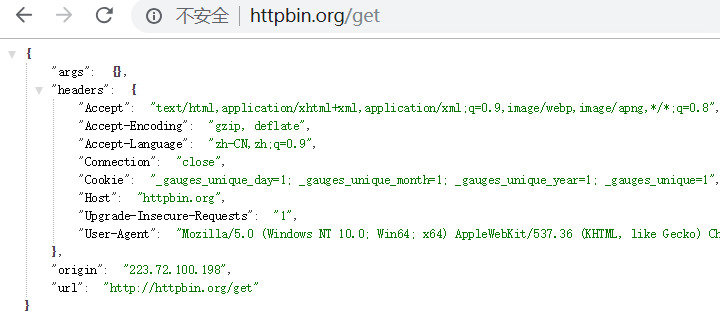
它将你的请求信息,直接展示到页面中!
args 表示get参数
headers 表示请求头
origin 表示 你所在网络运营商的公网IP地址
url 表示访问的url
带一个参数

requests模块
Requests 是使用 Apache2 Licensed 许可证的 HTTP 库。用 Python 编写,真正的为人类着想。
Python 标准库中的 urllib2 模块提供了你所需要的大多数 HTTP 功能,但是它的 API 太渣了。它是为另一个时代、另一个互联网所创建的。它需要巨量的工作,甚至包括各种方法覆盖,来完成最简单的任务。
在Python的世界里,事情不应该这么麻烦。
Requests 使用的是 urllib3,因此继承了它的所有特性。Requests 支持 HTTP 连接保持和连接池,支持使用 cookie 保持会话,支持文件上传,支持自动确定响应内容的编码,支持国际化的 URL 和 POST 数据自动编码。现代、国际化、人性化。
(以上转自Requests官方文档)
安装
pip install requests
基本语法
requests模块支持的请求:
import requests

requests.get("http://httpbin.org/get")

requests.post("http://httpbin.org/post")

requests.put("http://httpbin.org/put")

requests.delete("http://httpbin.org/delete")

requests.head("http://httpbin.org/get")

requests.options("http://httpbin.org/get")
上面列举了几种请求方式,最常用的还是get和post
get请求
1. 基本请求
import requests

response=requests.get('https://www.jd.com/',)

with open("jd.html","wb") as f:

    f.write(response.content)
2. 含参数请求
import requests

response=requests.get('https://s.taobao.com/search?q=手机')

response=requests.get('https://s.taobao.com/search',params={"q":"美女"})
直接访问: https://s.taobao.com/search?q=手机
这样是没有问题,但是后面的条件是动态的。应该使用params,即使有多个参数,它会自动拼接url。
举例:
import requests

res = requests.get("https://s.taobao.com/search",

                   params={"q": "美女"},

                   headers={

                       'User-Agent': 'Mozilla/5.0 (Windows NT 6.1; WOW64) AppleWebKit/537.36 (KHTML, like Gecko) Chrome/62.0.3202.75 Safari/537.36',

                   }

                   )

with open("res.html", "wb") as f:

    print(res.text)

    f.write(res.content)
使用Pycharm打开res.html,效果如下:

3. 含请求头请求
示例1:
import requests

response=requests.get('https://dig.chouti.com/',

                      headers={

                         'User-Agent':'Mozilla/5.0 (Windows NT 6.1; WOW64) AppleWebKit/537.36 (KHTML, like Gecko) Chrome/62.0.3202.75 Safari/537.36',

                              }

                      )
示例2:
import requests

res=requests.post('https://www.lagou.com/jobs/positionAjax.json',

             headers={

                    'Referer':"https://www.lagou.com/jobs/list_python",

                     'User-Agent': 'Mozilla/5.0 (Windows NT 6.1; WOW64) AppleWebKit/537.36 (KHTML, like Gecko) Chrome/63.0.3239.132 Safari/537.36',

             },

             data={

                 'first':True,

                 'pn':2,

                 'kd':'java高级开发'

             },

             params={

                 'gj': '3年及以下',

                 'px': 'default',

                 'yx': '25k-50k',

                 'city': '北京',

                 'needAddtionalResult': False,

                 'isSchoolJob': 0

             }

             )

comapines_list=res.json()

print(comapines_list)
4. 含cookies请求
import uuid

import requests

url = 'http://httpbin.org/cookies'

cookies = dict(sbid=str(uuid.uuid4()))

res = requests.get(url, cookies=cookies)

print(res.json())
等同于,下面的代码
import uuid

import requests

url = 'http://httpbin.org/cookies'

cookies = {"sbid":str(uuid.uuid4())}

res = requests.get(url, cookies=cookies)

print(res.json())
执行输出:
{'cookies': {'sbid': 'f51b0553-2fdc-49ee-a52d-f6fb7472d9ac'}}
比如某些网站,需要携带cookie,否则就拦截!
5. request.session()
import requests

# res=requests.get("https://www.zhihu.com/explore")

# print(res.cookies.get_dict())

session = requests.session()

res1 = session.get("https://www.zhihu.com/explore")

print(session.cookies.get_dict())

res2 = session.get("https://www.zhihu.com/question/30565354/answer/463324517", cookies={"abs": ""})
举例:
import requests

res = requests.get("https://www.zhihu.com/explore")

print(res.cookies.get_dict())  # 查看响应体携带的cookie
执行输出:
{'_xsrf': 'QHfkaGFpX6OxaDGFcyJq8IeaEJWyYlDz', 'tgw_l7_route': '29b95235203ffc15742abb84032d7e75'}
比如一个网站,有3个页面,分别是a,b,c。
访问a时,响应返回 cookie为1。访问b时,响应返回 cookie为2。
当访问c时,必须要同时具有cookie为1和2的记录。否则拦截掉!
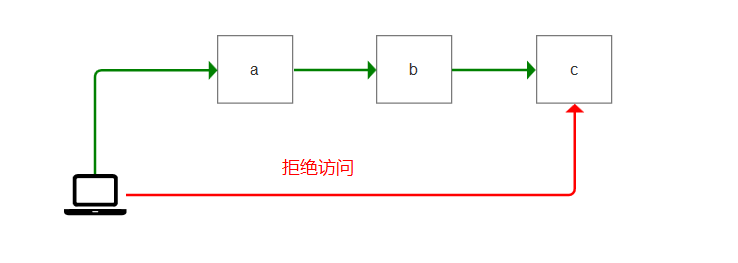
也就是说:必须要先访问a,b之后,才能访问c。
那么这个session的作用在于,每次访问的网页,只要响应信息,携带了cookie。它就会存储到session对象中!
那么我们使用下面的代码,就可以访问c页面了
import requests

session = requests.session()

res1 = session.get("https://www.xx.com/a")

res2 = session.get("https://www.xx.com/b")

res3 = session.get("https://www.xx.com/c")

print(session.cookies.get_dict())
post请求
1. data参数
requests.post()用法与requests.get()完全一致,特殊的是requests.post()多了一个data参数,用来存放请求体数据
response=requests.post("http://httpbin.org/post",params={"a":""}, data={"name":"yuan"})
举例:
直接访问post页面,是被拦截的。因为浏览器访问是get请求
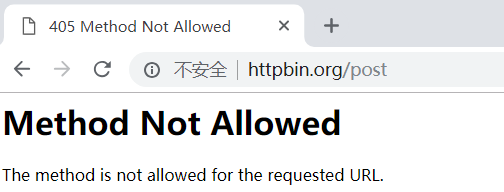
使用post访问访问
import requests

res2 = requests.post(url='http://httpbin.org/post',headers={},cookies={},params={'a': ""},data={"a":1234})

print(res2.text)
执行输出:
{

  "args": {

    "a": ""

  },

  "data": "",

  "files": {},

  "form": {

    "a": ""

  },

  "headers": {

    "Accept": "*/*",

    "Accept-Encoding": "gzip, deflate",

    "Connection": "close",

    "Content-Length": "",

    "Content-Type": "application/x-www-form-urlencoded",

    "Host": "httpbin.org",

    "User-Agent": "python-requests/2.19.1"

  },

  "json": null,

  "origin": "223.72.99.154",

  "url": "http://httpbin.org/post?a=1"

}
data为什么是空的呢?
是因为content-type,上面的代码,默认的请求头是:application/x-www-form-urlencoded,它只会放到form里面
如果要data里面有数据,必须是application/json才行!
2. 发送json数据
import requests

res1 = requests.post(url='http://httpbin.org/post',

                     data={'name': 'yuan'})  # 没有指定请求头,#默认的请求头:application/x-www-form-urlencoed

print(res1.json())

res2 = requests.post(url='http://httpbin.org/post', json={'age': "", })  # 默认的请求头:application/json)

print(res2.json())
举例:
import requests

res2 = requests.post(url='http://httpbin.org/post', json={'age': "", })  # 默认的请求头:application/json)

print(res2.text)
执行输出:
{

  "args": {},

  "data": "{\"age\": \"22\"}",

  "files": {},

  "form": {},

  "headers": {

    "Accept": "*/*",

    "Accept-Encoding": "gzip, deflate",

    "Connection": "close",

    "Content-Length": "",

    "Content-Type": "application/json",

    "Host": "httpbin.org",

    "User-Agent": "python-requests/2.19.1"

  },

  "json": {

    "age": ""

  },

  "origin": "223.72.100.198",

  "url": "http://httpbin.org/post"

}
data里面,就有数据了!
json={'age': "22", } 这句代码,它做了2件事情。
1. 指定content-type 为 application/json
2. 对数据做json序列化
response对象
(1) 常见属性
import requests

respone=requests.get('https://sh.lianjia.com/ershoufang/')

# respone属性

print(respone.text)

print(respone.content)

print(respone.status_code)

print(respone.headers)

print(respone.cookies)

print(respone.cookies.get_dict())

print(respone.cookies.items())

print(respone.url)

print(respone.history)

print(respone.encoding)
举例1:
import requests

response = requests.get('https://www.jd.com')

print(response)
执行输出:
<Response [200]>
它返回的是一个 Response对象
举例2:
import requests

response = requests.get('https://www.jd.com')

print(response.status_code)
执行输出:200
举例3:
import requests

response = requests.get('https://www.jd.com')

print(response.url)
执行输出: https://www.jd.com/
举例4:
import requests

response = requests.get('https://www.jd.com')

print(response.text)

print(type(response.text))  # str
执行输出:
<!DOCTYPE HTML>

<html lang="zh-CN">

<head>

  <meta charset="UTF-8">

  <title>京东(JD.COM)-正品低价、品质保障、配送及时、轻松购物!</title>

  ...

</body>

</html>

<class 'str'>
可以发现,response.text 它是一个字符串
从网络接收过来的,一定是字节流。response.text 将它转化成了字符串!
举例5:
import requests

response = requests.get('https://www.jd.com')

print(response.encoding)  # utf-8,目标网站编码
执行输出:utf-8
不是所有网站都是utf-8,比如汽车之家
import requests

response = requests.get('https://www.autohome.com.cn/beijing/')

print(response.encoding)  # gb2312
执行输出:gb2312
它的网站编码是使用gb2312的!那么我们保持这个网站时,必须使用gb2312编码,否则数据是乱码的!
举例6:
import requests

response = requests.get('https://www.jd.com/')

print(response.content)  # 源数据(字节流)
执行输出:
b'<!DOCTYPE HTML>\n<html lang="zh-CN">\n<head>\n ... </body>\n</html>\n'
它返回的是字节流,不存在于编码问题!
举例7:
import requests

response = requests.get('https://www.jd.com/')

with open("jd.html","w") as f:

    f.write(response.text)
执行输出:
UnicodeEncodeError: 'gbk' codec can't encode character '\ue600' in position 79125: illegal multibyte sequence
为什么会报错呢?
因为with open调用的是windows系统默认的编码,它的编码是gbk。而jd.com使用的是utf-8编码!
所以在使用gbk保存时,会报错!
所以,为了解决这个问题。with open必须指定编码为utf-8
import requests

response = requests.get('https://www.jd.com/')

with open("jd.html","w",encoding="utf-8") as f:

    f.write(response.text)
再次执行,就不会报错了!
使用Pycharm打开本地的jd.html,效果和官网是一摸一样的!

举例8:
比如访问一个网站,可能会有301跳转
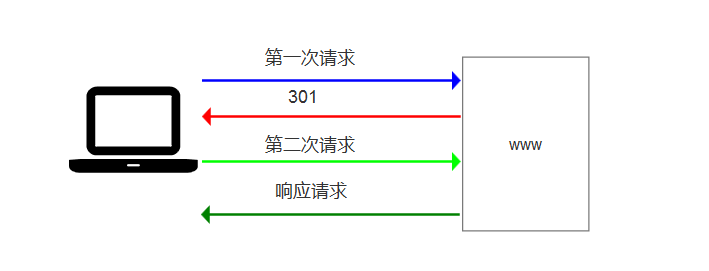
比如访问,链接网的二手房信息
使用http访问
http://bj.lianjia.com/ershoufang/
会跳转到https页面
https://bj.lianjia.com/ershoufang/
举例:
import requests

res = requests.get("http://bj.lianjia.com/ershoufang/")print(res.history[0].url)

print(res.url)
执行输出:
http://bj.lianjia.com/ershoufang/

https://bj.lianjia.com/ershoufang/
那么通过histroy,就可以得到访问历史了!它能得到重定向之前的url
(2) 编码问题
import requests

response=requests.get('http://www.autohome.com/news')

#response.encoding='gb2312' #汽车之家网站返回的页面内容为gb2312编码的,而requests的默认编码为ISO-8859-1,如果不设置成gbk则中文乱码

with open("res.html","w") as f:

    f.write(response.text)
执行报错:
UnicodeEncodeError: 'gbk' codec can't encode character '\xa1' in position 76: illegal multibyte sequence
更改代码
import requests

response=requests.get('http://www.autohome.com/news')

response.encoding='gbk' #汽车之家网站返回的页面内容为gb2312编码的,而requests的默认编码为ISO-8859-1,如果不设置成gbk则中文乱码

with open("res.html","w") as f:

    f.write(response.text)
执行代码,打开res.html,效果如下:
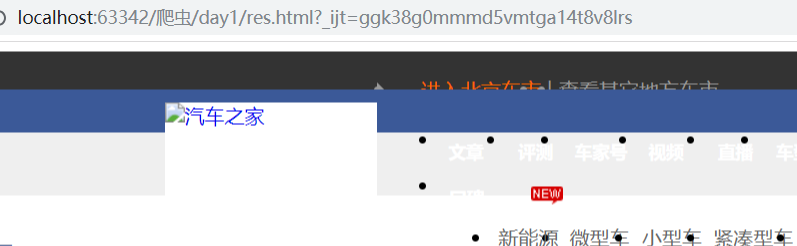
图片加载不出来,是因为做了防爬机制!
(3) 下载二进制文件(图片,视频,音频)
import requests

response=requests.get('http://bangimg1.dahe.cn/forum/201612/10/200447p36yk96im76vatyk.jpg')

with open("res.png","wb") as f:

    # f.write(response.content) # 比如下载视频时,如果视频100G,用response.content然后一下子写到文件中是不合理的

    for line in response.iter_content():

        f.write(line)
图片,视频,音频。都是二进制文件,必须使用wb模式写入。
response.iter_content() 表示,将响应体转换为迭代器。这样可以节省内存!缓解服务器压力!
(4) 解析json数据
import requests

import json

response=requests.get('http://httpbin.org/get')

res1=json.loads(response.text) #太麻烦

res2=response.json() #直接获取json数据

print(res1==res2)
(5) Redirection and History
默认情况下,除了 HEAD, Requests 会自动处理所有重定向。可以使用响应对象的 history 方法来追踪重定向。Response.history 是一个 Response 对象的列表,为了完成请求而创建了这些对象。这个对象列表按照从最老到最近的请求进行排序。
>>> r = requests.get('http://github.com')

>>> r.url

'https://github.com/'

>>> r.status_code

200

>>> r.history

[<Response [301]>]
另外,还可以通过 allow_redirects 参数禁用重定向处理:
>>> r = requests.get('http://github.com', allow_redirects=False)

>>> r.status_code

301

>>> r.history

[]
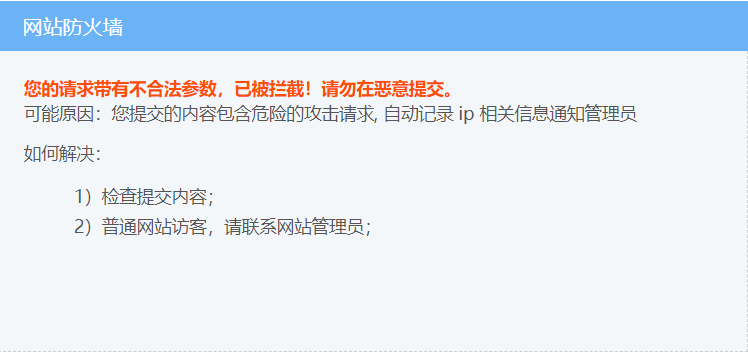
最简单的防爬机制
一般网站,最简单的防爬虫机制,就是判断user-agent是否存在。不存在,则认为是恶意访问,比如爬虫。它会拦截掉,返回一个错误页面!
举例:
比如,直接访问:抽屉热搜
import requests

res = requests.get("https://dig.chouti.com/")

with open("res.html","wb") as f:

    f.write(res.content)
使用Pycharm打开res.html,效果如下:
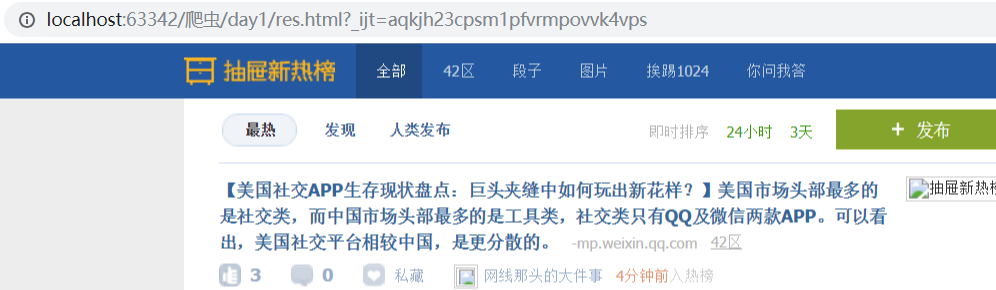
加一个user-agent就可以解决
import requests

res = requests.get("https://dig.chouti.com/",

             headers={

                     'User-Agent': 'Mozilla/5.0 (Windows NT 6.1; WOW64) AppleWebKit/537.36 (KHTML, like Gecko) Chrome/63.0.3239.132 Safari/537.36',

             },)

with open("res.html","wb") as f:

    f.write(res.content)
使用Pycharm打开res.html,效果如下:
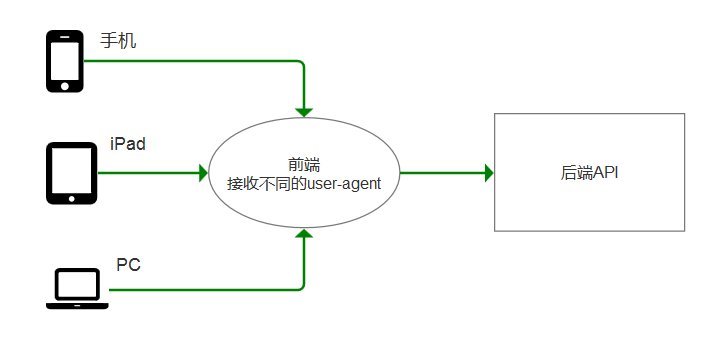
DRF为什么应用广泛
因为收,iPad,PC携带的user-agent是不一样的!前端根据不同的user-agent,返回不同的页面!
而后端API,针对同一个功能,返回的数据是统一的。
比如,访问jd.com,可以使用iPhone X访问

刷新页面,它会自动跳转到 m.jd.com
它的user-agent也变动了

应用案例
1、模拟GitHub登录,获取登录信息
import requests

import re

#请求1:

r1=requests.get('https://github.com/login')

r1_cookie=r1.cookies.get_dict() #拿到初始cookie(未被授权)

authenticity_token=re.findall(r'name="authenticity_token".*?value="(.*?)"',r1.text)[0] #从页面中拿到CSRF TOKEN

print("authenticity_token",authenticity_token)

#第二次请求:带着初始cookie和TOKEN发送POST请求给登录页面,带上账号密码

data={

    'commit':'Sign in',

    'utf8':'✓',

    'authenticity_token':authenticity_token,

    'login':'xx@xx.com',

    'password':'xx'

}

#请求2:

r2=requests.post('https://github.com/session',

             data=data,

             cookies=r1_cookie,

             # allow_redirects=False

             )

print(r2.status_code)      #

print(r2.url)              #看到的是跳转后的页面:https://github.com/

print(r2.history)          #看到的是跳转前的response:[<Response [302]>]

print(r2.history[0].text)  #看到的是跳转前的response.text

with open("result.html","wb") as f:

    f.write(r2.content)
步骤解析
如果不登录,直接访问: https://github.com/
网页会提示,让你登录!
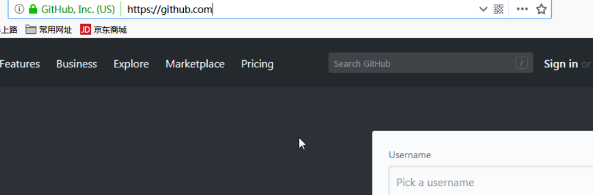
点击sign in,进入登录页面
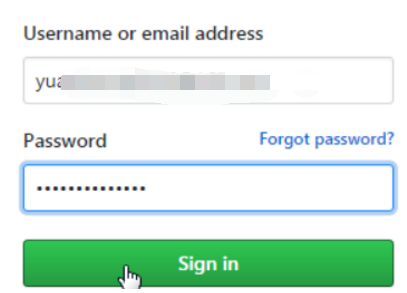
登录成功之后,跳转到首页:https://github.com/
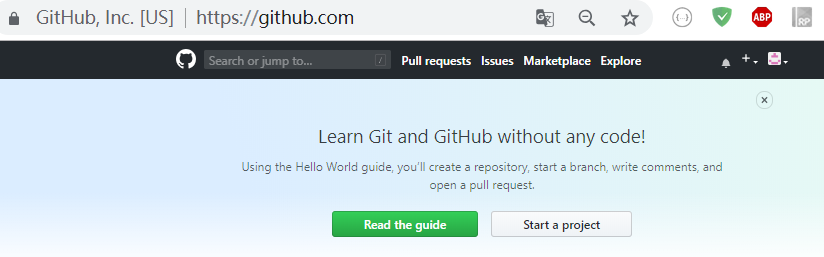
现在需要爬取页面:https://github.com/
那么直接用requests模块,访问 https://github.com/,是没有意义的!它肯定会拦截!
我们需要模拟 输入用户名和密码,点击 siin in按钮,进入首页的整个过程!
打开浏览器工具-->network,点击preserve log(保存记录)。
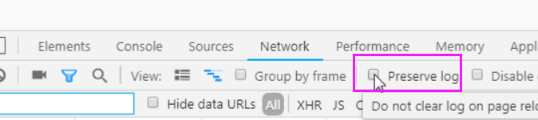
为什么要勾选这个呢?
因为登录之后,页面会刷新一次。所以network中的记录会被重新覆盖,那么我需要得到刷次之前的记录呢?
启用 preserve log,就可以看到了!
退出github账号,进入登录页面。打开浏览器工具,重新登录一次。查看network信息
这里面的 https://github.com/session,就是提交地址

再看响应信息中的Localtion,这就是调整地址。也就是首页!
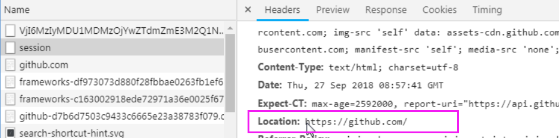
综上所述,我们就可以得出结论了!
模拟github登录示例

1. get 请求访问 https://github.com/login

2. post请求访问 https://github.com/session

3. get 请求访问 https://github.com/
正常登录,就是这3个过程!
有没有必要,从第一个位置,发送请求?
如果直接从 第二步开始,能访问到第三步,说明这样做可以。否则不可以!
测试一下吧,先来看From Data

它需要5个参数。密码是明文的,好吧,先不管它!
这3个,是干啥的呢?不管它,直接复制一下

因为是form表单,需要使用data参数。
import requests

session = requests.session()

res = requests.post("https://github.com/session",

                    data={

                        'commit': 'Sign in',

                        'utf8': '✓',

                        'authenticity_token': "u89SiiF6aFWFHSOboNVn8w/hbHQIcu0AeoJUTR+OLRP01noYZiCbpJL8E7rex29S5AkJz+w+Te47NC1PwjtXaA==",

                        'login': 'xx@xx.com',

                        'password': 'xx'

                    })

with open("res.html","wb") as f:

    f.write(res.content)
注意:需要改为自己的github账户
运行之后,使用Pycharm打开res.html,效果如下:
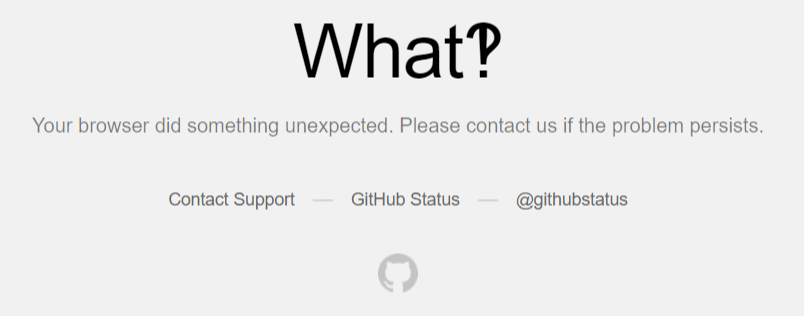
它提示访问非法,说明它已经知道你在爬取了!
怎么办呢?再加一个user-agent和Referer

修改代码
import requests

session = requests.session()

res = requests.post("https://github.com/session",

                    headers={

                        "Referer":"https://github.com/login",

                        "User-Agent":"Mozilla/5.0 (Windows NT 10.0; Win64; x64) AppleWebKit/537.36 (KHTML, like Gecko) Chrome/69.0.3497.81 Safari/537.36"

                    },

                    data={

                        'commit': 'Sign in',

                        'utf8': '✓',

                        'authenticity_token': "u89SiiF6aFWFHSOboNVn8w/hbHQIcu0AeoJUTR+OLRP01noYZiCbpJL8E7rex29S5AkJz+w+Te47NC1PwjtXaA==",

                        'login': 'xx@xx.com',

                        'password': 'xx'

                    })

with open("res.html","wb") as f:

    f.write(res.content)
执行代码,再次访问res.html。效果还是一样的!
既然请求头没有问题,那么就是数据有问题了!
打开login页面,搜索关键字 authenticity_token

刷新页面,再次查看

可以发现,它每次是不一样的!
注意:这个authenticity_token不是固定死的。每次访问页面,都是不一样的!
它和django的csrf组件,是一样的效果!
那么就卡在 token了。
只能往上推了,那就是登陆页面。
现在需要使用第一步了,必须找到token值
第一次请求:获取authenticity_token
第二次请求:模拟登录,成功重定向
获取authenticity_token
因为在页面上面,需要使用re模块来匹配
import requests

import re

r1=requests.get('https://github.com/login')

r1_cookie=r1.cookies.get_dict() #拿到初始cookie(未被授权)

authenticity_token=re.findall(r'name="authenticity_token".*?value="(.*?)"',r1.text)[0] #从页面中拿到CSRF TOKEN

print(authenticity_token)
执行输出:
hLpkfrH6C3kyxB5CXj5adhE0hNOJzmFa4Z++y6Et6+POSA3bw4bsBy/jfp/LFawCch6oWNEZxBF3sKjpw2oFig==
最终代码
import requests

import re

session = requests.session()

#请求1:

r1=requests.get('https://github.com/login')

r1_cookie=r1.cookies.get_dict() #拿到初始cookie(未被授权)

authenticity_token=re.findall(r'name="authenticity_token".*?value="(.*?)"',r1.text)[0] #从页面中拿到CSRF TOKEN

print(authenticity_token)

#第二次请求:带着初始cookie和TOKEN发送POST请求给登录页面,带上账号密码

res = requests.post("https://github.com/session",

                    headers={

                        "Referer":"https://github.com/login",

                        "User-Agent":"Mozilla/5.0 (Windows NT 10.0; Win64; x64) AppleWebKit/537.36 (KHTML, like Gecko) Chrome/69.0.3497.81 Safari/537.36"

                    },

                    data={

                        'commit': 'Sign in',

                        'utf8': '✓',

                        'authenticity_token': authenticity_token,

                        'login': 'xx@xx.com',

                        'password': 'xx'

                    },cookies=r1_cookie,)

with open("res.html","wb") as f:

    f.write(res.content)
效果如下:

这个,才是真正的首页
2、爬取豆瓣电影信息
import requests

import re

import json

import time

from concurrent.futures import ThreadPoolExecutor

pool=ThreadPoolExecutor(50)

def getPage(url):

    response=requests.get(url)

    return response.text

def parsePage(res):

    com=re.compile('<div class="item">.*?<div class="pic">.*?<em .*?>(?P<id>\d+).*?<span class="title">(?P<title>.*?)</span>'

                   '.*?<span class="rating_num" .*?>(?P<rating_num>.*?)</span>.*?<span>(?P<comment_num>.*?)评价</span>',re.S)

    iter_result=com.finditer(res)

    return iter_result

def gen_movie_info(iter_result):

    for i in iter_result:

        yield {

            "id":i.group("id"),

            "title":i.group("title"),

            "rating_num":i.group("rating_num"),

            "comment_num":i.group("comment_num"),

        }

def stored(gen):

        with open("move_info.txt","a",encoding="utf8") as f:

            for line in gen:

                data=json.dumps(line,ensure_ascii=False)

                f.write(data+"\n")

def spider_movie_info(url):

    res=getPage(url)

    iter_result=parsePage(res)

    gen=gen_movie_info(iter_result)

    stored(gen)

def main(num):

    url='https://movie.douban.com/top250?start=%s&filter='%num

    pool.submit(spider_movie_info,url)

    #spider_movie_info(url)

if __name__ == '__main__':

    before=time.time()

    count=0

    for i in range(10):

        main(count)

        count+=25

    after=time.time()

    print("总共耗费时间:",after-before)
今日作业
1. 爬取拉钩python的所有职位信息,爬取3页即可!(有一个隐藏的反扒机制)
2. 爬取链家二手房源信息,爬取3页即可!
本文参考链接:
https://www.cnblogs.com/yuanchenqi/articles/9449430.html
作业解析
拉钩
1. 爬取拉钩python的所有职位信息
打开拉勾网,打开浏览器工具,输入pythton,点击搜索
网页链接是这个
https://www.lagou.com/jobs/list_python?px=default&city=全国#filterBox
打开浏览器工具-->Network-->XHR
查看第一个链接,点击Preview,它返回的是一个json数据。
将数据一点点展开,result就是我们要的数据了

查看请求方式

查看请求参数
pn:表示分页数,kd:表示搜索关键字
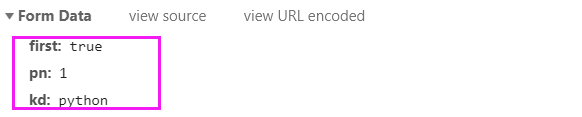
接下来,就可以直接上代码了
import requests

res = requests.post('https://www.lagou.com/jobs/positionAjax.json',

                    headers={

                        'Referer': "https://www.lagou.com/jobs/list_python",

                        'User-Agent': 'Mozilla/5.0 (Windows NT 6.1; WOW64) AppleWebKit/537.36 (KHTML, like Gecko) Chrome/63.0.3239.132 Safari/537.36',

                    },

                    data={

                        'first': True,

                        'pn': 1,  # 页码

                        'kd': 'python'  # 关键字

                    },

                    params={

                        'px': 'default',

                        'city': '全国',

                        'needAddtionalResult': False,

                    }

                    )

with open("lianjia.txt", "a", encoding="utf-8") as f:

    f.write(res.text + "\n")
参数解释:
我们要请求的地址是
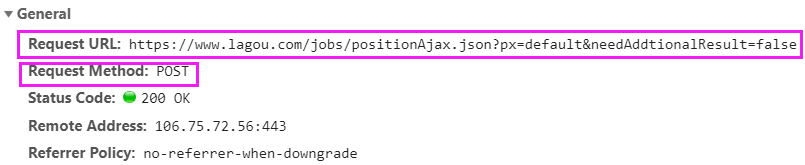
也就是这个
https://www.lagou.com/jobs/positionAjax.json?px=default&needAddtionalResult=false
因此,params参数,指定了参数px和needAddtionalResult
还有一个参数city,是从页面中获取的
https://www.lagou.com/jobs/list_python?px=default&city=全国#filterBox
headers指定了2个参数,Referer和User-Agent,是从这里获取的
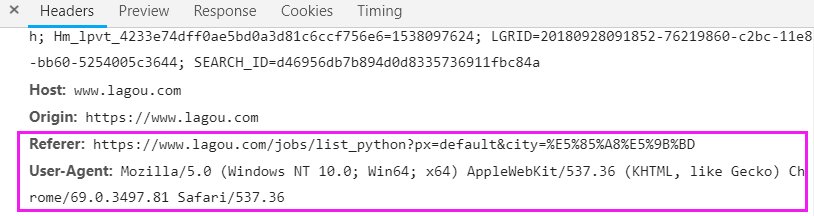
Referer 直接写前半段就可以了,后面的参数可以不要!
执行程序,查看lianjia.txt,它存储的就是一段json
再新建一个py文件,单独处理文件操作
import json

with open('lianjia.txt', encoding="utf-8") as f:

    for line in f:

        dic = json.loads(line)

        for i in dic.get('content').get('positionResult').get('result'):

            print(i.get('positionName'), i.get('city'), i.get('createTime'), i.get('salary'), i.get('workYear'),

                  i.get('education'), i.get('companyShortName'))
执行输出:
Python开发 上海 2018-09-26 14:43:36 13k-26k 3-5年 大专 德邦

...
将这2段代码,结合到一个py文件,最终代码如下:
import requests

import time

import json

page = [x for x in range(1, 4)]  # 只爬取3页

for i in page:

    res=requests.post('https://www.lagou.com/jobs/positionAjax.json',

                 headers={

                        'Referer':"https://www.lagou.com/jobs/list_python",

                         'User-Agent': 'Mozilla/5.0 (Windows NT 6.1; WOW64) AppleWebKit/537.36 (KHTML, like Gecko) Chrome/63.0.3239.132 Safari/537.36',

                 },

                 data={

                     'first':True,

                     'pn':i,  # 页码

                     'kd':'python'  # 关键字

                 },

                 params={

                     'px': 'default',

                     'city': '全国',

                     'needAddtionalResult': False,

                 }

                 )

    with open("lianjia.txt","a",encoding="utf-8") as f:

        f.write(res.text+"\n")

    time.sleep(5)

with open('lianjia.txt', encoding="utf-8") as f:

    for line in f:

        dic = json.loads(line)

        for i in dic.get('content').get('positionResult').get('result'):

            print(i.get('positionName'), i.get('city'), i.get('createTime'), i.get('salary'), i.get('workYear'),

                  i.get('education'), i.get('companyShortName'))
执行输出:
Python开发 上海 2018-09-26 14:43:36 13k-26k 3-5年 大专 德邦

...
拉钩网的防爬机制,不能访问的太频繁。否则会封锁IP,这里我暂停了5秒
还有一种升级方案,使用session访问,它是没有做限制的!
import requests

import time

import json

page = [x for x in range(1, 4)]  # 只爬取3页

for i in page:

    session = requests.session()

    session.get("https://www.lagou.com/")

    session.get("https://www.lagou.com/jobs/list_python")

    res=session.post('https://www.lagou.com/jobs/positionAjax.json',

                 headers={

                        'Referer':"https://www.lagou.com/jobs/list_python",

                         'User-Agent': 'Mozilla/5.0 (Windows NT 6.1; WOW64) AppleWebKit/537.36 (KHTML, like Gecko) Chrome/63.0.3239.132 Safari/537.36',

                 },

                 data={

                     'first':True,

                     'pn':i,  # 页码

                     'kd':'python'  # 关键字

                 },

                 params={

                     # 'gj': '3年及以下',

                     'px': 'default',

                     # 'yx': '25k-50k',

                     'city': '北京',

                     'needAddtionalResult': False,

                     # 'isSchoolJob': 0

                 }

                 )

    with open("lianjia.txt","a",encoding="utf-8") as f:

        f.write(res.text+"\n")

    # time.sleep(5)

with open('lianjia.txt', encoding="utf-8") as f:

    for line in f:

        dic = json.loads(line)

        for i in dic.get('content').get('positionResult').get('result'):

            print(i.get('positionName'), i.get('city'), i.get('createTime'), i.get('salary'), i.get('workYear'),

                  i.get('education'), i.get('companyShortName'))
执行脚本,效果同上!
链家
2. 爬取链家二手房源信息
这个网站,几乎没有XHR请求。无法直接得到我们想要的信息!它的信息,直接渲染到页面上了。
所以要获取房源信息,只有2个途径
1. 使用正则匹配
2. 使用模块或者框架解析html,比如BS和Xpath模块,还有scrapy
正则玩的不够6,模块和框架不会!。。。
python 全栈开发,Day134(爬虫系列之第1章-requests模块)的更多相关文章
- python 全栈开发,Day26(hashlib文件一致性,configparser,logging,collections模块,deque,OrderedDict)
一.hashlib文件一致性校验 为何要进行文件一致性校验? 为了确保你得到的文件是正确的版本,而没有被注入病毒和木马程序.例如我们经常在网上下载软件,而这些软件已经被注入了一些广告和病毒等,如果不进 ...
- python全栈开发- day14列表推导式、生成器表达式、模块基础
一.列表推导式 #1.示例 数据量小 egg_list=[] for i in range(10): egg_list.append('鸡蛋%s' %i) egg_list=['鸡蛋%s' %i fo ...
- python全栈开发目录
python全栈开发目录 Linux系列 python基础 前端~HTML~CSS~JavaScript~JQuery~Vue web框架们~Django~Flask~Tornado 数据库们~MyS ...
- python全栈开发中级班全程笔记(第二模块、第三章)(员工信息增删改查作业讲解)
python全栈开发中级班全程笔记 第三章:员工信息增删改查作业代码 作业要求: 员工增删改查表用代码实现一个简单的员工信息增删改查表需求: 1.支持模糊查询,(1.find name ,age fo ...
- Python全栈开发【面向对象进阶】
Python全栈开发[面向对象进阶] 本节内容: isinstance(obj,cls)和issubclass(sub,super) 反射 __setattr__,__delattr__,__geta ...
- python 全栈开发之路 day1
python 全栈开发之路 day1 本节内容 计算机发展介绍 计算机硬件组成 计算机基本原理 计算机 计算机(computer)俗称电脑,是一种用于高速计算的电子计算机器,可以进行数值计算,又可 ...
- 老男孩最新Python全栈开发视频教程(92天全)重点内容梳理笔记 看完就是全栈开发工程师
为什么要写这个系列博客呢? 说来讽刺,91年生人的我,同龄人大多有一份事业,或者有一个家庭了.而我,念了次985大学,年少轻狂,在大学期间迷信创业,觉得大学里的许多课程如同吃翔一样学了几乎一辈子都用不 ...
- 学习笔记之Python全栈开发/人工智能公开课_腾讯课堂
Python全栈开发/人工智能公开课_腾讯课堂 https://ke.qq.com/course/190378 https://github.com/haoran119/ke.qq.com.pytho ...
- python全栈开发之正则表达式和python的re模块
正则表达式和python的re模块 python全栈开发,正则表达式,re模块 一 正则表达式 正则表达式(Regular Expression)是一种文本模式,包括普通字符(例如,a 到 z 之间的 ...
随机推荐
- 加减乘除工具类BigDecimalUtil
场景:为毛要用BigDecimal这个类来实现加减乘除呢?我不说其他的,你去用小数乘小数,除小数就知道.话不多说,老规矩,开箱即用. BigDecimalUtil.java package com.m ...
- Java 编程下使用 Class.forName() 加载类【转】
在一些应用中,无法事先知道使用者将加载什么类,而必须让使用者指定类名称以加载类,可以使用 Class 的静态 forName() 方法实现动态加载类.下面的范例让你可以指定类名称来获得类的相关信息. ...
- java.io.Serializable 序列化问题【原】
java.io.Serializable 序列化问题 Person.java package a.b.c; public class Person implements java.io.Seriali ...
- 20155313 2016-2017-2 《Java程序设计》第五周学习总结
20155313 2016-2017-2 <Java程序设计>第五周学习总结 教材内容学习 第八章 异常处理 程序中总有些意想不到的状况所引发的错误,Java中的错误也以对象方式呈现为ja ...
- 第18月第2天 ios博客
1. github https://githuber.cn/search?language=Objective-C https://www.jianshu.com/u/815d10a4bdce htt ...
- J - Joseph and Tests Gym - 102020J (二分+线段树)
题目链接:https://cn.vjudge.net/contest/283920#problem/J 题目大意:首先给你n个门的高度,然后q次询问,每一次询问包括两种操作,第一种操作是将当前的门的高 ...
- mysql 查询优化案例汇总
一 简介:此文章为经历过的sql案例集合和相关思路 二 案例1: 现象: 测试环境出现select语句,join2张表多次join,explain结果如下 出现 using where,using j ...
- UML入门[转]
访问权限控制 class Dummy { - private field1 # protected field2 ~ package method1() + public method2() } Al ...
- 允许远程用户登录访问mysql的方法
需要手动增加可以远程访问数据库的用户. 方法一.本地登入mysql,更改 "mysql" 数据库里的 "user" 表里的 "host" 项 ...
- C语言中,float在内存中的储存方式
浮点型变量在计算机内存中占用4字节(Byte),即32-bit. 遵循IEEE-754格式标准. 一个浮点数由2部分组成:底数m 和 指数e. ±mantissa × 2exponent (注意,公式 ...