
(转)解决dubbox-demo-provider.xml报错的问题:提示Failed to read schema document
背景:在eclipse项目中,经常会遇到xml文件提示找不到.xsd文件的情况。很有必要弄清xsd文件的加载过程!
1 解决过程
dubbo-demo-provider导入eclipse后dubbox-demo-provider.xml报错详情:
Multiple annotations found at this line:

    - cvc-complex-type.2.4.c: The matching wildcard is strict, but no declaration can be found for element 'dubbo:application'.

    - schema_reference.4: Failed to read schema document 'http://code.alibabatech.com/schema/dubbo/dubbo.xsd', because 1) could not

     find the document; 2) the document could not be read; 3) the root element of the document is not <xsd:schema>.
解决方案:
1.解压dubbo-2.8.4.jar,在解压后的文件中找到dubbo.xsd文件,并copy至一个目录,如E:/dubbo
2.Eclipse::::
(1)windows->preferrence->xml->xmlcatalog
(2)add->catalog entry ->file system

3. 右击dubbo-demo-provider.xml--->validate.
4.错误搞定
2 对于此类问题的分析
2.1 XML的一些概念
首先来看下xml的一些概念:
xml的schema里有namespace,可以给它起个别名。比如常见的spring的namespace:
xmlns:mvc="http://www.springframework.org/schema/mvc"

xmlns:context="http://www.springframework.org/schema/context"
通常情况下,namespace对应的URI是一个存放XSD的地址,尽管规范没有这么要求。
如果没有提供schemaLocation,那么Spring的XML解析器会从namespace的URI里加载XSD文件。我们可以把配置文件改成这个样子,也是可以正常工作的:
原有写法:

<?xml version="1.0" encoding="UTF-8"?>

<beans xmlns="http://www.springframework.org/schema/beans"

    xmlns:xsi="http://www.w3.org/2001/XMLSchema-instance"

    xsi:schemaLocation="http://www.springframework.org/schema/beans http://www.springframework.org/schema/beans/spring-beans.xsd">

</beans>

变更后:

<?xml version="1.0" encoding="UTF-8"?>

<beans xmlns="http://www.springframework.org/schema/beans/spring-beans.xsd"

    xmlns:xsi="http://www.w3.org/2001/XMLSchema-instance">
schemaLocation提供了一个xml namespace到对应的XSD文件的一个映射,所以我们可以看到,在xsi:schemaLocation后面配置的字符串都是成对的,前面的是namespace的URI,后面是xsd文件的URI。比如:
xsi:schemaLocation="http://www.springframework.org/schema/beans

http://www.springframework.org/schema/beans/spring-beans.xsd

http://www.springframework.org/schema/security

http://www.springframework.org/schema/security/spring-security.xsd"
2.2 Spring是如何校验XML的
Spring默认在启动时是要加载XSD文件来验证xml文件的,所以如果有的时候断网了,或者一些开源软件切换域名,那么就很容易碰到应用启动不了。我记得当时Oracle收购Sun公司时,遇到过这个情况。
为了防止这种情况,Spring提供了一种机制,默认从本地加载XSD文件。打开spring-context-3.2.0.RELEASE.jar,可以看到里面有两个特别的文件:
spring.handlers:
http\://www.springframework.org/schema/context=org.springframework.context.config.ContextNamespaceHandler

http\://www.springframework.org/schema/jee=org.springframework.ejb.config.JeeNamespaceHandler

http\://www.springframework.org/schema/lang=org.springframework.scripting.config.LangNamespaceHandler

http\://www.springframework.org/schema/task=org.springframework.scheduling.config.TaskNamespaceHandler

http\://www.springframework.org/schema/cache=org.springframework.cache.config.CacheNamespaceHandler
spring.schemas:
http\://www.springframework.org/schema/context/spring-context-2.5.xsd=org/springframework/context/config/spring-context-2.5.xsd

http\://www.springframework.org/schema/context/spring-context-3.0.xsd=org/springframework/context/config/spring-context-3.0.xsd

http\://www.springframework.org/schema/context/spring-context-3.1.xsd=org/springframework/context/config/spring-context-3.1.xsd

http\://www.springframework.org/schema/context/spring-context-3.2.xsd=org/springframework/context/config/spring-context-3.2.xsd

http\://www.springframework.org/schema/context/spring-context.xsd=org/springframework/context/config/spring-context-3.2.xsd

...
再打开jar包里的org/springframework/context/config/ 目录,可以看到下面有
spring-context-2.5.xsd
spring-context-3.0.xsd
spring-context-3.1.xsd
spring-context-3.2.xsd
ps:这些xsd文件并不需要真的从网上下载,在本地的jar包都都是能够找到的。
很明显,可以想到Spring是把XSD文件放到本地了,再在spring.schemas里做了一个映射,优先从本地里加载XSD文件。
并且Spring很贴心,把旧版本的XSD文件也全放了。这样可以防止升级了Spring版本,而配置文件里用的还是旧版本的XSD文件,然后断网了,应用启动不了。
我们还可以看到,在没有配置版本号时,用的就是当前版本的XSD文件:
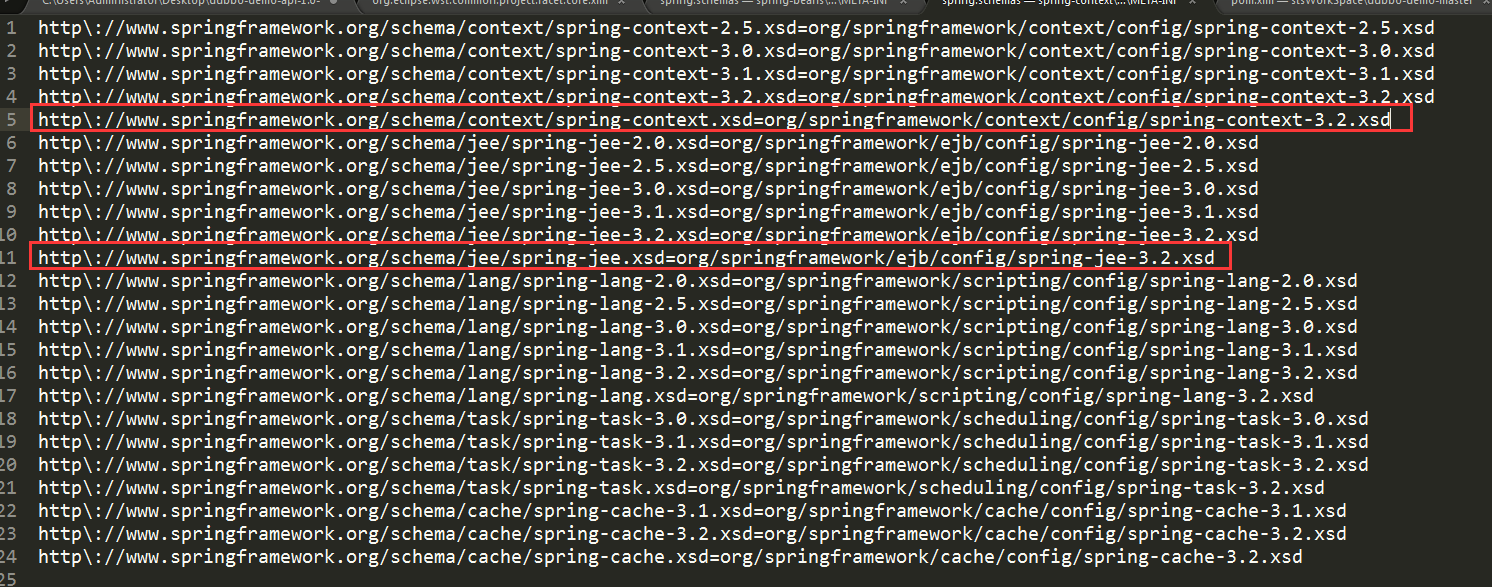
http\://www.springframework.org/schema/context/spring-context.xsd=org/springframework/context/config/spring-context-3.2.xsd
同样,我们打开dubbo的jar包,可以在它的spring.schemas文件里看到有这样的配置:
http\://code.alibabatech.com/schema/dubbo/dubbo.xsd=META-INF/dubbo.xsd
所以,Spring在加载dubbo时,会从dubbo的jar里加载dubbo.xsd。
虽然启动没有问题,但xml验证Failed to read schema document 'http://code.alibabatech.com/schema/dubbo/dubbo.xsd'出错,这个问题如何解决呢?
可以通过eclipse 手动添加schema文件来解决这个问题,解决过程在第一部分已经详细描述。
(转)解决dubbox-demo-provider.xml报错的问题:提示Failed to read schema document的更多相关文章
- android 程序中res/values-v14/styles.xml报错的解决办法
从旧的ADT迁移的新的ADT时, android 程序中res/values-v14/styles.xml报错: error: Error retrieving parent for item: No ...
- 打开struts-config.xml 报错 解决方法Could not open the editor
打开struts-config.xml 报错 解决办法Could not open the editor 错误信息:Could not open the editor: Project XXX is ...
- eclipse中Maven项目pom.xml报错:com.thoughtworks.xstream.io.HierarchicalStreamDriver
eclipse中创建Maven项目时 pom.xml报错:com.thoughtworks.xstream.io.HierarchicalStreamDriver 解决方案1.在pom文件中加入mav ...
- applicationContext.xml报错org.springframework.orm.hibernate3.LocalSessionFactoryBean not found
applicationContext.xml报错org.springframework.orm.hibernate3.LocalSessionFactoryBean not found 解决办法: 1 ...
- 解决MyEclipse中的js报错的小方法
今天,下了个模版,但是导进去的时候发现js会报错.看了下其他都没有错误.而有一个js报错误,请原谅我有点红色强迫症,不能留一点红色 . 错误如下:Syntax error on token " ...
- [转]解决IIS下UTF-8文件报错乱码的问题
找了两天才找到解决办法…….晕晕晕...用第二种方法解决了. 网上找到的方法都没有写这一条 If objASPError.ASPDescription > "" Then 后 ...
- 新建maven工程时pom.xml报错
新建maven工程时,pom.xml报错:第一行报如下错误:multiple annotations found at this line后添加org.eclipse.m2e相关的plugin配置后, ...
- python——报错ImportError:DLL load failed with error code -1073741795的解决方式
python中导入一个包,import cv2总是报错'ImportError:DLL load failed with error code -1073741795',报错形式: 网上找了好久的解决 ...
- Eclipse和MyEclipse使用技巧--解决MyEclipse中的js报错的小方法
今天,下了个模版,但是导进去的时候发现js会报错.看了下其他都没有错误.而有一个js报错误,请原谅我有点红色强迫症,不能留一点红色 . 错误如下:Syntax error on token " ...
随机推荐
- LAXCUS大数据操作系统3.03版本发布,欢迎使用试用
LAXCUS大数据操作系统3.03正式发布,欢迎下载使用试用.LAXCUS大数据操作系统,集成虚拟化.大数据.数据库.容器.中间件的多集群多用户多任务全栈通用系统软件,运行.开发.维护管理为一体的平台 ...
- java之接口开发-初级篇
简述:转眼之间已经开发java有五年之余了,从以前的刚刚接触电脑,到现在的公司上班,真是转眼之间呀!前两年开发过前端,后台和Android,Android火的那几年,差点转去做Android,哈哈!后 ...
- React Native移动开发实战-5-Android平台的调试技巧
Android平台的调试和其他平台的调试也很类似,例如:在Android Studio打开的工程中,打开源码MainActivity.java,然后,将鼠标移至代码编辑区的左侧后,单击鼠标即可添加断点 ...
- <React Native移动开发实战>-1-React Native的JSX解决方案
JSX并不是一门新的开发语言,而是Facebook提出的语法方案:一种可以在JavaScript代码中直接书写HTML标签的语法糖,所以,JSX本质上还是JavaScript语言. 小知识:语法糖(S ...
- 关于React面试题汇总
1.redux中间件 中间件提供第三方插件的模式,自定义拦截 action -> reducer 的过程.变为 action -> middlewares -> reducer .这 ...
- "重力锁屏"Beta版使用说明
一.产品介绍 重力锁屏是基于android系统的一款锁屏软件.它利用重力感应器来判断用户的动作从而自动锁屏亮屏,是锁屏软件的一大创新.相比传统的锁屏软件,“重力锁屏”从可操作性.方便性.功能全面性都有 ...
- Hibernate主键注解
http://www.cnblogs.com/hongten/archive/2011/07/20/2111773.html 版权声明:本文为博主原创文章,未经博主允许不得转载.
- Eclipse下高亮显示Freemarker文件
让eclipse高亮显示freemarker文件有两种方式,一种是安装JBoss的插件,一种是用JSP编辑器打开freemarker的文件.我使用第二种方式来完成. 打开eclipse,点击windo ...
- React鼠标事件
说明:假设有一个用户名片,当鼠标滑到上面,显示用户详细信息,且用户详情卡片位置随鼠标位置改变而改变. UI框架:Material-ui 实现思路: 1.一个用户简介组件A(用于展示用户列表): 2.一 ...
- es6箭头函数的注意要点
具有一个参数的简单函数 var single = a => a single('hello, world') // 'hello, world' 没有参数的需要用在箭头前加上小括号 var lo ...