
Android BLE 蓝牙编程(二)
大家中秋快乐啊~~哈哈,今天继续工程项目吧!
上篇我们已经实现了蓝牙设备的扫描,本篇我们来通过list展示扫描到的设备并
实现点击连接。
先贴出上篇的完整的MainActivity的方法:
package com.wbnq.shouhuan;

import android.bluetooth.BluetoothAdapter;

import android.bluetooth.BluetoothDevice;

import android.bluetooth.BluetoothManager;

import android.content.Intent;

import android.support.v7.app.AppCompatActivity;

import android.os.Bundle;

import android.util.Log;

import android.view.View;

import android.widget.Button;

import android.widget.TextView;

import android.widget.Toast;

import java.util.ArrayList;

import java.util.List;

public class MainActivity extends AppCompatActivity implements View.OnClickListener{

    private Button saomiao , duanzhen , changzhen , buting , tingxia;

    private TextView jibu , dianliang , lianjiezhuangtai;

    BluetoothAdapter bluetoothAdapter;

    List<BluetoothDevice> deviceList = new ArrayList<>();

    @Override

    protected void onCreate(Bundle savedInstanceState) {

        super.onCreate(savedInstanceState);

        setContentView(R.layout.activity_main);

        initView();

        //蓝牙管理,这是系统服务可以通过getSystemService(BLUETOOTH_SERVICE)的方法获取实例

        BluetoothManager bluetoothManager = (BluetoothManager) getSystemService(BLUETOOTH_SERVICE);

        //通过蓝牙管理实例获取适配器,然后通过扫描方法(scan)获取设备(device)

        bluetoothAdapter = bluetoothManager.getAdapter();

    }

    private void initView() {

        saomiao = (Button) findViewById(R.id.saomiao);

        duanzhen = (Button) findViewById(R.id.zhendong);

        changzhen = (Button) findViewById(R.id.changzhen);

        buting = (Button) findViewById(R.id.buting);

        tingxia = (Button) findViewById(R.id.tingxia);

        jibu = (TextView) findViewById(R.id.jibu);

        dianliang = (TextView) findViewById(R.id.dianliang);

        lianjiezhuangtai = (TextView) findViewById(R.id.lianjiezhuangtai);

        saomiao.setOnClickListener(this);

        duanzhen.setOnClickListener(this);

        changzhen.setOnClickListener(this);

        buting.setOnClickListener(this);

        tingxia.setOnClickListener(this);

    }

    @Override

    public void onClick(View view) {

        switch (view.getId()){

            case R.id.saomiao:

                //开始扫描前开启蓝牙

                Intent turn_on = new Intent(BluetoothAdapter.ACTION_REQUEST_ENABLE);

                startActivityForResult(turn_on, 0);

                Toast.makeText(MainActivity.this, "蓝牙已经开启", Toast.LENGTH_SHORT).show();

                Thread scanThread = new Thread(new Runnable() {

                    @Override

                    public void run() {

                        Log.i("TAG", "run: saomiao ...");

                        saomiao();

                    }

                });

                scanThread.start();

                break;

            case R.id.zhendong:

                break;

            case R.id.changzhen:

                break;

            case R.id.buting:

                break;

            case R.id.tingxia:

                break;

        }

    }

    public void saomiao(){

        deviceList.clear();

        bluetoothAdapter.startLeScan(callback);

    }

    //扫描回调

    public BluetoothAdapter.LeScanCallback callback = new BluetoothAdapter.LeScanCallback() {

        @Override

        public void onLeScan(final BluetoothDevice bluetoothDevice, int i, byte[] bytes) {

            Log.i("TAG", "onLeScan: " + bluetoothDevice.getName() + "/t" + bluetoothDevice.getAddress() + "/t" + bluetoothDevice.getBondState());

            //重复过滤方法,列表中包含不该设备才加入列表中,并刷新列表

            if (!deviceList.contains(bluetoothDevice)) {

                //将设备加入列表数据中

                deviceList.add(bluetoothDevice);

            }

        }

    };

}
这是上篇的,没有在log下看到扫描消息的小伙伴看看出啥问题了吧~~
好了,第二篇正式开始。
先贴出来MyAdapter的代码(这不是本节重点,请参阅前面关于adapter的写法)
package com.wbnq.shouhuan;

import android.bluetooth.BluetoothDevice;

import android.content.Context;

import android.view.LayoutInflater;

import android.view.View;

import android.view.ViewGroup;

import android.widget.BaseAdapter;

import android.widget.TextView;

import java.util.List;

/**

 * Created by guwei on 16-9-2.

 */

public class MyAdapter extends BaseAdapter{

    public List<BluetoothDevice> mlist;

    private LayoutInflater mInflater;

    public MyAdapter(Context context , List<BluetoothDevice> list){

        mlist = list;

        mInflater = LayoutInflater.from(context);

    }

    //获取传入的数组大小

    @Override

    public int getCount() {

        return mlist.size();

    }

    //获取第N条数据

    @Override

    public Object getItem(int i) {

        return mlist.get(i);

    }

    //获取item id

    @Override

    public long getItemId(int i) {

        return i;

    }

    //主要方法

    @Override

    public View getView(int i, View view, ViewGroup viewGroup) {

        ViewHolder viewHolder = new ViewHolder();

        if(view == null){

            //首先为view绑定布局

            view = mInflater.inflate(R.layout.devices_item , null);

            viewHolder.name = (TextView) view.findViewById(R.id.bluetoothname);

            viewHolder.uuid = (TextView) view.findViewById(R.id.uuid);

            viewHolder.status = (TextView) view.findViewById(R.id.status);

            view.setTag(viewHolder);

        }else{

            viewHolder = (ViewHolder) view.getTag();

        }

        BluetoothDevice bd = mlist.get(i);

        viewHolder.name.setText(bd.getName());

        viewHolder.uuid.setText(bd.getAddress());

        //viewHolder.status.setText(R.string.noconnect);

        return view;

    }

    class ViewHolder{

        private TextView name , uuid , status;

    }

}
item布局代码 devices_item.xml
<?xml version="1.0" encoding="utf-8"?>

<RelativeLayout xmlns:android="http://schemas.android.com/apk/res/android"

    android:layout_width="match_parent"

    android:layout_height="match_parent">

    <ImageView

        android:id="@+id/bluetoothicon"

        android:layout_width="37dp"

        android:layout_height="50dp"

        android:background="@mipmap/ic_bluetooth_black_36dp" />

    <TextView

        android:id="@+id/bluetoothname"

        android:layout_width="wrap_content"

        android:layout_height="wrap_content"

        android:layout_marginLeft="5dp"

        android:layout_toRightOf="@+id/bluetoothicon"

        android:text="name"

        android:textColor="#000000"

        android:textSize="19dp" />

    <TextView

        android:id="@+id/uuid"

        android:layout_width="wrap_content"

        android:layout_height="wrap_content"

        android:layout_below="@id/bluetoothname"

        android:layout_marginLeft="5dp"

        android:layout_marginTop="5dp"

        android:layout_toRightOf="@id/bluetoothicon"

        android:text="uuid"

        android:textSize="15dp" />

    <TextView

        android:id="@+id/status"

        android:layout_width="wrap_content"

        android:layout_height="wrap_content"

        android:layout_marginLeft="10dp"

        android:layout_marginTop="5dp"

        android:layout_toRightOf="@id/bluetoothname"

        android:text=""

        android:textColor="#ff0000" />

</RelativeLayout>
在布局文件中添加一下listview控件

并且在MainActivity添加监听。
然后在扫描回调中添加list.setAdapter(new MyAdapter(MainActivity.this , deviceList));
就可以顺利的将得到的列表用list展示出来啦~~
//扫描回调

    public BluetoothAdapter.LeScanCallback callback = new BluetoothAdapter.LeScanCallback() {

        @Override

        public void onLeScan(final BluetoothDevice bluetoothDevice, int i, byte[] bytes) {

            Log.i("TAG", "onLeScan: " + bluetoothDevice.getName() + "/t" + bluetoothDevice.getAddress() + "/t" + bluetoothDevice.getBondState());

            //重复过滤方法,列表中包含不该设备才加入列表中,并刷新列表

            if (!deviceList.contains(bluetoothDevice)) {

                //将设备加入列表数据中

                deviceList.add(bluetoothDevice);

                list.setAdapter(new MyAdapter(MainActivity.this , deviceList));

            }

        }

    };
看下效果:点击扫描后

想要连接设备就要在list的监听事件中添加下面的方法:
这里的bluetoothdevice就是用来存放每个item的内容的
上篇也说明了,想要连接设备就要使用bluetoothDevice的connectGatt方法:
该方法包含三个参数:
参数一 : context 上下文 这里传 MainActivity即可
参数二: autoConnect 是否自动重连 一般填 false
参数三: gattcallback 是BluetoothGattCallback回调,该方法由系统提供,我们只需要重写方法即可
该方法的返回值为bluetoothGatt类型。
//item 监听事件

        list.setOnItemClickListener(new AdapterView.OnItemClickListener() {

            @Override

            public void onItemClick(AdapterView<?> adapterView, View view, int i, long l) {

                bluetoothDevice = deviceList.get(i);

                //连接设备的方法,返回值为bluetoothgatt类型

                bluetoothGatt = bluetoothDevice.connectGatt(MainActivity.this, false, gattcallback);

                lianjiezhuangtai.setText("连接" + bluetoothDevice.getName() + "中...");

            }

        });
重写gatt回调方法:
BluetoothGattCallback
private BluetoothGattCallback gattcallback = new BluetoothGattCallback() {

        @Override

        public void onConnectionStateChange(BluetoothGatt gatt, int status, int newState) {

            super.onConnectionStateChange(gatt, status, newState);

        }

        @Override

        public void onServicesDiscovered(BluetoothGatt gatt, int status) {

            super.onServicesDiscovered(gatt, status);

        }

        @Override

        public void onCharacteristicRead(BluetoothGatt gatt, BluetoothGattCharacteristic characteristic, int status) {

            super.onCharacteristicRead(gatt, characteristic, status);

        }

        @Override

        public void onCharacteristicWrite(BluetoothGatt gatt, BluetoothGattCharacteristic characteristic, int status) {

            super.onCharacteristicWrite(gatt, characteristic, status);

        }

        @Override

        public void onCharacteristicChanged(BluetoothGatt gatt, BluetoothGattCharacteristic characteristic) {

            super.onCharacteristicChanged(gatt, characteristic);

        }

        @Override

        public void onDescriptorRead(BluetoothGatt gatt, BluetoothGattDescriptor descriptor, int status) {

            super.onDescriptorRead(gatt, descriptor, status);

        }

        @Override

        public void onDescriptorWrite(BluetoothGatt gatt, BluetoothGattDescriptor descriptor, int status) {

            super.onDescriptorWrite(gatt, descriptor, status);

        }

        @Override

        public void onReliableWriteCompleted(BluetoothGatt gatt, int status) {

            super.onReliableWriteCompleted(gatt, status);

        }

        @Override

        public void onReadRemoteRssi(BluetoothGatt gatt, int rssi, int status) {

            super.onReadRemoteRssi(gatt, rssi, status);

        }

        @Override

        public void onMtuChanged(BluetoothGatt gatt, int mtu, int status) {

            super.onMtuChanged(gatt, mtu, status);

        }

    } ;
我们这里主要用到
onConnectionStateChange
onServicesDiscovered
onCharacteristicWrite
首先通过onConnectionStateChange获取连接的状态:
public void onConnectionStateChange(BluetoothGatt gatt, int status, final int newState) {

            super.onConnectionStateChange(gatt, status, newState);

            runOnUiThread(new Runnable() {

                @Override

                public void run() {

                    String status;

                    switch (newState) {

                        //已经连接

                        case BluetoothGatt.STATE_CONNECTED:

                            lianjiezhuangtai.setText("已连接");

                            //该方法用于获取设备的服务,寻找服务

                 //bluetoothGatt.discoverServices();

                            break;

                        //正在连接

                        case BluetoothGatt.STATE_CONNECTING:

                            lianjiezhuangtai.setText("正在连接");

                            break;

                        //连接断开

                        case BluetoothGatt.STATE_DISCONNECTED:

                            lianjiezhuangtai.setText("已断开");

                            break;

                        //正在断开

                        case BluetoothGatt.STATE_DISCONNECTING:

                            lianjiezhuangtai.setText("断开中");

                            break;

                    }

                    //pd.dismiss();

                }

            });

        }
参数中的 newstate就是连接的状态。
连接状态一共分成四种:
一: 已连接
二: 正在连接
三: 正在断开
四: 已断开
不过实际使用中正在连接和正在断开的状态并没有真正的返回给我们的程序,
不过两个状态已经够我们使用了~
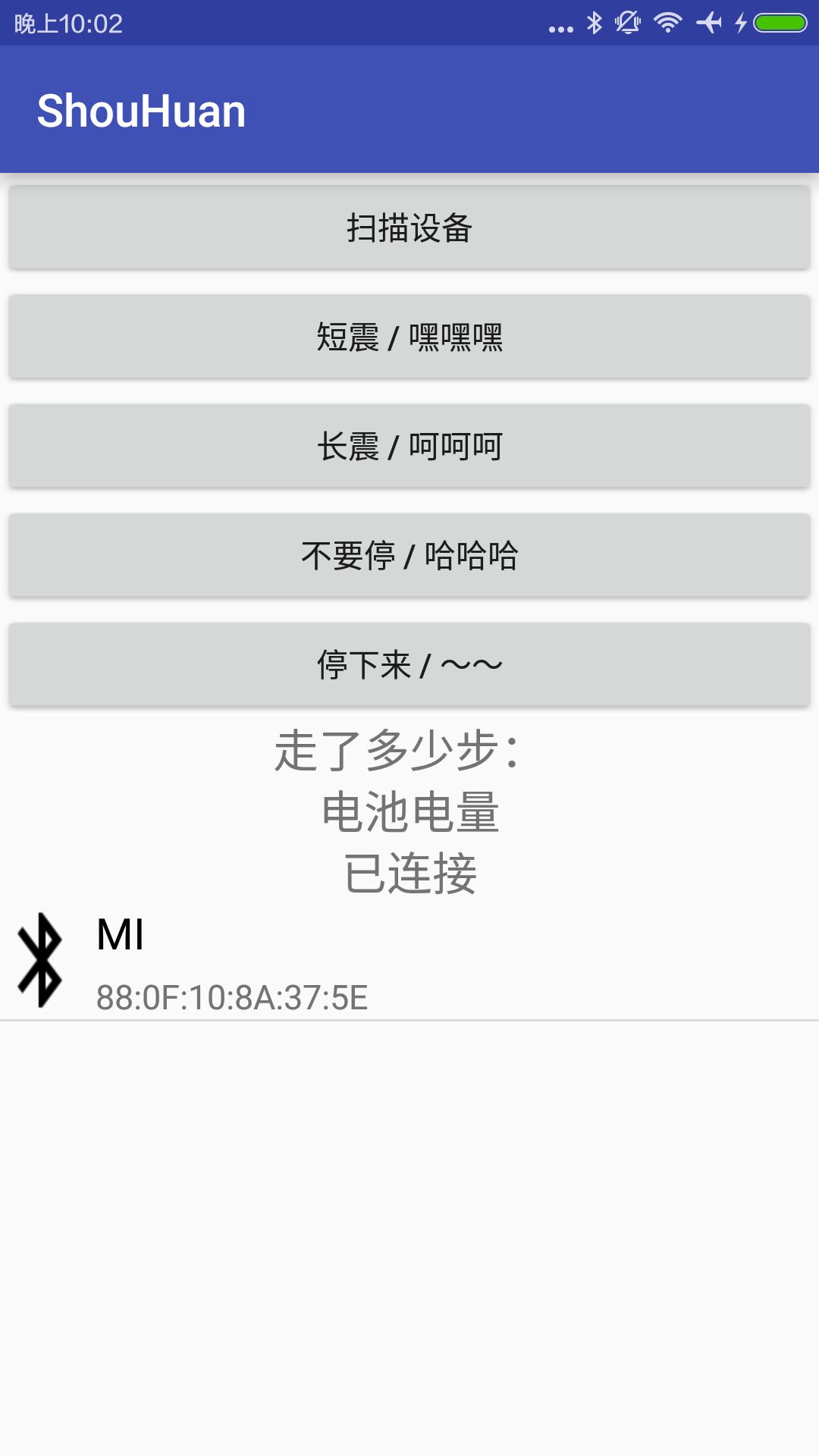
连接状态通过连接状态的textview展示一下,我们现在快来看看效果吧~
整体代码:
MainActivity.class:
package com.wbnq.shouhuan;

import android.bluetooth.BluetoothAdapter;

import android.bluetooth.BluetoothDevice;

import android.bluetooth.BluetoothGatt;

import android.bluetooth.BluetoothGattCallback;

import android.bluetooth.BluetoothGattCharacteristic;

import android.bluetooth.BluetoothGattDescriptor;

import android.bluetooth.BluetoothManager;

import android.content.Intent;

import android.support.v7.app.AppCompatActivity;

import android.os.Bundle;

import android.util.Log;

import android.view.View;

import android.widget.AdapterView;

import android.widget.Button;

import android.widget.ListView;

import android.widget.TextView;

import android.widget.Toast;

import java.util.ArrayList;

import java.util.List;

public class MainActivity extends AppCompatActivity implements View.OnClickListener{

    private Button saomiao , duanzhen , changzhen , buting , tingxia;

    private TextView jibu , dianliang , lianjiezhuangtai;

    private ListView list;

    BluetoothAdapter bluetoothAdapter;

    BluetoothGatt bluetoothGatt;

    List<BluetoothDevice> deviceList = new ArrayList<>();

    BluetoothDevice bluetoothDevice;

    @Override

    protected void onCreate(Bundle savedInstanceState) {

        super.onCreate(savedInstanceState);

        setContentView(R.layout.activity_main);

        initView();

        //蓝牙管理,这是系统服务可以通过getSystemService(BLUETOOTH_SERVICE)的方法获取实例

        BluetoothManager bluetoothManager = (BluetoothManager) getSystemService(BLUETOOTH_SERVICE);

        //通过蓝牙管理实例获取适配器,然后通过扫描方法(scan)获取设备(device)

        bluetoothAdapter = bluetoothManager.getAdapter();

    }

    private void initView() {

        saomiao = (Button) findViewById(R.id.saomiao);

        duanzhen = (Button) findViewById(R.id.zhendong);

        changzhen = (Button) findViewById(R.id.changzhen);

        buting = (Button) findViewById(R.id.buting);

        tingxia = (Button) findViewById(R.id.tingxia);

        list = (ListView) findViewById(R.id.list);

        jibu = (TextView) findViewById(R.id.jibu);

        dianliang = (TextView) findViewById(R.id.dianliang);

        lianjiezhuangtai = (TextView) findViewById(R.id.lianjiezhuangtai);

        saomiao.setOnClickListener(this);

        duanzhen.setOnClickListener(this);

        changzhen.setOnClickListener(this);

        buting.setOnClickListener(this);

        tingxia.setOnClickListener(this);

        //item 监听事件

        list.setOnItemClickListener(new AdapterView.OnItemClickListener() {

            @Override

            public void onItemClick(AdapterView<?> adapterView, View view, int i, long l) {

                bluetoothDevice = deviceList.get(i);

                //连接设备的方法,返回值为bluetoothgatt类型

                bluetoothGatt = bluetoothDevice.connectGatt(MainActivity.this, false, gattcallback);

                lianjiezhuangtai.setText("连接" + bluetoothDevice.getName() + "中...");

            }

        });

    }

    @Override

    public void onClick(View view) {

        switch (view.getId()){

            case R.id.saomiao:

                //开始扫描前开启蓝牙

                Intent turn_on = new Intent(BluetoothAdapter.ACTION_REQUEST_ENABLE);

                startActivityForResult(turn_on, 0);

                Toast.makeText(MainActivity.this, "蓝牙已经开启", Toast.LENGTH_SHORT).show();

                Thread scanThread = new Thread(new Runnable() {

                    @Override

                    public void run() {

                        Log.i("TAG", "run: saomiao ...");

                        saomiao();

                    }

                });

                scanThread.start();

                break;

            case R.id.zhendong:

                break;

            case R.id.changzhen:

                break;

            case R.id.buting:

                break;

            case R.id.tingxia:

                break;

            case R.id.list:

                break;

        }

    }

    public void saomiao(){

        deviceList.clear();

        bluetoothAdapter.startLeScan(callback);

    }

    //扫描回调

    public BluetoothAdapter.LeScanCallback callback = new BluetoothAdapter.LeScanCallback() {

        @Override

        public void onLeScan(final BluetoothDevice bluetoothDevice, int i, byte[] bytes) {

            Log.i("TAG", "onLeScan: " + bluetoothDevice.getName() + "/t" + bluetoothDevice.getAddress() + "/t" + bluetoothDevice.getBondState());

            //重复过滤方法,列表中包含不该设备才加入列表中,并刷新列表

            if (!deviceList.contains(bluetoothDevice)) {

                //将设备加入列表数据中

                deviceList.add(bluetoothDevice);

                list.setAdapter(new MyAdapter(MainActivity.this , deviceList));

            }

        }

    };

    private BluetoothGattCallback gattcallback = new BluetoothGattCallback() {

        @Override

        public void onConnectionStateChange(BluetoothGatt gatt, int status, final int newState) {

            super.onConnectionStateChange(gatt, status, newState);

            runOnUiThread(new Runnable() {

                @Override

                public void run() {

                    String status;

                    switch (newState) {

                        //已经连接

                        case BluetoothGatt.STATE_CONNECTED:

                            lianjiezhuangtai.setText("已连接");

                            //该方法用于获取设备的服务,寻找服务

                            bluetoothGatt.discoverServices();

                            break;

                        //正在连接

                        case BluetoothGatt.STATE_CONNECTING:

                            lianjiezhuangtai.setText("正在连接");

                            break;

                        //连接断开

                        case BluetoothGatt.STATE_DISCONNECTED:

                            lianjiezhuangtai.setText("已断开");

                            break;

                        //正在断开

                        case BluetoothGatt.STATE_DISCONNECTING:

                            lianjiezhuangtai.setText("断开中");

                            break;

                    }

                    //pd.dismiss();

                }

            });

        }

        @Override

        public void onServicesDiscovered(BluetoothGatt gatt, int status) {

            super.onServicesDiscovered(gatt, status);

        }

        @Override

        public void onCharacteristicRead(BluetoothGatt gatt, BluetoothGattCharacteristic characteristic, int status) {

            super.onCharacteristicRead(gatt, characteristic, status);

        }

        @Override

        public void onCharacteristicWrite(BluetoothGatt gatt, BluetoothGattCharacteristic characteristic, int status) {

            super.onCharacteristicWrite(gatt, characteristic, status);

        }

        @Override

        public void onCharacteristicChanged(BluetoothGatt gatt, BluetoothGattCharacteristic characteristic) {

            super.onCharacteristicChanged(gatt, characteristic);

        }

        @Override

        public void onDescriptorRead(BluetoothGatt gatt, BluetoothGattDescriptor descriptor, int status) {

            super.onDescriptorRead(gatt, descriptor, status);

        }

        @Override

        public void onDescriptorWrite(BluetoothGatt gatt, BluetoothGattDescriptor descriptor, int status) {

            super.onDescriptorWrite(gatt, descriptor, status);

        }

        @Override

        public void onReliableWriteCompleted(BluetoothGatt gatt, int status) {

            super.onReliableWriteCompleted(gatt, status);

        }

        @Override

        public void onReadRemoteRssi(BluetoothGatt gatt, int rssi, int status) {

            super.onReadRemoteRssi(gatt, rssi, status);

        }

        @Override

        public void onMtuChanged(BluetoothGatt gatt, int mtu, int status) {

            super.onMtuChanged(gatt, mtu, status);

        }

    } ;

}
实现效果:
好啦!!我们功能已经实现了一大部分了呢!!
下节我们就来获取手环中
我走的步数 , 和电池的电量吧~~
大家加油啦~~~
Android BLE 蓝牙编程(二)的更多相关文章
- Android BLE 蓝牙编程(一)
最近在研究这个,等我有时间来写吧! 终于在端午节给自己放个假,现在就来说说关于android蓝牙ble的 最近的学习成果吧!! 需要材料(写个简单教程吧--关于小米手环的哦!嘿嘿) Android 手 ...
- Android BLE 蓝牙编程(三)
上节我们已经可以连接上蓝牙设备了. 本节我们就要获取手环的电池电量和计步啦. 在介绍这个之前我们需要先了解下什么是 服务 什么是 UUID 我们记得上节中我们item监听事件的回调的返回值是Bluet ...
- Android BLE 蓝牙编程(四)
接上篇,我们已经实现了短震,长震的功能了- 现在我们需要实现点击后一直震动的功能 开始我的想法是再循环中不断执行write方法,然而这个办法行不通. 系统会报错. 那要如何实现这个想法呢?其实很简单, ...
- Android ble 蓝牙4.0 总结
本文介绍Android ble 蓝牙4.0,也就是说API level >= 18,且支持蓝牙4.0的手机才可以使用,如果手机系统版本API level < 18,也是用不了蓝牙4.0的哦 ...
- Android ble 蓝牙4.0 总结一
本文介绍Android ble 蓝牙4.0,也就是说API level >= 18,且支持蓝牙4.0的手机才可以使用,如果手机系统版本API level < 18,也是用不了蓝牙4.0的哦 ...
- Android BLE蓝牙详细解读
代码地址如下:http://www.demodashi.com/demo/15062.html 随着物联网时代的到来,越来越多的智能硬件设备开始流行起来,比如智能手环.心率检测仪.以及各式各样的智能家 ...
- 蓝牙防丢器原理、实现与Android BLE接口编程
本文是对已实现的蓝牙防丢器项目的总结,阐述蓝牙防丢器的原理.实现与android客户端的蓝牙BLE接口编程.在这里重点关注如何利用BLE接口来进行工程实现,对于BLE的协议.涉及到JNI的BLE接口内 ...
- [yueqian_scut]蓝牙防丢器原理、实现与Android BLE接口编程
本文是对已实现的蓝牙防丢器项目的总结,阐述蓝牙防丢器的原理.实现与Android客户端的蓝牙BLE接口编程.在这里重点关注如何利用BLE接口来进行工程实现,对于BLE的协议.涉及到JNI的BLE接口内 ...
- Android BLE 蓝牙开发——扫码枪基于BLESSED
一.蓝牙模式HID与BLE 当扫码枪与手机连接时,通常采用的是蓝牙HID(Human Interface Device)模式.本质上是一个把扫码枪作为一个硬件键盘,按照键盘协议把扫码后的结果逐个输入到 ...
随机推荐
- Objective-C 数据集合
1.NSSet 1.是一个无序的,管理多个对象的集合类,最大特点 是集合中不允许出现重复对象,和数学上的集合含义是一 样的 2.除了无序.不许重复之外,其它功能和NSArray是一样的 2.NSArr ...
- Sharepoint学习笔记—习题系列--70-576习题解析 -(Q112-Q115)
Question 112 You are designing a public-facing SharePoint 2010 Web site for an elementary school th ...
- iOS点击推送消息跳到应用指定页面
现在的推送用的越来越频繁,几乎每个应用都开始用到了.其实又有几个用户会去看推送消息呢?没办法,产品经理最大啊,只是苦了我们这一帮程序员啊!闲话少说,进入正题.兄弟我用的是极光推送,自然是以极光推送为例 ...
- iOS--KVO的概述与使用
一.概述 KVO,即:Key-Value Observing,它提供一种机制,当指定的对象的属性被修改后,则对象就会接受到通知.简单的说就是每次指定的被观察的对象的属性被修改后,KVO就会自动通知相应 ...
- tar解压问题gzip: stdin: not in gzip format
如下所示,使用tar -zxvf解压文件时遇到"gzip: stdin: not in gzip format"等错误: [root@DB-Server tmp]# [root@D ...
- SQL SERVER中用户定义标量函数(scalar user defined function)的性能问题
用户定义函数(UDF)分类 SQL SERVER中的用户定义函数(User Defined Functions 简称UDF)分为标量函数(Scalar-Valued Function)和表值函数(T ...
- T-SQL 常用DDL语句
数据库操作 删除数据库 drop database database_name(数据库名) 修改数据库名 alter database database_name(原数据库名) modify name ...
- [Java入门笔记] 面向对象编程基础(一):类和对象
什么是面向对象编程? 我们先来看看几个概念: 面向过程程序设计 面向过程,是根据事情发展的步骤,按进行的顺序过程划分,面向过程其实是最为实际的一种思考方式,可以说面向过程是一种基础的方法,它考虑的是实 ...
- char_dev.c 添加中文注释
char_dev.c里的中文注释,仅代表个人理解,仅供参考.如有错误之处,请指出,谢谢! /* * linux/fs/char_dev.c * * Copyright (C) 1991, 1992 L ...
- 在CentOS安装PHP5.6
简单介绍一下,如何在CentOS上安装PHP5.6. 配置yum源 追加CentOS 6.5的epel及remi源. # rpm -Uvh http://ftp.iij.ad.jp/pub/linux ...