
python的matplotlib的热门可视化动图
1.图
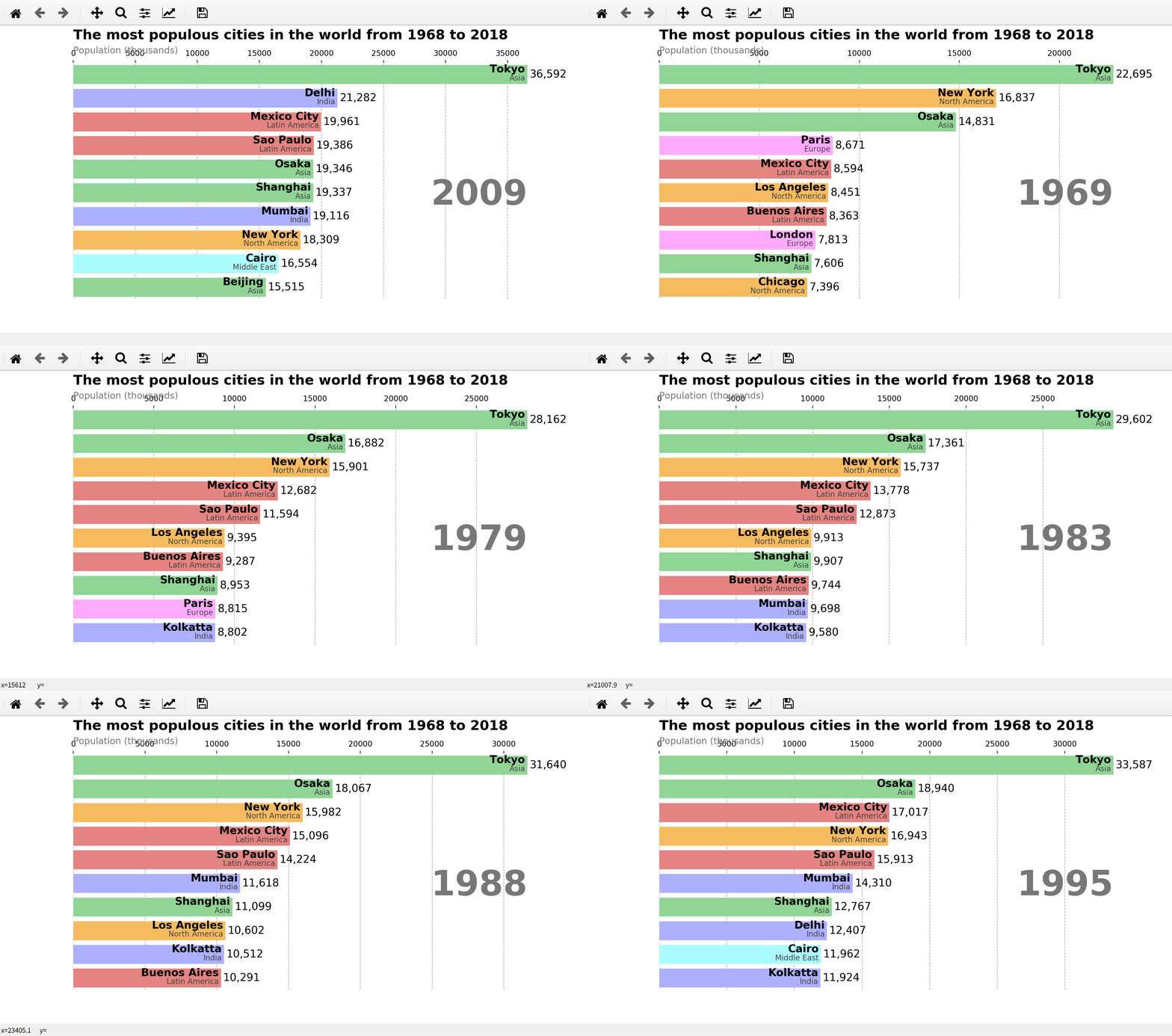
2.代码
import pandas as pd

import matplotlib as mpl

import matplotlib.pyplot as plt

import matplotlib.ticker as ticker

import matplotlib.animation as animation

#导出数据,当然这个数据也可以是直接在网上下载,是的有点慢

#网址:https://gist.githubusercontent.com/johnburnmurdoch/4199dbe55095c3e13de8d5b2e5e5307a/raw/fa018b25c24b7b5f47fd0568937ff6c04e384786/city_populations

df = pd.read_csv('city_populations.csv',

                 usecols=['name', 'group', 'year', 'value']) #将数据下载下来放在指定默认的目录和文件夹下,city_populations.csv

#定义

current_year = 2018

dff=()

fig, ax = plt.subplots(figsize=(15, 8))

colors = dict(zip(

    ['India', 'Europe', 'Asia', 'Latin America',

     'Middle East', 'North America', 'Africa'],

    ['#adb0ff', '#ffb3ff', '#90d595', '#e48381',

     '#aafbff', '#f7bb5f', '#eafb50']

))

group_lk = df.set_index('name')['group'].to_dict()

def draw_barchart(year):

    dff = df[df['year'].eq(year)].sort_values(by='value', ascending=True).tail(10)

    ax.clear() #每次清空、刷新

    ax.barh(dff['name'], dff['value'], color=[colors[group_lk[x]] for x in dff['name']])

    dx = dff['value'].max() / 200

    for i, (value, name) in enumerate(zip(dff['value'], dff['name'])):

        ax.text(value-dx, i,     name,           size=14, weight=600, ha='right', va='bottom')

        ax.text(value-dx, i-.25, group_lk[name], size=10, color='#444444', ha='right', va='baseline')

        ax.text(value+dx, i,     f'{value:,.0f}',  size=14, ha='left',  va='center')

    #显示文字,x=0,y=1.10,坐标,ha=水平对准=水平线平放

    #ax.text()格式=(x,y,string,fontsize=15,verticalalignment="top",horizontalalignment="right")

    #string=字符串='文字内容'

    ax.text(0, 1.10, 'The most populous cities in the world from 1968 to 2018',

            transform=ax.transAxes, size=18, weight=600, ha='left') #文字标题,第1层

    ax.text(0, 1.04, 'Population (thousands)', transform=ax.transAxes, size=12, color='#777777') #显示文字,第2层

    ax.text(1, 0.4, year, transform=ax.transAxes, color='#777777', size=46, ha='right', weight=800) #右边固定显示动图年份

    #va=verticalalignment="top",垂直对准

    #ha=horizontalalignment="right",alignment=对准,水平对准

    ax.xaxis.set_ticks_position('top')  #x轴在上面

    ax.set_yticks([]) #默认是显示y轴的名称,左边垂直的城市名字,设为[]就是不显示

    ax.margins(0, 0.01) #不设置就是默认值,缩放比例(0,0.05)

    ax.grid(which='major', axis='x', linestyle='--') #垂直线,布局和格式

    ax.set_axisbelow(True)  #默认是true的

    plt.box(False) #默认是True,False之后不显示黑色线框

animator = animation.FuncAnimation(fig, draw_barchart, frames=range(1968, 2019)) #以animator形式展现动画

plt.show() #以plt的形式展现图片
python的matplotlib的热门可视化动图的更多相关文章
- 手把手教你做一个python+matplotlib的炫酷的数据可视化动图
1.效果图 2.注意: 上述资料是虚拟的,为了学习制作动图,构建的. 仅供学习, 不是真实数据,请别误传. 当自己需要对真实数据进行可视化时,可进行适当修改. 3.代码: #第1步:导出模块,固定 i ...
- 基于matplotlib的数据可视化 - 热图imshow
热图: Display an image on the axes. 可以用来比较两个矩阵的相似程度 mp.imshow(z, cmap=颜色映射,origin=垂直轴向) imshow( X, cma ...
- python中matplotlib绘图封装类之折线图、条状图、圆饼图
DrawHelper.py封装类源码: import matplotlib import matplotlib.pyplot as plt import numpy as np class DrawH ...
- python下matplotlib的subplot的多图显示位置的问题
1.说明 1.1 多图: 221,222 212 ------------附最后讲解,这下更清楚了吧,取个名字:颠倒一下--- 1.2 多图 211 223,224 ------------附最后讲解 ...
- Python中matplotlib.pyplot.imshow画灰度图的多种方法
转载:https://www.jianshu.com/p/8f96318a153f matplotlib库的教程和使用方法此处就不累赘了,网上有十分多优秀的教程资源.此处直接上代码: def demo ...
- gganimate|创建可视化动图,让你的图表会说话
本文首发于“生信补给站”公众号,https://mp.weixin.qq.com/s/kKQ2670FBiDqVCMuLBL9NQ 更多关于R语言,ggplot2绘图,生信分析的内容,敬请关注小号. ...
- 利用Python生成GIF动图
一.PIL库 1.PIL库的概括: PIL(Python Image Library)是python的第三方图像处理库,但是由于其强大的功能与众多的使用人数,几乎已经被认为是python官方图像处理库 ...
- python学习之matplotlib绘制动图(FuncAnimation()参数)
1.函数FuncAnimation(fig,func,frames,init_func,interval,blit)是绘制动图的主要函数,其参数如下: a.fig 绘制动图的画布名称 b.func自定 ...
- Python数据分析matplotlib可视化之绘图
Matplotlib是一个基于python的2D画图库,能够用python脚本方便的画出折线图,直方图,功率谱图,散点图等常用图表,而且语法简单. Python中通过matplotlib模块的pypl ...
随机推荐
- Java爬虫学习(2)之用对象保存文件demo(1)
package com.mieba.spider; import java.util.ArrayList; import java.util.List; import java.util.Vector ...
- artTemplate使用说明
普通使用 <script id="test" type="text/html"> {{if isAdmin}} <h1>{{title} ...
- (c#)亲密字符串
题目 解
- linux deploy---旧手机变废为宝
前几天朋友送了我一部红米Note 1s,本来不想要,转念一想,不要白不要,就收了. 拿到之后我就想,这么一个1+8的手机能做什么呢? 翻遍了CSDN和简书,找到了一个性价比不错的方法:给旧手机装上一个 ...
- Bugku-一段Base64-Writeup
转载请注明出处:http://www.cnblogs.com/WangAoBo/p/7207874.html bugku - 一段Base64 - Writeup 题目: 分析: 本来看到题目名字和分 ...
- python做批量剪切、旋转等小程序
我自己在学习python时自己动手做了几个简单实用的小程序,对大家做图像的增强很有效果,我包括我的同学目前都在用我的小程序来做图像增强,非常的实用.话不多说上代码: import globimport ...
- FreeRTOS学习笔记2:列表
list.h 列表结构List_t 列表:主要看三个 xLIST:1.5检查列表完整性的.但是需要开启.默认不开启 2:记录列表中列表项的 数量:3:记录当前列表项 索引号:4:列表中的最后一个 列表 ...
- 安装CDH第三方依赖包
安装CDH第三方依赖包: yum install chkconfig python bind-utils psmisc libxslt zlib sqlite cyrus-sasl-plain cyr ...
- AcWing 852. spfa判断负环 边权可能为负数。
#include <cstring> #include <iostream> #include <algorithm> #include <queue> ...
- 概率dp light 1321
题意:给定一张无向图,每条边都有一个通过的概率 ,如果无法通过,那么就要回到起点重新出发从起点到终点的时间固定为K,如果成功到达,又需要额外花费K的时间,问走S次的最小期望时间 思路:这道题分为两部分 ...